Want to watch NFL, MLB, NASCAR and more sports on your Apple TV? This guide walks you through streaming Fox Sports without cable using the Fox Sports app, AirPlay, and live TV streaming services in 2026. If you are a sports fan wanting to cut the cord from expensive cable and satellite subscriptions, there are several easy ways to access Fox Sports on your Apple TV.
- Fox Sports app is free — download it from the App Store on Apple TV 4th gen or later and activate with your TV provider login
- AirPlay works on any Apple TV model — mirror Fox Sports from an iPhone, iPad, or Mac to your TV wirelessly
- YouTube TV offers the best overall value — 85+ channels including FS1, FS2, and Fox RSNs with unlimited DVR at $64.99/mo
- No free legal option exists — all live Fox Sports content requires an active TV provider or streaming subscription
- fuboTV leads in sports coverage — 121+ channels with the widest selection of regional Fox Sports networks at $69.99/mo
This guide covers everything you need to know, from activating the Fox Sports app with your TV provider login to AirPlaying content from your iPhone. We also explore live TV streaming options offering FS1 and regional Fox Sports networks.
#Quick Overview: Ways to Stream Fox Sports on Apple TV
Here’s a quick summary of all the methods covered to watch Fox Sports on Apple TV:
-
Fox Sports App – Free app for Apple TV 4th gen and later models. Requires TV provider login to activate and watch Fox Sports networks.
-
AirPlay – Wirelessly stream Fox Sports content from an iOS device or Mac to Apple TV.
-
Live TV Streaming – Services like fuboTV, Hulu Live TV, YouTube TV etc. carry FS1 and regional Fox Sports networks.
Below we explore each method in-depth, including step-by-step instructions and comparisons of the top live TV streaming options available in 2026.
#What Do You Need to Watch Fox Sports on Apple TV?
Before we get started, here are the key requirements for watching Fox Sports on Apple TV:
-
Apple TV model – The Fox Sports app requires a 4th generation or later Apple TV model running tvOS 14.0 or newer. Using AirPlay or a streaming service works with any Apple TV model.
-
TV provider subscription – Accessing live Fox Sports networks via the app or streaming services requires a pay TV subscription from a cable, satellite or live TV streaming provider.
-
Stable high-speed internet – You’ll need a reliable high-speed internet connection of at least 10-25 Mbps for live streaming.
Now let’s go through how to install and activate the Fox Sports app for the easiest way to watch Fox Sports on Apple TV with your existing TV subscription login.
#Method 1: Fox Sports App on Apple TV
The Fox Sports app for Apple TV provides live streaming access to networks like FS1, FS2, Fox Soccer Plus, Fox Deportes and your local regional Fox Sports channel.
#Installation and Activation
Here is the full process to install and activate the Fox Sports app on your Apple TV:
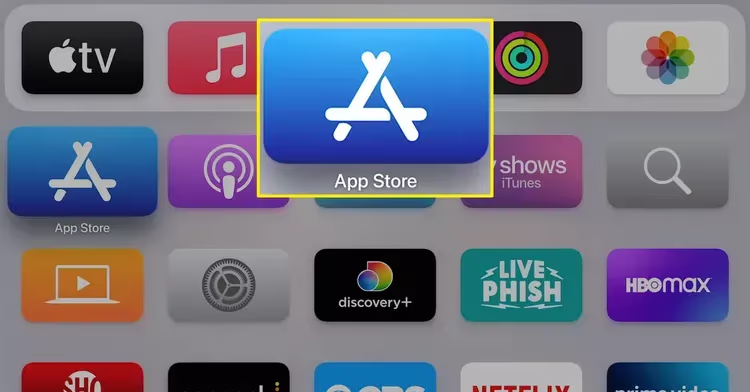
- On your Apple TV’s home screen, open the App Store.
-
Search for “Fox Sports” and select the Fox Sports app published by Fox Media LLC.
-
Download and install the Fox Sports app. This is a free app.
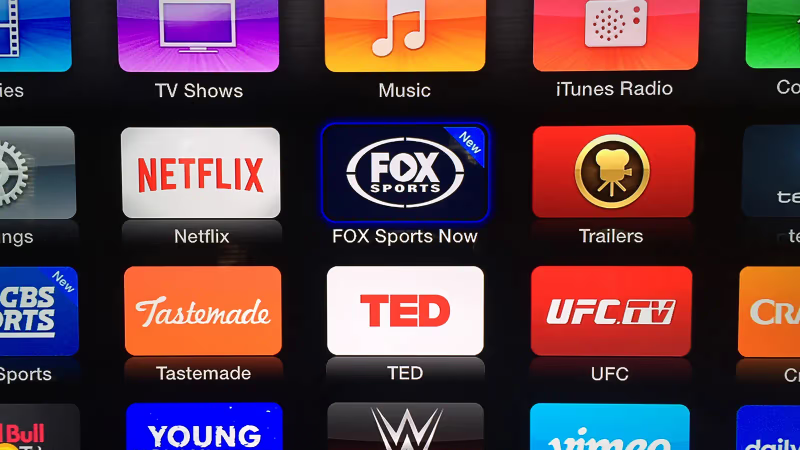
- Launch the Fox Sports app after installation completes.

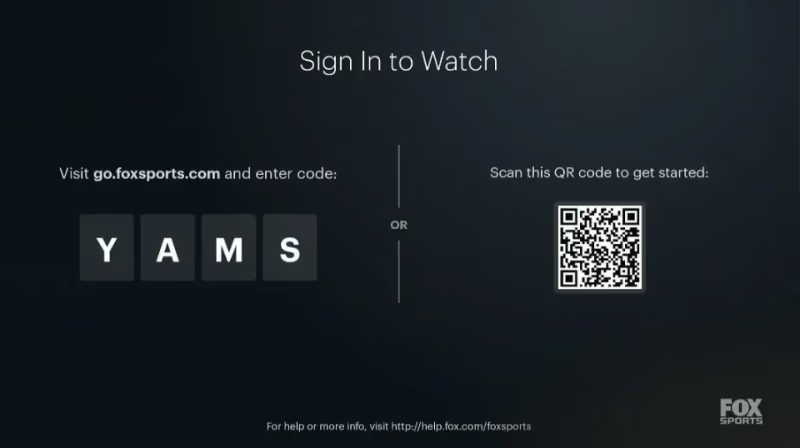
- A screen will appear with an activation code. Make a note of this code.
-
On your computer or mobile device, visit go.foxsports.com.
-
Enter the activation code from your Apple TV.

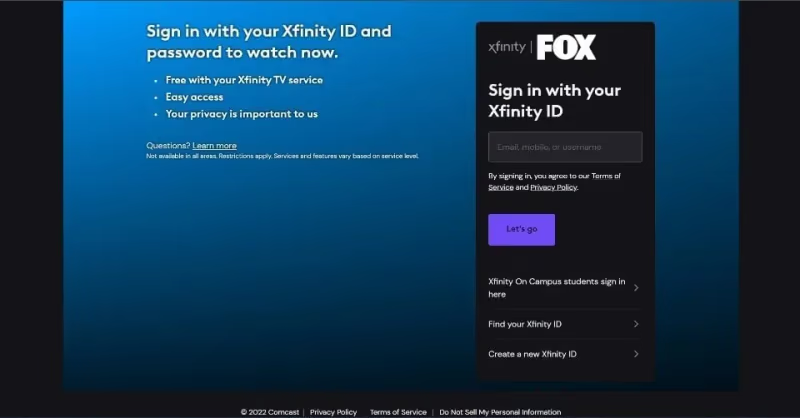
- Select your TV provider from the list. Examples include DirecTV, Dish Network, Comcast Xfinity, Spectrum and live TV streaming services like YouTube TV.
Note: You need an active subscription with one of these providers to activate the app.
-
Sign in with your TV provider credentials.
-
After activating, you can now watch Fox Sports content in the app on your Apple TV!
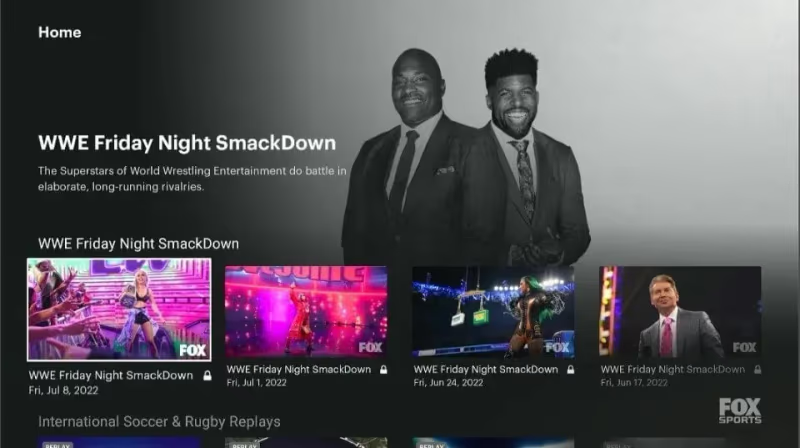
For the best experience, use voice search on your Siri remote to easily find your favorite teams and sports.
And that’s all there is to it! With just a few minutes of setup you can be streaming live sports from Fox Sports with your existing cable or streaming login.
#Pros
-
Watch Fox Sports networks included with your TV subscription
-
Personalized recommendations and coverage for your favorite sports and teams
-
Built-in AirPlay lets you stream from iOS devices to Apple TV
-
4K streaming available for select events
#Cons
-
Requires paid TV subscription (no freestanding option)
-
Limited to programming available on Fox Sports networks
-
Lacks broad sports coverage offered by streaming bundles
#How Do You Use AirPlay to Stream Fox Sports?
Don’t have one of the latest Apple TV models? Not a problem! Any Apple TV can AirPlay Fox Sports, letting you wirelessly beam video playing on an iPhone, iPad or Mac directly to the big screen.
Here is the full procedure to use AirPlay for streaming Fox Sports:
#From iPhone or iPad
-
Install the Fox Sports app on your iPhone or iPad from the App Store.
-
Play a live stream or video clip in the iOS app.
-
Tap the Airplay icon visible on the player screen.
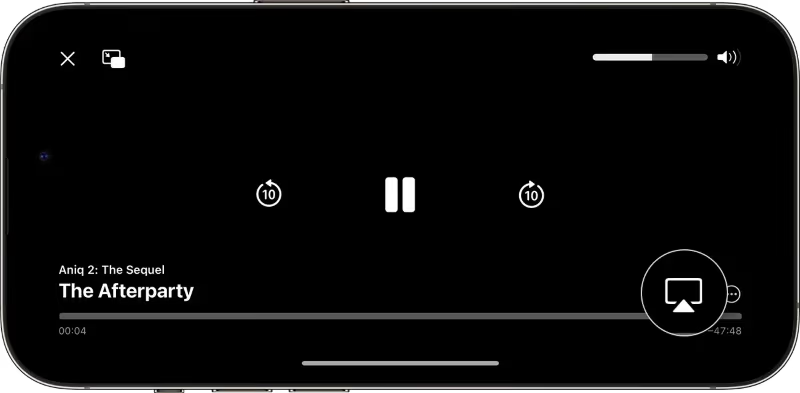
- Select your Apple TV from the menu.
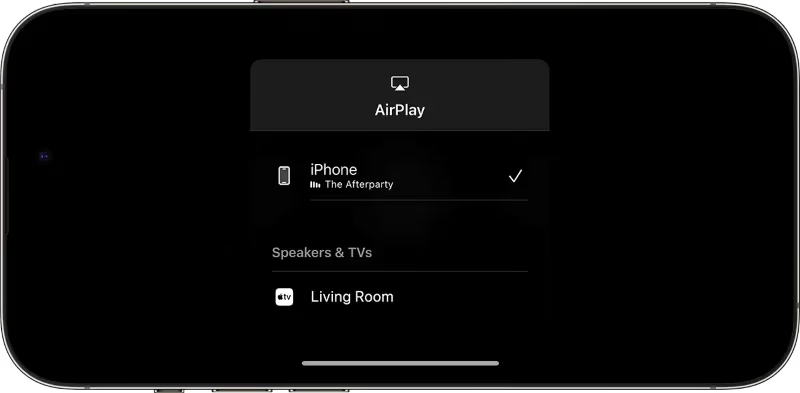
- The video will now start playing directly on your TV via AirPlay!
#From Mac Web Browser
-
On your Mac, use the Safari, Chrome or Firefox browser to visit foxsports.com.
-
Play any live stream or on-demand clip.
-
Click the Screen Mirroring icon in your Mac’s menu bar.
-
Choose your Apple TV.
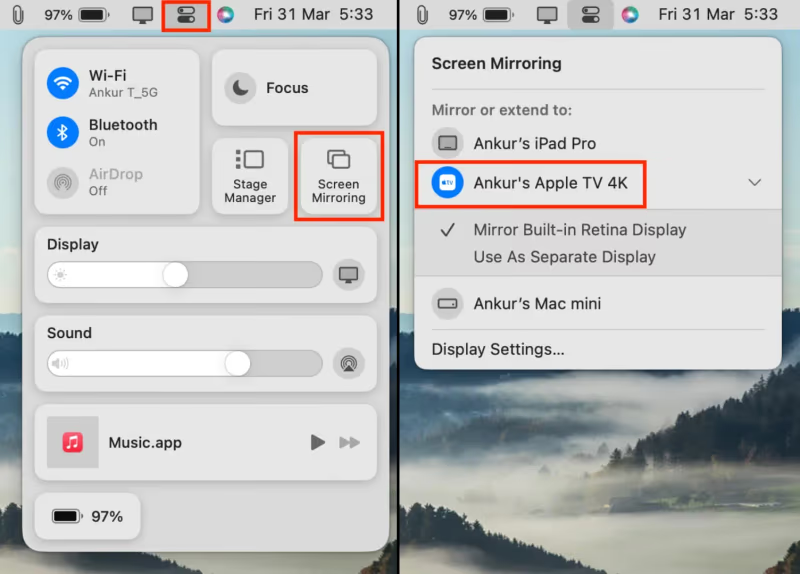
- Your entire Mac screen will mirror to the TV including the Fox Sports video playing in the browser.
And that’s all you need to wirelessly stream sports from Fox Sports! The native apps often provide the most reliable playback quality, but AirPlay works great as a backup option or for older Apple TVs.
The only catch is you still need an active TV provider subscription to watch most live content on Fox Sports networks.
#Method 3: Live TV Streaming Services
Live TV streaming has become extremely popular with cordcutters replacing traditional cable and satellite TV. Services like fuboTV, Hulu + Live TV, ESPN, YouTube TV, Philo, and Disney+ Bundle offer packages that include major national sports networks from Fox Sports along with tons of other popular channels for one monthly fee.
Here is a comparison of the best live TV streaming options for watching Fox Sports networks without cable in 2026:
| Service | Price | Channels | Free Trial |
|---|---|---|---|
| fuboTV | $69.99/mo | 121+ channels | |
| FS1, FS2, Fox RSNs | 7-day | ||
| Hulu + Live TV | $69.99/mo | 75+ channels | |
| FS1, FS2, Fox RSNs | 7-day | ||
| YouTube TV | $64.99/mo | 85+ channels | |
| FS1, FS2, Fox RSNs | Y | ||
| Sling TV | $40/mo | 30+ channels | |
| FS1, FS2 in Blue package | Y |
-
fuboTV provides the greatest variety of national and regional sports coverage, but is also the most expensive option.
-
Hulu and YouTube TV offer a balanced lineup with local sports and other entertainment alongside Fox Sports channels.
-
Sling Blue is the cheapest way to get FS1 and FS2 in its base $40 package.
Most cable channels are now offered through these streaming providers without needing an old-fashioned cable box. In many areas you also get local broadcast stations to watch national NFL and MLB games airing on FOX or FS1.
Streaming sticks like the Apple TV 4K provide the full experience of channels, sports and on-demand that cable provides without contracts or hidden fees.
Let’s breakdown key considerations when choosing a live TV streaming service for watching sports without cable:
Sports Channels. Make sure your package includes FOX Sports 1 and 2 along with league-specific channels like NFL Network, MLB Network, NBA TV or NBC Sports Network if needed. Some providers also offer regional sports networks like Fox Sports South or NBC Sports Chicago with locally-exclusive games.
Local Channels. If you want to catch NFL games airing nationally on the FOX broadcast channel or MLB baseball shown on FOX primetime, streaming TV needs to offer your local FOX and ABC stations.
Cloud DVR. Being able to record live games to watch later is crucial. Most streaming services allow unlimited storage and the ability to fast-forward through commercials in DVR recordings.
Simultaneous Streams. Consider how many devices need to stream simultaneously in your home along with bandwidth needs streaming 4K video.
Compatibility. All TV streaming platforms provide apps for Apple TV. Ensure service also works on your other devices like game consoles or mobile apps.
Free Trials. Test a service for at least 5-7 days to evaluate video quality for live sports before paying. fuboTV and YouTube TV offer the most extensive free trials.
Promotions. Services frequently discount first months, offer device bundles or provide other special sign-up offers allowing you to save money.
| Service | Fox Sports Channels | DVR | Simultaneous Streams | Apps |
|---|---|---|---|---|
| fuboTV | FS1, FS2, Fox RSNs | 250 hours | 2 streams (Add $6 for unlimited) | Apple TV, Fire TV, Roku, iOS, Android and more |
| Hulu + Live TV | FS1, FS2 | 50 hours | 2 streams (Unlimited for $10) | Apple TV, Fire TV, Roku, iOS, Android and more |
| YouTube TV | FS1, FS2, Fox RSNs | Unlimited | 3 streams | Apple TV, Fire TV, Roku, Smart TVs, iOS, Android and more |
| Sling Blue | FS1, FS2 | 50 hours | 3 streams | Apple TV, Roku, Fire TV, Chromecast, iOS, Android and more |
Based on the channel selection, full DVR features, broad device support and free trial period – YouTube TV stands as the best live TV streaming service in 2026 for Fox Sports access and overall flexibility.
But all the major options provide the full experience needed to ditch cable and still enjoy Fox Sports on your Apple TV and other devices.
#Bottom Line
Accessing Fox Sports on your Apple TV doesn’t require an expensive cable subscription if you use one of these methods:
-
Fox Sports App – Free app connects with your TV provider (cable/satellite/live streaming service) giving access to FS1/FS2/Fox RSNs live and on-demand
-
AirPlay – Wirelessly stream video from iPhone, iPad or Mac browser to Apple TV
-
Live TV Streaming – fuboTV, Hulu, YouTube TV and Sling offer Fox Sports as part of channel packages replacing cable
We covered how to install the Fox Sports app on Apple TV 4th generation and later then activate it with your TV everywhere provider credentials. Instructions to mirror content using AirPlay from iOS devices and Mac browser were also included.
Finally, we compared top live TV streaming services that feature both national Fox Sports channels and regional sports networks while delivering a cable-like experience without contracts. Many provide free trial periods making it easy to test Fox Sports on Apple TV yourself.
#FAQ
#Can I watch Fox Sports on Apple TV for free?
There is no way to legally access live Fox Sports content for free without an active TV provider subscription. The Fox Sports app does offer some complimentary clips and analysis programming, but live games and events require a paid login.
#Does the basic Hulu streaming plan include Fox Sports?
The base on-demand Hulu package does not include any live Fox Sports channels. You need to upgrade to the Hulu + Live TV plan at $69.99/mo to receive FS1, FS2, and regional sports from Fox.
#How do I fix buffering or lag when streaming Fox Sports on Apple TV?
Start by restarting both the Apple TV and your home router to refresh connections. If the issue persists, connect your Apple TV via Ethernet instead of Wi-Fi for more stable throughput. Also close any other apps running in the background that may be using bandwidth.
#Can I use the Fox Sports app on Apple TV outside the United States?
The Fox Sports app enforces geographic restrictions due to broadcast rights. A VPN service like ExpressVPN or NordVPN can change your virtual location to unlock the app and live streams from abroad. You still need a valid US TV provider subscription to sign in.
#Can I activate the Fox Sports app with a streaming service instead of cable?
Yes. The Fox Sports app fully supports live TV streaming providers such as YouTube TV, fuboTV, Hulu + Live TV, DirecTV Stream, and Sling TV. Select your streaming provider during activation and sign in with those credentials.
#Which live TV streaming service is best for Fox Sports on Apple TV?
YouTube TV offers the strongest balance of price, channel selection, and features at $64.99/mo with unlimited DVR and three simultaneous streams. fuboTV is the better pick if you need the widest regional sports network coverage, while Sling Blue is the cheapest entry point at $40/mo.
#Does the Fox Sports app support 4K streaming on Apple TV?
Select major events like NFL games and FIFA World Cup matches are available in 4K through the Fox Sports app on Apple TV 4K models. Standard programming streams in 1080p. You need a stable internet connection of at least 25 Mbps for 4K playback.