If your Vizio TV is showing a “No Signal” message, you are not alone. This is one of the most common Vizio issues, and it almost always comes down to an input mismatch or a cable problem.
The good news: most fixes take under five minutes and require zero technical skills. Below, we cover every cause and the exact steps to get your picture back.
- Wrong input source is the #1 cause — pressing the Source button on your Vizio remote and cycling through inputs fixes it in most cases
- HDMI cables degrade over time — cables older than 5 years should be replaced with a current-spec HDMI 2.1 cord
- Power cycle clears software glitches — unplug the TV for 60 seconds, hold the power button 10 seconds, then reconnect
- Factory reset is the last resort — it wipes all settings and app logins, so back up your data first
- Antenna users should rescan channels — go to Menu > Channels > Channel Scan after any weather event or signal loss
#Why Am I Seeing “No Signal” on My Vizio TV?
Before jumping into solutions, it helps to understand why this error appears.
The no signal message means your Vizio TV is not detecting an input source. Common causes include:
-
Incorrect Input Source: Your TV input might be set to a source that is switched off or has nothing connected.
-
Faulty HDMI Connection: Damaged HDMI ports or cables can prevent signal transmission.
-
Source Powered Off: If your external device like a streaming stick is powered off, the TV has no input to display.
-
Temporary Software Glitches: A quick reboot can clear minor bugs causing connectivity issues.
-
Bad Weather: Rain, wind, or ice disrupting your cable or satellite signal can also trigger the error.
With those causes in mind, let’s walk through the fixes.
#Step-by-Step Guide to Resolving the Vizio TV No Signal Problem
Follow these methods in order until your Vizio TV starts displaying video input correctly:
#1. Check External Input Device Connections
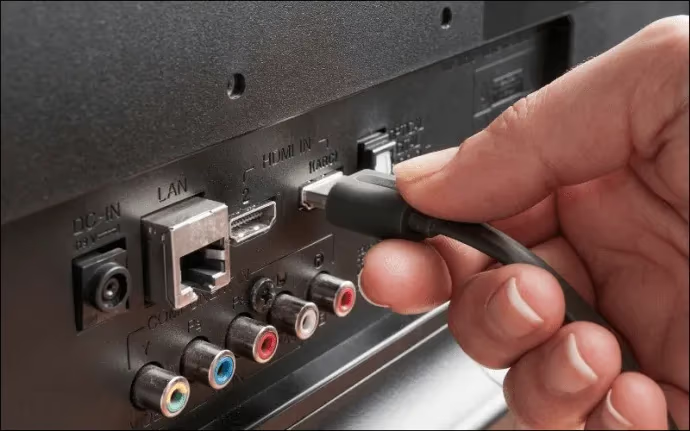
Make sure all devices — cable box, streaming stick, gaming console — are powered ON and firmly plugged into your Vizio TV.
Examine HDMI cables for wear and tear. Replace damaged cables and firmly reconnect loose plugs.
#2. Switch to the Correct Input Source
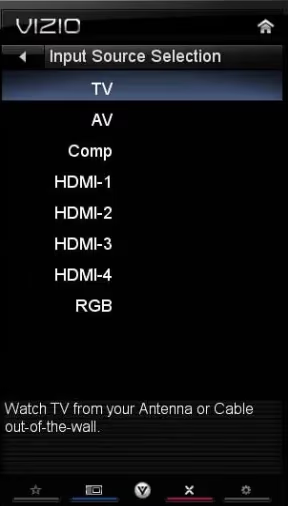
Press the Input or Source button on your Vizio remote and cycle through the options until you see video from the connected device instead of the no signal message. Check out this guide on using Vizio TV remotes if you need help.
Input sources may be renamed (for example, Firestick instead of HDMI-1). Go through all options carefully before concluding there is no signal.
#3. Try Different HDMI Ports
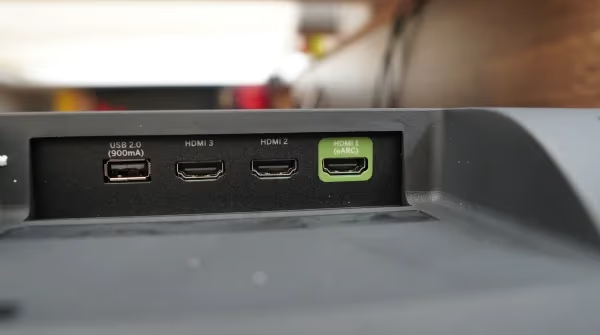
Some HDMI ports wear out over years of use and stop transmitting signals properly.
Disconnect your external device, plug it into a different HDMI port on the TV, and check whether the no signal error clears. If one port works and another does not, the faulty port likely needs a hardware repair.
#4. Power Cycle the Vizio TV
Software glitches can break connectivity without warning. A power cycle often resolves these intermittent issues.
To power cycle your Vizio:
-
Unplug all devices from the TV first
-
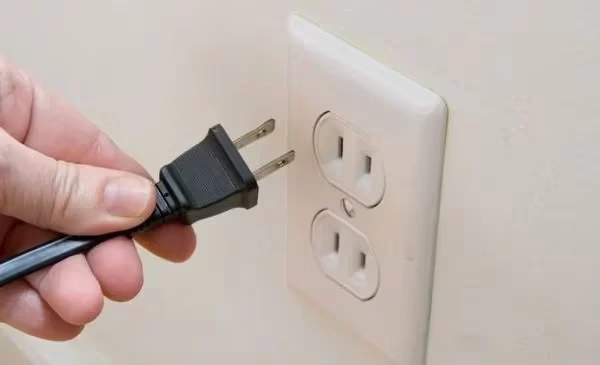
Disconnect the TV power cord from the wall socket
-
Press and hold the Power button on the TV for 10 seconds
-
Release the Power button and wait 1 minute
-
Reconnect the power cord and switch the TV back ON
Wait a few minutes after reboot for the system to stabilize before rechecking signal.
If your Vizio is also experiencing no sound or a black screen, try a power cycle before jumping to a factory reset.
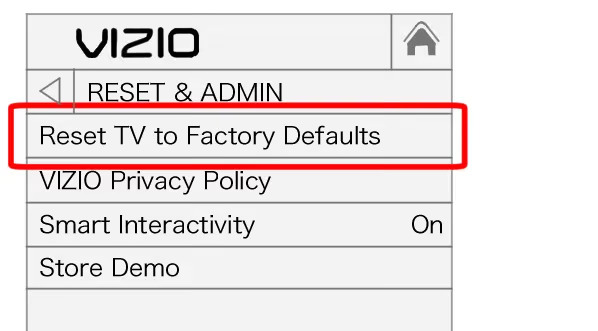
#5. Reset Vizio TV to Factory Settings
If the steps above fail to restore connectivity, a factory reset is the next option.
Note: Back up your settings and app logins first. A factory reset wipes all device data.
To complete the reset process:
-
On your remote, go to Menu > System > Reset & Admin
-
Select Reset TV to Factory Defaults > Confirm
-
When the TV reboots, run through the initial setup wizard
-
Check if “No Signal” still displays by cycling input sources
You can find Vizio TV universal remote code lists here to help restore your configured remotes.
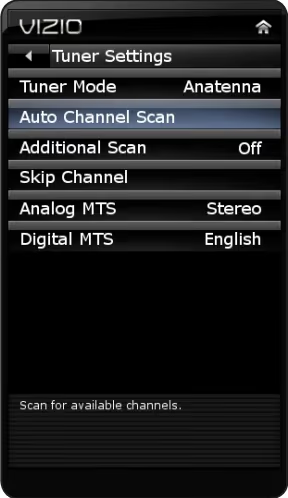
#6. Rescan Channels and Check Antenna/Cable Signal
For cable, satellite, or TV antenna connections, a channel rescan often restores a lost signal.
To rescan channels on your Vizio:
-
Using the remote, open Menu > Channels > Channel Scan
-
Start the Auto Channel Scan to identify available stations
-
The process may take several minutes to complete
-
At the end, check if TV channels are back or the no signal error persists
Visually inspect your rooftop antenna or cables for weather-related damage. Call your cable operator if channels still will not lock after rescanning.
Also check where the power button is located on your Vizio model to force reboot if needed.
#7. Get Your Antenna Professionally Serviced
Heavy rain, high winds, and ice can misalign antennas and cause signal loss.
If a manual realignment does not improve reception, hire a professional antenna technician. They can check for disrupted cabling or internal component damage that is not visible from the ground.
#Why Does My Vizio TV Say No Signal Even With Devices Connected?
Even when your streaming stick or cable box is powered on and connected, the TV may still not detect input. Here are the most likely reasons:
-
Incorrectly Configured Inputs: Go through all available input options to account for hidden or renamed sources.
-
Faulty HDMI Cable: Years of bending and tight storage can damage cables internally. Try a new HDMI cord before assuming the TV itself is broken.
-
Loose HDMI Ports: Worn-out connectors lose tension and create flaky signal connections. Wiggle the cable gently at the port to test.
-
Outdated Cables: HDMI cords older than 5 years may lack support for newer protocols. Upgrading to an HDMI 2.1 cable can solve compatibility issues.
-
Overheating: Overheated devices or ports can cut signal temporarily. Turn everything off and allow 30 minutes of cooling before rechecking.
Check your HDMI cable quality, port fittings, and input settings. Give your setup enough ventilation to prevent overheating, and “No Signal” errors should stop coming back.
#Bottom Line
“No Signal” on a Vizio TV is almost always fixable at home. Start with the basics: confirm the right input source, reseat HDMI cables, and try a different port.
If those do not work, power cycle the TV for 60 seconds and rescan channels for antenna setups. A factory reset is the nuclear option but resolves stubborn software-related signal failures.
If you are seeing other display issues like Vizio TV blue tint, flickering screens, or the TV not turning on, try these troubleshooting steps before calling for service.
#FAQ
#How do I fix no signal on my Vizio TV?
Start by pressing the Source or Input button on your remote to cycle through available inputs. Most no signal errors happen because the TV is set to an input that has nothing connected. If switching inputs does not work, unplug the TV for 60 seconds, hold the power button for 10 seconds, then plug it back in.
#Why does my Vizio TV say no signal when HDMI is plugged in?
The HDMI cable may be damaged, or the specific port you are using may be faulty. Try a different HDMI port on the TV first. If the problem continues, swap in a new HDMI cable. Cables older than five years are a common culprit.
#Can a bad HDMI cable cause a no signal error?
Yes. HDMI cables degrade from repeated bending, tight coiling, and general wear. A cable can look fine on the outside but have broken internal wiring. Replacing a suspect cable costs under $10 and is always worth trying before more involved troubleshooting.
#Will a factory reset fix no signal on a Vizio TV?
A factory reset can fix the issue if it is caused by a software glitch or corrupted settings. Go to Menu > System > Reset & Admin > Reset TV to Factory Defaults. Keep in mind that this erases all your apps, logins, and custom settings, so use it only after simpler fixes have failed.
#How do I rescan channels on my Vizio TV?
Open Menu > Channels > Channel Scan and select Auto Channel Scan. The process takes a few minutes while the TV searches for all available over-the-air or cable stations. Rescanning is especially useful after a weather event that may have disrupted your antenna signal.
#Does weather affect Vizio TV signal?
Weather does not affect HDMI-connected devices, but it can disrupt over-the-air antenna and satellite signals. Heavy rain, snow, and high winds can misalign antennas or cause temporary signal degradation. If signal drops during storms, wait for the weather to pass and then rescan channels.
#What should I do if only one HDMI port has no signal?
If other HDMI ports work fine, the problem port is likely physically damaged. Try compressed air to clean out dust or debris. If that does not help, the port may need a board-level repair from a technician. In the meantime, use a working port for your primary device.