If your Vizio TV has no coaxial input, you can still watch free over-the-air channels with the right setup. This guide walks you through every option, from budget converter boxes to wireless streaming solutions.
- Vizio P-Series, M-Series, and some E-Series (2016-2017) ship without built-in tuners or coaxial inputs, requiring external hardware for OTA channels
- An ATSC digital converter box costs $25-$40 and connects your antenna to the TV via HDMI
- HDHomeRun streams OTA channels wirelessly over your home network to multiple devices at once
- Hidden input settings on Vizio TVs can make the TV source invisible, so check System > Input Settings first
- OTA antennas receive 30+ free HD channels within 50 miles, and amplified models extend range past 100 miles
#Overview
In 2016-2017, Vizio released several TV models including the P-Series, M-Series, and some E-Series that did not have built-in tuners or coaxial inputs. These “theater displays” rely solely on internet connectivity for streaming content.
If you own one of these Vizio TVs and want to access over-the-air (OTA) channels, this guide explains your best options:
-
Getting an external tuner or converter box
-
Using a wireless content transmitter
-
Checking for hidden input sources
-
Troubleshooting cables, connections, and firmware
Follow the steps below to set up an antenna on your tuner-less Vizio TV.
#Does Your Vizio TV Support an Antenna?
Before connecting any cables, you need to verify if your Vizio TV actually has a coaxial input.
Tuner-less Vizio models without an antenna input include:
-
P50-C1
-
P55-C1
-
P60-C1
-
P75-C1
-
E55-E1
-
E60-E3
-
E32-D1
-
E55-D0
The quickest way to check is by examining the ports on the back of your TV. If you don’t see a coaxial port labeled “DTV/TV”, your Vizio does not support connecting an antenna.
You can also reference the TV’s specs in the included manual or on Vizio’s website by searching your model number.
#How Do You Connect an External Tuner or Converter Box?
If your Vizio TV lacks an antenna input, you can add this functionality with an external tuner or digital converter box.
These devices decode over-the-air signals and output content over HDMI just like an internal tuner. They act as a “middleman” between your antenna and display.
#How To Connect An External Tuner
Follow these steps to add broadcast channels on your tuner-less Vizio TV:
-
Purchase an ATSC digital converter box or tuner with both coaxial and HDMI outputs.
-
Connect the antenna cable to the coaxial input on the tuner.
-
Use an HDMI cable to connect the tuner box to an available HDMI port on your Vizio TV.
-
Turn on the TV and external tuner box. Switch inputs to the correct HDMI source.
-
Follow the tuner manufacturer’s instructions to auto-scan and save OTA channels.
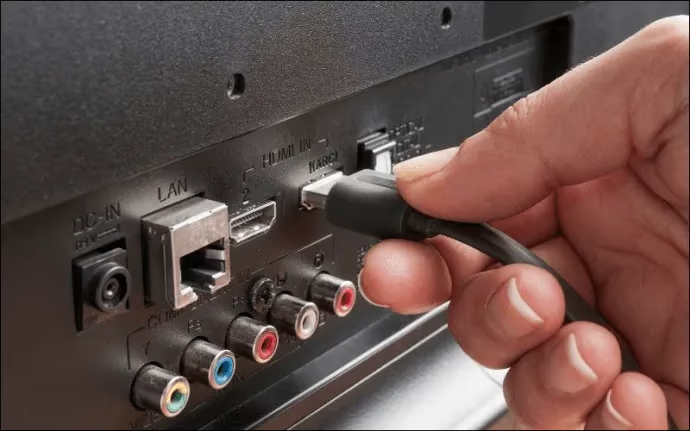
Once configured correctly, you’ll be able to use your tuner’s remote to easily change channels and control volume.
The Mediasonic HomeWorx is an excellent budget option that gets the job done. For better performance when receiving channels from farther distances, consider upgrading to a more powerful model like the iView 3300STB or SiliconDust HDHomeRun.
If you own a Vizio SmartCast TV, adding apps is generally easy. But if encountering issues with Disney+ or other streaming apps not functioning, referenced tuner-less troubleshooting guide covers common fixes.
Using an alternate universal remote can also help isolate problems. Check out advanced tips for powering on Vizios without operational remotes as well.
#Can You Access Channels Wirelessly With HDHomeRun?
An even more convenient approach is using a wireless transmission device like SiliconDust’s HDHomeRun. This eliminates the need to run long HDMI cables across your room.
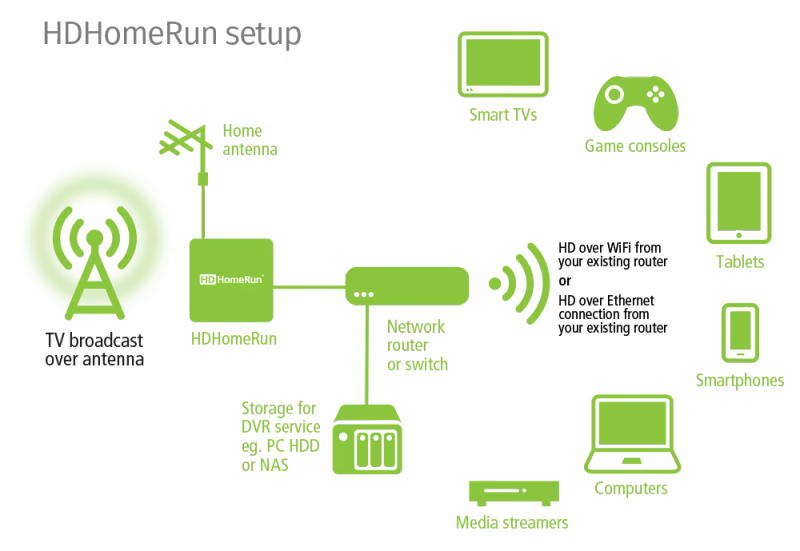
Here’s how to integrate OTA channels wirelessly:
-
Connect your antenna cable to the HDHomeRun input.
-
Use the included Ethernet cable to connect the HDHomeRun to your WiFi router.
-
Download the HDHomeRun app on your Vizio SmartCast TV.
-
Follow the in-app tutorial to scan for channels.
Now you’ll be able to stream crystal clear broadcast TV wirelessly over your home network. A single antenna can feed OTA content to multiple devices.
Unfortunately the HDHomeRun software does not natively work with 2016-2017 Vizio models. But by pairing it with Plex, you can circumvent this.
#Check for Hidden Input Sources
Before pursuing hardware upgrades, double check that your Vizio isn’t simply missing the TV input source.
The “Hide Input” feature allows you to remove clutter by hiding unused input options. If accidentally enabled on the source connected to your tuner, it would make that HDMI input invisible.
Luckily, it only takes a few quick steps to reveal hidden sources:
-
Using your Vizio remote, press the Menu button
-
Navigate to System > Input Settings
-
Select Hide Input
-
Highlight the missing input labeled TV
-
Change visibility toggle to Visible
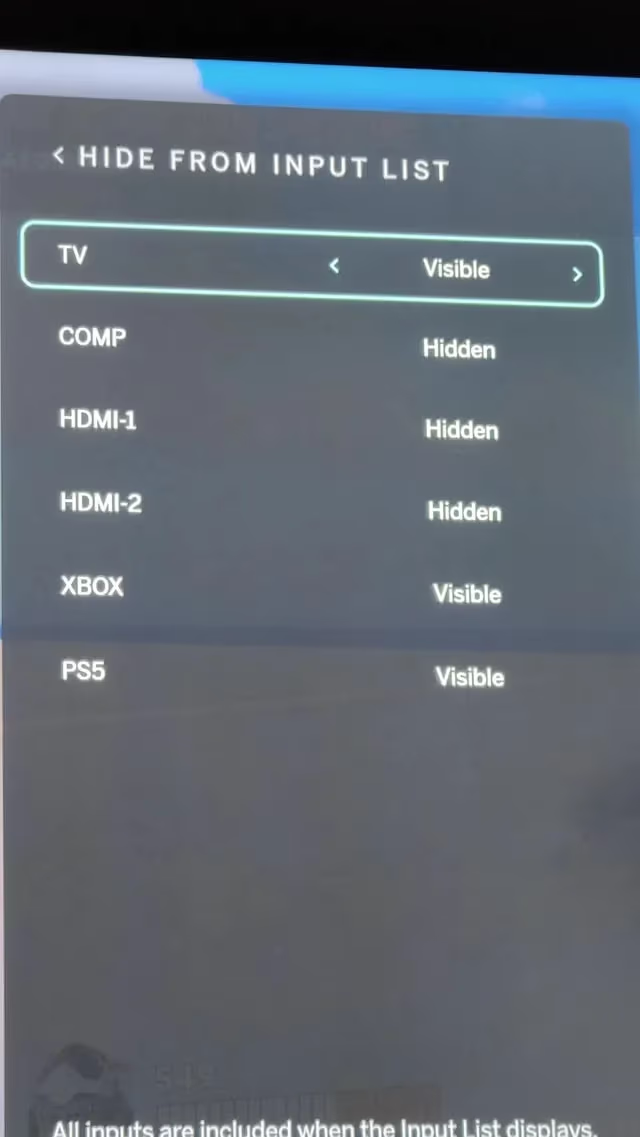
The source should now appear when cycling through inputs. Try connecting your antenna again via coaxial → tuner → HDMI.
#Antenna and Tuner Troubleshooting
If your external tuner is connected properly but you still aren’t receiving any channels, here are some additional troubleshooting tips:
-
Try adjusting placement of your antenna to optimize signal strength. Use AntennaWeb to identify direction of broadcast towers.
-
Verify coaxial cable connections are screwed in completely at both ends.
-
Inspect cables for damage like cracks or corrosion. Replace if necessary.
-
Rescan channels on tuner box after making any adjustments.
-
Check tuner box firmware and update to latest available version if possible.
-
Make sure TV input matches source HDMI port connected to tuner.
-
Factory reset tuner device then rescan channels.
-
As last resort, factory reset the Vizio TV, reconnect tuner, and rescan channels.
In optimal conditions, OTA HDTV broadcasts can be received within 50 miles without issue. With a capable directional outdoor antenna, maximum range exceeds 100 miles.
If problems persist even after trying all troubleshooting, your broadcast signal strength may simply be too weak. But in most cases, adding over-the-air TV to a coaxial-less Vizio TV is straightforward.
#Installing an Antenna on a Standard Vizio TV
For readers with traditional Vizio models featuring built-in tuners and coaxial inputs, here is a quick rundown on connecting an OTA antenna:
-
Purchase an indoor or outdoor HDTV antenna like the Mohu Leaf or Antennas Direct ClearStream.
-
Mount/place antenna with line of sight aimed towards broadcast towers.
-
Connect coaxial cable from antenna directly into the “DTV/TV” input on your Vizio TV.
-
Turn on TV and tune to correct input labeled “TV” or “DTV”.
-
Open menu then navigate to Channels > Channel Scan. Pick “Auto” then “Start” to scan.
-
TV will automatically find and save available OTA channels from antenna feed!
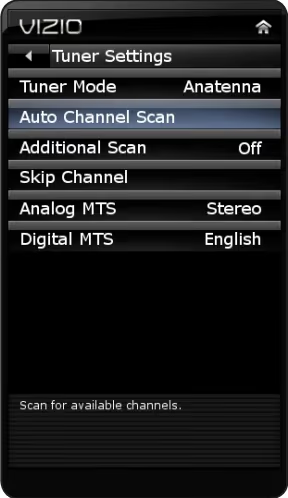
If not getting all expected stations, try adjusting location and orientation of antenna. Rescan channels after making any positional tweaks.
In most regions, even simple $20 unamplified antennas can reliably receive 30+ free HD channels. Adding an amplifier can extend range even further.
Now that you know how to connect both standard and tuner-less Vizio TVs, access to free over-the-air content is at your fingertips!
#Bottom Line
-
Recent Vizio home theater displays lack built-in tuners and coaxial inputs required for OTA antenna connectivity.
-
Purchase an external ATSC tuner or converter box to interface antenna feed with HDMI.
-
Wireless HDHomeRun devices offer full home DVR and multi-device streaming capabilities.
-
Use Plex to bridge HDHomeRun support limitations on SmartCast OS.
-
Check for hidden TV input if not appearing after tuner is connected via HDMI.
-
Inspect connections, reposition antennas, and rescan for channels if issues arise.
#Frequently Asked Questions
#What input do I use to connect an antenna to a Vizio TV?
If your Vizio TV has a built-in tuner, connect the coaxial cable from your antenna directly into the “DTV/TV” input port. Tune to the “TV” source, then scan for channels. For tuner-less displays, attach the antenna cable to a digital converter box or HDHomeRun instead, and connect the tuner to an open HDMI port.
#Why can’t my Vizio TV find channels from the antenna?
Check your antenna positioning first using a tool like AntennaWeb. Rescan after every adjustment. Inspect coaxial connections for damage and make sure both ends are screwed in tight. If you are far from the nearest broadcast tower, adding an amplifier can help.
#Do I need internet to use an antenna on a Vizio TV?
No, over-the-air HDTV does not need an internet connection. The only exception is when using a wireless HDHomeRun on a tuner-less Vizio, since it streams channels over your home WiFi network. A standard coaxial antenna setup works entirely offline.
#What is the range of an HDTV antenna?
Under good conditions with clear line of sight, most indoor antennas pick up stations within 50 miles. Directional outdoor antennas paired with a signal amplifier can extend range past 100 miles. Terrain, buildings, and weather all affect reception quality.
#How do I know if my Vizio TV has a built-in tuner?
Look at the ports on the back of your TV for a coaxial jack labeled “DTV/TV.” If you see it, your TV has a built-in tuner. You can also check the original spec sheet or search your model number on the Vizio website.
#Can I record OTA channels on a tuner-less Vizio TV?
Yes, a HDHomeRun paired with Plex gives you full DVR capabilities. Plex records live broadcasts to a connected hard drive, and you can watch recordings on any device in your home. This setup requires a Plex Pass subscription for the DVR feature.
#What is the best external tuner for a Vizio TV without coaxial input?
The Mediasonic HomeWorx is a solid budget option that handles basic channel viewing well. For longer-range reception or multi-room streaming, the SiliconDust HDHomeRun is the better choice. Both connect to your Vizio TV through HDMI.