Chromecast is a popular streaming device that lets you watch movies, TV shows, and local media on your TV. But what happens when you don’t have a Wi-Fi connection? The good news is that several workarounds exist for using Chromecast offline.
Google allows you to cast local content from your mobile device to Chromecast and mirror your screen without an active internet connection. You can also use apps like LocalCast to stream downloaded files directly. This guide covers three proven methods to get Chromecast working with no internet.
- Mobile hotspot method — create a personal hotspot on your phone and connect Chromecast to it for offline casting
- Hotel setup differs by OS — Windows has a built-in mobile hotspot feature, while macOS requires third-party tools like Connectify Hotspot
- Travel routers are the most reliable option — pocket-sized devices that create a local network for Chromecast without needing internet
- Local content casting works offline — photos, videos, and music stored on your device can be cast without any data connection
- Data usage warning — using mobile data as a hotspot will consume your cellular data plan, so disable mobile data after connecting to avoid charges
#How Can You Use Chromecast without Internet?
When you are at home, you likely have Wi-Fi available. This method becomes a lifesaver when you are in places like hotels or vacation rentals where connecting to the local network is tricky.
Sharing photos and videos on a big screen is easier than most people expect, even without internet access.
#Steps to use Chromecast without WIFI/Internet:
If you make use of the Google Cast application, you can use the following instructions to use it without the internet. So, let’s get started!
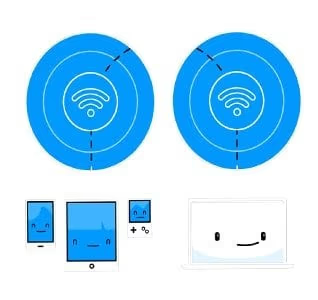
#Step 1: Click on the casting tab
In the first place, you have to click on the casting tab. By doing so, the app begins to identify nearby devices that are compatible.
#Step 2: Connect the device
Next, you have to connect the device when it shows up.
#Step 3: Enter the PIN
Now, you have to type in a 4-digit PIN so as to make the connection successfully. After that, press enters to make a connection between devices.
#Step 4: Enjoy it
Eventually, the device will automatically connect to the relevant device with no issues. In the end, you are all set and prepared to use Chromecast without the internet.
The application supports both Android and iOS devices. Now, you can use the Google Chromecast application and cast all the content on your TV using the streaming stick. If you’re comparing streaming devices for offline use, see our Chromecast vs Roku breakdown.
#What Is the Best Way to Use Chromecast in Hotels without Internet?
Undoubtedly, it is a tedious task to use Chromecast without WIFI/internet as they move to a private network. Most people try to avoid the Wi-Fi network available at hotels or sign up for another wireless connection. In situations like these, Chromecast is something that you need to consider.
#Steps to use Chromecast with no Wifi in Hotels on Windows PC:
In case, you are all set to use Chromecast, go through the instructions as follows. Now, begin implementing while having fun streaming the content to enjoy an entertaining day. Let’s begin analyzing the following steps for a successful connection.
#Step 1: Connect to the Wi-Fi network
Initially, you need to form a private network on the system. There is already a built-in mobile hotspot feature, which is present at the action center bottom. Now, connect to the Wi-Fi network of the hotel in any way or form.
#Step 2: Tap on “Settings”
If one fails to do so, you need to click on “Settings” and then, “System”. From there, click on the option “Notifications” and follow with “Actions”. Under this tab, click on the option “Add or Remove the Quick Actions” and lastly, enable this tab.
After this, act upon a click on the concerned tab. This will turn the Wi-Fi on as well as the device name with SSID.
#Step 3: Enter the password
Next, you need to connect to the Chromecast with the help of a default password. You can also change the password so as to keep the connection more secure with better accessibility. That’s it; you are all set to stream the content!
Please note that the above-listed method works for Windows operating system. If you want to connect Chromecast without the internet on Mac, you have to download a third-party application. For this, you can download the Connectify Hotspot tool. After downloading this tool, you can complete the entire setup and installation on an immediate basis.
#Steps to use Chromecast with no Wifi in Hotels on macOS:
To build up a strong connection, go through the following steps.
#Step 1: Connect to the Wi-Fi network
Firstly, you have to connect to the Wi-Fi network of the hotel. For this, you might even have to fill up some forms.
#Step 2: Share the connection
After that, you need to launch the application, Connectify Hotspot. Once done, share the network as the Wi-Fi hotspot.
#Step 3: Connect to Chromecast
In the next step, you have to connect the recently created hotspot with Chromecast. Now, you are all set to work with it.
PS: Also, click to learn about how to turn off Chromecast.
#How Do Travel Routers Help You Use Chromecast Offline?
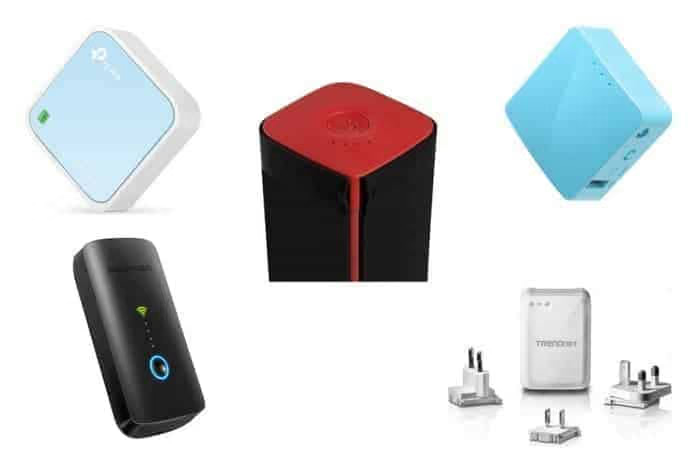
It is the best way to use Chromecast with no wifi for people who travel a lot. Travel routers are user-friendly and pocket-sized devices. These devices allow you to stream numerous devices without any disturbance.
You can also use this router to connect with Chromecast without the internet. The best part is that these travel routers are really handy and easier to carry all around.
#Steps to use Chromecast without Internet via Travel Router:
Using this awesome travel router, you can enjoy offline access to Chromecast. To perform this task, follow some simple steps as listed below.
#Step 1: Set up your travel router
Initially, you have to set up your travel router. In order to do so, you have to connect the router with the help of an SSID and the respective password.
#Step 2: Connect Chromecast
Next, you need to connect Chromecast to your travel router with the help of an application. This application is available for both Android and iOS devices.
#Step 3: Connect without the internet
Once you plug this router into Chromecast, there builds a connection. You can connect with Chromecast with no wifi without internet successfully at any location.
#Step 4: Pair up your device
After that, you have to pair your router with the concerned device which you want it to cast upon. In case you want to cast at a hotel, browse the settings of the TV, and choose the router. Now, all you need to do is cast the screen by entering the relevant password.
#Step 5: Enter SSID
If you fail to see your travel router, you can even manually enter the SSID and the concerned password. For this, you have to browse the network settings.
#Step 6: Use the Chromecast application
Now, you have Chromecast successfully without the internet. After this, you can pick up the streaming destination with the help of the Chromecast application.
#Step 7: Stream locally
In the end, you will be able to stream the locally saved content without Wi-Fi or internet. Once your travel router is set up, you can also watch Apple TV on Chromecast using downloaded content.
Also read: Best way to use Popcorn Time with Chromecast.
#FAQs
#Can I use Chromecast without Wi-Fi?
Yes, you can use Chromecast without Wi-Fi by creating a mobile hotspot on your phone and connecting Chromecast to it. You can also use a travel router to set up a local network. Both methods let you cast local content without a traditional Wi-Fi connection.
#Can I use Chromecast without an internet connection?
Yes. Create a hotspot from your phone, connect Chromecast to it, then disable mobile data. This gives you a local wireless link between your phone and Chromecast without using any internet bandwidth.
#Is it possible to stream local content using Chromecast?
Chromecast supports streaming local files like photos, videos, and music from your device’s storage. Apps such as LocalCast, BubbleUPnP, and AllCast let you browse and cast files saved on your phone or tablet directly to the TV.
#How do I use Chromecast with a mobile data connection?
Enable your phone’s hotspot feature and connect Chromecast to that hotspot network during the initial setup. Once paired, you can cast content from streaming apps, though this will consume your cellular data allowance.
#Are there any limitations to using Chromecast without internet?
Using Chromecast without internet limits you to local or downloaded content only. You won’t be able to access streaming services like Netflix or Disney+ that require an active connection. Data charges may apply when using a mobile hotspot, so keep an eye on your cellular plan limits.
#Do I need to set up Chromecast with internet first?
Yes, the initial Chromecast setup through the Google Home app requires an internet connection to register the device and download firmware updates. After that first-time setup, you can use the offline methods described in this guide.
#Can I use a travel router with Chromecast on an airplane?
Most airlines prohibit personal Wi-Fi hotspots and routers during flight. A travel router works best in hotels, conference rooms, and other locations where you have an Ethernet port or existing Wi-Fi network to bridge. Check the venue’s policy before setting up your own network.
#Bottom Line
Using Chromecast without internet or Wi-Fi is possible through various methods. Whether you want to stream local content, create a hotspot, utilize mobile data, travel routers, Ethernet adapters, or guest mode, these options provide flexibility and convenience for offline casting. Enjoy your favorite media on the big screen, even when an internet connection is not available.