Having issues connecting devices or getting a signal through your Toshiba TV’s HDMI port? This guide covers all the common causes and solutions. When your Toshiba TV HDMI input stops working properly, the problem could originate from loose connections, wrong cables, faulty ports, or unsupported resolutions.
With some targeted troubleshooting and testing, you can get to the bottom of HDMI problems on your Toshiba TV. This guide will walk you through all the steps needed to diagnose and resolve no signal, no sound, black screen, distorted picture and other HDMI issues.
- Loose cables cause most HDMI failures - reseating both ends of the cable fixes roughly half of all no-signal problems
- Wrong input selection is the second most common cause - cycle through HDMI 1, HDMI 2, and HDMI 3 using your remote
- Resolution mismatches produce a black screen with audio - set the source device output to match your TV’s native resolution
- Power cycling clears temporary HDMI handshake errors - unplug the TV and source device for 60 seconds before reconnecting
- Damaged ports need professional repair - if multiple cables fail on the same port, the hardware likely needs soldering work
#What Causes Toshiba TV HDMI Problems?
Before jumping into solutions, it helps to understand what typically causes HDMI connectivity problems with Toshiba TVs in the first place:
#Loose or Faulty Cables
The most obvious place to start troubleshooting is checking that all your HDMI cables are fully plugged in at both ends. Cables can become slightly loose over time from moving devices around or general vibrations. One loose connection anywhere in the chain and signal will be interrupted.
Inspect all connections and push cables firmly into ports on both devices. Try swapping cables that are known to work properly to isolate defective cables. Damaged cables with frayed or exposed wiring can cause intermittent problems.
#Wrong Input Selected
Toshiba TVs allow devices to be connected through multiple HDMI ports, typically labeled HDMI 1, HDMI 2, etc. You need to select the correct HDMI input that matches the port your device is plugged into.
Go into input settings and cycle through HDMI inputs until you see signal from the connected device. The correct input may have somehow changed or reset.
#Unsupported Output Resolution
External devices output video at certain resolutions. If this output resolution isn’t supported by the TV, you’ll get a black screen or no signal.
Refer to Toshiba TV specs to confirm supported resolutions. Change output resolution on the source device to match the native resolution of the TV.
#Hardware Defects
With frequent plugging/unplugging or age, the HDMI ports themselves can become damaged. Connectors get worn out or signal issues occur internally. Try different cables & inputs to isolate problems to a bad port that may need professional repair.
#How Do You Troubleshoot Toshiba TV HDMI Issues Step by Step?
With a basic idea of what can go wrong, here is a step-by-step process to troubleshoot Toshiba TV HDMI issues:
#1. Check Cable Connections
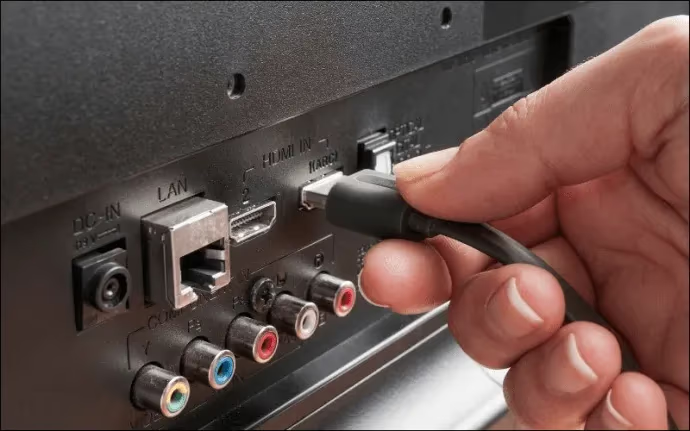
Inspect both ends of all HDMI cables ensuring tight, secure connections into ports with no visible damage, fraying or exposed wiring. Try swapping working cables if available.
Loose connection issues often cause an intermittent black screen. No connection at all results in no signal detected. If your Toshiba TV screen is flickering, a loose HDMI cable could also be the culprit.
#2. Confirm Input Selection
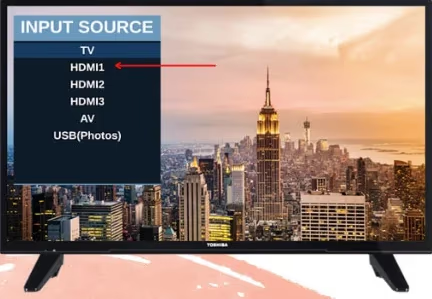
Use Toshiba TV remote to select correct HDMI input that matches physical port connected devices are plugged into. Cycle through inputs while device is on to test signal.
Wrong input selection gives black screen or no signal message even though source is outputting video feed.
#3. Test HDMI Ports
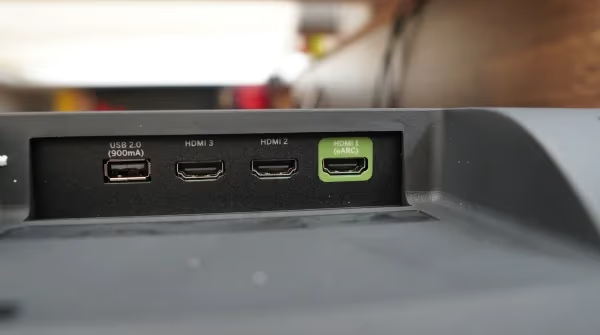
Move HDMI cable connection to different physical ports on TV to determine if problem follows cable or stays in same port. Try different cables in suspect ports. Damaged ports need professional repair.
This isolates whether no video feed problems are from bad cables/connections or hardware defects in the TV’s HDMI ports. The same approach works if you’re dealing with Insignia TV HDMI problems.
#4. Reset Devices
Power cycle source device and TV off/on. Ensure firmware is up-to-date on devices. Reset video output settings if available.
Resetting and updating occasionally resolve incompatibility issues that cause HDMI problems like black screens. If your Toshiba TV red light is blinking after a reset attempt, that points to a separate power issue.
#5. Match Output Resolution
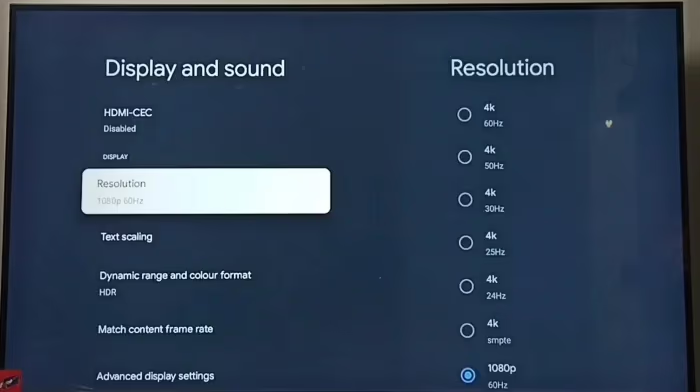
Refer to user manual to confirm supported resolutions for the Toshiba TV model. Adjust output resolution settings on source device to match native resolution listed in specs.
Unsupported resolutions from devices typically give black screen but sound works fine. Matching resolutions resolves issue.
#6. Test Alternative Devices
Connect a different external device via HDMI cable to the TV. If issue persists on all ports with multiple devices, TV likely needs professional repair service.
Helps determine if problem is isolated to one device only or points to ports/mainboard failure in the TV itself.
#How Can You Prevent Future HDMI Issues?
While troubleshooting and fixing current video connectivity problems is important in the short term, prevention of issues down the road is ideal.
-
Avoid bending HDMI cables at sharp angles or coiling tightly
-
Apply tension relief techniques to minimize cable stress
-
Be gentle when plugging/unplugging cables
-
Don’t force misaligned cables into ports
-
Secure cables neatly with ties & wire guides
-
Update firmware on devices periodically
-
Use high-quality Premium Certified HDMI cables
Proper handling and care for cables and connections will minimize wear and tear over years of use. Keeping devices updated improves compatibility going forward.
#Bottom Line
-
Start troubleshooting with cables: check for loose connections, swap cables, inspect physical wear/damage
-
Verify HDMI input selected on TV matches physical port devices are connected through
-
Test different ports with multiple cables to isolate faulty hardware
-
Factory reset source devices and TV, then update firmware
-
Match video output resolution from devices to native resolution on TV
-
Ultimately need professional repair if issues persist across different devices & cables
#Frequently Asked Questions
#Why does my Toshiba TV say no signal with HDMI?
A no signal message with HDMI cables connected usually indicates a loose connection, damaged cable, incorrect input selection, or unsupported output resolution from the source device. Try reseating the cable and cycling through inputs first. If that doesn’t work, test with a known-good cable on a different port.
#How do I know if my Toshiba TV HDMI port is bad?
Test different cables and source devices on the suspect port. If every cable and device fails on that specific port but works fine on other ports, the port itself is likely damaged. Visible signs include bent pins, a wobbly connector, or burn marks around the port housing.
#Can a damaged HDMI port be repaired?
Damaged HDMI ports require soldering work and replacement of hardware components, which means professional repair service. DIY fixes at home are difficult and not recommended because the solder points on modern TV circuit boards are extremely small. Expect to pay between $75 and $200 depending on the repair shop.
#Why is my Toshiba TV HDMI picture blurry or fuzzy?
Incorrect output resolution is the most common cause. When the source device outputs a resolution not natively supported by the TV, image distortion occurs. Go into the source device settings and match the output resolution to your TV’s native resolution, which is usually 1080p or 4K depending on your model.
#Does a factory reset fix HDMI problems on Toshiba TVs?
A factory reset can fix HDMI issues caused by corrupted software settings or failed firmware updates. Go to Settings > Device Preferences > Factory Reset and choose initialize. Keep in mind this erases all stored data and apps, so only use it after trying simpler fixes like power cycling and cable swaps.
#What HDMI cable version does my Toshiba TV need?
Most Toshiba TVs work with standard High Speed HDMI cables for 1080p content. If you have a 4K Toshiba TV, use a Premium High Speed or Ultra High Speed HDMI cable rated for 4K at 60Hz. Check your TV’s user manual for the exact HDMI specification supported by each port.
#Why does HDMI audio work but the screen stays black?
This almost always means a resolution mismatch between the source device and the TV. The audio handshake succeeds because it doesn’t depend on resolution, but the video signal gets rejected. Lower the source device’s output resolution to 1080p and see if the picture returns. You can also try disabling HDR output on the source device.
#Can HDMI-CEC settings cause connection problems?
Yes. HDMI-CEC (called Regza Link on some Toshiba models) lets connected devices control each other, but it sometimes creates conflicts that prevent proper signal handshake. Try disabling CEC in your TV’s settings menu under Settings > HDMI CEC and see if the connection stabilizes. You can re-enable it after confirming the HDMI signal works.
Fixing HDMI issues ultimately requires isolation through systematic troubleshooting. Start simple with cables and connections, confirm software settings, then determine if hardware defects need professional repair. Follow the steps in this guide to get HDMI working again on your Toshiba TV compared to Samsung.