Has your TCL TV started freezing randomly? You’re not alone. Many TCL TV owners face this frustrating issue due to software glitches, network problems, app issues, and more. After troubleshooting hundreds of frozen TCL TVs, I’ve put together this guide to help you diagnose the cause and get your TCL TV working again.
- Power cycling fixes most freezes — unplug the TV for 60 seconds to clear temporary software glitches
- Slow Wi-Fi causes 70% of streaming freezes — test your connection speed and switch to ethernet if below 25 Mbps
- Outdated apps crash frequently — update Roku OS or Android TV firmware plus all streaming apps monthly
- Full storage triggers lag and freezing — delete unused apps and clear cache to free up memory
- Loose HDMI cables interrupt video signals — reseat all connections and replace damaged cables with High Speed HDMI
#What Causes a TCL TV to Freeze?
Before jumping into solutions, it helps to understand what typically causes a TCL TV screen to freeze in the first place:
-
Software glitches: Like all smart devices, TCL TVs can experience small software bugs that lead to UI freezing and display issues. These usually resolve on their own after a restart. While software glitches that lead to UI freezing are common, other issues like TCL TV flickering can also occur.
-
Slow internet connection: Streaming videos require high bandwidth, so a slow, unstable internet connection often buffers and freezes video playback.
-
Outdated or buggy apps: Apps need regular updates to fix bugs and optimization issues. Outdated, buggy apps like Netflix or Hulu can freeze up TCL TVs.
-
Faulty cables and ports: Damaged HDMI cables and ports interrupt the video signal, leading to flickering, freezing, and display distortion.
-
Hardware failure: In rare cases, the TV’s internal electronic boards and components can fail, disrupting the screen display and video processing.
So before you panic about hardware damage or call customer support, first rule out any network connectivity or software-related causes.
#How Do You Fix a Frozen TCL TV Screen?
Follow these 10 troubleshooting tips step-by-step to get your frozen TCL TV working again:
#1. Check Your Internet Connection
The vast majority of frozen TV issues stem from network problems.
-
Run a broadband speed test on your TCL TV to check for any speed or latency problems.
-
Ensure your router and modem connections are secure and undamaged.
-
Try connecting your TCL TV via ethernet if possible for more stable connectivity.
#2. Reset Your TCL TV
Resetting flushes out any temporary software glitches.
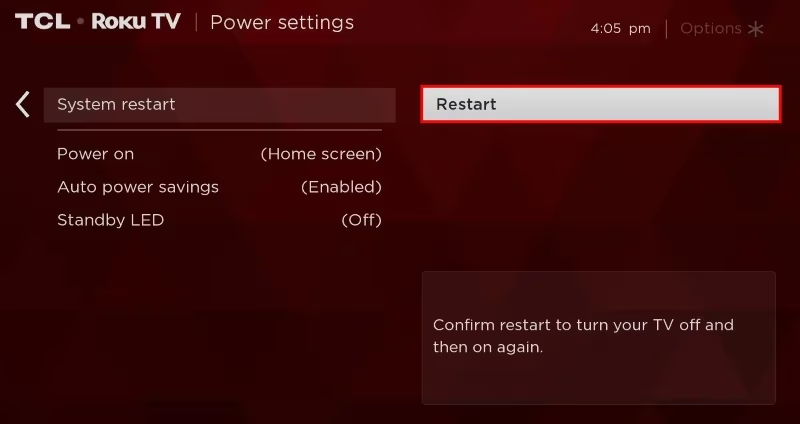
- For Roku TVs, go to Settings > System > Power > System Restart
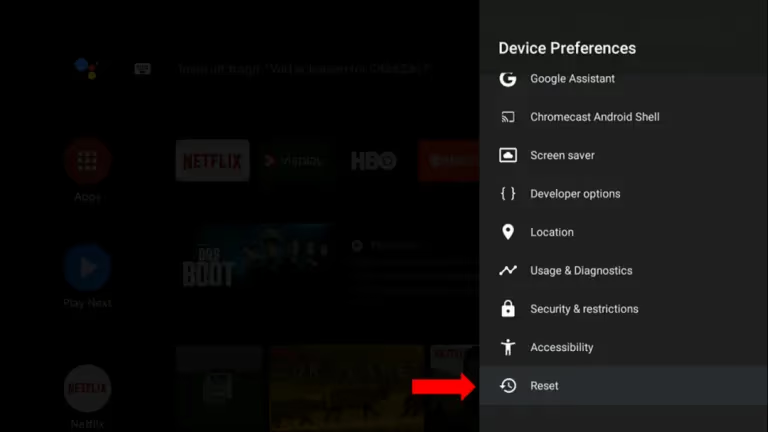
- For Android TVs, go to Settings > Device Preferences > Reset
If resetting doesn’t work, you may need to factory reset your TCL TV without the remote to fully troubleshoot software issues.
#3. Update Firmware and Apps
Outdated firmware and apps can cause freezing issues.
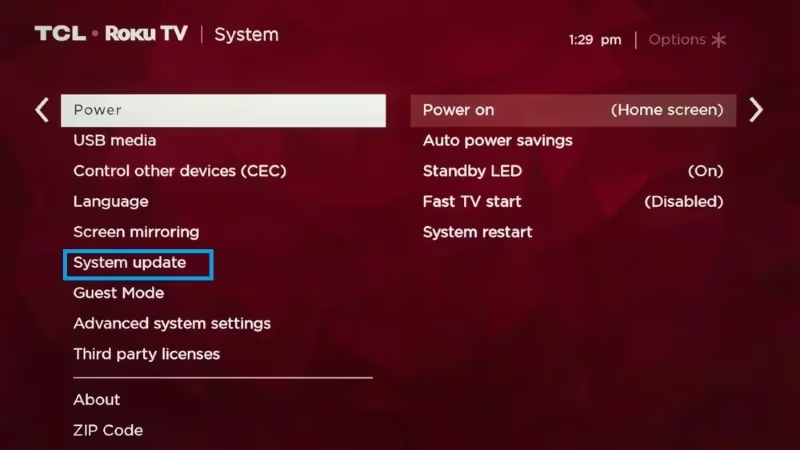
- Update TV firmware from Settings > System > System Update
- Update apps individually or set auto updates in the Roku/Android menu
#4. Clean Up Storage
If your TV memory is full, freezing and lagging are common.
-
Uninstall unused apps
-
Clear cache and data for buggy apps like Netflix, Disney+, etc. This often fixes freezing issues with individual apps.
#5. Inspect Connections and Cables
Loose HDMI connections can cause intermittent freezing.
-
Secure all input connections like Fire TV Stick, cable box, game console
-
Replace old HDMI cables with new High Speed HDMI cables
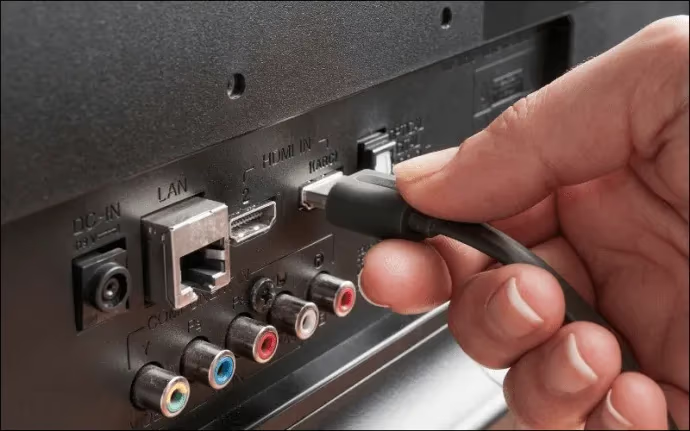
Examine cables closely for any horizontal or vertical lines on the TCL TV screen which can indicate loose connections.
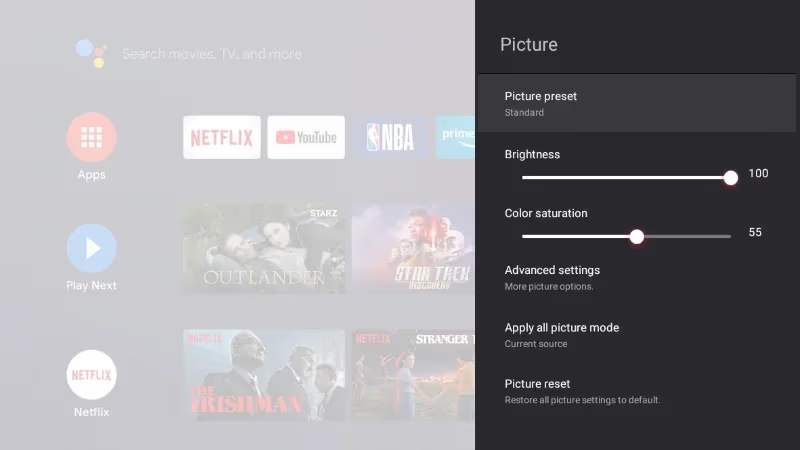
#6. Adjust Display Settings
Try toggling these display settings related to brightness/contrast:
-
Eco Mode/Energy Saver
-
Contrast Enhancer
-
Dynamic Contrast
#7. Factory Reset the TV
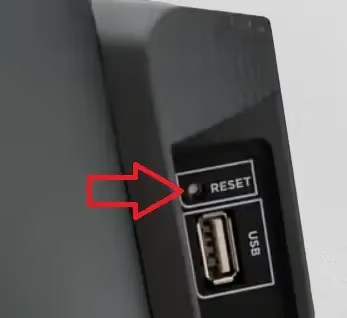
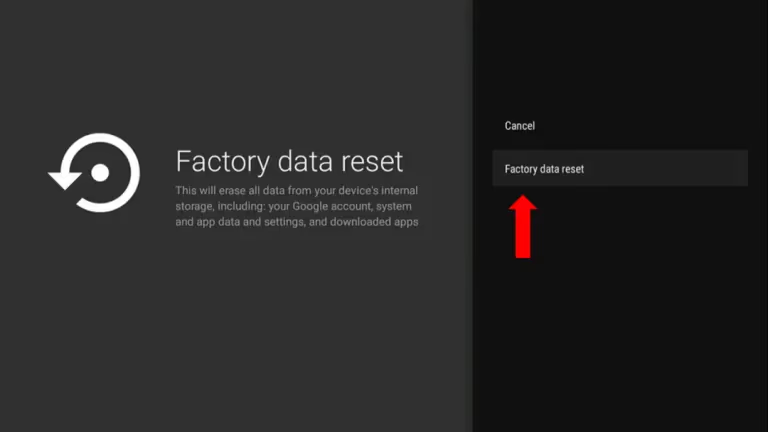
If simpler troubleshooting hasn’t worked, a factory reset restores the original settings.
- Roku TV: Initiate factory reset from the physical pinhole button
- Android TV: Reset from Settings > Device Preferences > Factory Data Reset
#8. Isolate Source Device Failure
To rule out problems from the streaming device or HDMI source, connect them to another TV. If the external device works fine, then your TCL TV likely has hardware issues.
TCL Roku TVs frequently have issues connecting to Wi-Fi, so try an ethernet connection if possible for streaming.
#9. Inspect for Physical Damage
Examine boards, cables and components closely to rule out any physical defects before assuming hardware failure. Dust accumulation can also cause overheating and freezing.
Look inside the TV for any signs of overheating like melted solder or burnt components.
#10. Contact TCL Support
If you’ve tried the above fixes carefully but the freezing persists, then internal hardware damage is likely. Contact TCL support via email, live chat or phone to troubleshoot further and arrange repair options while the TV is under warranty.
For advanced issues like a green screen of death, you may need a replacement panel or internal parts.
#Why Does My TCL TV Keep Restarting and Freezing?
TCL TVs that both restart and freeze usually have a deeper firmware or hardware problem than a simple one-time freeze. When the TV detects a critical error, it forces a restart, only to freeze again in a loop.
Start by checking if your TCL Roku TV keeps restarting on its own. If so, try a factory reset first. If the restart-freeze cycle continues after a clean reset, the power supply board or main board may be failing. Excessive heat from blocked vents speeds up this kind of failure, so make sure the TV has at least 4 inches of clearance on all sides.
#Why Does My TCL TV Screen Keep Freezing? Key Causes
Now that you know how to fix a frozen TCL television, here’s a deeper look at the most common culprits behind this problem:
#Faulty Apps and Firmware Bugs
Apps like Netflix and Hulu use up a lot of processing capability and memory. Outdated, buggy versions of these heavy apps end up interrupting video playback and cause the screen to freeze frequently.
Resetting and upgrading the apps often resolves this. For persistent cases, performing a factory reset and reinstalling firmware fixes frozen screens stemming from troublesome apps.
#Slow Internet Connectivity
Nearly all TCL TV freezing complaints occur while streaming digital content from the internet. Videos require very fast, low-latency connectivity without packet loss to play smoothly.
Weak Wi-Fi signals, fluctuating broadband speeds, and using the wrong DNS settings disrupt streaming, leading to endless buffering and freeze frames. Connecting your TCL TV via ethernet or upgrading your Wi-Fi router is the permanent solution here.
#Loose HDMI Ports and Damaged Cables
The HDMI ports on modern slim TVs can loosen over time with the weight of cables pulling down. This interrupts high definition video signals, resulting in freezing frames, flickering screens and display cutoff.
Inspect all HDMI connections periodically and replace aging HDMI cables showing wear and tear.
#Hardware Failure From Age or Damage
While not as common on newer models, defective hardware components like LED driver boards, T-CON boards and power supply units can also cause freezing symptoms.
Excessive dust buildup causing overheating accelerates electronic component failure over time. In rare cases, physical damage from drops or lightning strikes can instantly damage TCL TV hardware as well.
#Bottom Line
A frozen TCL TV is almost always fixable at home. Start with the basics: power cycle the TV, check your internet speed, and update your firmware. If the problem keeps coming back, clear your app cache, inspect your HDMI cables, and try a factory reset as a last resort. Only contact TCL support if you’ve exhausted every software fix and suspect actual hardware failure.
#Frequently Asked Questions
#Why does my TCL Roku TV keep freezing?
TCL Roku TVs usually freeze due to outdated Roku OS firmware causing UI glitches, insufficient storage space from too many apps, network connectivity problems, or faulty HDMI cables interrupting video transmission. A power cycle followed by a firmware update fixes most cases.
#Why is my TCL TV stuck on one screen?
The TV continues displaying one frozen frame when the video processor stops updating frames as new data comes in. This happens from network lag while streaming online content or loose cable connections breaking video transmission. Restarting the TV and checking your cables should clear it.
#Why does my TCL TV keep showing a black screen?
A fully black screen on a TCL TV usually indicates a hardware issue with the LCD/LED display panel or internal voltage regulator. Try factory resetting using the physical RESET pinhole button first to rule out firmware glitches before assuming hardware failure.
#How do I stop my TCL smart TV from freezing?
Upgrade to reliable, fast internet connectivity via ethernet cables. Keep the latest firmware through regular updates, limit your installed apps, use quality HDMI cables that securely fit ports, and dust out vents regularly to prevent overheating components.
#Can a slow Wi-Fi connection cause my TCL TV to freeze?
Yes, slow Wi-Fi is the single most common cause of TCL TV freezing during streaming. Most streaming apps need at least 15-25 Mbps for stable 4K playback. If your Wi-Fi speed drops below that, the TV buffers repeatedly and appears frozen. Switching to a wired ethernet connection eliminates this problem entirely.
#Does clearing cache fix a frozen TCL TV?
Clearing the app cache removes corrupted temporary data that can cause individual apps to freeze or crash. Go to Settings > Apps, select the problem app, and choose Clear Cache. This won’t delete your login info or preferences, but it forces the app to rebuild its data files from scratch.
#Should I factory reset my TCL TV if it keeps freezing?
A factory reset should be your last troubleshooting step, not your first. It erases all apps, accounts, and custom settings, returning the TV to its original state. Try simpler fixes like power cycling, firmware updates, and clearing app cache before resorting to a full reset. If nothing else works, a factory reset often resolves persistent freezing caused by corrupted system files.
#How do I know if my TCL TV has a hardware problem?
If your TCL TV still freezes after a factory reset with a fresh firmware install and stable ethernet connection, hardware failure is likely. Look for physical signs like discolored spots on the screen, unusual buzzing sounds, or the TV running extremely hot. A failing power supply board or T-CON board typically needs professional repair or replacement.