Have you noticed an annoying green tint or hue taking over your TCL TV screen? This green screen issue can stem from loose cable connections, bad picture settings, or even internal hardware problems. Here we cover all the potential reasons for the TCL green screen and provide fixes to get your TV working properly again.
- Loose HDMI or antenna cables are the most common cause, fixed by reseating or replacing the connection
- Extreme picture settings with brightness, contrast, or color pushed too high can produce a green tint across the entire screen
- Outdated firmware lacks patches for display bugs that may trigger color rendering issues on TCL TVs
- Factory reset clears corrupted data and restores all settings to default when other software fixes do not work
- Internal hardware failure is rare but T-Con board or ribbon cable problems require professional repair, typically after warranty expires
#What Causes a Green Screen on TCL TVs?
Before jumping into fixes, it helps to understand what triggers a green screen in the first place. Here are the most common culprits:
#Faulty External Connections
Issues with loose, damaged, or improperly connected cables leading into your TCL TV can alter and disrupt the video signal, causing a green hue.
- Common culprits include HDMI, DVI, VGA, and antenna connections.
#Incorrect Picture Settings
If the picture settings (especially brightness, contrast, and color) are set to extremes, they can overwhelm the screen and produce a green tint.
#Outdated Firmware
TCL periodically releases firmware updates with bug fixes and performance improvements. Running outdated firmware can sometimes cause display issues like green screens.
#Faulty Hardware
In rare cases, the issue may be due to internal hardware problems with components like:
-
Power supply boards
-
T-Con board
-
Ribbon cables
-
LED driver board
-
Display panel
Malfunctioning hardware can disrupt color signal rendering.
#How Do You Fix a TCL TV Green Screen?
Before pulling apart your TV for hardware repairs, try these troubleshooting fixes first. If you notice flickering or other display issues along with the green screen, reference this guide on how to fix TCL TV flickering.
#Check External Connections
Inspect all the cables connected to external devices like gaming consoles, streaming sticks, cable boxes, etc.
-
Reseat connections properly and securely.
-
Try different ports if possible.
-
Test different HDMI cables to isolate issues.
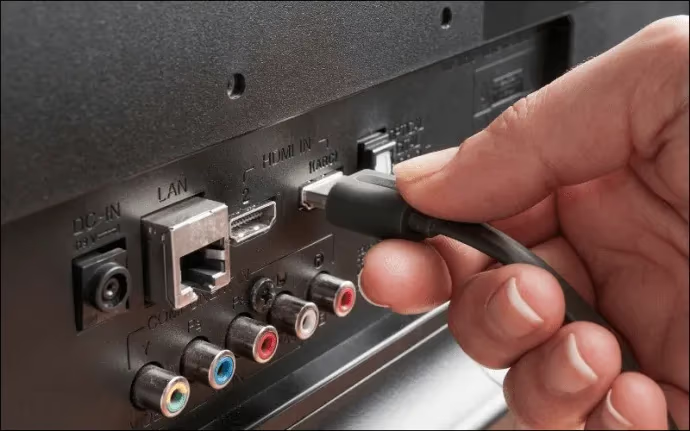
Also check antenna and wall connections. If the connections are loose or cables damaged, it can interfere with the video signal.
#Adjust Picture Settings
Navigate to the picture settings menu and revert any extreme adjustments back to normal:
-
Brightness: Too high can cause green screening. Set back to middle.
-
Contrast: Too high amplifies issues. Set back to middle.
-
Color: Too intense colors overwhelm panel. Set back to 50/warm2.
-
Sharpness: Too much sharpness also strains the panel. Set to middle value.
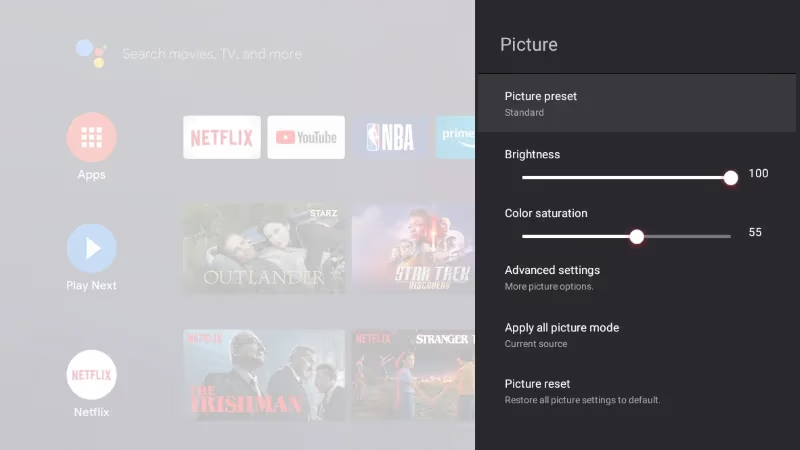
Restore picture modes to factory default. Turn off any exaggerated dynamic contrast, true tone, or noise reduction features.
You can also try manually rebooting your TCL TV if it is unresponsive by following these steps to power cycle a TCL TV that won’t turn on.
#Update Firmware
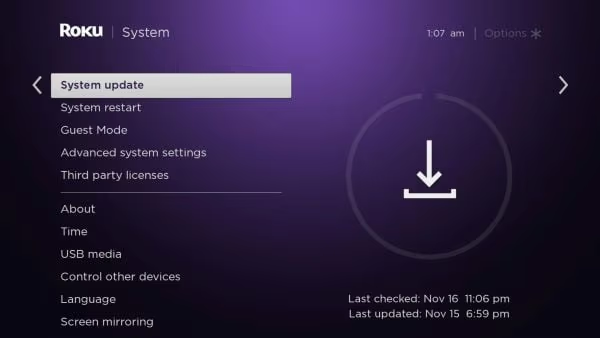
Go into settings and manually check for a system firmware update. Follow prompts to download the latest firmware over the internet and install it.
This resolves bugs that can contribute to display issues.
#Factory Reset the TV
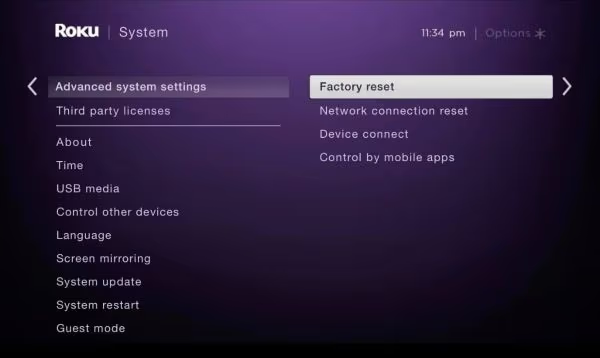
If the steps above do not fix the green screen, try a factory reset to clear any corrupted data and settings. For a step-by-step walkthrough, see our guide on how to factory reset a TCL TV without a remote.
Go to System > Advanced System Settings > Factory Reset
#Replace Damaged Cables
Visually inspect all connection cables for any deterioration or physical damage. If damage is spotted, order a replacement cable for that connection.
#Hardware Repairs
For internal hardware issues causing a consistently green screen on TCL TV, professional repair may be necessary once warranty expires:
-
Power Board: technicians test voltage outputs using multimeter, replace if out of spec.
-
T-Con Board: test and replace faulty timing controller board disrupting visual output signal.
-
Ribbon Cable: inspect ribbon condition and reseat cable connection between boards.
-
LED Driver: power regulation failure can blow LED driver transistor causing video issues.
-
Display Panel: cracks, impacts, drops can damage screen necessitating panel replacement.
#How Can You Prevent Future Green Screen Issues?
To avoid repeat green screen problems on your TCL TV:
-
Handle TV gently to prevent internal hardware damage.
-
Keep TV dust free and away from moisture risks.
-
Maintain stable room temperature and ventilation.
-
Avoid static discharge and sudden power interruptions. Use a surge protector.
-
Keep firmware updated for continued performance improvements.
-
Check external connections are snug. Consider cable management.
-
Set picture settings conservatively according to lighting environment.
To prevent overheating issues leading to potential hardware damage and green screens, maintain proper ventilation as explained in this TCL TV overheating guide.
#Bottom Line
A green screen on your TCL television can definitely disrupt your viewing experience. In most cases though, the problem clears up through basic troubleshooting once you identify the root cause.
Start by checking your connections, cables, picture settings, and TV firmware. From there you can determine if professional repairs may be needed for internal hardware issues. If the screen stays green after a factory reset, a faulty T-Con board or ribbon cable is the likely culprit, and a technician should inspect the TV.
#FAQs About TCL TV Green Screen
#Why is my TCL TV screen green?
The green screen on TCL televisions is typically caused by either loose external cable connections, incorrect TV picture settings that are too extreme, or outdated firmware potentially containing bugs. In rarer cases, internal failing hardware components can also lead to a green hue or tinted screen.
#How do I remove the green tint from my TCL TV?
Start troubleshooting a green tinted TCL television by checking external cable connections, adjusting brightness/contrast/colors back to neutral levels, performing a firmware update, and running a factory reset. If the green persists beyond these fixes, internal hardware repairs by an experienced technician may be necessary.
#Can faulty HDMI or antenna cables cause a green screen on a TCL TV?
Yes, damaged or loose HDMI and antenna cables are one of the top causes of green screen issues. In addition to green screens, damaged HDMI connections can also cause horizontal lines on a TCL TV. If replacing cables does not help, internal T-Con board repairs may be required.
#Does a factory reset fix the green screen on a TCL TV?
A factory reset fixes the green screen when the issue is caused by corrupted settings or software glitches. It restores all picture settings to their original values and clears any data that may be interfering with display output. If the green screen returns after a factory reset, the cause is likely hardware-related.
#What is the T-Con board and how does it cause a green screen?
The T-Con (timing controller) board manages the signals sent to your TV display panel. When this board malfunctions, it can disrupt color rendering and produce a persistent green tint. T-Con board replacement typically costs $50 to $150 for parts, though labor adds to the total.
#Can outdated firmware cause a green screen on a TCL Roku TV?
Yes, outdated firmware on TCL Roku TVs can contain bugs that affect display color processing. TCL releases periodic firmware updates that patch these issues. You can check for updates by going to Settings > System > System Update on your Roku TV.
#Should I repair or replace a TCL TV with a green screen?
That depends on the TV age and repair cost. If your TCL TV is under warranty, contact TCL support for a free repair or replacement. For out-of-warranty TVs, compare the repair estimate against the price of a new TV. Board-level repairs under $200 are usually worth it for TVs under 5 years old.
#Is a green screen covered under TCL TV warranty?
TCL offers a standard one-year limited warranty that covers manufacturing defects, including display issues like green screens. If the green screen appears within the warranty period and is not caused by physical damage, TCL will repair or replace the TV at no cost. Keep your proof of purchase handy when filing a claim.