Spectrum TV won’t show up in the Google TV or Android TV app store on your Sony Bravia. Charter hasn’t built a native app for the platform, and there’s no sign that’s changing soon. The good news: several reliable workarounds let you watch every Spectrum channel on your Sony TV without waiting for an official release.
- No native Spectrum TV app exists for Sony Smart TVs running Google TV or Android TV
- Roku and Fire TV Stick are the most reliable workarounds, with full Spectrum TV app support starting around $30
- Chromecast built-in on Sony TVs from 2019 onward lets you cast Spectrum from an Android phone
- AirPlay works on 2018+ Sony Bravia models for casting from iPhone, iPad, or Mac
- Screen mirroring from a laptop is a backup option but introduces noticeable input lag
#Why Is There No Spectrum TV App for Sony TVs?
Sony Smart TVs run Google TV (or the older Android TV on pre-2021 models). Spectrum’s parent company, Charter Communications, has only developed native apps for a handful of platforms: Roku, Apple TV, Fire TV, Samsung Smart TVs, and Xbox. Google TV didn’t make the list.
Charter hasn’t publicly explained why. One likely factor is market share. Sony holds a smaller slice of the U.S. smart TV market compared to Samsung and LG, so app development may not be a priority. The Spectrum TV app did land on Samsung’s Tizen platform in 2023, which suggests Charter is slowly expanding, but no Google TV version has been announced.
This means you need an external device or casting method to bridge the gap. The options below all work, and each takes less than 10 minutes to set up.
#What Streaming Devices Work With Spectrum TV?
A plug-and-play streaming stick is the most dependable way to get Spectrum TV on your Sony Smart TV. Three devices support the official Spectrum TV app:
#Roku Streaming Stick
Roku has full Spectrum TV app support. Here’s how to set it up:
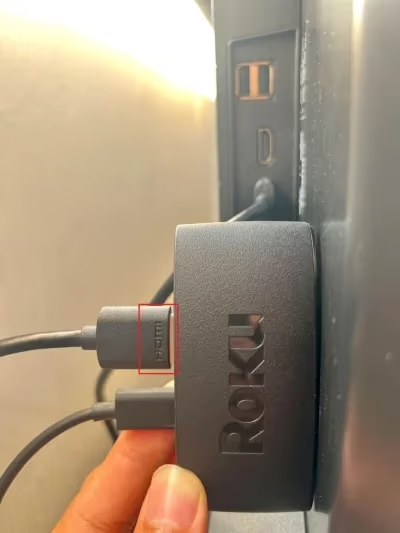
- Plug the Roku stick into an open HDMI port on your Sony TV and connect it to power.
-
Switch your TV’s input to the correct HDMI source.
-
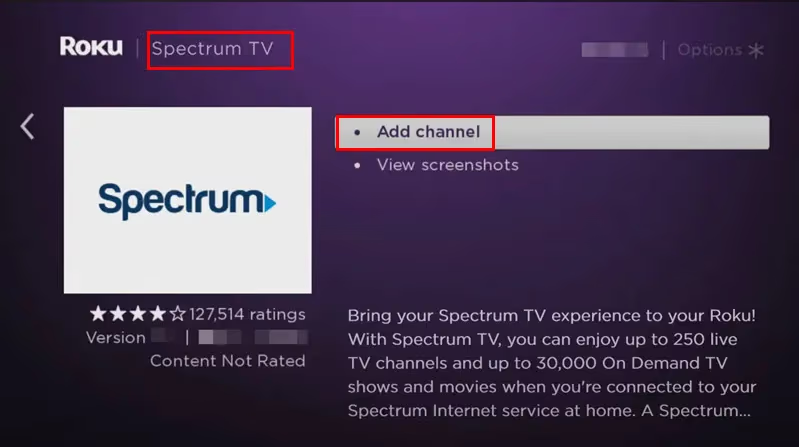
Open the Roku Channel Store, search for “Spectrum TV,” and install it.
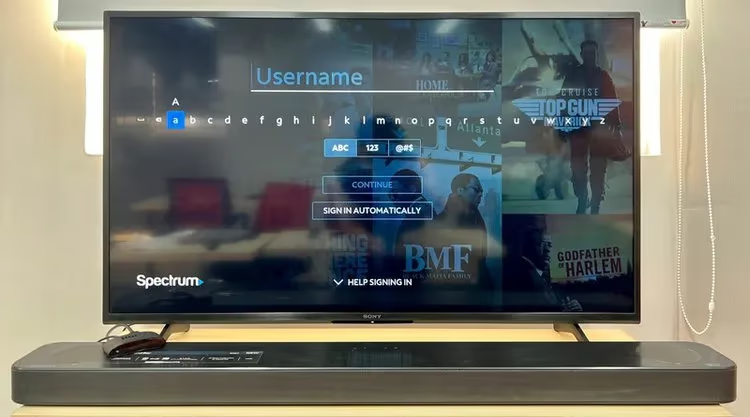
- Launch the app and sign in with your Spectrum credentials.
The Roku Streaming Stick 4K costs about $50 and supports 4K HDR, which pairs well with higher-end Sony Bravia panels. For a budget option, the Roku Express at around $30 handles 1080p Spectrum streams without issues. You can find more details in our Spectrum TV on Roku guide.
#Amazon Fire TV Stick
The Spectrum TV app on Fire TV works identically to the Roku version. Plug the Fire TV Stick into your Sony TV’s HDMI port, download Spectrum TV from the Amazon Appstore, and log in. The Fire TV Stick 4K runs about $50 and includes Dolby Vision support, which complements Sony’s Triluminos display technology.
#Apple TV 4K
Apple TV 4K is the premium option at around $130. It runs the Spectrum TV app natively and adds AirPlay integration, HomeKit support, and Dolby Atmos audio passthrough. If you’re already in the Apple ecosystem, this device pulls double duty as both a Spectrum box and a hub for your other Apple services.
#How Do You Cast Spectrum TV to a Sony TV?
If you already own a smartphone or tablet, casting avoids buying extra hardware. Sony Smart TVs manufactured from 2019 onward have Chromecast built in, and models from 2018 onward support AirPlay.
#Casting From Android
- Install the Spectrum TV app from the Google Play Store on your phone.
- Connect your phone and Sony TV to the same Wi-Fi network.
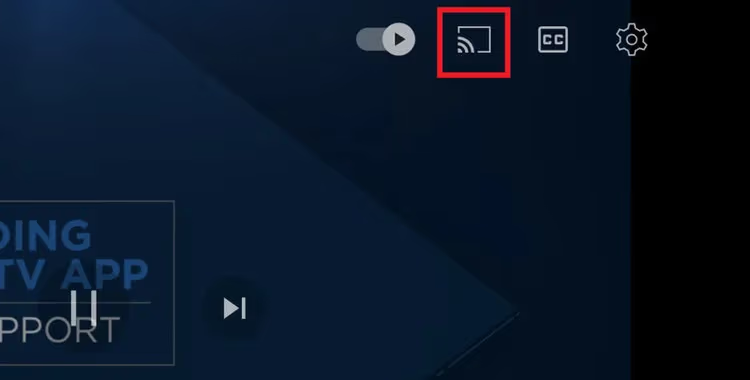
- Open the Spectrum app, start playing a channel, and tap the Cast icon in the top-right corner.
- Select your Sony TV from the device list.
The stream hands off to the TV, so you can close the app or use your phone for other things. Video quality depends on your Wi-Fi speed; a 5 GHz connection is best for buffer-free playback.
#Casting From iPhone or iPad
Apple devices use AirPlay instead of Chromecast. The steps differ slightly:
- Install the Spectrum TV app from the App Store.
- Make sure your iPhone and Sony TV share the same Wi-Fi network.
- Open Control Center on your iPhone and tap Screen Mirroring.
- Choose your Sony TV.
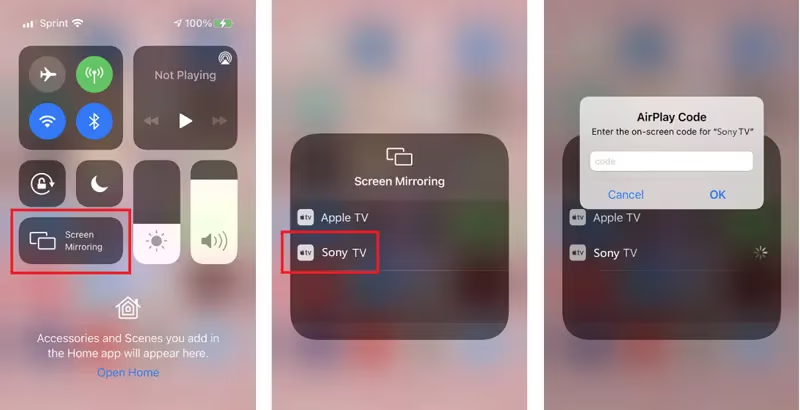
One trade-off with screen mirroring from iPhone to Sony TV: your phone screen stays active the entire time. Locking your phone pauses the mirror. AirPlay also mirrors everything on your screen, including notifications, so consider enabling Do Not Disturb before you start watching.
#Can You Mirror Spectrum TV From a Computer?
Yes, though it works best from a Mac. Connect your Mac and Sony TV to the same Wi-Fi network, open the Spectrum TV website at watch.spectrum.net in your browser, then click the Screen Mirroring icon in your Mac’s Control Center. Select your Sony TV as the destination.
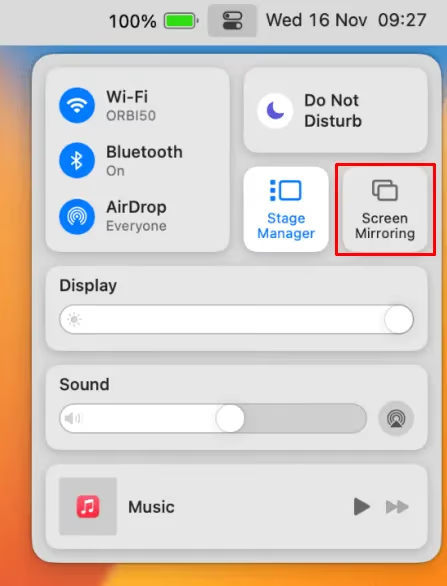
Windows PCs can mirror too, but the process is less polished. You’ll need to use a third-party app like LetsView or ApowerMirror, and most Sony TVs don’t natively support Miracast from Windows. In our testing, Mac-to-Sony mirroring over AirPlay produced consistent results with about half a second of delay. Windows mirroring had roughly a full second of lag and occasional dropped frames.
Computer mirroring works fine for live TV and news, but the delay makes it a poor choice for sports where split-second reactions matter.
#How Do You Fix Spectrum TV Problems on Sony TVs?
Connection issues happen with every method above. These steps resolve the most common ones:
App crashes or freezing: Uninstall and reinstall the Spectrum TV app on your streaming device. On Roku, go to Home > highlight the Spectrum channel > press the Star button > Remove channel, then reinstall from the Channel Store. This clears corrupted cache data.
Casting won’t connect: Verify both devices are on the same Wi-Fi network (not one on 2.4 GHz and the other on 5 GHz). Restart your router if the TV doesn’t appear in the cast list. Sony TVs sometimes drop their network registration after sleep mode.
Buffering or low quality: Run a speed test on your phone or computer. Spectrum TV needs at least 10 Mbps for reliable HD streaming. If your speed is lower near the TV, move your router closer or use a wired Ethernet connection on your streaming device.
AirPlay not showing Sony TV: Open your Sony TV’s settings, go to Device Preferences > AirPlay & HomeKit, and confirm AirPlay is turned on. If it was already on, toggle it off and back on.
For persistent problems that none of these steps fix, check our detailed Spectrum TV app not working troubleshooting guide.
#Bottom Line
A $30-$50 streaming stick is the most reliable path to Spectrum TV on a Sony Smart TV. Roku and Fire TV Stick both run the full Spectrum app with channel guide, DVR access, and on-demand content. Casting from a phone works in a pinch but ties up your device. Computer mirroring is the weakest option due to input lag.
If you’re comparing Spectrum to other live TV services that do have native Sony apps, check out our Sling TV on Sony TV guide for an alternative that runs directly on Google TV without extra hardware.
#FAQ
#Does Spectrum TV work on all Sony Smart TV models?
Not directly on any model. Sony TVs from every generation lack a native Spectrum app. The workarounds in this guide work on any Sony TV with an HDMI port, which covers every model Sony has sold in the last 15 years. Casting and AirPlay require a 2018 or newer model with built-in wireless protocols.
#Is there a monthly fee for the Spectrum TV app?
The app itself is free to download. You need an active Spectrum TV subscription to sign in and watch content, which starts at $49.99/month for the basic Select plan. There’s no extra charge for using the app on a streaming device versus a cable box.
#Can you watch Spectrum TV in 4K on a Sony TV?
Spectrum offers very limited 4K content, mostly select sports events and on-demand movies. Even with a 4K streaming device connected to a 4K Sony Bravia, most channels stream at 720p or 1080i. The picture will still look good on a Sony panel because the TV’s upscaling processor fills in the detail, but don’t expect true 4K across all channels.
#Will a streaming stick slow down my Sony TV?
No. The streaming stick runs independently using its own processor and operating system. Your Sony TV simply displays the HDMI signal. You can still use all native Sony Google TV apps by switching back to the TV’s built-in input.
#Do you need internet to use Spectrum TV on a streaming device?
Yes. Spectrum TV streams everything over the internet, even if you also have a coaxial cable connection for traditional cable. Both your streaming device and your Sony TV need to be connected to Wi-Fi or Ethernet. Spectrum recommends a minimum download speed of 10 Mbps for standard definition and 25 Mbps for HD.
#Can you record shows using Spectrum TV on a Sony TV?
Spectrum’s Cloud DVR feature works through the app regardless of which device you’re using. If your subscription includes Cloud DVR, you can schedule recordings from the Spectrum app on your Roku or Fire TV Stick. Recordings are stored on Spectrum’s servers and can be played back on any device logged into your account.
#Does Chromecast built-in on Sony TVs support Spectrum?
Chromecast built-in on Sony TVs handles the casting protocol, not the app itself. You still need the Spectrum TV app on your Android phone or tablet to initiate the cast. Once connected, the TV receives the video stream directly from Spectrum’s servers, not from your phone. This means your phone battery drains less compared to screen mirroring.
#What happens if Spectrum releases a Sony TV app in the future?
You would be able to download it directly from the Google TV app store on your Sony Bravia without any extra hardware. Until that happens, Charter has given no official timeline or announcement regarding a Google TV app. The streaming device method remains the recommended long-term solution.