The Spectrum TV app turns your Roku into a cable box replacement. It gives Spectrum subscribers access to live channels, an on-screen guide, and on-demand content without renting extra equipment from Spectrum.
This guide walks you through setup, what you can watch, and how to fix problems if the app stops working.
- Free for subscribers — the Spectrum TV app costs nothing if you already pay for Spectrum TV and internet service
- In-home only — the app works exclusively on your home Spectrum Wi-Fi network, not on mobile data or other networks
- Live TV and on-demand — access to 200+ live channels and thousands of on-demand titles depending on your plan tier
- Setup takes under 5 minutes — download from the Roku Channel Store, sign in, and start watching immediately
- Not all on-demand content available — some programming is restricted to Spectrum cable boxes and not accessible through the Roku app
#What Do You Need to Use Spectrum TV on Roku?
Before installing the app, confirm you meet three requirements. Missing any one of them will block access.
Active Spectrum TV subscription. The app is not a standalone streaming service. It mirrors what you already pay for through your cable plan. Internet-only customers cannot use it.
Spectrum internet at your home. Your Roku must connect to your home Spectrum Wi-Fi network. The app uses geolocation tied to your Spectrum internet account to verify you are watching from home. Public Wi-Fi, mobile hotspots, and VPNs will not work.
A compatible Roku device. Most Roku players and Roku TVs from 2017 onward support the Spectrum TV app. This includes the Roku Express, Roku Streaming Stick 4K, Roku Ultra, and TCL Roku TVs. Older models running Roku OS 9 or earlier may not support the app.
Spectrum also offers its app on other platforms. If you own a Fire TV Stick, the setup process is similar but uses the Amazon Appstore instead.
#How Do You Install and Set Up the Spectrum TV App?
The installation process is straightforward. Follow these three steps.
#Step 1: Open the Roku Channel Store
From your Roku home screen, scroll down and select Streaming Channels. This opens the Channel Store where all available apps are listed.
#Step 2: Search and Install
Use the search function and type Spectrum TV. Select the official Spectrum TV app from the results. Click Add Channel and wait for the download to finish. It takes about 30 seconds on most connections.
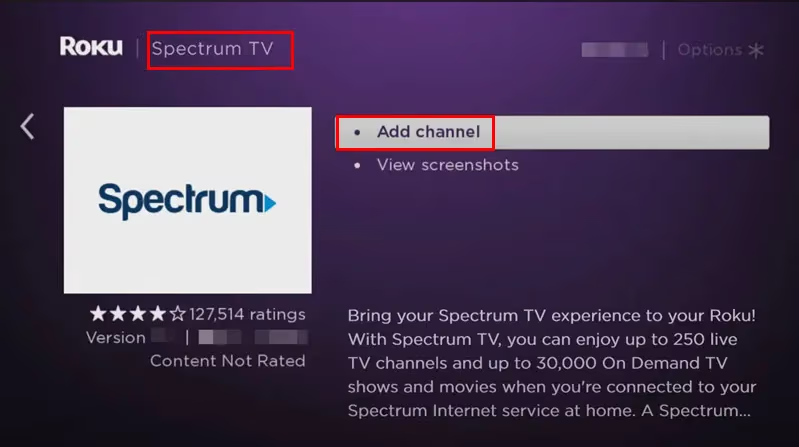
If you prefer installing remotely, log into your Roku account at roku.com and add the channel from the web. Your Roku device will download it automatically the next time it connects to the internet.
#Step 3: Sign In With Your Spectrum Account
Open the Spectrum TV app and enter your Spectrum username and password. If you have never created online credentials, visit spectrum.net to set up your account first.
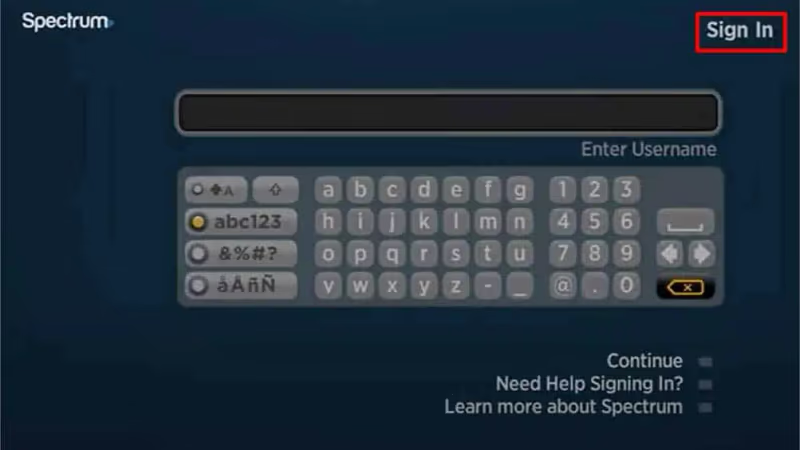
After signing in, the app loads your channel lineup within a few seconds. You can start watching live TV right away.
#What Channels and Content Can You Watch?
The Spectrum TV Roku app mirrors your cable subscription. You get access to every live channel included in your plan.
Live TV channels. Watch local broadcast networks (ABC, CBS, NBC, FOX) and cable channels like CNN, HGTV, TNT, and ESPN. Sports fans can access ESPN channels on Spectrum directly through the app. The channel guide looks and works like a traditional cable guide with a grid layout showing what is airing now and upcoming programs.
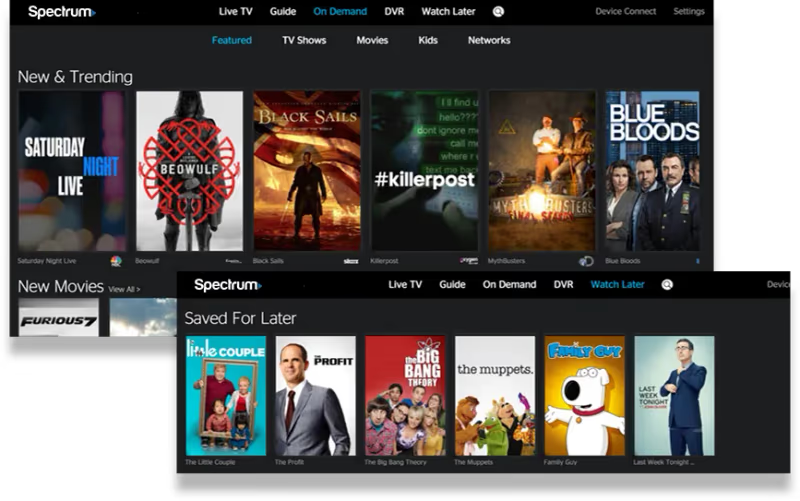
On-demand library. Thousands of movies and TV episodes are available on demand. The selection varies by network. Some channels like HBO and Showtime offer deep on-demand catalogs, while others provide only recent episodes.
Cloud DVR recordings. If your Spectrum plan includes Cloud DVR, you can access your recordings through the Roku app. This feature was added in a 2024 update and works on most Roku devices running OS 12 or later.
One limitation to know: not all on-demand content available on Spectrum cable boxes appears in the Roku app. Certain licensing agreements restrict some programming to Spectrum’s own hardware. If a specific show is missing from the Roku app, check it on a Spectrum set-top box.
#Troubleshooting Common Spectrum TV App Issues on Roku
The app generally runs well, but a few problems come up regularly. Here is how to fix them.
App won’t load or crashes on startup. Restart your Roku by going to Settings > System > System restart. If that does not help, remove the Spectrum TV app and reinstall it from the Channel Store. This clears corrupted cached data that builds up over time. For persistent crashes, check our guide on Spectrum TV app not working for deeper fixes.
Buffering or freezing during playback. Spectrum recommends at least 25 Mbps for streaming live TV through the app. Run a speed test on your Roku under Settings > Network > Check connection to see your current speed. If your connection is slow, move your Roku closer to your router or switch to a wired Ethernet connection using a USB adapter. Frequent freezing issues have their own dedicated troubleshooting guide.
“Not in home network” error. This means the app cannot verify your Roku is on your Spectrum home network. Confirm your Roku is connected to your home Wi-Fi (not a guest network or extender on a different subnet). Restart your Spectrum router by unplugging it for 30 seconds, then plug it back in and wait 2 minutes before trying again.
Login failures. Reset your Spectrum password at spectrum.net if your credentials are not working. The app sometimes logs you out after a Spectrum system update. Re-entering your password usually fixes it.
#How Does Spectrum TV on Roku Compare to Other Platforms?
The Roku version of Spectrum TV is one of several ways to watch Spectrum content without a cable box. Each platform has slight differences.
On LG Smart TVs, the Spectrum app supports 4K streaming on select channels, which the Roku version does not offer yet. Sony Smart TVs running Google TV also get the Spectrum app through the Google Play Store, with a similar feature set to Roku.
Vizio SmartCast TVs and TCL TVs support the app as well, though Vizio users sometimes report slower menu navigation compared to Roku. The Fire TV version offers Alexa voice control for changing channels, which Roku lacks.
For most users, Roku provides the most reliable experience. Its interface is clean, the app loads quickly, and Spectrum has prioritized Roku for updates since it remains the most popular streaming platform in the US with over 80 million active accounts.
#Bottom Line
Setting up Spectrum TV on Roku takes about 5 minutes and replaces the need for a rented cable box in secondary rooms. The app gives you live TV, an on-screen guide, on-demand content, and Cloud DVR access at no extra cost beyond your existing Spectrum subscription.
The biggest limitation is the in-home Wi-Fi requirement. You cannot take your Roku to a hotel or a friend’s house and expect the Spectrum app to work there. If portability matters, use the Spectrum TV app on your phone or tablet instead, which does allow some out-of-home streaming.
For Roku owners already paying for Spectrum TV and internet, the app is worth installing on every Roku device in your home.
#FAQ
#Is the Spectrum TV app free to download on Roku?
Yes. The app itself costs nothing to download or use. However, you must have active Spectrum TV and internet subscriptions to sign in and access content. There is no standalone option for non-subscribers.
#Can I watch Spectrum TV on Roku outside my house?
No. The app is locked to your home Spectrum Wi-Fi network. If you connect your Roku to a different network, the app will display an error and refuse to load content. Spectrum enforces this restriction through IP-based geolocation tied to your internet account.
#What Roku models support the Spectrum TV app?
Most Roku devices manufactured from 2017 onward work with the app, including Roku Express, Roku Premiere, Roku Streaming Stick, Roku Ultra, and all Roku TV models from brands like TCL, Hisense, and ONN. Devices running Roku OS 9.4 or later are officially supported.
#Why does my Spectrum TV app keep buffering on Roku?
Buffering usually points to a slow or unstable internet connection. Spectrum recommends at least 25 Mbps for live TV streaming through the app. Test your connection speed in Roku’s network settings, and consider using a wired Ethernet adapter if your Wi-Fi signal is weak in the room where your Roku is located.
#Does Spectrum TV on Roku include Cloud DVR?
Yes, if your Spectrum plan includes Cloud DVR service. Recordings appear in the app under a dedicated DVR section. You can watch, pause, fast-forward, and delete recordings directly from your Roku. This feature requires Roku OS 12 or later.
#Can I use Spectrum TV on Roku with an internet-only plan?
No. An internet-only Spectrum subscription does not grant access to the Spectrum TV app. You need both TV and internet service from Spectrum. If you want cable-style live TV without a traditional TV plan, consider alternatives like YouTube TV or Sling TV that work independently on Roku.
#How do I fix the Spectrum TV app not opening on Roku?
Start by restarting your Roku through Settings > System > System restart. If the app still will not open, uninstall it and reinstall from the Channel Store. Also check that your Roku OS is up to date under Settings > System > System update. Outdated firmware causes compatibility problems with newer app versions.
#Does the Spectrum TV Roku app support parental controls?
Yes. You can set parental controls through the Spectrum TV app by going to Settings within the app and enabling PIN-based restrictions. This lets you block specific channels or content ratings. The controls sync with your Spectrum account, so settings you apply on Roku also apply on other Spectrum devices.