Vizio Smart TVs cannot download or install the Spectrum TV app directly. The app is not available in the Vizio SmartCast app store, and Vizio has not announced plans to add it. That does not mean you are stuck without options. Three workarounds let you watch Spectrum channels on your Vizio TV right now, and each takes less than five minutes to set up.
- No native Spectrum app on Vizio — Vizio SmartCast does not support a dedicated Spectrum TV app on any model year
- SmartCast casting works on 2018+ models — Vizio TVs with built-in Chromecast let you cast Spectrum from a phone or Chrome browser
- External devices fill the gap — a Chromecast or Roku Streaming Stick plugged into HDMI gives full Spectrum app access
- Wi-Fi network match is required — your casting device and Vizio TV must be on the same Wi-Fi network for casting to work
- Spectrum requires an active TV subscription — you need a Spectrum TV plan (Select, Silver, or Gold) to log in and stream
#Which Vizio TVs Support Casting for Spectrum?
Vizio does not offer a standalone Spectrum app, but every Vizio SmartCast TV from 2018 onward has built-in Chromecast. That built-in Chromecast is what makes casting possible.
Check your model number in Settings > System > System Information. Models starting with V, M, P, or OLED from 2018 or later all include SmartCast with Chromecast built in. Look at the remote too. A button labeled “V” or “Input” that opens the SmartCast home screen confirms your TV has the feature.
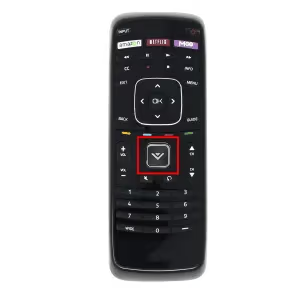
Pre-2016 Vizio TVs use the older VIA or VIA Plus platform instead of SmartCast, so casting is not supported. If you own one of those older models, skip to the external device sections below. If your SmartCast is acting up, our Vizio SmartCast troubleshooting guide covers the most common fixes.
#How Do You Cast Spectrum to a Vizio TV via SmartCast?
This is the fastest method if your Vizio TV already has SmartCast. No extra hardware needed.
#From a Phone or Tablet
- Connect your phone and Vizio TV to the same Wi-Fi network.
- Open the Spectrum TV app on your phone (iOS or Android).
- Start playing a channel or on-demand title.
- Tap the Cast icon (rectangle with Wi-Fi waves) in the top-right corner of the app.
- Select your Vizio TV from the list of available devices.
The video shifts from your phone screen to the TV within a few seconds. You can still use your phone for other tasks while casting.
#From a Chrome Browser on PC
- Open Chrome and go to watch.spectrum.net.
- Sign in with your Spectrum account credentials.
- Click the three-dot menu in Chrome and select Cast.
- Choose your Vizio TV from the device list.
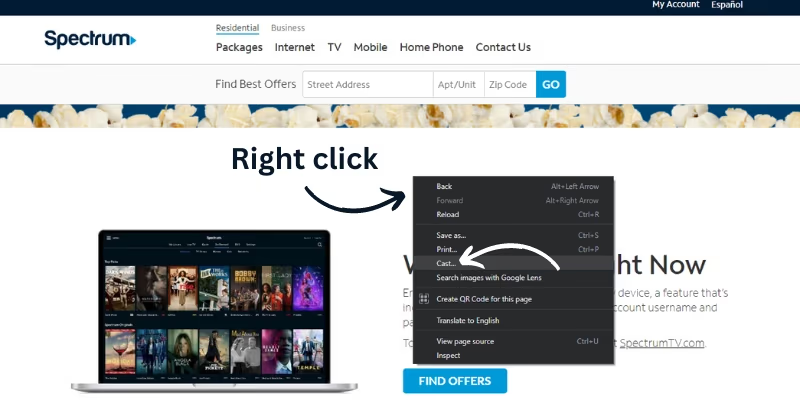
Chrome casting mirrors the browser tab, so keep the tab active. Closing or minimizing it stops the stream.
For the best picture quality when casting from Chrome, set the video to full screen in the browser tab before casting. This fills the entire TV screen instead of showing a small player window.
#What External Devices Work With Spectrum on Vizio?
If your Vizio TV is older than 2018 or SmartCast casting gives you trouble, an external streaming device solves the problem. Both Chromecast and Roku have full Spectrum app support.
#Chromecast or Chromecast With Google TV
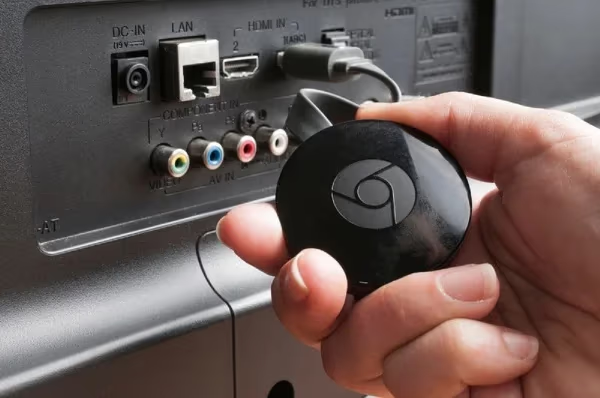
Plug a Chromecast with Google TV into any HDMI port on your Vizio TV. With a standard Chromecast, you cast from the Spectrum app on your phone using the same steps listed above. With Chromecast with Google TV, you can install the Spectrum app directly on the device and use the Chromecast remote to navigate. No phone needed.
#Roku Streaming Stick
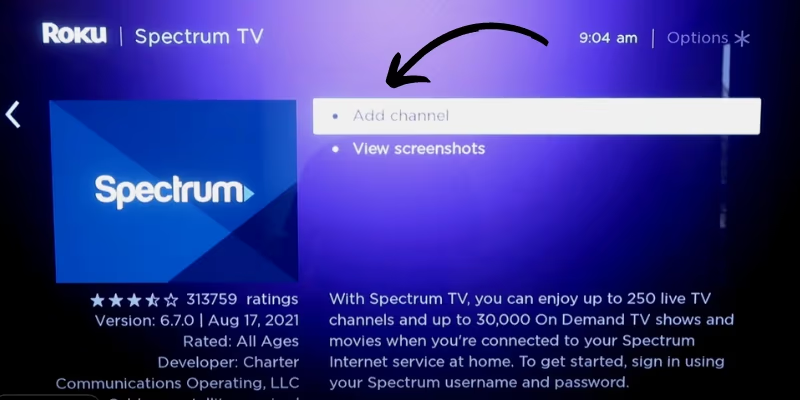
A Roku Streaming Stick is another strong option. Plug it into HDMI, connect to Wi-Fi, and search for “Spectrum TV” in the Roku Channel Store. Install the app, sign in with your Spectrum credentials, and you are good to go. The Spectrum app on Roku supports live TV, on-demand content, and cloud DVR. Our guide on Spectrum TV on Roku walks through the full setup.
#Amazon Fire TV Stick
The Spectrum TV app is also available on Fire TV Stick. Search for it in the Amazon Appstore, install, and sign in. If you already own a Fire TV Stick, this might be the most convenient option. See our Spectrum on Fire TV guide for step-by-step instructions.
#Do You Need a Specific Spectrum Plan to Stream?
Yes. Streaming through the Spectrum TV app requires an active Spectrum TV subscription. Internet-only plans do not include app access. Spectrum offers three TV tiers:
| Plan | Channels | Starting Price |
|---|---|---|
| Select | 125+ | ~$49.99/mo |
| Silver | 175+ | ~$74.99/mo |
| Gold | 200+ | ~$94.99/mo |
Pricing varies by region. Bundling with Spectrum internet often lowers the monthly cost. All three plans include cloud DVR and the ability to stream on up to five devices at once on your home network.
Spectrum competes with live TV streaming services like YouTube TV and fuboTV. The main advantage of Spectrum is that it bundles with your internet plan, while YouTube TV and fuboTV work on any internet connection.
#How Do You Fix Spectrum Casting Problems on Vizio?
Casting from phone to Vizio TV does not always work on the first try. Here are the fixes for the most common issues.
Both devices must be on the same Wi-Fi network. This is the number one cause of casting failures. Check your phone’s Wi-Fi settings and your TV’s network settings (Settings > Network > Wi-Fi) to confirm they match.
Restart both devices. Power cycle the Vizio TV by unplugging it for 30 seconds. Close and reopen the Spectrum app on your phone. Then try casting again.
Update the Spectrum app. Open the App Store (iOS) or Google Play Store (Android) and check for a Spectrum TV update. Outdated app versions sometimes lose casting ability after a firmware change on the TV.
Check Vizio firmware. Go to Settings > System > Check for Updates on your Vizio TV. SmartCast casting bugs are occasionally fixed through firmware patches. Vizio’s official support page lists current firmware versions by model.
If casting still fails after all of these steps, an external Roku or Chromecast device is the most reliable backup. You can also read our Spectrum TV app not working guide for more troubleshooting steps.
#Spectrum on Other Smart TV Brands
The Spectrum TV app experience differs by platform. Some brands support a native app, while others rely on casting or external devices:
- LG Smart TVs have a native Spectrum app on webOS. See our Spectrum on LG TV guide.
- Sony Smart TVs run Spectrum natively on Google TV models. Details in our Spectrum on Sony TV guide.
- TCL Roku TVs install Spectrum through the Roku Channel Store. See Spectrum on TCL TV.
#Bottom Line
Your Vizio TV will not get a native Spectrum app, but that should not stop you from watching. Cast from your phone using SmartCast if your TV is from 2018 or newer. For older models or a more reliable experience, plug in a Roku Streaming Stick or Chromecast with Google TV and install the Spectrum app directly on that device. Make sure your Spectrum TV subscription is active, and keep both your TV firmware and app updated to avoid connection drops.
#Frequently Asked Questions
#Can you download the Spectrum app on a Vizio TV?
No. Vizio SmartCast does not have the Spectrum TV app in its app store. This applies to all Vizio models regardless of year. The workaround is casting from a phone or using an external streaming device like Roku or Chromecast.
#Does Spectrum work on Vizio TVs without internet?
Spectrum TV requires an internet connection to stream content through the app. Without internet, neither casting nor the external device method will work. You would need a traditional cable box and coaxial connection to watch Spectrum channels offline.
#What internet speed do you need for Spectrum TV?
Spectrum recommends at least 25 Mbps for standard definition streaming. For HD content on a large screen, 50 Mbps or faster provides a buffer-free experience. If multiple people in your household stream at the same time, aim for 100 Mbps or higher.
#Can you watch Spectrum on multiple Vizio TVs at once?
Yes, as long as each TV has its own casting setup or external device. Spectrum allows up to five simultaneous streams on your home network with a single account. Each Vizio TV needs to be connected to the same Wi-Fi network tied to your Spectrum internet service.
#Is there a free version of the Spectrum TV app?
Spectrum does not offer a free streaming tier. You need an active Spectrum TV subscription (Select, Silver, or Gold) to sign in. Spectrum internet-only customers cannot use the TV app unless they add a TV plan to their account.
#Why does Spectrum keep buffering on my Vizio TV?
Buffering usually comes from a weak Wi-Fi signal between your router and TV. Move your router closer or use a 5GHz Wi-Fi band instead of 2.4GHz for better throughput. Restarting your router and Vizio TV also clears network congestion that causes stuttering. If the problem persists, check our Spectrum TV freezing guide for more fixes.
#Do you need a cable box if you have the Spectrum app?
No. The Spectrum TV app replaces the need for a cable box on supported devices. You get live channels, on-demand shows, and cloud DVR recordings through the app. The only exception is if you want to record on a traditional DVR or need channels not included in the app lineup.
#Which is better for Spectrum on Vizio: Roku or Chromecast?
Roku gives you a dedicated remote and a full on-screen app experience without needing your phone. Chromecast with Google TV offers the same standalone experience with the added benefit of Google Assistant voice search. A standard Chromecast (without Google TV) still requires your phone as a remote, which makes Roku the easier pick for most people.