Your soundbar is blocking the TV remote sensor, and now you have to stand up and walk across the room just to change the channel. This is one of the most common home theater annoyances, but it only takes a few minutes to fix.
- Soundbar placement — positioning the bar directly in front of the TV stand is the #1 cause of IR sensor blockage
- IR repeater setting — many soundbars have a built-in relay that passes the remote signal through to the TV
- External IR kits cost about $20 — they work with any soundbar/TV combo and require zero programming
- Wall mounting eliminates the problem entirely — it frees up stand space and keeps the IR path clear
- CEC auto-switching causes a related issue — disable HDMI-CEC if your TV keeps jumping to the soundbar input
#Why Does a Soundbar Block the TV Remote Sensor?
There are two main reasons a soundbar blocks the TV infrared (IR) sensor.
#Positioning
The most common culprit is placement. Soundbars are wide, flat devices, so when placed directly in front of the TV stand, they can fully cover the IR receiver. This breaks the line of sight between the remote and the sensor, and the TV stops responding to button presses.
If you are weighing a soundbar vs TV speakers, keep in mind that soundbars are more prone to blocking issues because they sit in front of the screen.
#Size
Size plays a role too. Modern soundbars have grown wider to accommodate more speaker drivers. Many current models stretch past 3 feet, taking up most of the stand surface. The wider the bar, the harder it is to keep the IR path open.
When comparing a soundbar vs Bluetooth speaker for TV, soundbars are much larger and more likely to block sensors.
#How Do You Fix a Soundbar That Blocks the TV Sensor?
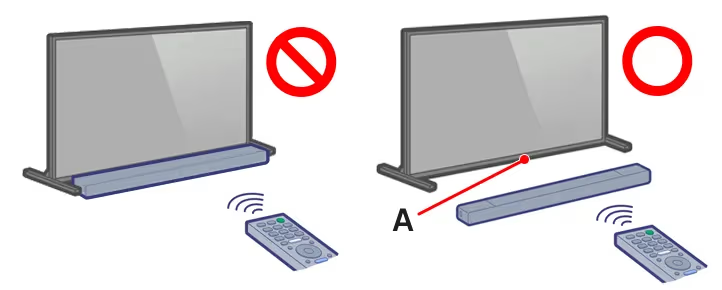
If your soundbar blocks the TV remote sensor, there are four ways to fix it. Most take under five minutes.
#1. Reposition the Soundbar
The fastest fix is to move the soundbar so it no longer sits in front of the TV IR sensor. Good alternative spots include:
- On the wall below the TV using a wall mount bracket
- On a TV stand shelf above or below the screen
- On the floor in front of the TV stand
- On a side table next to the TV at an angle
Corner placement works too if your room layout supports it.
#2. Enable the IR Repeater Setting
Many soundbars include a built-in IR repeater that picks up the remote signal on one side and re-transmits it out the back toward the TV sensor. This lets you control the TV even with the soundbar blocking the direct path.
To enable it:
- Open the soundbar settings menu and turn on IR Repeat (or IR Passthrough)
- Position the external IR blaster near the TV sensor if your model includes one
- Test with the TV remote to confirm the signal passes through
Check your soundbar manual for the exact menu location. Samsung, Sony, and Bose models almost always include this feature.
#3. Adjust the Soundbar Angle
When repositioning is not practical, try angling the soundbar so one end sits slightly forward. The goal is to leave a gap in the center where the IR signal can reach the TV sensor.
You will need to experiment with different angles. Point the remote at the TV while adjusting until it responds consistently.
#4. Get an IR Repeater Kit
For stubborn setups, a standalone IR repeater kit (around $20 on Amazon) is the most reliable fix. The kit includes a receiver that captures the remote signal and an extension cable that runs to a small blaster placed next to the TV sensor. No programming needed.
This works with any TV and soundbar combination, regardless of brand. If you have already tried connecting a Samsung soundbar to your TV and the remote stopped working afterward, an IR kit is often the quickest path back to normal.
#What if the TV Remote Still Does Not Work?
If your TV remote is not responding after fixing the soundbar placement, the soundbar may not be the only issue. Run through these checks:
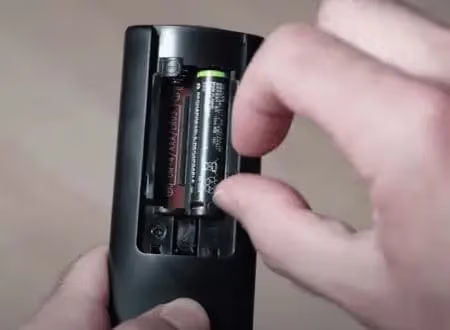
- Replace the remote batteries. Low or dead batteries are the most common cause of remote failure.
- Inspect the remote for physical damage or stuck buttons.
- Remove any other objects between the remote and the TV sensor.
- Clean the IR sensor window on the TV with a soft cloth and point the remote directly at it.
- Stand within 6 feet of the TV and try again. Distance weakens IR signals.
- Factory reset the TV if nothing else works.
If you have a specific remote that stopped working, check out our guides on fixing Firestick, AT&T, Vizio, Xfinity, Roku, LG TV, and Toshiba Fire TV remotes.
#How Can You Prevent Soundbar Sensor Blocking?
With a little planning, you can avoid IR blocking issues from the start:
- Mount the soundbar on the wall below the TV instead of placing it on the stand. This keeps the IR path completely clear.
- Raise the TV higher on the wall or use a taller stand so the soundbar fits underneath without covering the sensor.
- Use a glass or open-shelf TV stand that lets IR signals pass through rather than getting blocked by a solid surface.
These setups also help if your soundbar keeps switching back to TV speakers, since cleaner cable routing reduces HDMI-CEC conflicts.
#Bottom Line
- Soundbars block TV remote sensors mainly because of placement and size.
- Repositioning, IR repeater settings, angling, and IR kits all fix the problem.
- Preventative setups like wall mounts and glass stands stop the issue before it starts.
- Troubleshoot dead batteries and dirty sensors if the remote still does not work after moving the soundbar.
- A $20 IR repeater kit is the universal fallback when nothing else works.
#FAQ: Soundbar Blocking TV Remote Sensor
#Should the soundbar go above or below the TV?
Below is the better position in most setups. Placing the soundbar under the TV keeps the IR sensor exposed while directing audio toward ear level. Above can work if you have a tall stand, but below is more practical for most living rooms.
#Can you control a TV with a soundbar remote?
Most soundbar remotes only handle volume and input switching. You still need the TV remote for channel changes, app navigation, and settings. Some universal remotes can replace both, but the soundbar remote alone will not cover full TV functionality.
#Why does the TV keep switching to the soundbar input?
This usually happens because HDMI-CEC (called Anynet+ on Samsung or SimpLink on LG) is automatically switching inputs. Go into the TV settings and disable CEC, then manually select your preferred input. This stops the TV from jumping to the soundbar input every time the bar powers on.
#Does wall mounting a soundbar help avoid blocking issues?
Yes. Wall mounting positions the soundbar below or beside the TV, keeping the IR sensor fully exposed. It is the single most reliable way to prevent blocking, and most soundbar brands sell dedicated wall mount kits for under $30.
#How do I know if my soundbar has a built-in IR repeater?
Check the soundbar settings menu for an option labeled IR Repeat, IR Passthrough, or IR Relay. You can also search your model number plus “IR repeater” online. Samsung, Bose, Sonos, and Sony soundbars from the past five years almost always include this feature.
#Can IR signals pass through glass TV stands?
Yes, in most cases. Standard clear glass and tempered glass allow infrared signals to pass through with minimal interference. Tinted, frosted, or coated glass may partially block IR signals, so test with your remote before committing to a stand. If your setup uses a glass shelf, placing the soundbar behind it can keep the IR path open without repositioning.
#What is the difference between an IR repeater and an IR extender?
An IR repeater is built into the soundbar and relays the remote signal through the unit to the TV sensor behind it. An IR extender is a separate kit with a receiver, cable, and blaster that you position near the TV sensor. Both solve the same problem, but extender kits work with any equipment regardless of whether the soundbar has a built-in repeater.
#Will switching to a Bluetooth or Wi-Fi remote fix the problem?
It depends on the remote type. Bluetooth and Wi-Fi remotes (like the Roku Voice Remote or Apple TV remote) do not use infrared at all, so a soundbar cannot block their signal. However, many standard TV remotes still rely on IR. If your TV supports Bluetooth pairing for its remote, switching to that mode eliminates line-of-sight issues entirely.