Sony televisions are known for their high-quality display and reliable technology. However, they can be temperamental when it comes to turning on. This can happen for several reasons, including outdated software or hardware issues. Fortunately, you can try several fixes before calling a professional.
Here, you will learn why the Sony TV won’t turn on and find effective fixes to solve the issue.
- Power cycling fixes most Sony TV startup issues — unplug the TV for 60 seconds, then reconnect to clear temporary glitches
- Dusty vents cause overheating shutdowns — blocked airflow is one of the top reasons a Sony TV refuses to power on
- A blown fuse will prevent any response — if no LED lights appear when pressing the power button, the internal fuse may need replacement
- Wrong input source can mimic a “won’t turn on” problem — the TV may actually be on but displaying a blank screen from an inactive input
- Outdated firmware creates compatibility conflicts — Sony TVs running old Android versions may fail to boot until the OS is updated
#Why Won’t My Sony TV Turn On?
If your Sony TV is not turning on, here are the most common reasons.
If you are also having trouble with other TV brands, check our guides on Sharp TV won’t turn on or Samsung TV won’t turn on.
#Reason 1. Dusty and Jammed TV Vents
Dust and debris are the most common reasons a TV shuts off. Dust can build up in the vents, blocking airflow and causing overheating.
Overheating could also result from high power consumption. That is, too many devices connected to one outlet.
#Reason 2. Outdated TV Software
If you’re using an old Sony TV that hasn’t been updated in a while, the problem might be with the software. This can happen if your TV’s software isn’t compatible with its hardware or remote controls.
If your TV has an outdated Android version installed, this may also be why your Sony TV won’t turn on. You’ll need to update the device’s operating system (OS) before being able to use it again.
#Reason 3. A Fuse in Your TV’s Hardware / Circuitry
If your Sony TV doesn’t turn on, it may be because of a blown fuse. To find out if this is the case, look for the power button on your remote or at the back of your TV.
Pressing this button will turn on either a red or green light (depending on your LED type). If there is no response to this button, you need to check if there are any blown fuses in your hardware/circuitry.
Contact Sony customer service if you don’t know where they are located and provide them with your model number so they can give you specific instructions on how to access them.
#Reason 4. Random Bugs
If your Sony TV doesn’t turn on, it might be due to a random bug. There are two things you can try:
-
Reboot the TV using the remote control or power button on the back of it. This may fix the problem temporarily, but if it keeps happening, have a technician check your device for more severe issues.
-
Reset your TV to factory settings. This wipes away any corrupt files that may be causing these issues. To do so:
-
Turn off your TV by holding its power button for several seconds until its screen goes black or becomes unresponsive (known as “standby”).
-
Once done, remove any cables from ports like HDMI or USB ports before restarting.
-
#Reason 5. The TV is Not Connected Properly
Check to make sure it is connected properly. To do this:
-
Make sure the cables are securely plugged in. Check that no jacks are loose or bent, as this can cause a connection problem.
-
If any cables are damaged or broken, replace them with new ones. If they’re not available, ask an electronics store employee to help find replacement parts.
-
If you have more than one device connected to your TV, make sure each device is powered up and connected securely to the same outlet as your Sony TV using an HDMI cable.
-
Check if any lights on either side of your remote control point towards “Input” or “Source.” If they’re lit up red instead of green or blue, try pressing both buttons simultaneously until they change color again.
#Reason 6. System Error
If your Sony TV won’t turn on and you’ve tried the troubleshooting steps above, the issue may not be with your TV itself. The problem could be with the firmware that powers it.
Updating the firmware on your television should fix it. Before doing this, make sure to back up any critical content or data stored in your home theatre system so you won’t lose anything if something goes wrong during the update.
#Reason 7. Your TV is Overheating
If your TV is overheating, there are several ways to fix it. First, check if the vents are blocked by dust or anything else that might be causing a blockage.
If this turns out to be the case, remove whatever is blocking it and let it cool down for several hours before turning on your TV again.
Also check if the TV has been left on for too long without being turned off. You may notice a slight discoloration in areas around these vents, which could indicate overheating. Take note of any such discolorations when trying different solutions.
If your Sony TV powers on but has display problems, you might also want to read about Sony TV with sound but no picture.
#Reason 8. The Wrong Input Source is Configured on Your TV
It could be the wrong input source set on your TV. Most of the time, this can be resolved by just making sure the input source is correct.
If it is, check the connection to the TV. If that’s right, check the input source on your remote and any buttons available around or on the TV itself.
#How Do You Fix a Sony TV That Won’t Turn On?
There are several methods to fix the issue. These include:
#1. Power Reset
The first thing to try is a power cycle. This is a common fix for most electronic devices and can be done by anyone. Unplug your device from the wall outlet and wait 60 seconds before plugging it back in.
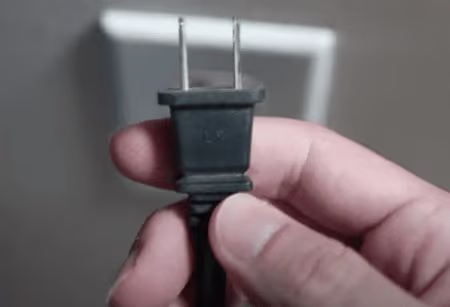
If you don’t see any lights on the device after doing this, wait another 30 seconds before trying again. Still no luck? Proceed to the next troubleshooting step.
#2. Try Another Power Source
The next step is to try using a different power source. Open your TV and verify that all the wires are correctly connected.
If they are not, check the connection points on the back of the TV and ensure they are secured well.
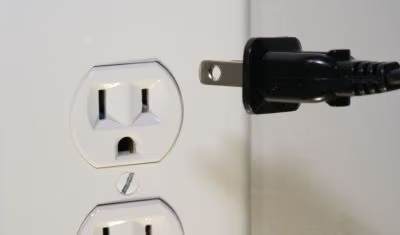
Once you have confirmed there is no damage to any wires or connections, try using another cord or plugging it into another outlet in your home.
If this works, you know that it is not an issue with your TV’s internal wiring or its power source.
#3. Switch to the Correct TV Input
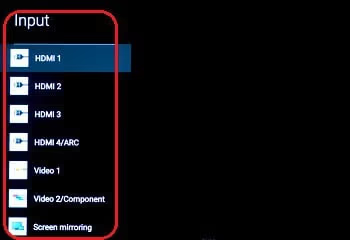
If your Sony TV is not turning on, first check if it’s on the correct input source. The easiest way to do this is with a remote control.
If you can’t access a remote control or don’t have one, there are other ways:
-
Check the buttons on the device itself. Most TVs will have at least one button that turns it on and off. Some may also have separate buttons for changing inputs.
-
Use your smartphone as an alternative for changing inputs. This might be especially helpful if all of your devices are connected via HDMI cables, because HDMI ports often share power through those cables.
#4. Replace the Cable
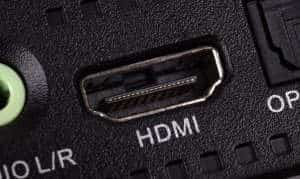
If you use an HDMI cable to connect your TV to the source device, make sure it’s plugged into the correct port.
If your TV has multiple HDMI ports, try switching cables and the ports they are plugged into.
If you are using an optical audio cable to connect your TV and source device, check if this cable is properly connected at both ends. Also check if there’s any damage or breakage in this connection.
You can also try connecting a different type of cable to see if that works better than what you currently use.
#5. Get the TV Fixed by an Expert
If you’re unsure how to fix it or are just looking for a second opinion, take your TV to an expert. If the place you bought it from can’t help either, make sure to ask them about getting a refund for a broken TV so that at least some of your money will be returned.
For other Sony TV issues like a blinking red light or vertical lines on screen, we have dedicated troubleshooting guides as well.
#What if a Sony TV Still Won’t Turn On After Troubleshooting?
If none of the fixes above work, the issue is likely a hardware failure. A dead power supply board or a faulty T-CON board will require professional repair. Contact Sony Support directly with your TV model number to check if the repair falls under warranty. Out-of-warranty repairs for Sony TVs typically cost between $100 and $400 depending on the component that needs replacing.
#FAQs
#How long does it take to reset a Sony TV?
The time required to reset a Sony TV depends on the model. A soft reset (power cycle) takes about 60 seconds. A full factory reset usually finishes in 3 to 5 minutes. Check your user manual for model-specific instructions.
#Can a power surge damage my Sony TV?
Yes, power surges can damage electronic devices including TVs. A large voltage spike can fry the power supply board or main board. Use a surge protector to safeguard your TV from power-related damage.
#What should I do if the troubleshooting steps don’t work?
If the fixes in this article do not resolve the issue, contact Sony support for assistance. They can provide guidance based on your specific TV model and situation. Have your model number ready when you call.
#Are there common issues with Sony TVs not turning on?
The most frequent causes include power supply failures, blown internal fuses, and faulty capacitors on the main board. Remote control issues and incorrect input sources are also common but easier to fix at home.
#How can I prevent power-related problems with my Sony TV?
Connect your Sony TV to a surge protector or power conditioner. Avoid plugging the TV into an outlet shared with high-draw appliances like space heaters or vacuum cleaners. Keep the TV firmware updated to benefit from bug fixes that improve power management.
#Does unplugging a Sony TV for a long time cause any issues?
No, unplugging a Sony TV for an extended period will not damage it. When you plug it back in, the TV may take a few extra seconds to boot up as it reinitializes its settings. Your saved preferences and apps will remain intact.
#How do I know if my Sony TV’s power supply board is faulty?
A faulty power supply board usually shows specific symptoms: no standby light at all, a clicking sound when you try to turn on the TV, or the TV turning off immediately after powering on. If you notice any of these signs, the power board likely needs professional repair or replacement.
#Bottom Line
Now you know the most common reasons why your Sony TV won’t turn on and how to fix them.
If you tried all the troubleshooting steps above and still cannot get your Sony TV working, the issue is most likely hardware-related. Contact Sony support or take the TV to a certified repair technician for a professional diagnosis.