Sling TV on a Sony Smart TV gives you live and on-demand channels without a cable subscription. Install the app from the Google Play Store, cast from your phone, or use AirPlay to watch on Sony’s 4K HDR display.
- Sling TV starts at $40/month with Sling Orange or Sling Blue, or bundle both for $55/month
- Sony TVs run Google TV so you can download the Sling TV app straight from the Google Play Store
- Cast from mobile devices using AirPlay on iPhone/iPad or Google Cast on Android
- 50+ add-on channels available across sports, comedy, lifestyle, news, and kids packages
- Cloud DVR included to record live shows and watch them later on any device
#What Is Sling TV?
 Sling TV is an over-the-top streaming service that delivers live and on-demand shows without a cable subscription. Here are the basics:
- No long-term contracts, cancel anytime
- Stream on up to 3 devices at once
- Add-on channels for sports, comedy, and lifestyle
- Cloud DVR to record shows
- On-Demand library with current and past seasons
Sling offers two main packages, Sling Orange and Sling Blue, each priced at $40 per month. Bundle them together for $55 per month.
#Why Stream Sling TV on a Sony Smart TV?
Sony TVs pair sharp displays with a straightforward interface that makes streaming easy. The Google Play Store comes pre-installed, so you can download and start streaming Sling in a few minutes.
Key advantages of streaming Sling on a Sony Smart TV:
- Picture quality up to 4K HDR
- Google TV operating system with voice search
- Voice commands with Google Assistant
- Chromecast built-in for casting content
- Works with Apple AirPlay and Google Cast
- Hundreds of apps on the Google Play Store
#How Do You Install Sling TV on a Sony Smart TV?
Follow these six steps to get Sling TV running through the native app.
-
Sign up for a Sling TV account by visiting sling.com
-
On your Sony Smart TV, open the Google Play Store app
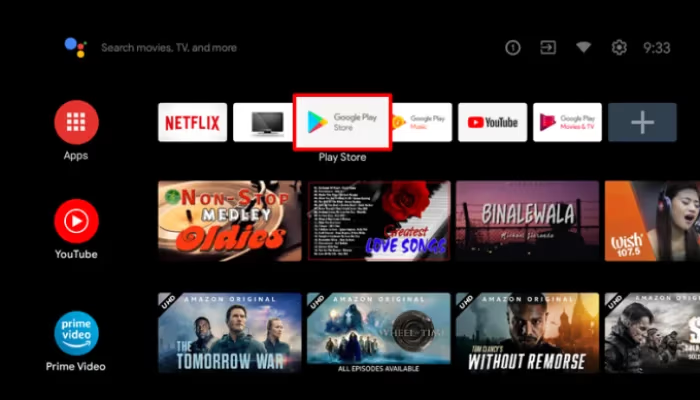
- Search for “Sling TV”
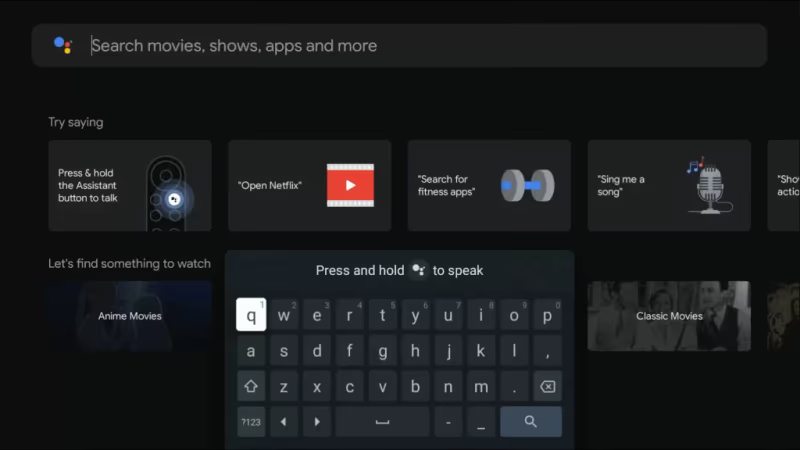
-
Select the Sling TV app and choose Install
-
Launch the newly installed Sling app and log in with your credentials
-
Start streaming live and on-demand shows
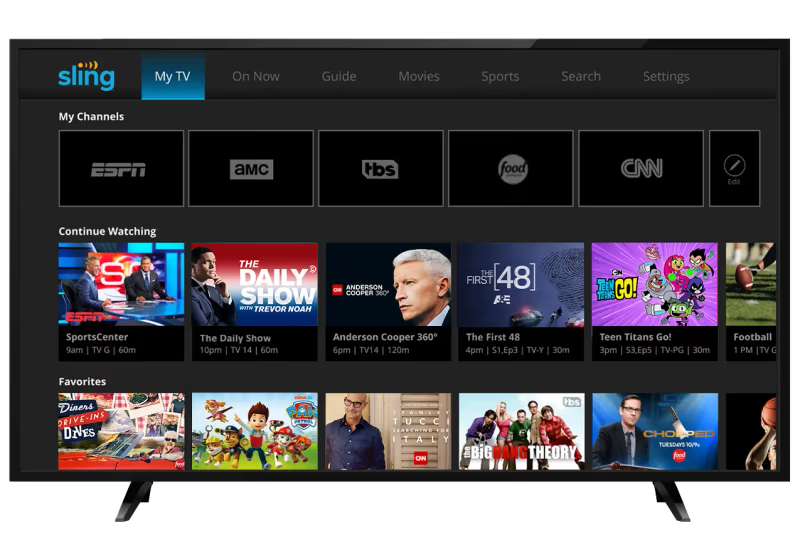
Below are more details on plans, casting from mobile, troubleshooting, and more.
#Sling TV Plans and Packages
Sling Orange and Sling Blue are the base packages. You can customize your channel lineup by adding extras like:
- Sports Extras: NFL RedZone, PAC 12, ACC Network
- Comedy Extra: MTV, Paramount, CMT, and more
- Lifestyle Extra: Hallmark, VH1, Cooking Channel
- News Extra: BBC World News, Cheddar, Reuters
- Kids Extras: NickToons, Duck TV, Baby First
Premium channels like Showtime and Starz are also available. No long-term contract required.
The Orange plan has the best selection of sports channels like ESPN, ESPN2, and MLB Network. If you watch a lot of sports, start there.
Sling Blue leans toward entertainment, news, and local channels. Combine it with Sling Orange for the full lineup. Can’t decide? Check out our Sling vs Philo comparison.
#Casting Sling TV to Sony Smart TV
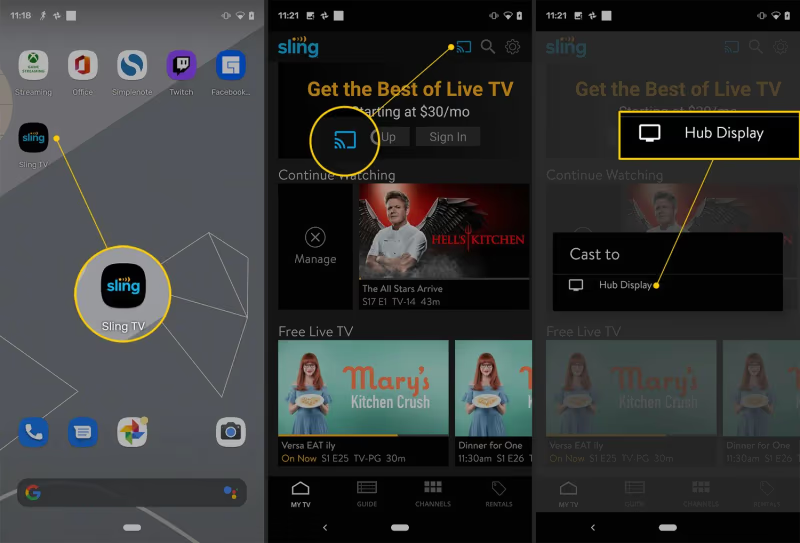
If you prefer watching Sling TV on your mobile device or tablet, Sony TVs make casting quick and painless.
To cast from an iPhone or iPad, enable AirPlay. For Android devices, use Google Cast. As long as your Sony TV is on the same Wi-Fi network, you can cast Sling TV with a single tap.
Want to compare alternatives? See how Sling TV stacks up against YouTube TV, fuboTV, and free options like Pluto TV.
#What Should You Do if Sling TV Is Not Working?
If Sling TV gives you trouble on your Sony Smart TV, try these steps in order:
- Check app permissions and allow if prompted
- Disable ad blockers temporarily
- Make sure your TV firmware is up to date
- Reinstall the Sling TV app
- Reboot the Smart TV
- Factory reset if nothing else works
Most issues resolve after a reboot or app reinstall. Sony’s Google TV platform and Sling TV’s broad device support mean you should be streaming again within minutes.
#Frequently Asked Questions
#What devices can I use to stream Sling TV?
Sling TV runs on Roku, Fire TV, Xbox, PlayStation, iOS and Android phones, and Smart TVs from Sony, Samsung, LG, and Vizio. You can also watch in a web browser on your computer.
#Does Sling TV offer local channels?
Fox and NBC are available in select metro areas through Sling Blue. Local channel availability depends on your zip code. Pair an HD antenna with your Sling subscription to fill in any gaps.
#Can I pause, rewind, or replay shows on Sling TV?
Yes. Sling TV’s Cloud DVR lets you pause, rewind, fast-forward, and replay live TV streams. You can also record shows and watch them later on any supported device.
#How many channels does Sling Orange include?
Sling Orange has around 30+ channels in its base package, including ESPN, CNN, Disney Channel, AMC, and TNT. Genre add-on packs let you expand from there.
#What is the difference between Sling Orange and Sling Blue?
Sling Orange focuses on sports and family entertainment with channels like ESPN and Disney. Sling Blue carries more news, entertainment, and local channels. Bundle both for $55/month to get everything.
#Can I customize my Sling TV channel lineup?
Absolutely. Beyond the base Orange and Blue packages, Sling offers genre-based add-on packs for sports, comedy, lifestyle, news, and kids programming. Pick only the extras you actually watch.
#Is there a free trial for Sling TV?
Sling TV occasionally offers promotional deals for new subscribers, but a standard free trial is not always available. Check sling.com for current offers before signing up.
#Bottom Line
Sling TV on a Sony Smart TV is one of the most affordable ways to watch live TV without cable. Here is what to do next:
- Download Sling TV from the Google Play Store on your Sony TV
- Pick Sling Orange ($40/month) for sports or Sling Blue ($40/month) for news and entertainment
- Add genre packs to build your own channel lineup
- Use AirPlay or Google Cast to stream from your phone when you want
Sign up and start streaming Sling TV on your Sony Smart TV today.