“My Samsung TV won’t turn on since yesterday no matter what methods I try. In fact, I am not an expert or tech-savvy, so I did some basic troubleshooting. Can someone please assist me in getting rid of this error and use my TV once again? I appreciate your assistance!”
- Standby mode is the #1 cause — the red LED stays on but the screen remains off, and a simple power button press on the TV panel fixes it
- 60-second unplug reset — draining residual power from the capacitors resolves most firmware-related startup failures
- Faulty remote controls mislead owners — dead batteries or stuck buttons make it seem like the TV is broken when it is not
- Red blinking light signals a voltage problem — this points to a short circuit in the power board that often requires professional repair
- Broken wall outlets go unnoticed — plugging the TV into a different outlet rules out the most overlooked cause of power failure
#Why Won’t My Samsung TV Turn On?
Before finding a solution to fix this error, let’s find out its potential reasons. That will make the troubleshooting process easier. So, let’s go ahead and learn more about this. The most common reasons your Samsung TV won’t turn on are mentioned below.Besides, here, let’s figure out how to locate your Samsung TV power button and how to operate your TV without using a remote controller.
#● The Device Is on “Standby Mode”
Your Samsung TV continues to work even if the red light is on and the display is turned off. To turn the television, hit the power switch on the device’s front panel or remote control.Also, are you experiencing the problem of the Sony TV won’t turn on? If so, here you will be introduced to some troubleshooting tips.
#● Samsung TV Won’t Turn On Because of a Malfunctioning Remote Control
To begin, replace the batteries and double-check all of the keys. Installing a special app on your smartphone called a TV remote is always possible. This specific app allows you to change stations and adjust their volume with your regular phone.
#● The Socket Is Broken
Sometimes, your Samsung TV won’t turn on because of a broken socket. Connect your TV to a different power source if the indication on its control panel does not light up. Once you have done that, it is possible to use the device as usual.
#● Connection Failure
The AV activation, HDMI, or Wi-Fi internet connection is most likely to blame for the formation of this problem. As a result, the screen displays an image of a smartphone or laptop. Simply switch off all devices, then check all connected HDMI to VGA converters to continue watching terrestrial TV. That could be the reason why your Samsung TV won’t turn on.
#● Weak Signals
Only a black, blank screen is displayed on the TV screen due to a weak signal. This is frequently caused by bad weather conditions such as severe precipitation, thunderstorms, etc. Do not take action now; the broadcast will most likely restart in a few hours.PS: let’s figure out how to turn on Vizio TV without a remote.
#What Should You Do if Your Samsung TV Won’t Turn On?
Now that you have a brief idea about why Samsung TV won’t turn on. Let’s go to the solutions. Below are the solutions you should try if your Samsung TV won’t turn on. All these steps are explained fairly conveniently, so even a novice can follow them. So, let’s go ahead and learn what you do.A lot of power-related errors are the consequence of a hardware issue. Therefore, if you experience such problems, the wisest choice is to have a certified Service Technician. You can start by trying a few things at home as well. For instance, it is possible to determine which mode the TV equipment is now in.It displays a red-light notification on the lower left side of the TV’s main panel. That is particularly if you can find it in standby mode. You must exit standby mode to resume TV transmission.01. Check if the LED is switched off by pressing the “Power” button on your remote.02. If it shuts off, the TV is properly connected to the power source.03. Use your finger to tap the screen to see if it works properly softly. If the screen flickers, it signifies everything is fine.04. If the screen does not blink or even the LED does not turn off, there is some problem. It may be related to the remote, the power source, or the screen itself. You may also see a dark screen on your Samsung television.
#How Do You Fix a Samsung TV With a Red Standby Light?
If the indicator is red and the TV doesn’t turn on, it’s also in standby mode. Please note that it is a normal situation. On the other hand, it indicates that power is being received. First, use the power button to turn on your TV without using the remote.In certain cases, the signal becomes green before becoming red again. This signifies that the CPU was built, and the incoming turn-on data was delivered to other modules. The LED can change color anytime, but the television never goes on. An inverter, perhaps a transistor, is the source of the problem. It is required to call the service department so that the problematic modules can be replaced.If you are experiencing issues like LG TV not connecting to WiFi, here are the top solutions.
#01. Check if the Power Button Is Working
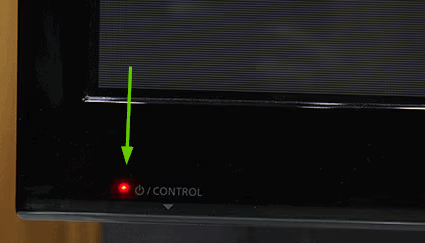
Hold down that power button located on the television for at least ten seconds. The power button on your Samsung TV can be found on the front bezel. That means on its back or at the bottom.Look at the standby indicator if the TV doesn’t turn on after pushing the power button on the panel. When that button is pushed, it turns off, indicating that the internal lock has been activated. You shouldn’t necessarily rule out the possibility of the button or the loop creating the connection breaking.Does the button start falling into the panel when pressed but not clicked? If so, it needs to be replaced. You can’t accomplish anything independently, so you’ll need to attend a Support Center. So, that should be checked if my Samsung TV won’t turn on.In addition, if you see that your Sharp TV won’t turn on and has a blank screen, don’t worry, you can simply try the troubleshooting steps in this article to fix it easily.
#02. Check With the TV Remote
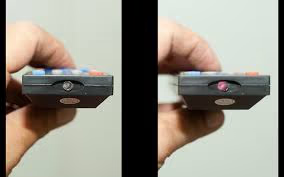
The batteries must be replaced if your remote isn’t working and the Samsung TV won’t turn on.Then you should double-check the keys. Some of them may be stuck and only work after a couple of clicks.If you cannot switch on the channels with the remote, the issue is related to its IR sensor. Physical damage or liquid entry into the gadget are other causes of these issues.You’ll need to purchase a new remote to use remote to control your TV again. If not, you can even use a smartphone app instead. Then, check if your Samsung TV won’t turn on.
#03. Check Your Source Selection
If you wish to watch live TV but can’t see anything, make sure you’ve selected the correct signal source. An HDMI cord is most likely linked to your TV. In that case, it should be switched off and the antenna connection activated instead. What if your device doesn’t work with the TV? In that case, look for an HDMI to VGA converter to let you connect the device.In addition, if you wonder what is the most effective solution to use when is your Smart View not working? In this article, let’s show you the reasons and the simple solutions.
#What Does a Green Standby Light Mean on a Samsung TV?
If the indication is green, but the television doesn’t turn on, the professionals will perform a full examination. The test starts with a thorough inspection of the motherboard with specific equipment to assess the incoming voltage. In addition, commands for illuminating indicators, switching on the TV, and other functions are being tried.Assume that the light illuminates, indicating it is operational, but no transmissions from the motherboard are present. In this case, it could indicate software issues. Try using a TV remote or tapping a button on the panelboard to switch on the device.The damaged component on the motherboard is replaced to solve the hardware issue easily. The experts will change the user settings before installing the latest software if the power is supplied correctly.Also, here are some tips you can use to solve the Disney Plus not working on Samsung TV error message if your Disney Plus is not working on Smart TV.
#What Does a Flashing Red Light Mean on Your Samsung TV?
There’s an issue with the power supply when the TV would not switch on despite the indicator blinking continuously. Failing to specify the problem results in a red flashing light that is a failure indicator.A detailed diagnosis is conducted to establish the reason for the occurrence of a red flashing on the TV. The power adapter and the motherboard converter are tested using an oscilloscope.Generally, a flashing red light on the Samsung TV indicates a voltage issue. And that explains why it won’t come on. The contact circuit, for instance, has a short circuit error. Unplugging its power supply and plugging in the power board will quickly reveal whether or not the problem exists. You should see lights in the screw holes if the power supply works properly. That indicates that the respective issue has been resolved. That is a solution to try if your Samsung TV won’t turn on.
#What if Your Samsung TV Has a Dark Screen With a Red Light?
This means that the Samsung TV won’t turn on or has a dark screen even if it is turned on. In this case, you should try pressing any TV button to see if you can get it to respond.If you see anything on the screen, your TV is on. If not, turn it off. ‘Channel List’ allows you to examine the strength of the broadcasting signal and measure it digitally. Inclement weather, such as heavy rains or thunderstorms, can cause this.
#Perform a Test on the Socket
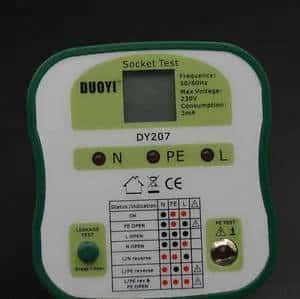
Even though the device’s standby light is on, it won’t start unless you use the TV remote. If not, you can use the front-panel key. The next step is to make sure the outlet is working properly. The power socket errors will keep your TV from turning on.So, just unplug the device and leave it for about 30 seconds. After that, plug it into a different wall outlet. You should contact the service center if my Samsung TV doesn’t turn on even after that.
#Why Doesn’t My Samsung TV Turn Off?
When the television doesn’t shut off, there’s a problem with one of the nodes. Compared to LED models, things are different if you use a TV unit with liquid crystal technology. Unplugging all of your extra plugins will allow you to see if that’s the source of the problem. PS4, Xbox, or any converters or external Samsung TV devices, such as soundbars, speakers, etc., can be the reason. If your Samsung TV doesn’t turn off after you unplug it, you’ll know if something is wrong with it.
#When Should You Contact the Service Center?
Have you tried everything listed above, and still, the Samsung TV won’t turn on? If that’s the case, your only option is to contact the Samsung service center for assistance. Even if you know what you’re doing, taking apart a device on your own is a bad idea. It isn’t always possible to fix software issues with a Samsung Smart TV on your own.A Flash drive or an internal hard drive is required for performing firmware updates. That is because you must install the file and save it somewhere. This is a difficult task that not everyone will be able to do. So, contact the Service Center if your Samsung TV won’t turn on even after the steps mentioned above.
#Tips to Prevent Samsung TV From Not Turning On
To prevent future instances of your Samsung TV not turning on, consider the following tips:
-
Use a surge protector to protect your TV from power surges and voltage fluctuations.
-
Keep your TV’s software up to date by installing the latest firmware updates provided by Samsung.
-
Avoid using unauthorized or incompatible accessories that may damage the TV’s components.
-
Clean the vents and ensure proper ventilation to prevent overheating, which can cause power-related issues.
-
Follow the manufacturer’s guidelines for handling and maintenance to keep your TV in optimal condition.
#FAQs
#Why won’t my Samsung TV turn on after a power outage?
Power surges during an outage can trip the TV’s internal protection circuit. Unplug the TV from the wall for at least 60 seconds, then plug it into a surge protector before turning it back on. If the TV still refuses to start, the power board may have sustained damage and needs professional inspection.
#How do I fix a Samsung TV that keeps turning off and on by itself?
Start by disabling Anynet+ (HDMI-CEC) in the settings menu, because a connected device can send repeated power signals. If the cycling continues, check for a pending firmware update under Settings > Support > Software Update. A faulty capacitor on the power supply board can also cause this behavior, which requires a technician to replace.
#What does a blinking red light mean on a Samsung TV?
A red light that blinks in a pattern usually points to a voltage irregularity on the power supply board or main board. Count the number of blinks between pauses and note the pattern, as Samsung technicians use this code to identify the failing component. This is not a DIY fix for most owners.
#Can I turn on my Samsung TV without the remote?
Yes. Every Samsung TV has a physical power button, typically located on the bottom center bezel, the back-right panel, or the underside of the frame near the Samsung logo. Press and hold it for two seconds to power on the TV. You can also download the Samsung SmartThings app on your phone and use it as a remote over Wi-Fi.
#Does unplugging a Samsung TV for 30 seconds actually fix anything?
It does. Unplugging the TV drains the residual charge stored in the capacitors, which forces the firmware to reload from scratch on the next boot. Samsung recommends waiting at least 30 seconds, though 60 seconds is more reliable for clearing stubborn glitches.
#Why does my Samsung TV have a black screen but I can hear sound?
This typically means the backlight has failed while the main board still processes audio normally. Try pressing the flashlight of your phone against the screen in a dark room. If you can faintly see the menu, the LED backlight strips or the inverter board need replacement. A factory reset will not help with this hardware issue.
#Should I use a surge protector with my Samsung TV?
Absolutely. A surge protector guards against voltage spikes from lightning strikes, grid fluctuations, and appliance cycling on the same circuit. Choose a protector rated at 2,000+ joules with automatic shutoff for the best protection. Replace it every 3 to 5 years, since surge protectors lose effectiveness over time.
#When should I contact Samsung support instead of troubleshooting at home?
Contact Samsung support if the TV shows no LED light at all after trying multiple outlets, if the screen displays colored vertical lines, or if you smell burning from the back panel. These symptoms indicate hardware failure in the power board, T-CON board, or main board that requires certified parts and tools to repair safely.
#Bottom Line
Dealing with a Samsung TV that won’t turn on can be frustrating, but by following the troubleshooting steps outlined in this article, you can often resolve the issue. Remember to check the power source, connections, and try a soft reset before seeking professional assistance. By taking preventive measures, you can also minimize the chances of encountering this problem in the future.