You bought a Samsung soundbar for better audio, but the TV keeps reverting to its own built-in speakers. This is a common problem, and it almost always comes down to a cable issue, a wrong setting, or a firmware glitch.
- Loose cables are the top cause — a partially seated HDMI or optical cable triggers intermittent audio switching on most Samsung TV and soundbar combos
- Audio output must be set to “Receiver/Soundbar” — Samsung TVs default to internal speakers after software updates or factory resets
- HDMI-CEC (Anynet+) can conflict — turning Anynet+ off and back on often stops the switching loop
- Firmware updates fix known bugs — Samsung has patched soundbar-switching issues in several 2023-2024 firmware releases
- A factory reset is the last resort — resetting the soundbar clears corrupted settings without affecting the TV
#Why Does a Samsung Soundbar Keep Switching to TV Speakers?
There are a few main reasons why your Samsung soundbar may keep switching audio output to your TV’s built-in speakers:
Improper or loose connections. If the HDMI or optical audio cable between your TV and soundbar is not firmly connected at one or both ends, it can cause intermittent switching or dropouts.
Incorrect input source selected. Your soundbar needs to be set to the same input source as the content you’re playing (e.g. HDMI 1). If it’s on a different input, it won’t receive an audio signal.
TV speakers enabled. Some TVs allow you to turn the internal speakers on/off. Make sure the TV speakers are disabled so audio isn’t duplicated.
Incorrect audio output setting. Your TV may be configured to output audio to its internal speakers rather than an external soundbar by default.
Outdated soundbar firmware. Bugs and compatibility issues sometimes only get fixed with firmware updates.
Interference from nearby electronics. Devices like WiFi routers can potentially cause interference with audio signals between your TV and soundbar.
Faulty HDMI cable/port. Worn or damaged cables and HDMI ports may only pass an audio signal intermittently.
Remote control programming issue. If you use a universal remote, it may need to be re-programmed for full soundbar control.
Now that we know the common causes, here are specific steps to fix the problem.
#How Do You Fix the Soundbar Switching Issue?
#1. Check Cable Connections
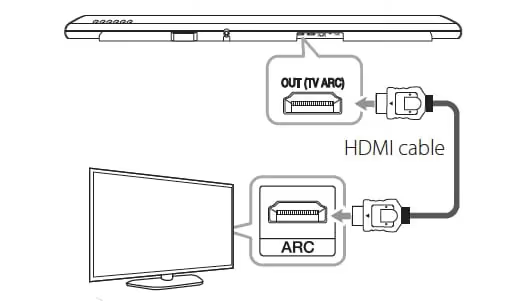
Begin by inspecting all cable connections between your TV and soundbar. Make sure the HDMI cable or optical audio cable is firmly inserted at both ends without any looseness. Wiggle and re-seat the cables if needed. Also check for any visible damage to ports or connectors.
#2. Ensure Correct Input Source
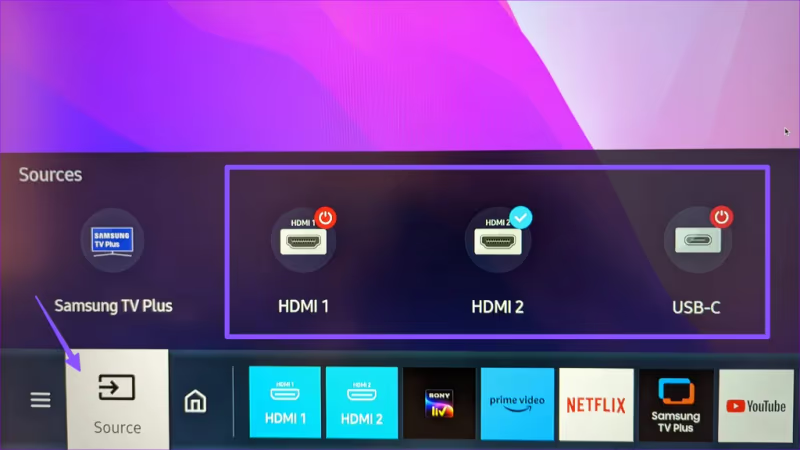
On your soundbar, confirm that the input source matches the one being used. For example, make sure HDMI 1 is selected if playing content via an HDMI cable hooked up to the first HDMI port on your TV. Refer to your soundbar manual if unsure how to change inputs.
#3. Disable TV Speakers
Many TVs allow you to turn internal speakers on/off separately. Navigate to sound settings and disable or mute the TV speakers. This prevents possible audio conflicts or signal duplication issues.
#4. Configure TV Audio Output
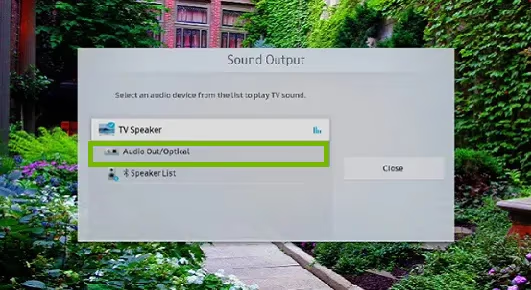
On your TV, check audio settings and ensure the audio output is configured for “external speakers” rather than TV internal speakers. Look for options like “Audio Out” or “Audio System” in your TV sound menu.
#5. Update Soundbar Firmware
Check if a new firmware update is available for your Samsung soundbar model. Outdated firmware can cause unintended behaviors that switching may stem from. Refer to your soundbar manual for firmware update instructions.
#6. Adjust Audio Format Settings
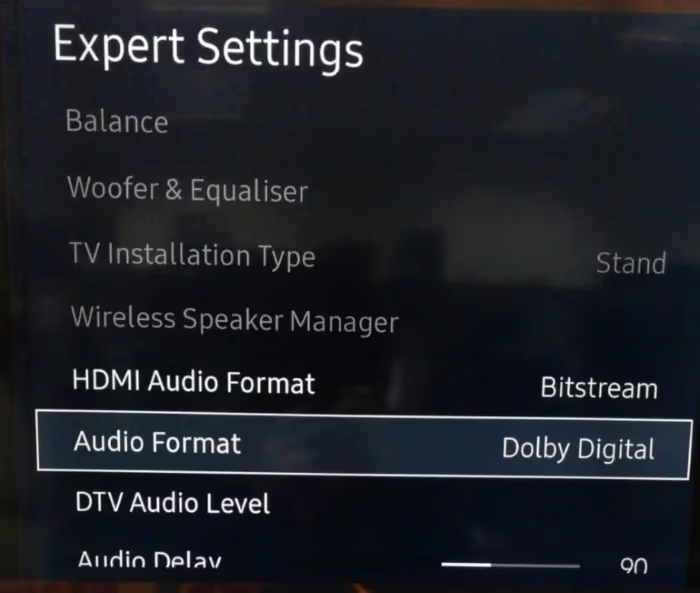
Try matching the audio formats on your TV and soundbar. For example, if playing Dolby Digital content, set both to Dolby Digital output. If you are connecting your soundbar to the TV via HDMI ARC, make sure the TV’s audio format is set to PCM or Bitstream rather than Auto.
#7. Relocate Electronics
Move your soundbar and TV further from any nearby wireless routers, cordless phones or other electronics that could interfere. Even a few extra inches of separation can help.
#8. Replace HDMI Cable
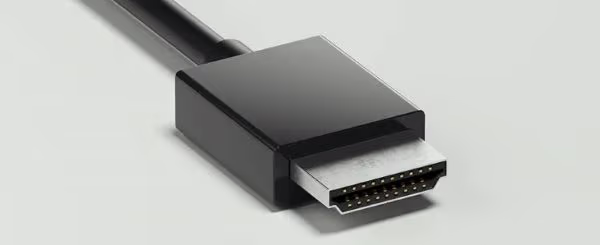
Old or low-quality HDMI cables are more prone to intermittent connection issues. Swap them out for a high-quality, certified HDMI cable rated for 4K/HDR if possible. You can also try connecting without an optical cable if your current setup keeps dropping the signal.
#9. Soft Reset Soundbar
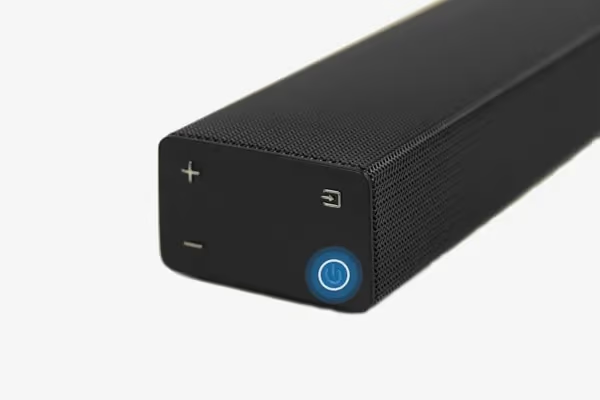
With all cables disconnected, press and hold the power button for 5+ seconds to perform a soft reset. This clears temporary glitches without erasing settings. Reconnect and test.
#10. Factory Reset Soundbar
As a last resort, perform a factory data reset by pressing and holding the reset button as outlined in your owner’s manual. You’ll need to re-configure settings but this can fix deeper software problems.
#11. Contact Samsung Support
If resetting doesn’t work, the issue may require service. Call or chat with a Samsung support agent to potentially diagnose over the phone, or qualify for warranty coverage to repair or replace the unit if needed.
#Bottom Line
The main causes for a Samsung soundbar repeatedly switching audio output to the TV are loose or incorrect connections between devices, improper input source selection, unoptimized audio format or output settings, interference issues, and potentially faulty hardware.
By checking cables, configuring audio settings, updating firmware, and troubleshooting interference as outlined above, you should be able to resolve the switching behavior in most cases. Resetting the soundbar is worth trying too if nothing else works. Contacting Samsung is the next best step if issues persist.
#FAQs
#Why does my Samsung soundbar keep turning off by itself?
This is usually caused by a loose or faulty connection between the soundbar and TV. Check that all cables are fully inserted and secured. It could also be due to the soundbar entering power saving mode, which you can disable in the soundbar’s settings menu.
#How do I stop my Samsung TV from defaulting to internal speakers?
Go to Settings > Sound > Sound Output on your Samsung TV and select your soundbar or “Receiver” instead of “TV Speaker.” After a software update, the TV sometimes resets this preference, so check it again whenever your TV installs new firmware.
#Can HDMI-CEC (Anynet+) cause soundbar switching problems?
Yes. Anynet+ automatically controls connected devices, and it can sometimes create a loop where the TV and soundbar fight over audio output. Try turning Anynet+ off in Settings > General > External Device Manager, then re-enable it after 30 seconds.
#Will using an HDMI splitter cause audio dropout issues?
An HDMI splitter can introduce interference that causes dropout issues. Connecting the soundbar directly to the TV via HDMI ARC is the most reliable option. If a splitter is needed, use a high quality model that supports 4K/HDR to reduce the chance of signal problems.
#What is the difference between HDMI ARC and optical for a soundbar?
HDMI ARC carries higher-quality audio formats like Dolby Atmos and supports CEC control, so your TV remote can adjust the soundbar volume. Optical is limited to stereo and basic 5.1 surround. For Samsung soundbars, HDMI ARC is the recommended connection. See our soundbar vs TV speaker comparison for more on audio quality differences.
#Does a firmware update fix the switching problem?
In many cases, yes. Samsung has released firmware patches specifically addressing audio-output switching bugs on certain TV and soundbar models. Check for updates through the SmartThings app or the soundbar’s built-in update menu.
#How do I factory reset a Samsung soundbar?
Hold the power button on the soundbar for about 10 seconds until it turns off and the LED blinks. On some models, you press a small reset pinhole on the back instead. After the reset, you’ll need to pair the soundbar with your TV again and reconfigure your audio settings.
#Should I use Bluetooth instead of HDMI for my soundbar?
Bluetooth adds noticeable audio delay, which makes dialogue fall out of sync with video. It also supports lower audio quality than HDMI ARC. Stick with a wired HDMI or optical connection for watching TV and movies, and save Bluetooth for streaming music from your phone.