Want to access over 250+ free live TV channels and thousands of free movies and shows on your Firestick? Pluto TV is the go-to free streaming app for exactly that. In this guide, you’ll learn everything you need to install and use Pluto TV on your Amazon Fire TV devices.
- Pluto TV is 100% free — no subscription, no fees, just ad-supported streaming with 250+ live channels
- Installation takes under 3 minutes — search for Pluto TV in the Amazon Appstore and download it directly
- Three content sections — Live TV, On Demand, and My Stuff give you channels, movies, and personalized favorites
- Works on most devices — Firestick, Roku, Android TV, Apple TV, iOS, Windows, Mac, and web browsers all supported
- VPN unlocks geo-blocked content — a VPN like ExpressVPN bypasses regional restrictions and adds privacy
#Overview of Pluto TV

Pluto TV is a 100% legal and free streaming service owned by Paramount. It has:
-
Over 250+ live TV channels
-
Thousands of on-demand movies and shows
-
News, sports, comedy, drama, lifestyle channels across all genres
-
No subscription required
-
Ad-supported model
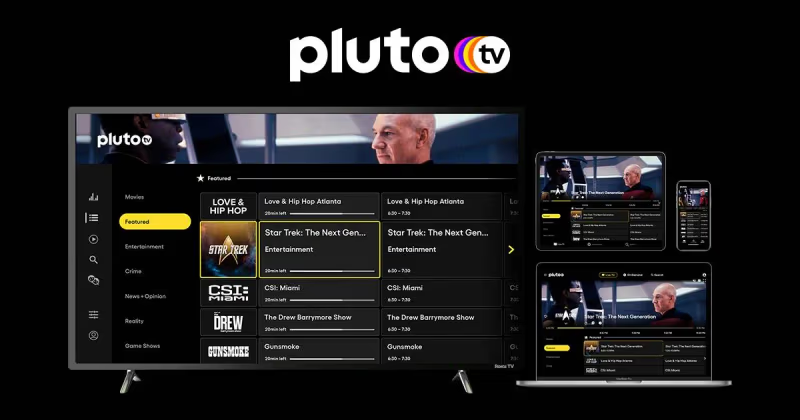
The service is available on Firestick, Roku, Android TV, Apple TV, smartphones, and web browsers.
Pluto TV gives you a cable-like live TV experience at no cost. You get channels from major networks like CNN, Fox Sports, NBC, CBS, Comedy Central, and more. There’s also a large on-demand catalog with movies, shows, and Pluto TV originals.
It’s a strong addition for any cord-cutter looking to supplement Netflix or Prime Video with a free live streaming option.
#Is Pluto TV Legal and Safe to Use?
Yes, Pluto TV is 100% legal, verified, and safe to use.
The app is available on the official Amazon Appstore for Firestick. All streams come from official sources through partnerships or access to public domain content.
There are no privacy or security risks with Pluto TV. Ads are present to support the free service.
#Why Should You Use a VPN with Pluto TV?
A VPN is not mandatory for Pluto TV, but using one gives you these advantages:
-
Access more channels and content: Certain live channels or shows are geo-restricted in some regions. A VPN bypasses geo-blocks to unlock more content.
-
Enhanced privacy: Hide your streaming activity and IP address from your ISP and entities performing surveillance or tracking.
-
Better streaming experience: Override throttling and restrictions sometimes imposed by ISPs on streaming services.
We recommend ExpressVPN as the best VPN service to use with Firestick and Pluto TV for fast speeds, reliability, and security.
#How Do You Install Pluto TV on Firestick?
Follow these steps to install Pluto TV on your Firestick, Fire TV Stick 4K or Fire TV Cube:
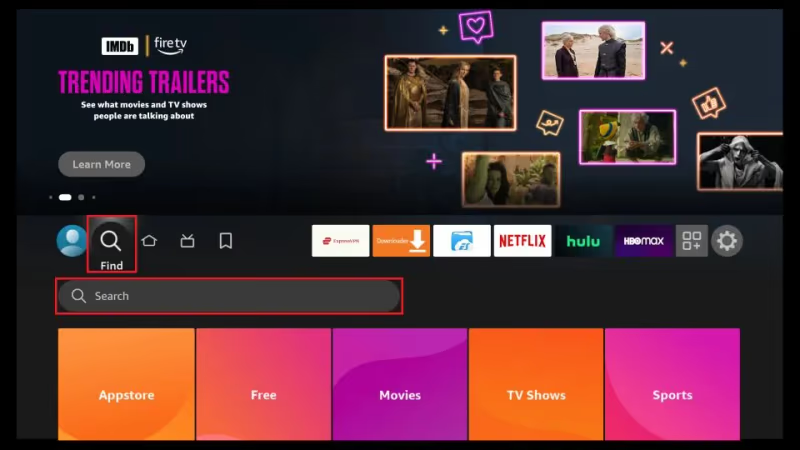
- From the Firestick home screen, use the search option (magnifying glass icon) to look for “Pluto TV”.
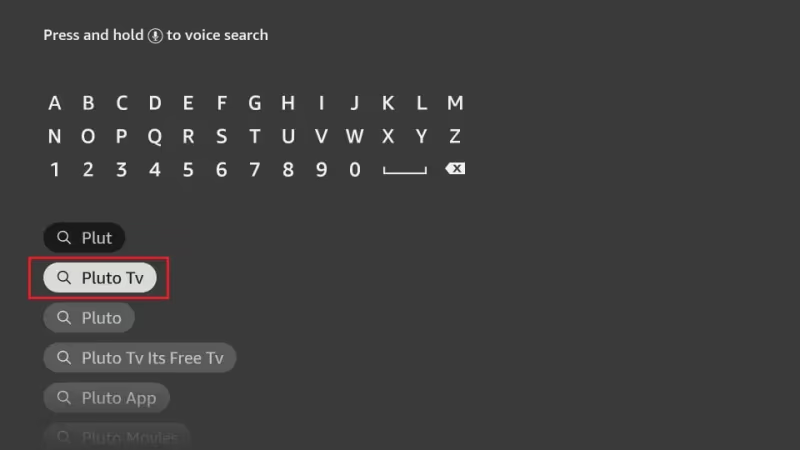
- Select the Pluto TV app from search results.
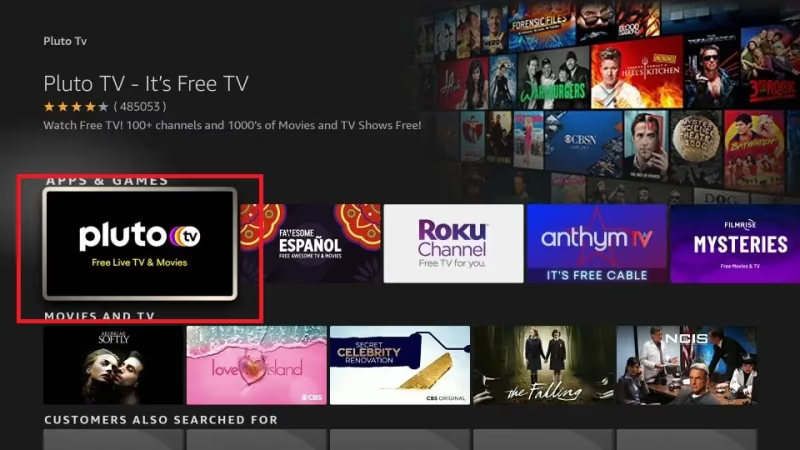
- Click “Download” or “Get”. Allow installation to complete.
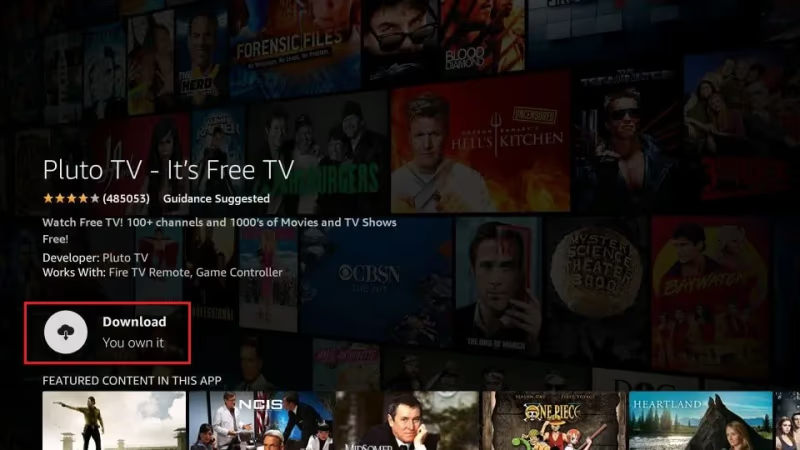
- Once installed, launch the Pluto TV app. Sign up for a free account or continue as a guest.
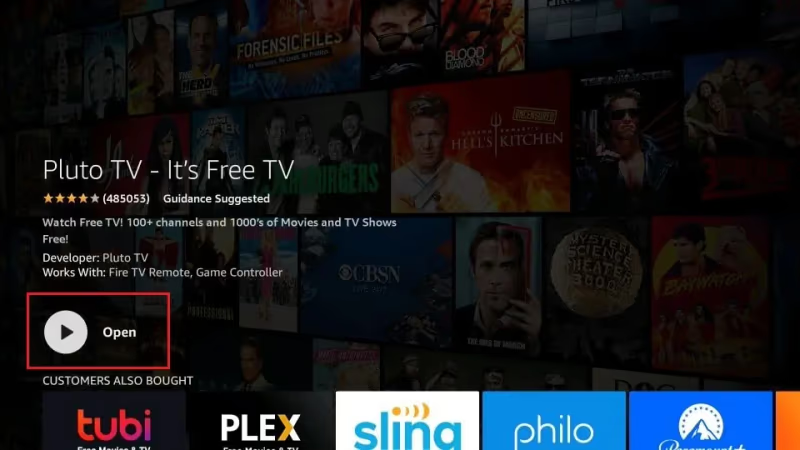
The whole process takes about 2-3 minutes on Firestick.
Tip: Move the Pluto TV app icon to the homescreen for quick access.
That wraps up installation. Now let’s look at how to use Pluto TV and get the most out of it.
#Step 2: How to Use Pluto TV on Firestick
The Pluto TV interface has three main sections:
#1. Live TV
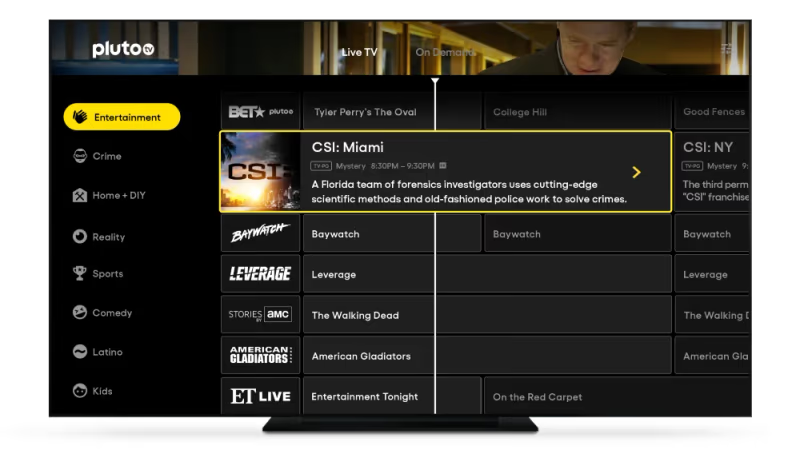
This gives you live streaming access to 250+ channels across categories like News, Sports, Movies, Entertainment, Lifestyle, Crime, and more.
Click on a channel logo to start live streaming it. You can also view a traditional cable-style TV guide to browse channels. Check out this guide on how to search channels on Pluto TV.
#2. On Demand
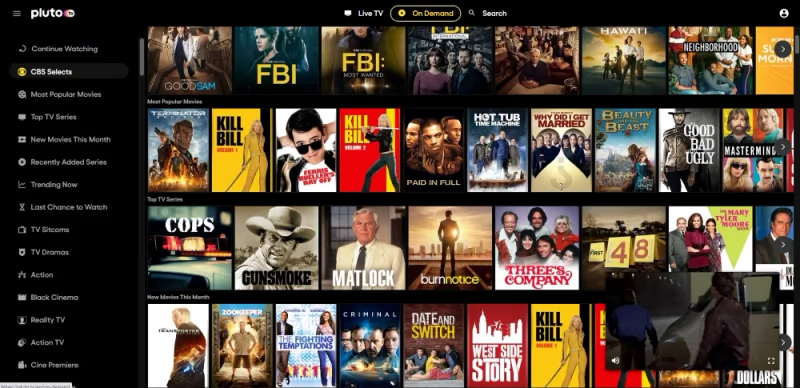
Browse a large catalog of movies and shows available for streaming on-demand. There are over 100+ categories to explore based on genre, decade, network, and more.
#3. My Stuff
All your favorites like recently watched channels or movies appear under the My Stuff tab for quick access. You need to sign in to your Pluto account to use this section.
#Other Features
-
Turn on subtitles by clicking on CC icon
-
Pause, rewind or replay live TV
-
Favorites List to mark movies or channels
-
Personalized recommendations

Pluto TV gives you unlimited access to live TV channels, thousands of shows, movies, and more at no cost.
Compare Pluto TV vs. other free streaming alternatives like Samsung TV Plus, Xumo, Freevee and more.
#What Other Devices Support Pluto TV?
Pluto TV is available across many platforms beyond Firestick.
#Android TV / Android Box
-
Google Play Store: Install directly as an Android TV app
-
Kodi on Android: Add from Official Kodi Repository
#iOS Devices
- Get Pluto TV app from Apple App Store
#Windows and Mac
-
Microsoft Store: Install Windows app
-
Mac App Store: Install Mac app
-
Use web browser: Pluto TV Web Version
#Kodi Setup
Pluto TV has an official Kodi addon that can be installed via the Kodi repository.
-
In Kodi, go to Add-ons > Install from repository
-
Select Kodi Add-on repository
-
Go to Video add-ons section
-
Find and install Pluto TV
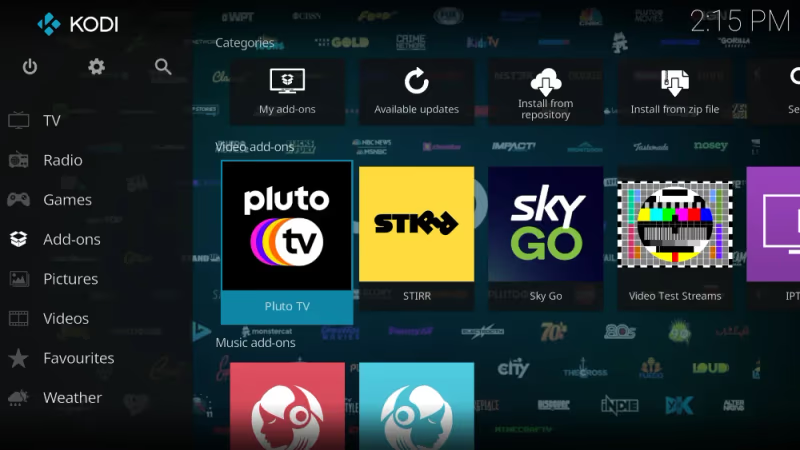
This lets you use the live and on-demand libraries of Pluto TV within the Kodi interface.
#Tips for Getting the Most Out of Pluto TV
Here are tips to get the best experience with Pluto TV on Firestick and other devices:
-
Use a VPN for bypassing geo-restrictions and adding privacy when Pluto TV keeps freezing
-
Create an account for personalized recommendations and saved watch history
-
Bookmark favorite channels to My Stuff for quick access
-
Enable subtitles in CC settings during playback if you face Pluto TV with no sound issues
-
Pause or rewind live TV streams
-
Use TV Guide to discover new channels
-
Try different genres like News, Comedy, Drama, Reality TV
-
Hide ads using AdBlock browser extension on the web
-
Check channels like ESPN on Pluto TV for sports
#FAQ
#Is Pluto TV really free?
Yes, Pluto TV is 100% free to use. No subscription or hidden fees are involved. The service runs on an ad-supported model, so you’ll see occasional commercials during playback. You can start watching immediately without entering any payment information.
#What devices support the Pluto TV app?
Pluto TV runs on Firestick, Roku, Android TV, Apple TV, iOS, Android phones, Mac, Windows, and web browsers. The app is available through each platform’s official app store. You can also watch directly at pluto.tv in any modern browser.
#How many channels does Pluto TV have?
Pluto TV has over 250 live TV channels spanning News, Entertainment, Sports, Comedy, Lifestyle, and more. The channel lineup changes periodically as Paramount adds new options. On top of live channels, there are thousands of on-demand movies and shows.
#Can I use Pluto TV outside the United States?
Pluto TV is available in several countries, but channel lineups vary by region. Some content is geo-restricted to specific locations. A VPN lets you access the full US channel lineup from anywhere.
#Do I need an account to watch Pluto TV?
No account is required to start watching. You can browse live channels and on-demand content as a guest right away. Creating a free account unlocks the My Stuff section, where you can save favorites and get personalized recommendations.
#Does Pluto TV have on-demand content?
Yes, Pluto TV has a large on-demand library alongside its live channels. You’ll find movies and shows sorted into over 100 categories by genre, decade, and network. New titles rotate in regularly, so there’s always something fresh to watch.
#Is Pluto TV legal on Firestick?
Pluto TV is 100% legal on Firestick and all Fire TV devices. The app is listed in the official Amazon Appstore and all content comes from licensed sources through Paramount’s partnerships.
#How do I fix Pluto TV buffering on Firestick?
Start by checking your internet connection and restarting your Firestick. Clearing the Pluto TV app cache in Settings > Applications often resolves buffering. If the problem continues, try using a VPN to bypass ISP throttling on streaming traffic.
#Bottom Line
Pluto TV is one of the best free streaming apps you can add to your Firestick. It takes under 3 minutes to install from the Amazon Appstore, and you get instant access to 250+ live channels and thousands of on-demand movies and shows.
For the best experience, create a free account to save your favorites, enable subtitles through CC settings, and explore the TV guide to discover channels you might not find otherwise. If you run into geo-restrictions, a VPN like ExpressVPN opens up the full content library.