Philo gives you 70+ live TV channels for $25/month, and it works on Vizio Smart TVs through casting. If you want affordable entertainment without sports or local channels eating into the price, Philo is worth a serious look. This guide covers how to set it up on your Vizio TV, what channels you get, and whether the casting experience holds up for daily use.
- Philo costs $25/month for 70+ live entertainment and lifestyle channels with no contract
- No native Vizio app exists but every Vizio SmartCast TV has built-in Chromecast for casting Philo
- Setup takes under 5 minutes using the free Philo app on iOS or Android
- Unlimited DVR is included at no extra cost, with recordings available for 30 days
- Up to 3 simultaneous streams are supported, so multiple household members can watch at once
#What Is Philo TV?

Philo is a live TV streaming service built around entertainment, lifestyle, and knowledge channels. It carries 70+ channels from networks like Discovery, Viacom, AMC, and Hallmark for $25/month.
The reason Philo costs so much less than competitors is straightforward: it skips sports, local broadcasts, and premium movie networks entirely. That trade-off keeps the bill low while still delivering the cable entertainment channels most people actually watch.
Every Philo subscription includes unlimited DVR storage and 3 simultaneous streams. There is no contract, so you can cancel anytime. Philo also offers a 7-day free trial for new subscribers, which gives you enough time to test the channel lineup before committing.
#Philo TV Key Details:
-
$25 per month
-
70+ channels
-
Unlimited DVR
-
3 simultaneous streams
-
7-day free trial
#What Channels Does Philo Include?
Some of the top channels in Philo’s lineup include:
-
AMC
-
BBC America
-
Comedy Central
-
Discovery Channel
-
Food Network
-
Hallmark Channel
-
HGTV
-
Investigation Discovery
-
Lifetime
-
MTV
-
Nickelodeon
-
Paramount Network
-
TLC
-
Travel Channel
-
WEtv
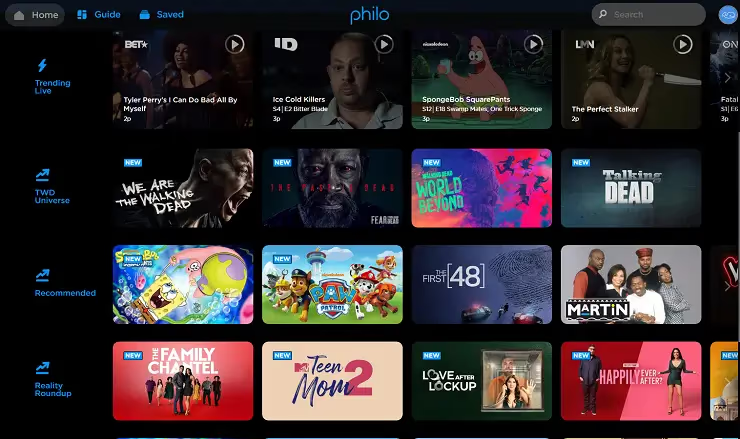
Philo lacks sports and local news, but its entertainment and lifestyle lineup is strong. You get channels that would cost $60-$80/month on services like YouTube TV or Hulu + Live TV. If your household mostly watches reality TV, cooking shows, true crime, or comedy, Philo covers those genres well.
#Is Philo Available on Vizio Smart TV?
Philo does not have a native app on the Vizio SmartCast platform. However, all Vizio SmartCast TVs (2016 and newer) have built-in Chromecast, which lets you cast Philo directly from your phone or tablet.
Here are the steps to stream Philo using Google Cast:
-
Sign up for a Philo account at philo.com or through the mobile app
-
Download the Philo app on your iPhone or Android device
-
Log into your Philo account on the app
-
Make sure your phone and Vizio TV are connected to the same Wi-Fi network
-
Open a channel or show in the Philo app
-
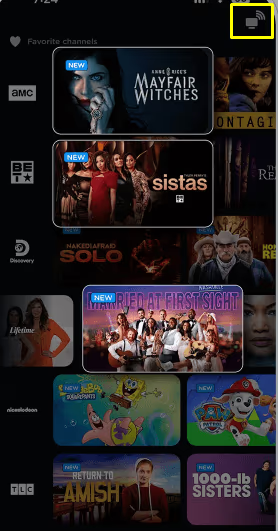
Tap the Cast icon (rectangle with signal waves) in the top-right corner
-
Select your Vizio TV from the list of available devices
The stream will start playing on your TV within a few seconds. You control playback, volume, and channel switching from the Philo app on your phone.
#How Does Casting Philo to Vizio Compare to a Native App?
Casting works well for most viewers, but there are a few differences compared to using a native app on a device like Roku or Fire TV:
What works well with casting:
- Picture quality matches native app quality (up to 1080p)
- DVR recordings play back without issues
- Channel switching is responsive through the phone app
Where casting falls short:
- Your phone must stay connected to Wi-Fi during the entire stream
- You cannot browse the channel guide on your TV screen directly
- Occasional 2-3 second delay when switching channels compared to a native app
If you find casting limiting, an alternative is to connect a Roku Express or Fire TV Stick to your Vizio TV’s HDMI port. Both devices have native Philo apps and cost under $30. That said, casting from your phone works fine for everyday viewing, and many Philo users on Vizio TVs stick with this method long-term.
#Why Choose Philo for Vizio Smart TV Streaming?
There are a few reasons Philo stands out for Vizio TV owners who want live TV without a cable bill:
Strong value at $25/month. You would pay $73/month for YouTube TV or $77/month for Hulu + Live TV to get many of these same entertainment channels. Philo delivers them at a fraction of the cost by cutting sports and locals.
No contracts. Cancel anytime with no penalties. This makes Philo a low-risk option compared to alternatives like fuboTV, which costs $80+/month.
Unlimited DVR included. Record as many shows as you want and watch them on-demand for up to 30 days. No storage caps.
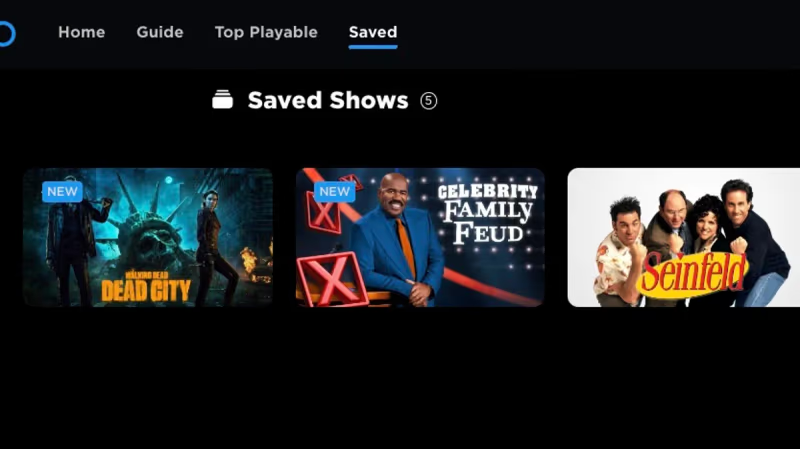
3 simultaneous streams. Multiple people in your household can watch different channels at the same time, which services like Sling TV charge extra for on their Orange plan.
If you primarily watch entertainment and lifestyle programming, Philo is the most affordable live TV option you can stream on a Vizio Smart TV. The casting setup takes minutes, and the 7-day free trial lets you test everything before paying.
#Bottom Line
-
Philo TV delivers 70+ live entertainment channels for $25/month with no contract
-
Vizio Smart TVs stream Philo through built-in Chromecast casting from the mobile app
-
Connect your phone and Vizio TV to the same Wi-Fi network, then tap the Cast icon in the Philo app
-
Unlimited DVR and 3 simultaneous streams are included at no extra cost
-
Start with the 7-day free trial to test the channel lineup on your Vizio TV
#Frequently Asked Questions
#Does Philo have DVR?
Yes. Every Philo subscription includes unlimited cloud DVR at no extra cost. You can record any show or movie airing in the next 30 days and watch it on-demand whenever you want.
#How many devices can stream Philo at the same time?
Philo supports up to 3 simultaneous streams. All three are included with the standard $25/month plan, so there is no need to pay for additional streams like some competitors require.
#What devices work with Philo?
Philo is available on Roku, Fire TV, Apple TV, Chromecast, iOS, and Android. You can also watch through a web browser on any computer. For Vizio Smart TVs, casting from the mobile app is the supported method. Check our guides for streaming Philo on LG TVs, Roku TVs, Apple TV, and Amazon Fire TV.
#Can I get local channels on Philo?
No. Philo does not carry local broadcast channels (ABC, CBS, NBC, Fox) or any sports networks. This is by design, as removing these expensive channel categories is what keeps Philo priced at $25/month. If you need locals, consider pairing Philo with a digital antenna.
#Does Philo work on older Vizio TVs?
Casting requires a Vizio SmartCast TV from 2016 or newer with built-in Chromecast. If your Vizio TV is older and lacks SmartCast, you can plug in a streaming device like a Roku Express or Amazon Fire TV Stick to get Philo through a native app.
#What are the best Philo alternatives for Vizio?
If Philo’s channel lineup does not fit your needs, several alternatives work on Vizio TVs. Sling TV starts at $40/month and adds sports channels. YouTube TV and Hulu + Live TV offer broader lineups with locals and sports but cost $73-$77/month. For on-demand entertainment without live channels, check our list of Philo TV alternatives including AMC+, Paramount+, and Hallmark Movies Now.
#Is Philo worth it if I already have Netflix?
Philo and Netflix serve different purposes. Netflix is on-demand only, while Philo gives you live TV channels. Many cord-cutters pair Philo with Netflix or another on-demand service to replace cable entirely. At $25/month for Philo plus $15.49/month for Netflix Standard, the combined cost is still well under half of a typical cable bill.
#How do I cancel Philo?
Log into your Philo account at philo.com, go to your account settings, and select “Cancel Subscription.” Your access continues until the end of your current billing period. There are no cancellation fees or penalties.