Your Philips TV won’t turn on, and pressing every button on the remote changes nothing. This is one of the most common Philips Smart TV complaints, and the fix usually takes less than five minutes. Below are seven troubleshooting steps, ranked from quickest to most involved, so you can get back to watching without calling a technician.
- Power cycling fixes most Philips TV startup failures — unplug, hold the power button for 30 seconds, wait two minutes, then plug back in
- A dead standby light points to a power supply problem — test the outlet with another device and inspect the cord for damage
- Remote batteries cause about 40% of “won’t turn on” reports — swap in fresh alkaline batteries before assuming the TV is broken
- HDMI-CEC conflicts can block startup — disconnect all external devices and try powering on with nothing connected
- Swollen capacitors on the power board are the most common hardware failure — look for bulging tops or brown residue after removing the back panel
#Why Won’t My Philips TV Turn On?
Several issues can prevent a Philips TV from powering up. The standby LED is your first diagnostic clue.
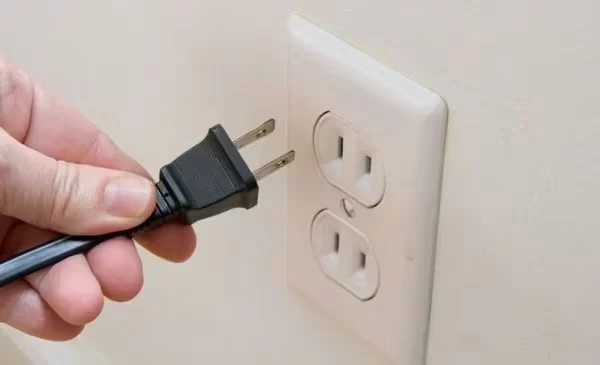
Standby light is off. No light at all means the TV has no power. The wall outlet, power cord, or the internal power supply board is the problem. Test the outlet with a lamp or phone charger. If the outlet works, inspect the power cord for fraying or loose connections at both ends.
Standby light is on, but the TV won’t respond. The TV receives power but cannot complete startup. Residual charge, a firmware glitch, or a failing main board could be the cause. A power cycle resolves this in most cases.
Standby light blinks red. A blinking red LED indicates a specific hardware fault. The number of blinks often maps to an error code. See our guide on Philips TV blinking red light for a breakdown of blink patterns and what each one means.
#How Do You Power Cycle a Philips TV?
Power cycling drains stored electricity from the TV’s capacitors and resets the processor. It is the single most effective fix.
- Unplug the power cord from the wall outlet (not from the TV).
- Press and hold the physical power button on the TV set for 30 seconds.
- Release the button and leave the TV unplugged for two full minutes.
- Plug the cord back in and press the power button once.
The TV should display the Philips logo within a few seconds. If it does, the problem was a temporary software fault. If nothing happens, move to the next step.
#Check the Power Source and Cable
Skip this if you already confirmed the outlet works. Otherwise, test systematically.
Plug a different device into the same outlet. If that device works, the outlet is fine. Next, check the power cord itself. Look for kinks, cuts, or a loose fit where the cord meets the TV. Philips TVs from the 55PFL and 65PUS series use a detachable figure-8 cord that can work itself loose over time.
Try connecting the TV directly to a wall outlet instead of a power strip or surge protector. Overloaded strips can starve a TV of the wattage it needs during startup. A 55-inch Philips Smart TV draws roughly 100-150 watts at boot, and a cheap power strip may not deliver that reliably.
#Replace and Reset the Remote
When the standby light glows but pressing the power button does nothing, the remote is the most likely suspect.
Swap the batteries first. Use brand-new alkaline batteries, not rechargeable ones that may have lower voltage. Make sure the polarity markings (+/−) line up correctly.
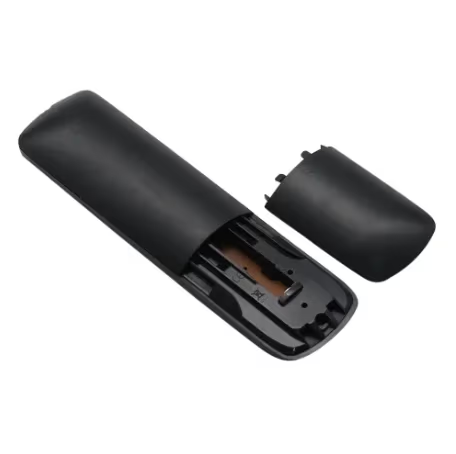
Reset the remote. Remove the batteries. Press every button two or three times to discharge any stuck signals. Wait 60 seconds, reinsert the batteries, and test again. This clears micro-charge buildup that can make the remote unresponsive.
Test with the TV’s physical button. Every Philips TV has a power button on the back edge or underside of the panel. If the TV turns on with that button but not the remote, the remote itself is faulty. Replacement Philips remotes are available on Amazon for under $15.
If your remote’s LED blinks orange when you press buttons, the remote may need re-pairing. Our Philips TV remote blinking orange guide covers that issue step by step.
#Disconnect All External Devices
HDMI-CEC lets connected devices control your TV’s power state. A glitchy soundbar, game console, or streaming stick can send a conflicting signal that prevents startup.
- Unplug every HDMI cable, USB device, and ethernet cord from the TV.
- Power cycle the TV again (unplug, hold button 30 seconds, wait two minutes).
- Try turning the TV on with nothing connected.
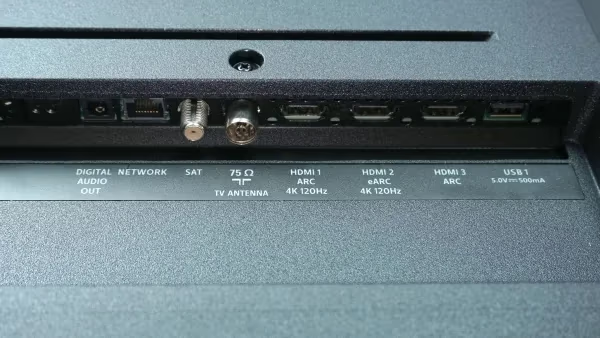
If the TV starts, reconnect devices one at a time to find the culprit. Once identified, disable CEC for that device in your TV’s settings menu under General Settings > EasyLink.
This same HDMI-CEC conflict appears on other brands too. Samsung TVs that won’t turn on often trace back to a connected device holding the CEC line low.
#What Should You Check Inside the TV?
Capacitors inside the TV can hold a dangerous charge even when unplugged. Wait at least 30 minutes after unplugging before opening the back panel. Do not touch any components directly.
If every external fix fails, the problem is likely on the power supply board or main board inside the TV. You do not need special tools to do a visual inspection.
Remove the screws from the back panel and carefully lift it off. Look at the power supply board (the one connected to the power cord input). Check for capacitors with bulging or domed tops, brown or black residue around components, or burn marks on the circuit board.
Swollen capacitors are the number one hardware cause of Philips TVs not powering on. Replacing them costs $5-10 in parts if you can solder, or $80-120 at a repair shop. A full replacement power board runs $30-60 on eBay for most Philips models.
Backlight test. Turn the TV on in a dark room and shine a flashlight at the screen from about two inches away. If you can see a faint image, the backlight has failed but the main board works. Backlight repair typically costs $100-200. For related display issues, see our Philips TV black screen troubleshooting guide.
#When Should You Contact Philips Support?
If none of the steps above bring your TV back, professional help is the next move.
Check your warranty status. Philips TVs sold in the US come with a one-year manufacturer warranty through the licensed brand partner (currently Funai for most North American models). Visit the Philips support contact page to verify coverage by entering your model and serial number. Extended warranties from retailers like Best Buy or Walmart may add two or three years of coverage.
Board replacement vs. new TV. A replacement main board or power supply board costs $30-80 for parts. Compare that to the current price of your TV model. For Philips TVs under $300 new, board repair is worth it. For older sets, the math may favor buying a replacement. Other brands like Sony and TCL have similar repairability, so switching brands does not guarantee fewer issues.
#Bottom Line
Start with a power cycle. That single step resolves the majority of Philips TV startup failures. If the TV still refuses to turn on, work through the remote, power source, and connected devices before opening the back panel. Keep your model number handy when contacting Philips support, and check warranty status before paying for repairs.
#FAQ
#Why does my Philips TV turn on by itself?
HDMI-CEC (called EasyLink on Philips TVs) allows connected devices to wake the TV automatically. A game console in rest mode or a streaming stick receiving an update can trigger a power-on signal. Disable EasyLink in your TV’s General Settings menu to stop it.
#Can a power surge damage a Philips TV permanently?
Yes. A voltage spike can fry the power supply board’s capacitors or the main board’s voltage regulator. If your TV stopped working after a storm or a sudden power outage, the power board is the most likely casualty. Using a surge protector rated for at least 1,000 joules helps prevent this.
#How do I know if my Philips TV remote is broken?
Point the remote at your phone’s front-facing camera and press any button. If the remote’s IR emitter works, you will see a purple or white flash on your phone screen. No flash means the remote is dead even with fresh batteries.
#Does unplugging a Philips TV reset it?
Unplugging performs a soft reset that clears temporary data and resets the processor, but it does not erase your settings, apps, or Wi-Fi passwords. A factory reset requires accessing the settings menu or using a specific button combination during startup.
#How long do Philips TVs typically last?
Most Philips LED TVs last 5 to 7 years with regular use before major components start failing. The backlight LEDs degrade first, followed by capacitors on the power supply board. Keeping the TV in a well-ventilated area and using a surge protector extends its lifespan.
#What does a blinking standby light mean on a Philips TV?
The number of red blinks between pauses corresponds to a specific error code. Two blinks often indicates a power supply fault, while five or more blinks usually points to a main board failure. Count the blinks carefully and search for your model number plus the blink count to find the exact diagnosis.
#Is it worth repairing a Philips TV that won’t turn on?
For TVs under three years old, yes. A replacement power supply board costs $30-60, and a main board runs $50-80, both well below the cost of a new TV. For TVs older than five years, compare the repair cost to a new set in the same size range before committing.