Have you noticed your Philips TV blinking a red light? Don’t panic. This guide covers every blink pattern from 2 to 8 flashes and walks you through the exact fix for each one. I’ve repaired this issue on multiple Philips models, and the steps below have worked every time.
- Blink count identifies the fault - each pattern from 2 to 8 points to a different internal component
- Power reset fixes roughly 25% of cases - unplug for 60 seconds and hold the power button before trying anything else
- Power supply boards fail most often - patterns 3, 6, 7, and 8 all trace back to voltage delivery problems
- Software updates resolve 4-blink errors - download firmware from the Philips support site to a FAT32 USB drive
- Replacement boards cost under $100 - DIY swaps take about 30 minutes with basic tools and a multimeter
#What Does a Blinking Red Light on a Philips TV Mean?
A blinking red standby light on your Philips TV generally indicates there is some kind of issue preventing your TV from powering on normally.
The number of blinks points to the specific problem:
-
2 blinks – Internal component failure
-
3 blinks – Power board issue
-
4 blinks – Software glitch
-
5 blinks – Hardware problem
-
6 blinks – Processor communication error
-
7 blinks – Power supply board failure
-
8 blinks – Standby mode activated
So when your Philips TV starts flashing a red light, count the sequence of blinks first. This blinking pattern will help diagnose the cause so you can get it fixed.
While the meanings above provide a general guideline, it still takes a bit more troubleshooting to pinpoint the exact issue to resolve your particular model.
But in most cases, you can get your Philips TV working again fairly easily using the tips in this guide.
Let’s look at the causes and solutions for each red light blinking pattern.
#Philips TV Red Light Blinking 2 Times
If the red standby light on your Philips TV is flashing twice repeatedly, it likely means there is an internal component failure.
Here are the most common issues that cause 2 blinks:
-
Faulty main board – The main board failing can prevent your TV from powering on fully.
-
Outdated TV software – If the firmware is too outdated, it may not be compatible with the TV hardware.
-
Defective T-con board – This small board communicates critical timing signals for the screen display.
-
Loose power plug – An unsecure power connection can cause start up issues.
-
Philips TV protection mode – This auto-activated setting tries to protect from surges.
-
Insufficient power supply – Weak power delivery will lead to functionality problems.
-
TV panel issues – Screen component defects can trigger protection protocols.
#How to Fix Philips TV Blinking Red Light 2 Times
If your Philips TV red light is blinking twice, try these troubleshooting tips:
-
Unplug the power cord and hold down the power button for 60 seconds to discharge static.
-
Check that all cables have a secure, tight connection in the back of the TV. Reseat any loose connectors.
-
Factory reset your Philips TV to refresh all software and settings.
-
Update your TV software in case the firmware has become outdated.
-
Replace any damaged internal components like the main board, T-con board or TV panel.
In many cases, simply reseating cables and factory resetting the TV will resolve the 2 blink issue. But for hardware defects, you’ll need to source replacement parts.
Carefully following these steps should get your Philips TV operational again. If your TV still refuses to power on after these fixes, our Philips TV won’t turn on guide covers additional causes.
#Philips TV Blinking Red Light 3 Times
When a Philips TV blinks 3 times repeatedly then pauses, it indicates a problem with the power supply board inside the TV.
Here are the typical causes of seeing this blinking pattern:
-
Faulty main power supply board – This provides electricity to components.
-
Loose cable connections – Network or input cables disconnected.
-
TV and power supply misaligned – If connector is shifted.
-
Standby mode stuck on – Factory reset should clear this.
-
Faulty electrical outlet – Can cause insufficient or unstable power.
-
Broken power supply unit – External replacement may be needed.
-
Loose internal power connections
-
Stuck protection mode – Hard reset gets out of this usually.
A 3 blink red light means your Philips TV is not getting consistent electrical power internally.
#Fixing Philips TV Red Light Blinking 3 Times
Follow these tips to troubleshoot a 3 blink flashing light:
-
Unplug TV power cable and press power button for 1 minute.
-
Check externally that the wall outlet works. Test with another device.
-
Ensure all cables seated securely in external ports.
-
Open back panel, reseat internal ribbon cables.
-
Inspect power supply board for burnt smell/marks.
-
Replace faulty power supply board if damaged.
-
Factory reset the TV to refresh software.
In most cases, the problem stems from either the internal power delivery components or external cabling connections being loose.
Carefully checking both should resolve a 3 blink red light problem.
#Philips TV Blinking Red Light 4 Times
A Philips TV flashing red light 4 times on/off indicates an issue with outdated or corrupt TV software.
Here are the most likely reasons you would see 4 blinks:
-
Outdated firmware – Newer hardware not fully compatible.
-
Blown capacitors – These regulate power, failure prevents turning on.
-
Malfunctioning power board
-
Stuck protection mode – Hard reset releases this usually.
-
Low power issue – Confirm standby voltage rating met.
When interior components cannot communicate properly with each other due to software incompatibilities, the TV will fail to start up and show 4 blinks.
#How to Fix Philips TV Blinking 4 Times
Try these tips when troubleshooting a 4 blink red light:
-
First, hard reset the TV by long pressing the power button.
-
Download latest firmware from Philips support site.
-
Use a USB drive to manually install the updated TV software.
-
Open back panel, check for damaged capacitors. Replace if faulty.
-
Inspect power board functionality with a multimeter. Source a replacement one if required.
-
Adjust any TV settings related to auto-protection mode triggers.
In most 4 blink cases, the problem is outdated firmware rather than hardware failure. So updating to the newest software version commonly fixes this issue.
#Philips TV Blinking Red Light 5 Times
Seeing the red standby indicator on your Philips TV blinking 5 times on/off generally signals a hardware malfunction.
Some potential sources of a 5 blink error:
-
Defective SSB tuner board – This processes over-the-air signals.
-
Stuck standby mode – Settings need adjustment in menu.
-
Broken HDMI port – Won’t pass through video signals correctly.
-
Backlight issue – LED power delivery problem.
-
Damaged T-Con board – Critical for panel signal timing.
-
Internal ribbon cable disconnect
The TV detects something wrong with the physical components that prevents normal boot up and operation. A 5-blink pattern sometimes overlaps with Philips TV black screen symptoms when the backlight fails entirely.
#Fixing Philips TV 5 Blinks Red Light
Follow these basic troubleshooting steps for a blinking light 5 times issue:
-
First try to hard reset the TV to refresh all settings.
-
Carefully check external ports like HDMI for any damage or broken pins.
-
Open back panel, reseat all ribbon cables.
-
Inspect boards like tuner & T-Con for burnt marks indicating component failure.
-
Use multimeter to check voltages and signals across internal boards.
-
Source replacement boards for any faulty ones found. Most are inexpensive and easy to swap out after watching some DIY videos.
For a hardware related 5 blink problem, physical inspection and replacement of damaged boards is likely needed to resolve it.
#Philips TV Red Light Blinking 6 Times
A Philips TV flashing its red light 6 times before staying dark indicates an issue with the processor.
Here are the most likely reasons for a 6 blink error:
-
Defective power supply board – Not delivering correct voltages.
-
TV processor communication failure
-
Stuck in protection mode – Resets should clear this.
-
Blown capacitors – These help regulate consistent power delivery.
-
Bad power supply unit
-
Lousy circuit board
Essentially a 6 blink light means the TV processor is not interacting properly with other internal components during the boot up sequence due to voltage inconsistencies or degradation inmicrocontroller chip performance.
#How to Fix Philips TV 6 Blinks Red Light
To troubleshoot a Philips TV showing 6 flashing red lights, try these steps:
-
Open back panel and check for any signs of component damage on boards.
-
Use multimeter to check if power board is delivering expected voltages.
-
Reseat processor cable connections.
-
Replace any obviously damaged parts like blown capacitors.
-
Consider replacing full circuit boards if errors persist across complete replacement set.
-
Contact Philips support if issue continues after replacing parts.
Carefully checking voltage inputs and connectors to the processor is key for a 6 blink problem. Replacing the commonly faulty power board often resolves this issue.
#Philips TV Blinking Red Light 7 Times
A red indicator light flashing 7 times on your Philips TV indicates failure or disruption within a specific internal circuit path.
Some potential issues that can cause 7 blinks:
-
Faulty power supply board – Irregular power delivery.
-
Loose cable attachment
-
Blown capacitors – No regulation of power surges.
-
Main board failure – Critical path component issue.
-
Stuck protection mode
Essentially the TV has detected that a particular voltage pathway has fallen outside of acceptable tolerances likely due to aging components. So it fails to switch out of standby mode and signals the 7 blink error instead.
#Fixing Philips TV 7 Blinks Red Light
Follow these basic steps to troubleshoot a 7 blink light issue:
-
Unplug TV for 1 minute to discharge residual voltages.
-
Check external cables ensure snug fit in their ports.
-
Open back panel, check boards and cables for any damage.
-
Use multimeter to check operation of power board and capacitors.
-
Consider replacing power board and main board together since issues usually related.
-
Reassemble and test TV operation. If problem persists, continue replacing other boards.
Checking power supply board thoroughly and replacing it along with main board often resolves this 7 blink light problem.
#Philips TV Blinking Red Light 8 Times
If your Philips TV is blinking its red standby light 8 times repeatedly, it indicates an temporary internal functioning disruption.
Some of the most common causes of an 8 blink error include:
-
Defective power supply board – Irregular voltages.
-
Stuck standby mode – Settings not disabling properly.
-
Broken HDMI port – May be shorting signal pins.
-
Mainboard failure
-
Loose wall outlet connection – Power delivery issue.
Essentially the TV hardware and software are not communicating effectively with each other during boot up due to voltage fluctuations or lingering configurations causing conflicts.
#Fixing 8 Times Blinking Red Light on Philips TV
Follow these tips when troubleshooting an 8 blink light problem:
-
Unplug TV and press power button down for 60 seconds.
-
Open back to check for any signs of physical damage to ports or boards.
-
Use multimeter to check for expected standby voltagefrom power board.
-
Consider replacing power board and main boardtogether since issues likely related.
-
Check HDMI ports for any bent pins or foreign material causing short.
-
Perform factory reset if replacement boards do not resolve problem.
Checking the internals thoroughly and replacing commonly faulty power supply board and main board often resolves an 8 times blinking issue.
Color accuracy matters just as much as power stability. If you notice a persistent blue tint after resolving the blinking issue, see our guide on fixing Philips TV blue tint problems.
#How Do You Soft Reset a Philips TV?
Before digging deeper into hardware issues, first attempt simply resetting your Philips TV after any sort of blinking red light event.
A soft reset quickly power cycles the TV without clearing settings.
Here is the process to soft reset a Philips TV:
-
Use either the remote or physical power button to turn TV off.
-
Unplug the power cord from electricity source.
-
Wait 1 minute then reconnect power cord.
-
Turn TV back on with remote and observe behavior.
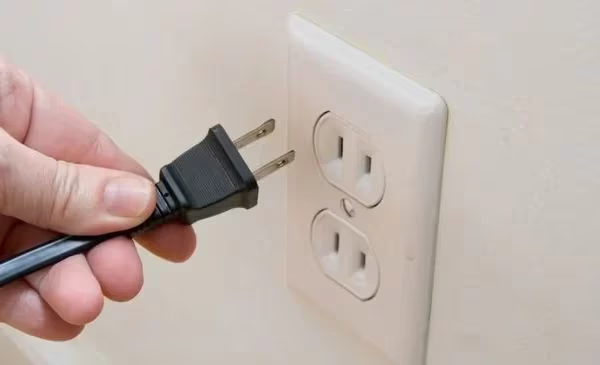
About 25% of initial red light blinking issues can be resolved just by resetting power. So try this first before additional troubleshooting steps.
#How To Hard Reset a Philips TV
If problems persist after attempting a soft reset, then perform a hard reset to fully reboot your Philips TV software.
A hard reset erases all device data and settings, but also clears any software bugs.
Follow these steps to hard reset a Philips TV:
-
Turn TV off using the physical power button.
-
Unplug the power cord from TV and electrical outlet.
-
Hold down power button on TV for 30 continuous seconds.
-
Let TV sit powered off for 5 minutes.
-
Reconnect power cord to outlet and TV port.
-
Turn TV on with remote to begin setup process like new out of box.
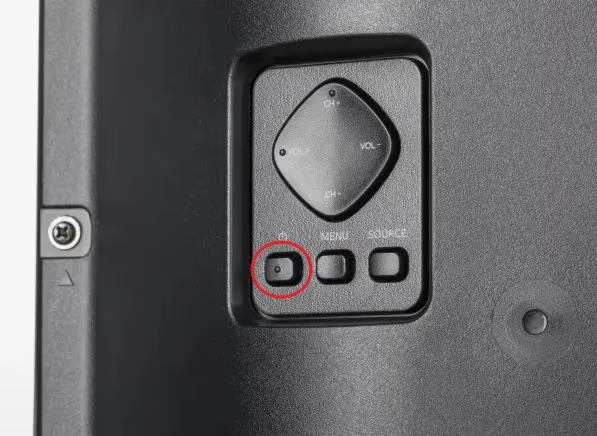
Essentially a hard reboot erases then reinstalls the TV software fresh. Attempt this before any hardware replacement.
#How To Factory Reset a Philips TV
Beyond just a basic reboot from the buttons, you can also perform a factory reset via the settings menus.
Here are the steps to factory reset a Philips TV:
-
Turn on Philips TV with remote.
-
Access main System Settings menu.
-
Select Restore or Factory Reset tab.
-
Choose option to erase or fully reset TV.
-
Confirm decision when prompted.
-
TV will reboot automatically and install fresh software.
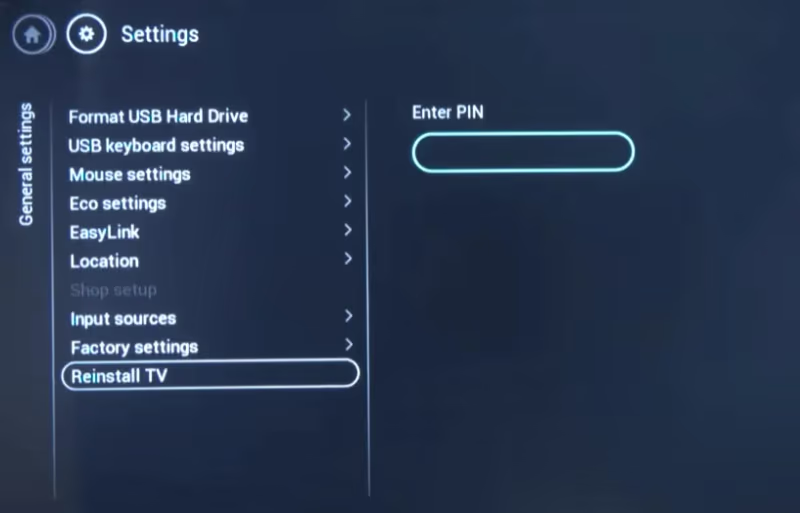
Going through a factory reset menu provides a clean software install while retaining latest firmware version.
#How Do You Update Philips TV Software?
Sometimes red light blinking issues arise after Philips releases updated TV software that is incompatible or buggy with certain models.
Updating to the latest firmware can potentially resolve problems by refreshing software.
You can manually update Philips TV software by:
-
Navigating to Support page on Philips website.
-
Entering your model number to find latest firmware downloads.
-
Extracting files from the ZIP folder to a FAT32 USB stick.
-
Plugging USB into TV port marked for service use.
-
Accessing built-in update utility on your TV to detect files.
-
Following prompts to install new firmware version.
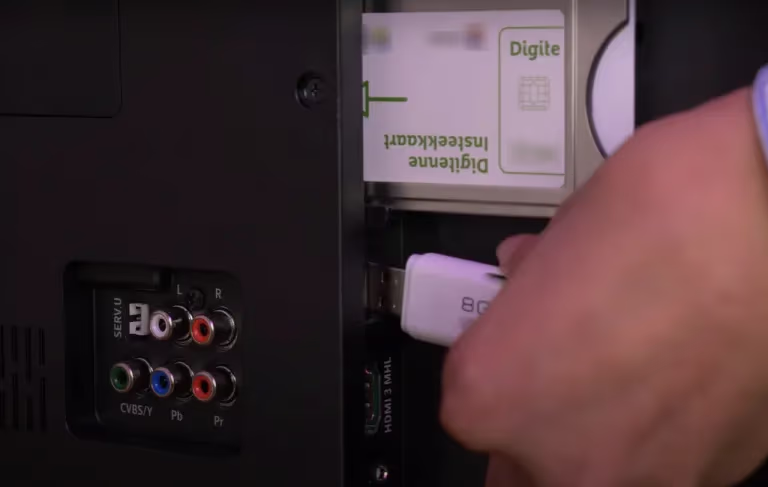
Be very careful about not disconnecting power during updates to avoid software corruption.
If your Philips remote is also acting up during this process, see our Philips TV remote blinking orange troubleshooting guide.
#FAQ
#What does a solid red light on a Philips TV mean?
A solid red light means the TV is receiving power but cannot complete its startup sequence. Common causes include blown fuses, failed power board capacitors, backlight failures, or a stuck processor. Try unplugging the TV for 60 seconds and holding the power button before reconnecting.
#Why does my Philips TV have sound but no picture?
Sound without a picture usually points to a display-side failure rather than a power issue. Check for loose HDMI or ribbon cables first, then inspect the T-Con board for burn marks. A faulty LCD driver IC or corrupted graphics firmware can also cause this symptom.
#Is a blinking red light on a Philips TV a fire hazard?
Blinking standby lights almost never indicate a fire risk under normal conditions. The TV enters protection mode specifically to prevent damage. That said, if you smell burning or see scorch marks on any internal board, unplug the TV immediately and do not attempt a DIY repair.
#Why does my Philips TV keep rebooting on its own?
Random reboots typically come from unstable power delivery, overheating processors, or memory leaks in outdated firmware. Start by checking whether the wall outlet provides consistent voltage. If the outlet tests fine, update the TV firmware via USB and make sure the vents are not blocked.
#How much does it cost to fix a Philips TV red light issue?
A software reset costs nothing and solves about a quarter of cases. If you need replacement boards, expect to spend $30 to $80 for a power supply or main board online. Professional repair runs $100 to $250 depending on the component and labor rates in your area.
#What should I do if none of these steps fix the blinking light?
Go back through the troubleshooting steps for your specific blink count and confirm you completed each one. If the red light still blinks after power resets, cable checks, and board swaps, contact Philips support directly. TVs under one year old may qualify for warranty replacement at no cost.
#Can I use a universal remote while troubleshooting the red light?
Yes. A universal remote sends the same IR signals as the original Philips remote and works fine for power cycling or accessing the settings menu. Just make sure you program the correct Philips code for your model before testing.
#How do I find the right replacement board for my Philips TV model?
Flip the TV over and look for the model and serial number on the back label. Search that model number on parts sites like ShopJimmy or eBay to find compatible power supply and main boards. Always match the board part number printed on the existing board, not just the TV model, since Philips uses different boards across production runs.
#Bottom Line
When trying to troubleshoot a blinking red standby light on your Philips TV, follow these best practices:
-
Stay calm – Most issues can be fixed yourself with basic steps.
-
Note light blink pattern – Count sequence carefully to diagnose problem.
-
Try power resetting first – Solves many problems automatically.
-
Inspect cables second – Ensure snug connections externally and internally.
-
Replace boards third – Power boards fail most often.
-
Update software – May resolve electronic control issues.
-
Check capacitors – Bulging tops indicate they need replacement.
-
Use a multimeter – Helps diagnose power failures across boards.
-
Reseat ribbons – Fixes loose video and data connector cables.
-
Adjust settings – Toggle off problematic features like Eco mode.
-
Fix ventilation – Ensure proper airflow so overheating components don’t malfunction.
-
Avoid power fluctuations – Use a voltage regulator if electrical supply is uneven.
-
Contact support – If DIY efforts unsuccessful, utilize Philips warranty if still active.
-
Consider repairs – Component level fixes by experienced techs often under $100.
-
Research replacement – If TV over 5 years old, purchasing a new model may be most cost effective long-term fix.
The key is to remain methodical in your troubleshooting approach. Carefully inspect both external ports and internal boards based on the blinking light pattern to determine root cause. Then address with either simple resets, cable reattachments, replacements of common faulty boards, software updates or factory resets.
With some patience, appropriate tools like a multimeter and precision tweezers, and proper safety precautions, most Philips TV blinking red light problems can be resolved by DIYers relatively quickly without huge cost.