Are you looking for a way to access Peacock’s on-demand library and live channels on your Vizio Smart TV? With over 15,000 hours of movies, shows, news, sports and more, Peacock pairs well with any Vizio home entertainment setup. This guide covers everything you need to know about using Peacock on Vizio televisions.
- Peacock is pre-installed on 2016+ Vizio SmartCast TVs — older models can download it from the App Store
- Three subscription tiers available — Free (7,500+ hours), Premium ($4.99/mo), and Premium Plus ($9.99/mo)
- Stream on up to 3 devices at once — with up to 6 viewer profiles per account
- Live sports included with Premium — Sunday Night Football, Premier League, Olympics and more
- Troubleshooting is straightforward — most playback issues resolve with an app restart or internet check
#What Is Peacock TV?
Peacock TV is a subscription video on-demand (SVOD) service owned and operated by NBCUniversal.
It features a massive catalog of classic shows, brand new original programming, breaking news and live sports coverage courtesy of NBC, along with blockbuster films from Universal Pictures and Focus Features.
Some of the hit titles available on Peacock include:
-
The Office
-
Sunday Night Football
-
Yellowstone
-
Modern Family
-
New Amsterdam
-
Premier League matches
-
Harry Potter films
-
Jurassic Park films
-
Meet the Parents films
-
Despicable Me films
Peacock offers three main subscription tiers:
-
Free – Includes 7,500 hours of movies, shows, and more with 5 minutes of ads per hour. Does not include Premier League or WWE programming.
-
Premium – $4.99/month with ads, $9.99/month no ads. Gets you full 15,000+ hour catalog including Premier League soccer, every WWE PPV event, new NBC shows next-day and more.
-
Premium Plus – $9.99/month with ads, $14.99/month no ads. Same as Premium, but also adds your local NBC/Telemundo station live stream.
Peacock is currently available in the United States and certain U.S. territories. For information on accessing Peacock in other regions check out this review of Peacock TV’s global availability.
Now let’s explore how Vizio Smart TV owners can access everything Peacock has to offer!
#How Do You Get the Peacock App on Vizio Smart TVs?
The Peacock app comes pre-installed on all Vizio SmartCast TVs from 2016 and later. For earlier Vizio TV models, you can add Peacock by downloading it from the Vizio SmartCast App Store.
Here are step-by-step instructions for installing Peacock on your Vizio television:
#On 2016-2022 Vizio Smart TVs
-
Using your Vizio remote, select the SmartCast input on your TV
-
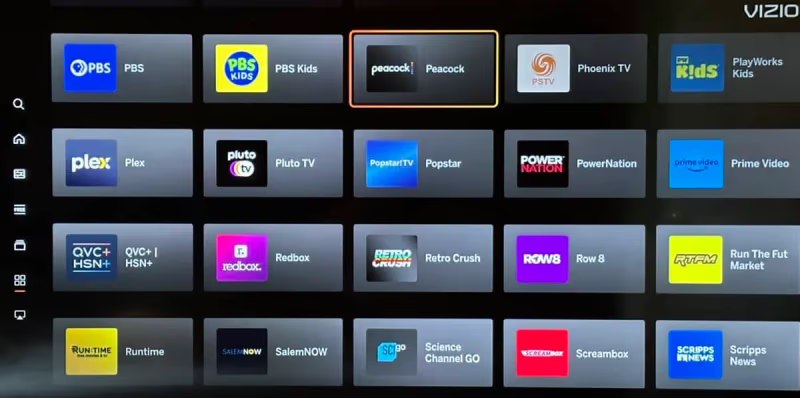
Scroll to the Peacock app tile and select to open
-
Follow the on-screen instructions to sign up for a subscription or login to an existing account
-
Start streaming Peacock!
#On Pre-2016 Vizio TVs
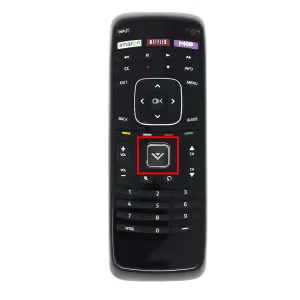
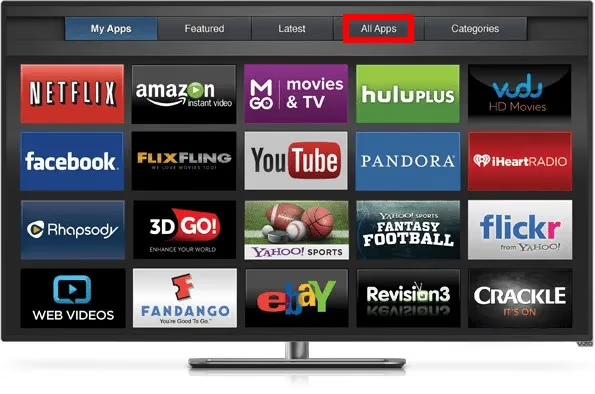
- Press V Button → Select App Store
- Search for “Peacock”
-
Select Download → Add to Home
-
Open the newly installed Peacock app
-
Sign up or sign in to start streaming
And that’s all there is to it! The Peacock app should now be successfully set up on compatible Vizio televisions.
Quick tip: Make sure your Vizio Smart TV is connected to the internet via Wi-Fi or Ethernet before attempting to install apps.
#Signing Up for Peacock on Your Vizio TV
Once you have the Peacock application installed, you’ll need to create an account to start streaming.
Here is an overview of what you can expect from Peacock’s sign-up process on a Vizio Smart TV:
-
Open the Peacock app and select Sign Up
-
Choose whether to create a free or paid subscription
Free lets you stream over 7,500 hours of movies, shows, news and sports with 5 minutes of ads per hour
-
Premium ($4.99/month with ads or $9.99/month no ads) includes the full 15,000+ hours of Peacock programming with extras like Premier League soccer
-
Enter your email, create password and provide payment info (for paid plans)
-
Personalize your profile with your name, preferred genres, and streaming preferences
-
Start watching Peacock on your Vizio TV!
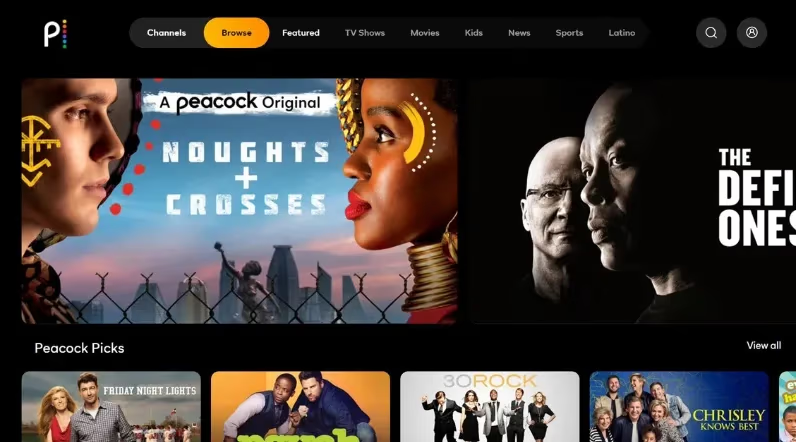
Things to note:
-
You can stream Peacock on up to 3 devices simultaneously per account
-
Switch between profiles using the profile icons
-
Cancel Premium subscriptions anytime
-
If you run into playback issues on your Samsung TV, this guide on fixing Peacock problems on Samsung TVs may help
-
Downloads are not yet supported on Vizio, but learn how to download Peacock videos offline with this overview of Peacock capabilities on Roku devices.
Ready to unlock thousands of hours of NBCU entertainment? Get started with a free or paid Peacock subscription now!
#Peacock Features and Viewing Recommendations
Peacock neatly organizes its massive catalog into easy-to-navigate sections like channels, genres, movies by decade and more.
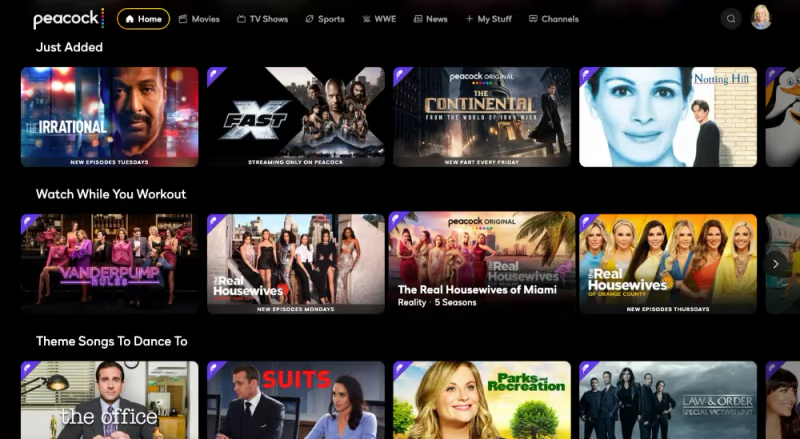
Here is an overview of key Peacock categories to help you filter through programming options:
#Channels
-
Trending Now – Most buzzworthy titles this minute
-
New This Month – Latest films/series added to Peacock
-
Tokyo NOW – Live Olympics coverage & events
-
NBC – Flagship NBC shows, news and classics
-
Premier League – Soccer matches & highlights
-
WWE – Wrestling events, docs & collections
-
Movies – Hundreds of films sorted by genre
#Genres
-
Comedy (sitcoms, stand-up, sketch)
-
Drama (legal, hospital, sci-fi, crime)
-
Reality (dating, talent contests, makeovers)
-
Kids (animation, live-action)
-
Latino (telenovelas, series)
-
Unscripted (talk shows, late night)
#Movies Decades
-
2010s Movies
-
2000s Movies
-
1990s Movies
-
1980s Movies
-
1970s Movies
-
1960s Movies
-
1950s Movies
-
Classics from 1915-1949
#Peacock Originals
Don’t miss Peacock’s growing slate of addictive original programming:
-
Bel-Air – Dramatic reboot of 90s sitcom classic The Fresh Prince
-
Joe vs Carole – scripted telling of Netflix’s Tiger King saga
-
MacGruber – Action comedy series starring Will Forte
-
Wolf Like Me – Isla Fisher romantic creature feature
Peacock organizes content by genre, decade and channel for quick browsing on your Vizio TV
#Live Events
Peacock Premium subscribers can live stream must-see NBC Sports events:
-
Sunday Night Football
-
Sunday morning Premier League matches
-
U.S. Open and Ryder Cup golf tournaments
-
2024 Paris Summer Olympic Games
Breaking news and special event coverage also air live from NBC News.
#Profile Features
Enhance your viewing experience with Peacock’s handy profile tools:
-
Continue Watching – Resume shows/films where you left off
-
My List – Bookmark favorites for your watchlist
-
Ratings – Like/dislike titles to improve recommendations
For an eye-opening tour of everything Peacock offers, browse the Peacock Hub on Vizio.
#How Do You Fix Peacock Problems on Your Vizio TV?
Don’t panic if you run into playback issues or error messages while streaming Peacock on your Vizio set. Here are some handy troubleshooting tips:
#App Troubles
-
Force close and relaunch the Peacock app
-
Check for pending app updates and install latest version
-
Uninstall/reinstall the Peacock app
-
Restart or factory reset your Vizio Smart TV
#Buffering / Quality Issues
-
Pause, let buffer, then resume playback
-
Ensure Vizio TV OS is also updated
-
Check internet connection – restart modem/router if needed
-
Test streaming speed using Fast.com app
-
Adjust video quality settings in the Peacock app
#Error Codes
Google search error codes appearing on your Vizio to uncover specific causes and fixes, such as:
-
Error code 106 – Geographical content restrictions
-
Error code 108 – Issues loading content
#Account & Payment Problems
-
Double check login credentials
-
Contact Peacock Support to resolve account issues
-
Update payment method details if invalid
Stuck buffering, getting error messages or struggling with account access? Reach out to Peacock’s 24/7 customer service team for personalized troubleshooting assistance.
#Peacock Viewing Tips for Vizio Smart TVs
Optimizing your setup will help you enjoy smooth Peacock streaming on a Vizio television.
#Connection
For best playback, connect your Vizio to the internet via ethernet cable or 5GHz Wi-Fi network. Check out how to get Peacock on Firestick for more Fire TV streaming tips.
#Display
Access display settings through the Vizio SmartCast menu. Enable 4K HD, HDR or Dolby Vision based on content and model capabilities for superior picture quality.
#Audio
Sync a Vizio sound bar for more immersive, cinematic audio. Use SAP function to switch Peacock programs into secondary languages.
#Accounts
Set up dedicated viewer profiles so each person can bookmark favorites, pick up where they left off and receive tailored recommendations.
#Navigation
Vizio remotes feature quick action buttons for popular streaming platforms – simply program your Peacock button for one-touch app access!
Want to explore other options? See how Peacock stacks up against YouTube TV for cord-cutting or visit the Vizio support page for model-specific help.
#FAQs About Getting Peacock on Vizio Smart TVs
#Is Peacock available on all Vizio Smart TVs?
Peacock comes pre-installed on Vizio SmartCast TVs made between 2016 and 2022. Just switch to the SmartCast input and look for the app tile. Older models can grab it from the Vizio App Store.
#What internet speed do I need for Peacock on Vizio?
You need at least 8 Mbps for standard streaming. For 4K content, 25 Mbps or faster gives the best results. A wired ethernet connection tends to be more reliable than Wi-Fi for heavy streaming.
#Can I watch Peacock Originals like Bel-Air on my Vizio TV?
Yes. Any Vizio TV running the Peacock app gives you access to originals, classic shows like The Office, movies, and live sports. What you can watch depends on your subscription tier — Free, Premium, or Premium Plus.
#How many profiles does Peacock support?
Each Peacock account supports up to 6 individual profiles. Family members get their own watchlists, viewing history, and personalized recommendations.
#Does my cable plan include Peacock Premium?
Some providers bundle Peacock Premium with certain TV packages. Cox Contour and Comcast Xfinity are two common examples. Check with your cable company to see if you already have access.
#How do I turn on closed captions in Peacock on Vizio?
Open the Peacock app and start playing any title. Tap the CC icon in the player toolbar, then pick your preferred language and text style from the Accessibility menu.
#Why does Peacock buffer or look blurry on my Vizio TV?
Buffering and low video quality usually point to a weak internet connection. Restart your modem and router, then try connecting your Vizio TV with an ethernet cable instead of Wi-Fi. You can also lower the video quality setting inside the Peacock app to reduce buffering. If the problem continues, uninstall and reinstall the app.
#What live sports can I stream on Peacock?
Peacock Premium includes Sunday Night Football, Premier League soccer matches, MLB Sunday Leadoff games, Ryder Cup and U.S. Open golf, and Olympics coverage through NBC Sports and Golf Channel.