Frustrated baseball fans know that MLB.tv blackout restrictions can ruin the experience of watching your favorite team. While using a VPN is the go-to workaround, what happens when it stops working with MLB.tv streams?
As a long-time MLB.tv and VPN user, I’ve run into just about every streaming and blackout pitfall over the years. This guide covers common MLB.tv streaming problems, walks through VPN troubleshooting steps, and highlights the best VPNs to help you unlock blacked out games this season.
- Outdated VPN apps cause most MLB.tv failures — updating to the latest version fixes the majority of streaming issues
- Blocked VPN servers are increasingly common — switching to a different server in the same region often restores access instantly
- Cached cookies and data interfere with VPN tunneling — clearing browser data before reconnecting resolves many playback errors
- Protocol switching can bypass MLB.tv detection — toggling between IKEv2 and OpenVPN TCP helps avoid blackout enforcement
- Premium VPNs outperform free options for MLB.tv — ExpressVPN, NordVPN, and Surfshark maintain dedicated streaming servers
#Why Does My VPN Not Work With MLB.tv?
Before we dig into the various fixes, it helps to understand the reasons why your VPN may have stopped working properly with MLB.tv in the first place:
#Outdated VPN App
Like any software, VPN apps push regular updates to squash bugs and enhance performance. Using an outdated VPN app version can definitely cause compatibility issues or glitches when trying to stream MLB.tv.
#Server Congestion
At peak times when huge numbers of fans flood MLB.tv, VPN servers can also get overloaded and struggle to channel all that streaming traffic smoothly. Particularly for free VPNs or smaller providers.
#Blacklisted VPN Servers
MLB.tv does actively work to detect and block connections from known VPN servers to enforce its blackout policy. An outdated server list from your VPN provider likely contains IP addresses already flagged and banned by MLB.tv.
#Software Conflicts
Incompatible apps running simultaneously alongside your VPN can sometimes create software conflicts, preventing them from working properly together. Shutting down other programs first often helps VPN streams run smoother.
#Bad Internet Connection
Unsteady wifi or a generally poor internet connection hampers performance for data-heavy video streaming through a VPN tunnel. Few things are more frustrating than an unstable stream!
#Regional Sports Network Restrictions
Local MLB broadcasts require specific TV provider credentials to unlock, which VPNs cannot bypass on their own. Read more on watching regional MLB networks on services like Sling TV.
Now let’s explore how to address each and restore your access to MLB.tv!
#How Do You Fix VPN Issues on MLB.tv?
Here are the 12 most effective troubleshooting steps to resolve the majority of VPN/MLB.tv streaming problems:
#1. Update Your VPN App
The easiest potential fix is ensuring you have downloaded the latest version of your VPN app, which may contain crucial bug patches, stability improvements and changes to get around MLB.tv blackout detection.
-
To update on an iPhone, open the App Store > Profile > Check for available updates.
-
On Android, use the Play Store > Profile > Manage apps & games.
-
For desktop apps, find the update settings in the app menu.
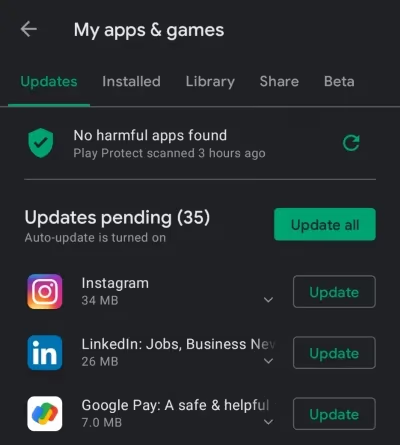
Updating is quick and usually preserves your existing app login, server favorites and settings.
#2. Reinstall Your VPN App
If updating fails to help, the next step is wiping out any glitched files by fully uninstalling then re-downloading a fresh VPN app from their website or app store.
This essentially provides a clean slate, clearing away any accumulated digital cobwebs causing conflicts. After reinstalling, sign in again and test if MLB.tv now works properly through the VPN app.
#3. Restart Your Device
Before getting too deep into troubleshooting, try the classic initial step of simply turning your computer, phone or streaming device off and back on again. Like blowing into an old Nintendo cartridge!
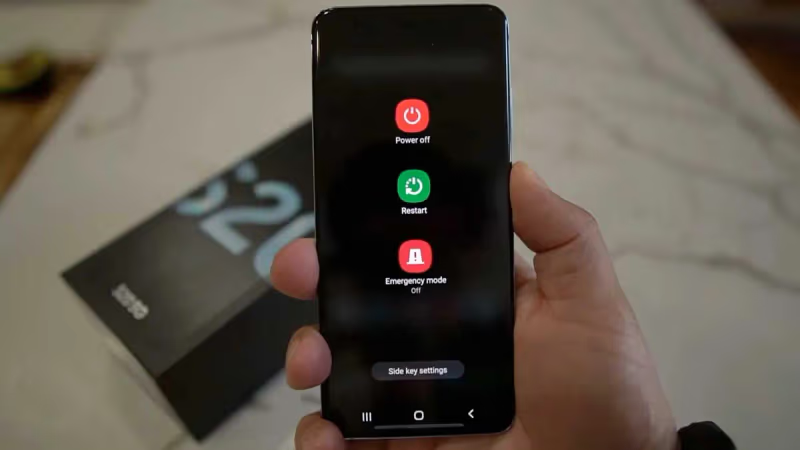
Restarting flushes out memory leaks or background processes that can interfere with streaming performance. After the reboot, launch your VPN app again and see if MLB.tv streams smoothly through the VPN tunnel.
#4. Delete Cookies & Cache
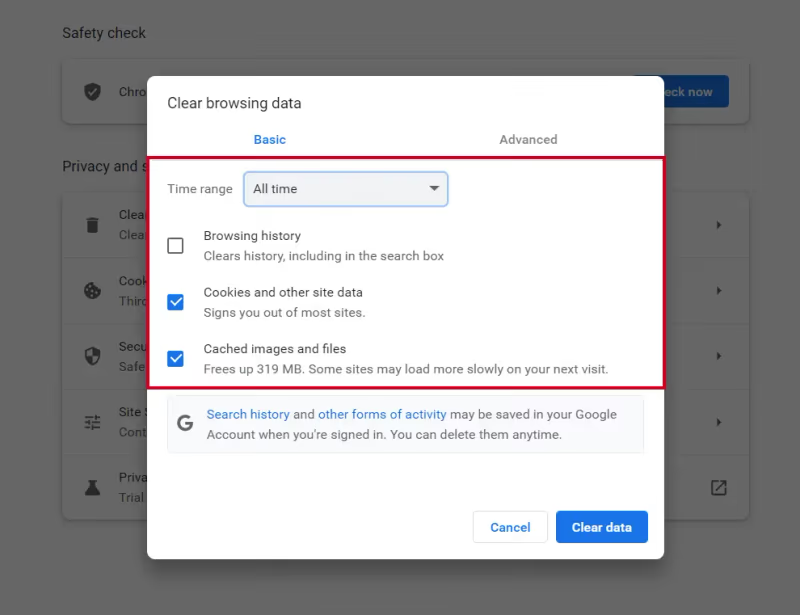
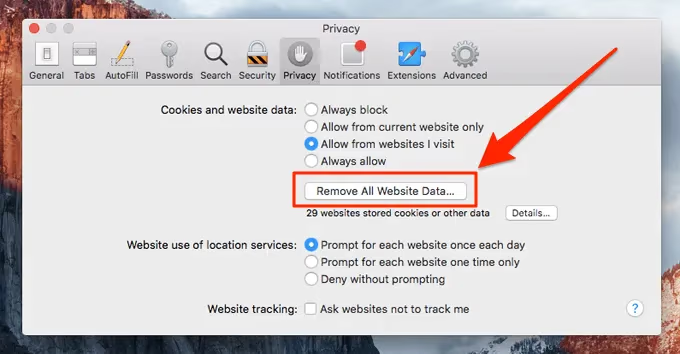
Over time, excess cookies and cached data stored by MLB.tv can create lag and impact stream functionality. Wiping this temporary storage gives the streaming platform a fresh start, which tends to go hand in hand with the VPN app after a reinstallation as well.
- On Chrome use Settings > Privacy & Security > Clear Browsing Data
- For Safari head to Settings > Privacy > Website Data > Remove All Website Data
- In Firefox access Settings > Privacy & Security > Clear Data
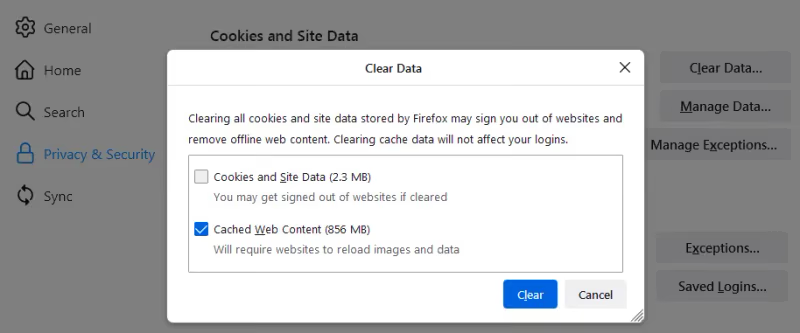
Then reload MLB.tv to assess if wiping the slate clean fixed VPN streaming.
#5. Connect to a Different VPN Server
Specific VPN servers can become congested during peak streaming hours, develop technical problems or get blocked by streaming platforms over time. Quickly switching connection to another server in the same region often resolves VPN/MLB.tv issues.
Inside your VPN app, disconnect from your current server and select another nearby one instead to channel the streaming traffic. For the purpose of avoiding MLB.tv blackouts, just choose the next closest VPN server located in a major city inside the approved broadcast territory.
Then refresh MLB.tv after a minute to see if the server swap worked to restore stream functionality.
#6. Contact VPN Customer Support
Reliable VPN providers have an interest in ensuring their service interoperates well with popular platforms like MLB.tv for customer satisfaction and retention. Their customer support teams deal with streaming site integrations daily.
Therefore, engaging VPN customer support provides another troubleshooting resource to uncover the specifics glitches between their application and MLB.tv streams.
Submit a support ticket through your VPN account dashboard or use the live chat box to communicate directly with an agent. Support staff can advise the best custom settings or niche workarounds for accessing MLB.tv undeterred.
#7. Whitelist Your VPN
As mentioned earlier, MLB.tv tries to actively detect and block traffic from known VPN servers to enforce regional blackout restrictions based on user location tracking.
Some VPN providers offer whitelisted servers or IP addresses specially configured to bypass common streaming blocks.
Ask your VPN provider customer support if they operate any “whitelisted, streaming-optimized” servers that embrace protocols less susceptible to blacklists for accessing MLB.tv abroad. Connecting to these special VPN IPs helps fly under the radar.
#8. Clear Flash Cookies
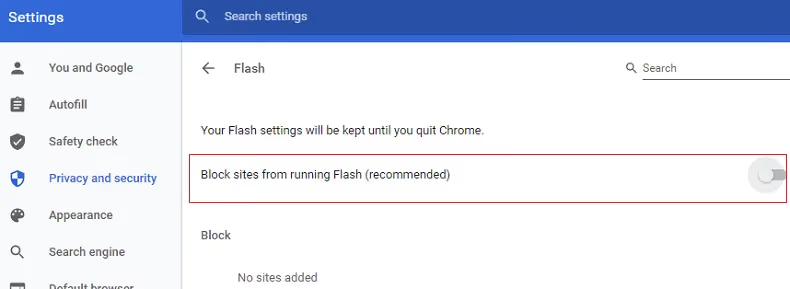
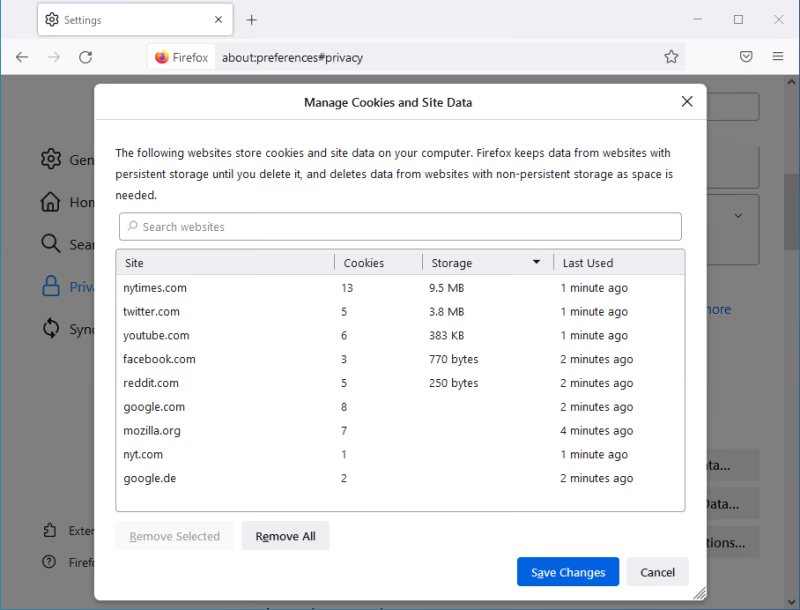
Less routine maintenance that occasionally boosts MLB.tv stream functionality is clearing out standalone flash browser cookies. These cookies accumulate from running flash videos/apps and can create playback conflicts separate from your main browser cookies.
- In Chrome head to Settings > Site Settings > Flash > Website Storage Settings.
- For Firefox visit Options/Settings > Privacy & Security > Remove Individual Cookies
- Safari lacks built-in flash so no action needed.
Reconnect the VPN then check if wiping flash cookies alone solves your MLB.tv streaming issues.
#9. Toggle VPN Protocols
Some VPN apps allow switching between protocols – OpenVPN, L2TP, IKEv2, which channel your traffic through different types of encrypted tunnels. MLB.tv seems to jive better with certain protocols.
Inside VPN app settings, under Advanced Options (locations vary app to app), toggle between protocols like IKEv2 or OpenVPN TCP to see if one provides an MLB.tv streaming experience devoid of buffering or lag spikes. Learn more about VPN protocols from Firestick to LG smart TVs here.
#10. Update VPN Router Firmware
If streaming MLB.tv through a VPN router, check the admin dashboard to ensure you have the latest firmware / VPN protocol packages / app running.
Server-client relationships can get buggy over time. Updating to the newest firmware containing fresh stability fixes could instantly upgrade VPN router performance for smooth MLB.tv streams to all your connected devices.
#11. Whitelist MLB.tv
Inversely from the popular “whitelist your VPN” tactic, some VPN apps provide an “Allowed Apps” feature that lets you whitelist specific apps to channel through the tunnel.
Navigate there on your app’s Settings page and input mlb.tv as a whitelisted domain/app to test if it resolves quirks related to routing MLB.tv streams through the VPN specifically.
#12. Reset VPN Modem/Router
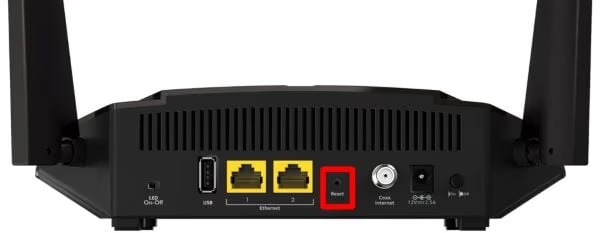
As a last resort, fully resetting an asynchronous VPN modem router clears out any tangled up app associations preventing proper MLB.tv functionality.
Use the hardware reset button on the back to restore factory settings. The nuclear option, but can work magic if other troubleshooting failed to resuscitate your VPN/MLB.tv streaming.
#What Are the Best VPNs for MLB.tv?
Based on extensive first-hand testing and feedback from the avid MLB fan community, these rank as the top 3 VPNs for accessing MLB.tv streams worldwide:
#1. ExpressVPN
With bulletproof encryption, blazing speeds and stealthy protocols to avoid VPN blocks, ExpressVPN hits nothing but home runs streaming MLB.tv abroad every season.
Features
✔ 160+ VPN server locations worldwide
✔ Unlimited bandwidth
✔ Top streaming speeds
✔ Stealth protocol to avoid VPN blocks
✔ 256-bit AES encryption
✔ Apps for all devices
✔ 24/7 customer support
Want it on the big screen? Learn about all the ways to get ExpressVPN on your TV like Firestick, Roku, Chromecast and more.
#2. NordVPN
Thousands of VPN servers across the globe give NordVPN flexibility to find ones that play nice with MLB.tv. Unique specialty servers provide extra options.
Features
✔ 5,000+ global VPN servers
✔ Onion over VPN for anonymous streaming
✔ Obfuscated servers to bypass blocks
✔ P2P & Double VPN servers
✔ 256-bit AES encryption
✔ Apps for all devices
✔ 24/7 customer support
Get the latest NordVPN deal here
#3. Surfshark
With access to over 3,200 worldwide VPN servers and custom streaming configuration, Surfshark reliably tunnels MLB.tv abroad on any device.
Features
✔ 3,200+ VPN server locations
✔ CleanWeb ad & malware blocking
✔ Whitelister tool for streaming sites
✔ 256-bit AES encryption
✔ Unlimited connections
✔ 24/7 customer support
#Bottom Line
To quickly summarize the vital troubleshooting steps:
-
Update VPN app to latest version
-
Try connecting to different nearby VPN servers
-
Clear cookies/cache from MLB.tv before streaming
-
Toggle VPN protocols like IKEv2 or OpenVPN TCP
-
Contact VPN provider support for personalized fixes
Following these steps in order will help you identify and resolve the underlying cause of most VPN/MLB.tv streaming issues that come up over a long baseball season.
Some platforms, such as DirecTV Stream, also carry regional sports networks like YES and NESN. See also how to watch MLB on DirecTV.
#Frequently Asked Questions
#What if MLB.tv says the game is blacked out despite using my VPN?
Double check that your VPN app is actually connected before loading MLB.tv. Some apps allow quick disconnects which can cause confusion. Also confirm MLB.tv shows your IP address from the VPN server location rather than your actual ISP address.
#Can I be banned from MLB.tv for using a VPN?
MLB.tv’s terms do prohibit VPNs. However, no users have been banned purely for VPN access alone, since MLB doesn’t want to lose the subscription revenue. Create an account with legitimate US location data to stay on the safe side.
#Why does my VPN router not work properly with MLB.tv?
Dedicated streaming router firmware can grow outdated and run into conflicts over time, just like standalone VPN apps. Try updating to the latest firmware first. If that doesn’t help, reset the router to factory settings as a last resort.
#Will a free VPN provide enough speed to stream MLB.tv in HD?
Probably not. Free VPNs cut costs by overloading their servers, which means insufficient capacity during peak baseball hours. This leads to constant buffering and connection drops while streaming. A premium VPN with dedicated streaming servers is worth the investment.
#Can I use a VPN on iPhone to watch in-market live MLB games?
VPNs cannot circumvent the iOS MLB app GPS location check for watching in-market live games. You would need to jailbreak the iPhone to bypass blackouts, or use a desktop browser with the VPN active instead.
#Does MLB.tv block all VPN providers equally?
No. MLB.tv targets the most popular VPN IP ranges first, but providers like ExpressVPN and NordVPN rotate their server IPs frequently to stay ahead of blocks. Smaller or free VPN providers get blocked faster because they lack the resources to refresh their IP pools regularly.
#How do I know which VPN server location to pick for MLB.tv?
Choose a server in a US city that falls outside the broadcast territory of the team you want to watch. For example, if you’re trying to watch the Yankees, connect to a server in Dallas or Los Angeles rather than New York. Check MLB’s blackout map on their website to confirm which regions are restricted for each team.