Baseball fans, rejoice! The 2026 MLB season is here. If you want to cut the cord on cable but don’t want to miss your favorite team’s games, have no fear. You can watch MLB on FireStick with just a few steps, and this guide walks you through every option for streaming MLB games on your Amazon Fire TV devices.
- MLB.TV covers out-of-market games — subscriptions start at $24.99/month or $112.99/season for every regular season game outside your local area
- Live TV services fill the local gap — YouTube TV ($64.99/mo) and fuboTV ($69.99/mo) carry regional sports networks and national channels like ESPN and TBS
- A VPN bypasses blackout restrictions — connecting to a server outside your home market unlocks blacked-out games on MLB.TV
- FireStick supports all major MLB apps — MLB.TV, YouTube TV, and fuboTV all have native Fire TV apps with HD streaming
- Spring Training requires live TV services — MLB.TV does not include preseason games, so YouTube TV or fuboTV are your best options for early-season action
#Why Should You Watch MLB on FireStick?
Here are some of the key reasons to watch baseball on your Firestick or Fire TV:
-
No cable required – Stream MLB games without an expensive cable subscription
-
HD quality – Get crystal clear HD streams on your big screen
-
On-demand access – Watch full game replays, highlights and classic games
-
Mobile viewing – Stream games outside the home on your mobile devices
-
Low cost – Pay only for the content you want at significant savings
Now let’s get started so you can watch your favorite MLB team on FireStick this season!
#MLB Streaming Service Options
Fortunately, there are several good options for streaming MLB games at home on FireStick without cable:
#1. MLB.TV
MLB.TV is the official streaming service from Major League Baseball. It offers live streams of every out of market regular season game.
With MLB.TV on FireStick you can:
-
Watch live MLB games in HD
-
Use multigame view to watch up to 4 games simultaneously
-
Includes game archives, highlights and stats
-
Stream on multiple devices
-
Services start at $24.99/month or $112.99/season
One limitation is that locally televised games are blacked out. But using a VPN for MLB streaming is an easy way around this.
VPN problems with MLB.TV are common but avoidable with the right server selections. Or consider MLB streaming on platforms like YouTube TV.
#2. YouTube TV

YouTube TV offers 85+ channels including ESPN, TBS and local sports networks that carry MLB games.
Notable features include:
-
Stream MLB Network 24/7
-
Unlimited cloud DVR storage
-
Works on up to 3 devices simultaneously
-
7 day free trial available
-
$64.99/month after free trial ends
The main catch is that YouTube TV is only available in the US. So if you’re outside the country, you’ll need a VPN.
#3. FuboTV

While pricier than other options, FuboTV provides excellent MLB coverage with over 100 channels.
With FuboTV you get:
-
130+ channels with MLB Network and many local sports networks
-
Cloud DVR with 500 hour capacity
-
Streams on up to 10 devices simultaneously
-
7 day free trial
-
$69.99/month after free trial
Again, FuboTV only works in the United States. So international viewers will need a quality VPN.
Now that you know the best legal MLB streaming options available, let’s talk about how to unlock them…
To learn more about watching national baseball coverage on MLB with Sling TV, or getting games streamed via MLB.TV on Vizio TVs, check out those guides.
#Using a VPN for MLB Streaming
In many cases, you’ll need access to a virtual private network (VPN) to stream MLB games on FireStick, such as when:
-
Traveling or living outside the USA
-
Attempting to bypass MLB blackout restrictions
-
Securing WiFi connections from hacking, throttling and tracking
A VPN allows you to change your virtual location, securing your data and unlocking geo-restricted streaming platforms.
Our VPN recommendation is ExpressVPN. Here’s why it’s the best VPN for MLB streaming:
-
Blazing fast speeds ensure smooth HD streams
-
Works reliably to unblock geo-restrictions
-
Easy to set up and use on Firestick/Fire TV devices
-
Excellent 24/7 live chat customer support
-
30 day money back guarantee
Follow these simple steps to get ExpressVPN setup on your Firestick/Fire TV:
-
Purchase an ExpressVPN subscription
-
Download & install the ExpressVPN app for Fire OS
-
Run the ExpressVPN app and log in
-
Connect to a VPN server location of your choice
-
You can now safely stream blacked out games and more!
It’s really that easy. [Get 49% off ExpressVPN today] to secure your 2026 MLB streams.
Now let’s look at installing the necessary apps for MLB streaming…
#Installing Important Apps
While some MLB streaming platforms like MLB.TV have mobile apps, others require using the Firestick’s web browser. Here are the best apps to get installed for MLB streaming:
#Silk Browser
The Silk Browser comes pre-installed on Amazon Firestick and Fire TV devices. This web browser gives you access to streaming sites that don’t have dedicated Fire TV apps.
To use Silk:
-
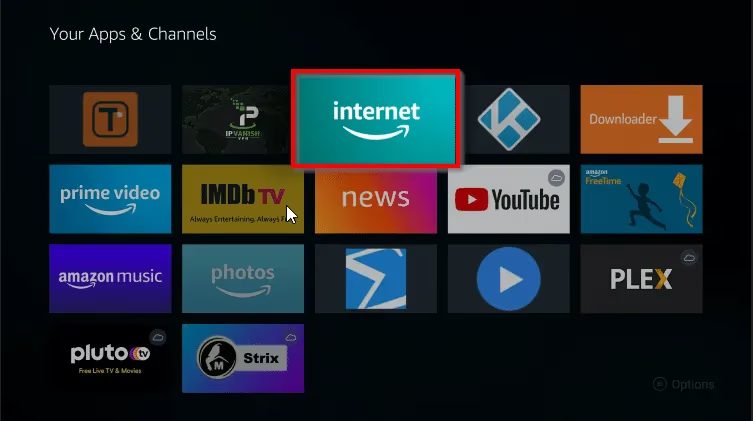
From your Fire TV home screen scroll down to “Your Apps & Channels”
-
Select the Silk Browser app icon
-
Enter the URL of the streaming service in the search bar
-
Bookmark sites like ESPN3 and MLB.TV for easy access
Occasionally clear cached data and cookies in Silk’s Privacy settings for optimal performance.
#Downloader App
You can install helpful third party apps and tools with Downloader:
-
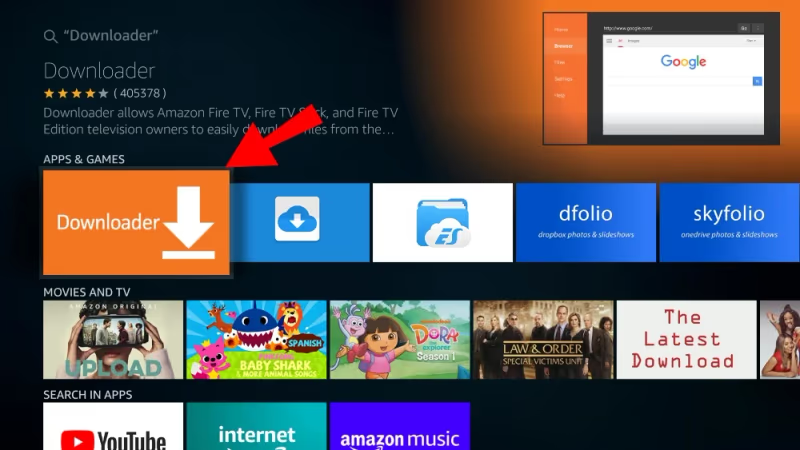
Search for “Downloader” in the Firestick search menu
-
Select Downloader from the Apps & Games results
-
Choose Download / Install to get the app on your device
-
Grant the necessary permissions when prompted
-
You can now download browser extensions like Opera or applications not available in the Amazon App Store!
Downloader allows sideloading apps, tools like VPNs and convenient access to restricted platforms.
#Watching Local, National & Playoff Games
Here are some tips for catching all the MLB action on your Fire TV this season:
#Local Games
Your local team’s games are usually broadcast on regional sports networks (RSNs) like FOX Sports or NBC Sports regional channels. Live TV streaming services like YouTube TV, Hulu Live and FuboTV carry most RSNs.
Again, a VPN gets around annoying blackout restrictions when traveling or living abroad.
#Nationally Televised Games
ESPN, FOX, FS1 and TBS nationally broadcast MLB games during the regular season. YouTube TV, Hulu Live and AT&T TV NOW all include these channels.
For the playoffs and World Series you can also catch games on ABC and MLB Network.
#Streaming Spring Training
Unfortunately MLB.TV does NOT include Spring Training coverage in its subscriptions.
Your best bet is using YouTube TV, Hulu Live or AT&T TV NOW which feature live streams from ESPN, FS1 and MLB Network that show preseason baseball action.
Now let’s discuss solutions for the dreaded streaming blackouts…
#How Do You Get Around MLB Streaming Blackouts?
Nothing kills an MLB streaming party faster than running into a blackout restriction stopping you from the game you want to see.
Blackout rules are complicated, but essentially prohibit local live streams when a game is available on cable TV in your area.
Thankfully, using a VPN provides an easy way to avoid frustrating MLB streaming blackouts by helping you appear to stream from a different location.
To configure a VPN to bypass MLB blackouts on Firestick:
-
First, sign up for a reliable VPN like ExpressVPN
-
Install & launch the VPN app on your Fire TV device
-
Connect to a server location outside your local area
-
You’ll then be able to access live MLB streams blocked in your location!
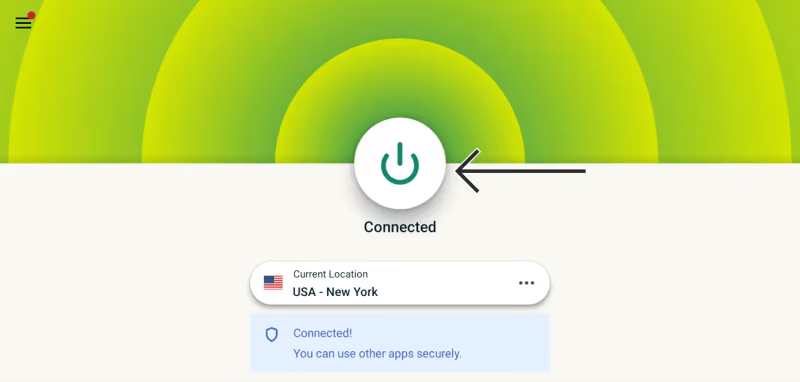
It’s a simple and effective solution. MLB can’t blackout games if they don’t know your actual location!
#Key MLB Streaming Tips & Tricks
Boost your MLB streaming experience to the max with these handy tips:
-
Use private listening mode on your mobile device for headphone streaming during night games
-
Enable Game Start notifications so you never miss the first pitch
-
Set recordings for entire series or just your favorite team’s games
-
Bookmark MLB.TV on Silk Browser for quick access to live Look In
-
Use multi-view to watch 4 games simultaneously on MLB.TV
-
Refresh stale streams by clearing cache/cookies in Silk settings
-
Disable auto-play of game highlights if wanting to avoid spoilers
-
If all else fails, doublecheck your VPN connection to access restricted content
These small adjustments go a long way toward a smoother viewing experience all season.
#Frequently Asked Questions
#Does MLB.TV include local games?
No. Local team games broadcast in your region are blacked out on MLB.TV due to league broadcasting agreements. You need a live TV streaming service like YouTube TV or fuboTV to watch your local team’s games live.
#Can I use my MLB.TV subscription on multiple devices?
MLB.TV subscriptions work on Fire TV Stick, Roku, Apple TV, smartphones, tablets, and web browsers all at the same time. There is no device limit for simultaneous streams on a single account, making it easy to share with family members in your household.
#Do I need the MLB At Bat app on FireStick?
The At Bat mobile app works well on phones and tablets, but you do not need it on FireStick. The dedicated MLB.TV app for Fire TV provides full access to live games, replays, and highlights.
#What is the cheapest way to stream MLB games?
An MLB.TV Single Team pass costs $49.99 for the entire season and covers every out-of-market game for one club. If you follow multiple teams, splitting the full-season MLB.TV subscription with a household member brings the per-person cost under $60. Free options like MLB.TV’s “Free Game of the Day” also give you one live game daily at no charge.
#Can I watch ESPN baseball games on FireStick?
YouTube TV, Hulu + Live TV, and Sling TV all carry ESPN and are available as native FireStick apps. Sling TV’s Orange plan at $40/month is the most affordable option that includes ESPN’s Sunday Night Baseball and other national broadcasts.
#How do I fix buffering when streaming MLB on FireStick?
Clear the app cache by going to Settings > Applications > Manage Installed Applications and selecting the streaming app. Restart your FireStick and router, and make sure your internet speed is at least 10 Mbps for reliable HD streaming. If you are using a VPN, try switching to a closer server to reduce latency.
#Is a VPN legal for watching MLB games?
Using a VPN is legal in the United States and most countries. MLB’s terms of service discourage circumventing blackouts, but there are no reported cases of account bans for VPN use. Choose a reputable VPN provider like ExpressVPN that regularly rotates IP addresses to avoid detection.