MLB.TV subscribers who own a Chromecast can cast live games and on-demand replays directly to their TV. The setup takes about two minutes whether you cast from a phone, tablet, or computer browser.
This guide walks through every casting method, covers common streaming problems, and explains how to deal with MLB blackout restrictions so you never miss a pitch.
- MLB app casting — works on Android 8+ and iOS 14+ devices with built-in Cast support
- Chrome tab casting — lets you send the MLB.TV web player to Chromecast from any computer
- Edge and Firefox — both support Chromecast casting through built-in menus or extensions
- Same Wi-Fi requirement — your phone or laptop and Chromecast must share the same network for casting to work
- Blackout workarounds — a VPN or YouTube TV subscription can bypass local MLB blackout restrictions
#What Do You Need to Stream MLB.TV on Chromecast?
Before you start casting, make sure you have these basics covered.
Hardware:
- A Chromecast (any generation) or a TV with Chromecast built in
- A smartphone, tablet, or computer on the same Wi-Fi network
Software and accounts:
- An active MLB.TV subscription (single-team or all-team plan)
- The MLB app installed on your mobile device, or Google Chrome on your computer
One thing to keep in mind: MLB.TV does not natively run on Chromecast as a standalone app. You always cast from another device. This is different from streaming sticks like Fire TV Stick or Roku, which run the MLB app directly.
#How to Cast MLB Games from the Mobile App
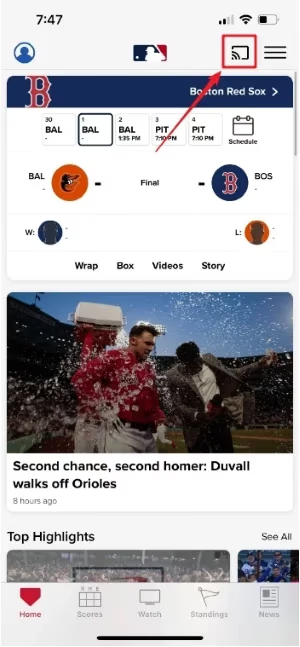
The MLB app for Android and iOS has built-in Chromecast support. This is the fastest way to get games on your TV.
#Setup Steps
- Connect your phone or tablet and Chromecast to the same Wi-Fi network
- Open the MLB app and sign in to your MLB.TV account
- Tap the Cast icon (a rectangle with Wi-Fi waves) in the top-right corner
- Select your Chromecast device from the list
- Pick a live game or archived broadcast and tap play
The stream starts on your TV within a few seconds. Your phone becomes the remote control, so you can pause, rewind, or switch games without interrupting the cast.
#Supported Devices
The MLB app supports casting from:
- Android phones and tablets running Android 8.0 or later
- iPhones and iPads running iOS 14.0 or later
If your app version is outdated, update it through the Google Play Store or Apple App Store. Older versions sometimes drop casting features after mid-season updates.
Lock your phone screen after casting starts. The stream continues on your TV even when the phone display is off, which saves battery during a full nine-inning game.
#How Do You Cast MLB.TV from a Computer Browser?
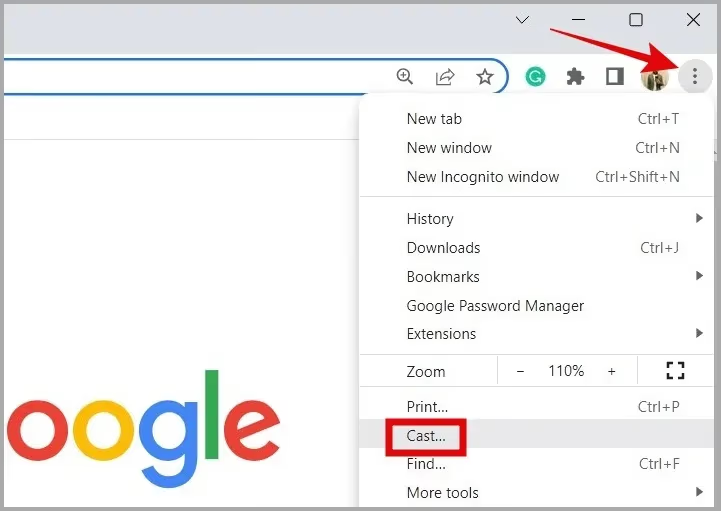
If you prefer watching on your laptop first, you can send the MLB.TV web player to your Chromecast using browser tab casting. Google Chrome gives the best results because Chromecast support is built in.
#Casting from Google Chrome
- Open Google Chrome on your Windows or Mac computer
- Go to mlb.com/tv and sign in
- Click the three-dot menu in the top-right corner, then click Cast
- Select Cast tab from the sources dropdown
- Choose your Chromecast device
The browser tab mirrors to your TV. You can resize Chrome to full screen for a better viewing experience. Audio routes through your TV speakers automatically.
#Casting from Microsoft Edge
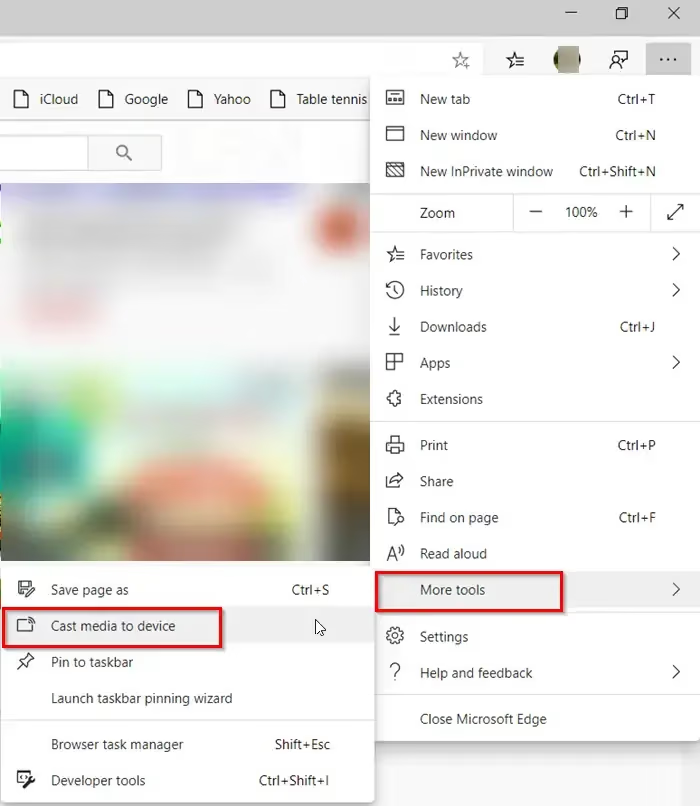
Edge uses the same Chromium engine as Chrome, so casting works the same way:
- Open Edge and navigate to MLB.TV
- Click the … menu at the top right
- Select More tools then Cast media to device
- Pick your Chromecast and choose Cast tab
#Casting from Firefox
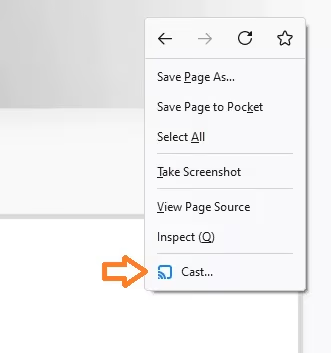
Firefox does not have native Chromecast support. You need a third-party extension like fx_cast to enable casting. Install the extension, then click the Cast icon in the toolbar and select your device.
The experience is less reliable than Chrome or Edge. If you run into buffering or audio sync issues, switch to Chrome for casting.
#What About Safari?
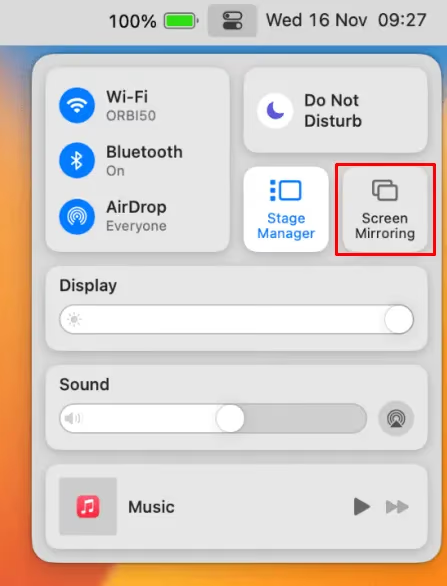
Safari does not support Chromecast at all. Apple’s browser only works with AirPlay devices. If you have a Mac and want to cast to Chromecast, install Chrome or Edge instead.
#Fixing Common Chromecast Streaming Problems
Even with the right setup, casting can sometimes fail. Here are the most common issues and how to fix them.
Chromecast not showing up in the device list:
- Confirm both devices are on the same Wi-Fi network (not guest networks, which isolate devices)
- Restart your Chromecast by unplugging it for 10 seconds
- Restart the MLB app or browser
Stream starts but keeps buffering:
- Move your router closer to the Chromecast, or use a 5GHz Wi-Fi band for less interference
- Close other bandwidth-heavy apps on your network
- Lower the stream quality in the MLB app settings from 1080p to 720p
Audio plays but the screen is black:
- Force-close the MLB app and reopen it
- Try casting from a different device to rule out a phone-specific bug
- Update your Chromecast firmware through the Google Home app
Cast icon disappears mid-game:
- Your Wi-Fi connection likely dropped briefly. Reconnect to Wi-Fi and reopen the app.
If none of these fixes work, contact MLB.TV support directly. They can check whether the issue is account-related or a known outage.
#How Do You Get Around MLB Blackout Restrictions?
MLB blacks out local market games on MLB.TV. If your home team is playing and you are in their broadcast region, the game will not stream live. It becomes available as a replay about 90 minutes after it ends.
There are a few ways around this:
Use a VPN. A VPN changes your apparent location so MLB.TV thinks you are outside the blackout zone. Connect to a server in a different state before opening the MLB app or website. Check our guide on MLB.TV VPN issues if you run into problems.
Subscribe to a live TV service. YouTube TV and Sling TV carry regional sports networks that broadcast local games. You can cast these services to Chromecast the same way you cast MLB.TV.
Watch on an LG Smart TV instead. If you own an LG Smart TV, the MLB app runs natively without needing a Chromecast at all. Same blackout rules apply, but you skip the casting step entirely.
#Bottom Line
Chromecast is a reliable, affordable way to watch MLB.TV on your TV. The MLB app on your phone gives you the cleanest casting experience, while Chrome tab casting works well from a computer. Keep both devices on the same Wi-Fi network, update your apps regularly, and you should have zero issues through the entire baseball season.
If blackouts are your main problem, pair a VPN with MLB.TV or pick up a live TV plan that includes your local RSN. Either way, every game ends up on your big screen.
#FAQ
#Does Chromecast work with MLB.TV without a paid subscription?
No. MLB.TV requires an active subscription to stream live games and full replays. Free highlights and condensed games on the MLB app do not support casting to Chromecast. You need either a single-team plan or the all-team package.
#Can you cast MLB.TV in 4K on Chromecast?
MLB.TV streams in 1080p at 60fps. The service does not offer a 4K feed as of the 2026 season, so even a Chromecast with Google TV 4K will display games at 1080p. The picture quality still looks sharp on most TVs up to 65 inches.
#Why does my Chromecast keep disconnecting during MLB games?
Wi-Fi interference is the most common cause. Chromecast uses your home network to receive the stream, and a weak signal causes drops. Move your router closer, switch to a 5GHz band, or plug your Chromecast into an HDMI extender to improve reception. Also check that your router firmware is current.
#Is there a delay when casting MLB games to Chromecast?
Yes, expect a 30 to 60 second delay compared to cable broadcasts. This is standard for all MLB.TV streams, not just Chromecast. Avoid checking live scores on your phone during the game if spoilers bother you.
#Can you use Chromecast to watch MLB games for free?
Not legally through the MLB app. Free options like MLB.TV’s free game of the day were discontinued. Your best free option is watching nationally broadcast games through a service trial on YouTube TV or Hulu + Live TV, then casting from those apps.
#Does the MLB app let you choose home or away broadcasts on Chromecast?
Yes. The MLB app lets you pick between home and away TV feeds, as well as home and away radio audio overlays, before you start casting. Select your preferred feed on your phone, then tap the Cast icon. The audio and video feed selection carries over to your TV.
#What happens if my phone battery dies during a cast?
The stream stops. Chromecast relies on your phone or computer to maintain the casting session. If your device shuts off or disconnects from Wi-Fi, the cast ends immediately. Plug your phone in during long games to avoid interruptions.