MLB.TV is the go-to streaming service for watching out-of-market baseball games, and Samsung Smart TVs handle it well. If you own a 2018 or newer Samsung model, you can install the MLB.TV app straight from the App Store and start watching within minutes.
This guide walks through every method for getting MLB on your Samsung Smart TV, from the native app to casting from your phone. You will also find tips for getting the best picture quality and avoiding common problems.
- Samsung Smart TVs from 2018 onward support the MLB.TV app natively through the Samsung App Store
- MLB.TV streams at 720p or 1080p 60fps on Samsung Smart TVs, with select games available in 4K
- AirPlay casting requires both devices on the same Wi-Fi network and works on 2018+ Samsung models
- An MLB.TV subscription costs $24.99/month or $149.99/year and covers all out-of-market regular season games
- Multi-View lets you watch up to 4 games at once on the Samsung MLB.TV app with split-screen display
#What Do You Need to Stream MLB on Samsung Smart TV?
Before you start, make sure you have these basics covered:
- A Samsung Smart TV from 2018 or later (check Settings > About This TV for your model year)
- A stable internet connection with at least 10 Mbps download speed
- An active MLB.TV subscription

MLB.TV pricing sits at $24.99 per month or $149.99 for the full season. If you have Amazon Prime, check whether MLB.TV is included free with your membership before paying full price. T-Mobile customers should also look into the annual free MLB.TV offer that typically launches each spring.
One thing to keep in mind: MLB.TV only covers out-of-market games. Local market games are blacked out, which means you will need a live TV service like YouTube TV or a regional sports network for your home team.
#How to Install the MLB.TV App on Samsung Smart TV
The native app gives you the best performance and the most features. Here is how to set it up:
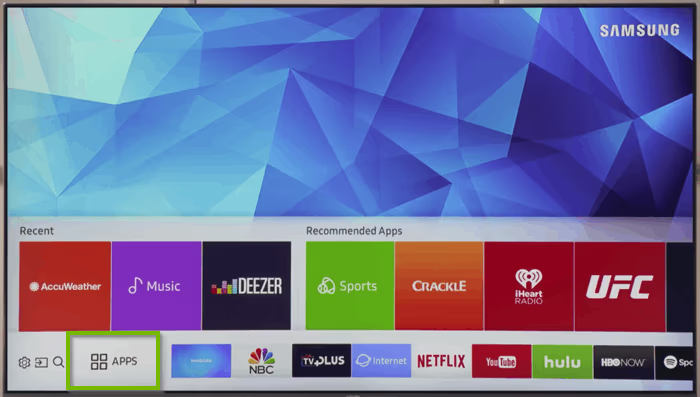
- Press the Home button on your Samsung remote
- Navigate to the Apps tab at the bottom of the screen
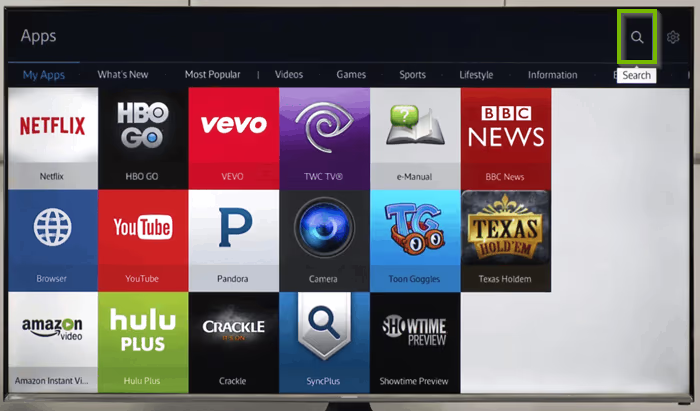
- Select the Search icon (magnifying glass) in the top right
- Type MLB and press Enter
- Select MLB.TV from the results
- Click Install and wait for the download to finish
- Open the app and sign in with your MLB.TV credentials
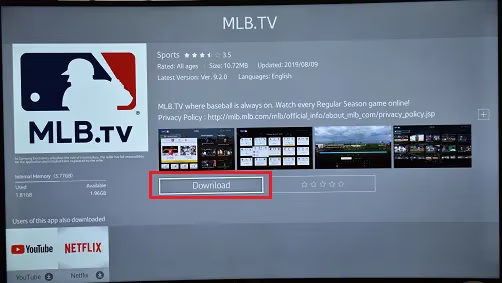
The app should appear on your home screen after installation. If it does not show up, go back to the Apps tab and add it to your home screen manually by long-pressing the app icon and selecting “Add to Home.”
On older Samsung models (2018-2019), the app may take a few extra seconds to load. This is normal. The app runs more smoothly on 2020 and newer Tizen OS versions.
#How to Cast MLB Games from Your Phone to Samsung TV
If you prefer using your phone as a remote, casting is a solid option. It works through AirPlay on iPhones and through the SmartThings app or screen mirroring on Android.
#AirPlay (iPhone)
- Make sure your iPhone and Samsung TV are connected to the same Wi-Fi network
- Open the MLB At Bat app on your iPhone
- Start playing a game
- Tap the AirPlay icon in the top-right corner of the video player
- Select your Samsung TV from the list
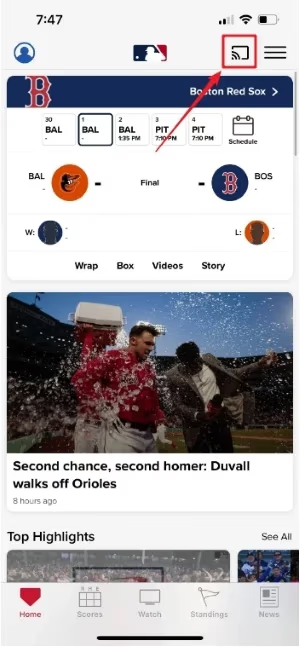
The stream should appear on your TV within a few seconds. Keep your phone unlocked during playback, or the cast may disconnect. If you run into AirPlay problems on your Samsung TV, our AirPlay troubleshooting guide covers the most common fixes.
#Android
Android users can cast using the SmartThings app. Open SmartThings, connect to your Samsung TV, then start the MLB stream on your phone and use screen mirroring. The quality depends on your phone’s processing power and Wi-Fi strength.
#Setting Up MLB.TV on Your Phone First
Some users find it easier to create their account on mobile before logging in on the TV. The phone keyboard makes entering payment details faster.
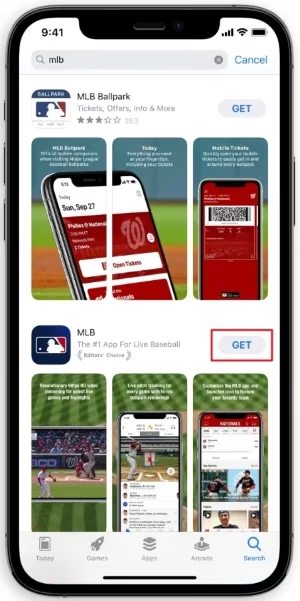
- Download the MLB At Bat app from the App Store or Google Play
- Create an account or sign in
- Choose your subscription plan and enter payment info
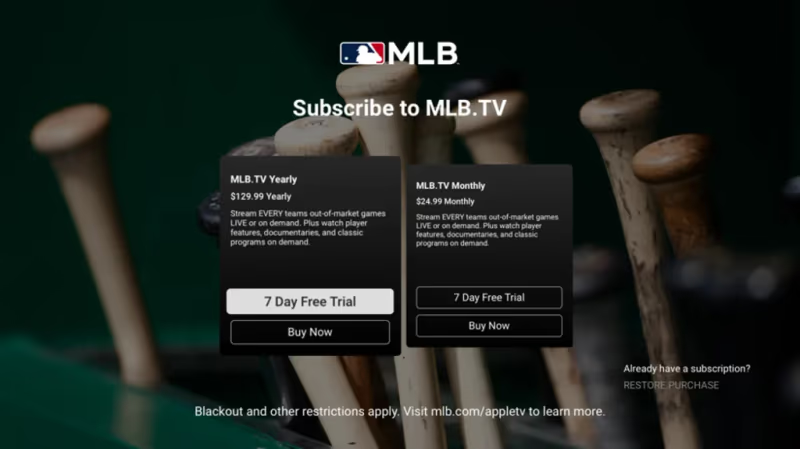
Once your account is active, open the MLB.TV app on your Samsung TV and sign in with the same credentials. Your subscription works across all devices tied to your account.
#What Features Does the Samsung MLB.TV App Have?
The Samsung version of MLB.TV has most of the features you will find on other platforms. A few stand out for big-screen viewing.
Multi-View is the highlight. It splits your screen into four quadrants, each showing a different live game. This is useful during playoff races or when several close games overlap on the schedule. You control which games fill each quadrant through the on-screen menu.
Home and away broadcast feeds let you pick your preferred commentary team. For nationally broadcast games, you might also get an alternate feed with different announcers.
Condensed games compress a full 9-inning game into about 20 minutes of action. No dead time between pitches. This is a great way to catch up on games you missed without sitting through three hours of footage.
The app also has customizable stat overlays that display live box scores, pitch tracking, and player stats on top of the video. You can toggle these on and off during playback using your Samsung remote.
#What If Your Samsung TV Does Not Support MLB.TV?
Samsung TVs made before 2018 do not have access to the MLB.TV app. You have a few alternatives.
The most straightforward fix is plugging in a streaming device. An Amazon Fire TV Stick or Chromecast with Google TV both support MLB.TV and cost under $40. Connect the device to an open HDMI port on your TV and install the app from that device’s app store.
You can also connect a laptop to your TV using an HDMI cable and stream through the MLB.TV website in a browser. This method works on any TV with an HDMI input, regardless of age or brand.
If you watch MLB on other TVs in your home, we have setup guides for LG Smart TVs and Vizio TVs as well.
#Troubleshooting Common MLB.TV Problems on Samsung TV
A few issues come up regularly with the MLB.TV app on Samsung Smart TVs. Here are the quickest fixes.
#App Freezing or Crashing
Close the app completely by pressing the Home button, navigating to the app, and holding the Select button until the options menu appears. Choose Close and reopen it. If the problem continues, go to Settings > Apps > MLB.TV > Clear Cache. Our clear cache guide for Samsung TVs walks through this step in detail.
#Buffering During Games
Buffering usually points to a network issue. Run a speed test from your TV by going to Settings > General > Network > Network Status > Speed Test. You need at least 10 Mbps for a stable 1080p stream. If your TV is far from the router, consider switching to a 5GHz Wi-Fi band or using an ethernet adapter for a wired connection.
#Blackout Restrictions
MLB enforces local market blackouts, so games involving your local team will not be available on MLB.TV. The game typically becomes available about 90 minutes after it ends. A VPN can bypass blackouts, but MLB actively blocks many VPN services. Check our guide on MLB.TV VPN issues if you need help with that.
#Bottom Line
Getting MLB on a Samsung Smart TV takes about five minutes. Install the app from the Samsung App Store, sign in, and pick a game. If your TV is from 2018 or later, the native app handles everything from Multi-View to condensed games and stat overlays.
For older Samsung TVs, a Fire TV Stick or Chromecast fills the gap for under $40. Either way, you get full access to every out-of-market game in the MLB.TV catalog on the biggest screen in your house.
#FAQ
#Does MLB.TV work on all Samsung Smart TVs?
No. The MLB.TV app requires a Samsung Smart TV from 2018 or newer running Tizen OS. Models from 2017 and earlier use an older operating system that MLB no longer supports. You can check your model year in Settings > About This TV.
#How much does MLB.TV cost in 2026?
MLB.TV costs $24.99 per month or $149.99 for a full-season annual pass. T-Mobile often runs a free MLB.TV promotion each spring, and Amazon Prime members may get discounted access depending on current partnership deals.
#Can I watch local team games on MLB.TV?
Local market games are blacked out on MLB.TV due to broadcast rights agreements. You will need a cable subscription, YouTube TV, or another live TV service with your regional sports network to watch your home team live. Blacked-out games become available on MLB.TV about 90 minutes after they end.
#Is there a free trial for MLB.TV on Samsung TV?
MLB occasionally offers a free trial at the start of the season, but availability changes each year. Check the MLB.TV app on your Samsung TV or visit MLB.com to see current promotions. The monthly plan at $24.99 lets you cancel anytime if you want to test the service without a long commitment.
#Why does MLB.TV keep buffering on my Samsung TV?
Buffering happens when your internet connection drops below the required speed. MLB.TV needs at least 10 Mbps for 1080p streaming. Switch from 2.4GHz to 5GHz Wi-Fi, move your router closer to the TV, or use a wired ethernet connection for the most reliable performance. Clearing the app cache also helps if the problem started recently.
#Can I watch MLB.TV on multiple TVs at the same time?
Yes. One MLB.TV account supports streaming on multiple devices simultaneously. You can watch on your Samsung TV, a phone, and a tablet at the same time without hitting a device limit. Each device signs in with the same account credentials.
#How do I fix the MLB.TV app not showing up on Samsung TV?
First, make sure your Samsung TV is from 2018 or later. If it is, try updating your TV firmware through Settings > Support > Software Update. After updating, search for MLB in the App Store again. If the app still does not appear, do a factory reset of the Smart Hub by going to Settings > Support > Device Care > Self Diagnosis > Reset Smart Hub.
#What picture quality does MLB.TV stream on Samsung TV?
MLB.TV streams at either 720p 60fps or 1080p 60fps on Samsung Smart TVs, depending on the broadcast. Select games during the season and postseason are available in 4K HDR. Samsung TVs with upscaling features like Crystal UHD can improve the visual quality of 720p streams noticeably.