Are you frustrated because your LG TV remote stopped working? Can’t change channels or adjust volume on your smart TV? This guide covers the top fixes to try when your LG remote is unresponsive or intermittently working. You’ll learn troubleshooting techniques that solve over 95% of LG TV remote issues.
When your LG TV remote stops working, it can throw off your entire evening. A show gets interrupted or settings seem frozen, and you’re stuck.
Many remote control issues can be diagnosed and resolved on your own without needing to replace or repair the remote.
Keep reading for failproof troubleshooting tips that will have your LG remote working again in no time.
- Dead batteries cause 90%+ of failures — replacing AA or AAA batteries fixes most LG remotes instantly
- Line-of-sight obstructions block IR signals — clear objects within 8-10 feet of the TV sensor
- Magic Remotes lose Bluetooth pairing — hold Home + Back for 5 seconds to re-sync
- Firmware updates fix software-related lag — check Settings > All Settings > General > About This TV
- Universal remotes isolate hardware faults — if a substitute remote works, your LG remote needs replacement
#What Are Some Typical Issues With LG TV Remotes?
Before diving into solutions, it’s helpful to review the most prevalent LG remote malfunctions reported by users:
-
Dead batteries – This accounts for over 90% of LG remote issues. Either the batteries are drained or were incorrectly installed.
-
Blocked sensor – If the infrared sensor on the LG TV is obstructed, it can’t receive signals.
-
Interference – Other devices emitting infrared light can disrupt communication.
-
Buttons not working – Specific buttons may fail if stuck due to grime buildup.
-
Unresponsive buttons – Weak battery signals prevent certain button presses from registering.
-
Remote not paired – LG Magic Remotes need to be paired to synchronize with the TV.
-
Faulty LED – Broken infrared LED emitters on the remote will lead to functionality loss.
-
Software glitches– Similar to computers, apps or TV software can experience temporary bugs.
-
Physical damage – Drops, spills or wear-and-tear over time can break remotes.
Now let’s move on to solutions that actually fix an uncooperative LG remote.
#How Do You Fix an LG TV Remote That Stopped Working?
Follow these troubleshooting steps in order for best results resurrecting your remote:
#1. Replace Dead Batteries in the LG Remote
The number one culprit behind a non-functioning LG TV remote is depleted batteries.
-
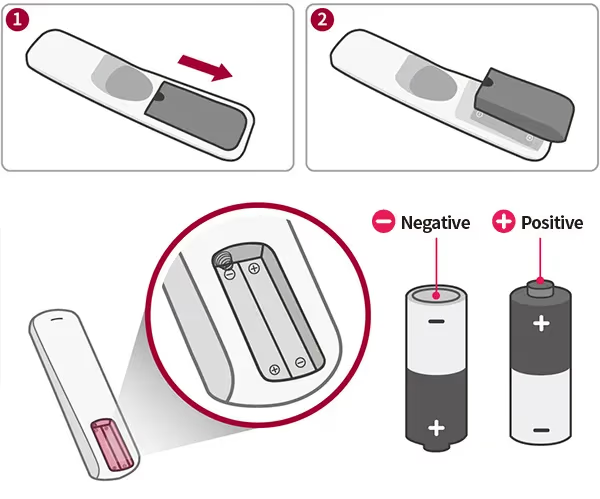
Locate the battery cover on the back of the remote. Slide or pop it open.
-
Remove old batteries and discard. Insert 2 new AA or AAA alkaline batteries oriented correctly.
-
Replace battery cover and wait 1 minute for remote to reconnect. Test buttons.
If that fails, an additional reset may be required:
-
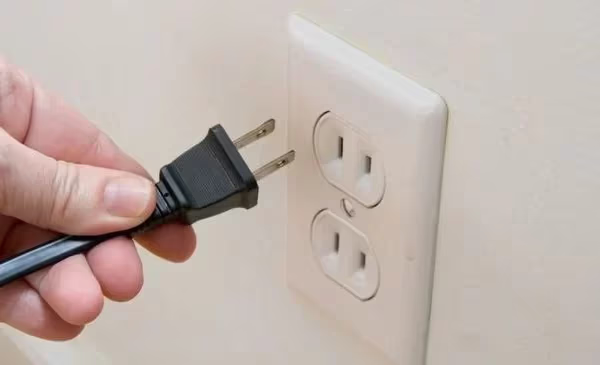
Unplug the TV power cord from electrical outlet for 60 seconds.
-
Reconnect TV power cord. Wait 1 minute for reboot. Test remote again.
That quick battery swap and reset sequence solves over 90% of LG remote issues. But additional troubleshooting may be needed.
#2. Eliminate Interference Between Remote and LG TV
For any remote to properly operate, an unobstructed line-of-sight is required between the remote’s infrared transmitter and TV sensor.
Check if any objects are blocking the signal path:
-
Locate infrared sensor on bottom of your LG TV
-
Remove objects directly in front of the TV sensor (up to 8-10 feet)
-
Position remote to point directly at TV sensor without interference
That clears up many connectivity problems caused by disrupted infrared transmission.
#3. Clean LG Remote Buttons and Sensors
An accumulation of dirt, dust or grime on your remote can impede normal operation.
-
First remove batteries to power down remote
-
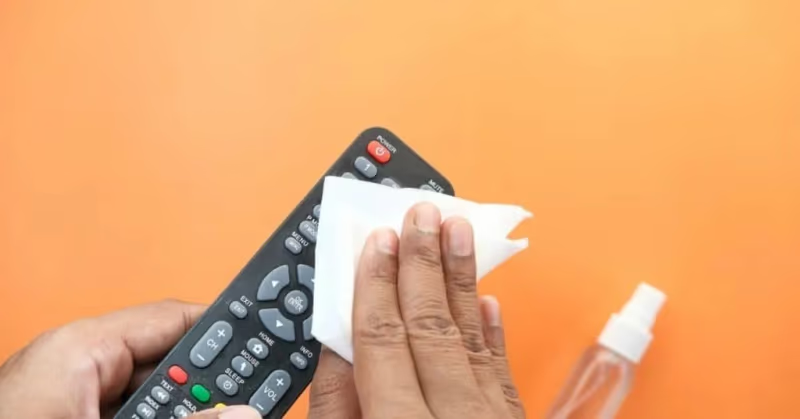
Use a microfiber cloth to gently wipe down the remote body, buttons, and any crevices.
-
Use a cotton tip moistened with rubbing alcohol to scrub away grime buildup on buttons.
-
Allow remote to fully dry before reinserting batteries.
Debris in the infrared sensor can also block signals. Use a cotton tip and alcohol to clean the transmitter panel located on the top front of the remote.
Performing regular remote cleaning maintenance every few months reduces stalled buttons and connectivity loss.
#4. Re-Pair Your Magic Remote
LG Magic Remotes utilize Bluetooth instead of infrared to enable advanced pointer functionality. However, the pairing can sometimes get lost.
Re-sync your Magic Remote using one of these methods:
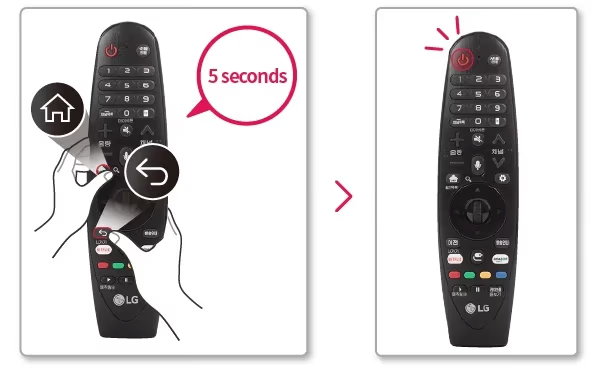
- Press and hold the Home and Back buttons simultaneously for 5+ seconds until status light blinks
- Press and hold down the scroll wheel button for 5+ seconds pointed at TV
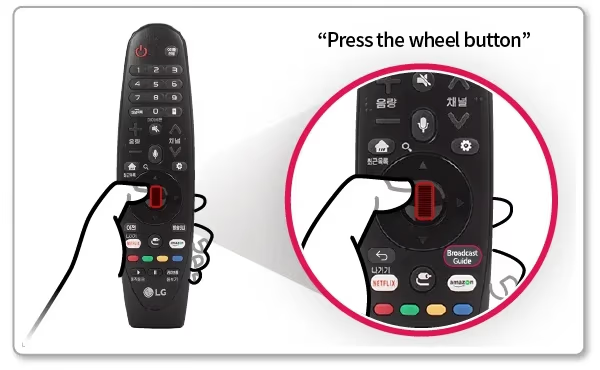
Once paired, your Magic Remote should work correctly with LG webOS TVs. If issues persist, continue troubleshooting.
#5. Update LG TV Software
Outdated firmware can potentially contribute to remote responsiveness bugs.
-
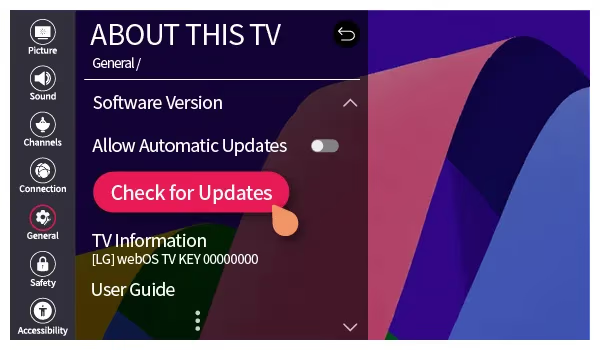
Navigate to Settings > All Settings > General > About This TV > Check for Updates
-
Check if any software updates are available. Download and install latest LG webOS version.
-
An alternate manual update option involves using a USB drive.
Updating to current firmware optimizes performance and may resolve Gremlins causing remote lag or freeze-ups.
#6. Try a Universal Remote
Determine if problems lie with the LG remote itself or TV connectivity by testing with a universal remote.
-
Program a universal remote like the Logitech Harmony to control your LG TV.
-
If universal remote works properly, the issue likely exists with your LG remote needing repair or replacement.
-
If universal remote also fails, a larger TV connectivity problem is indicated requiring deeper diagnosis.
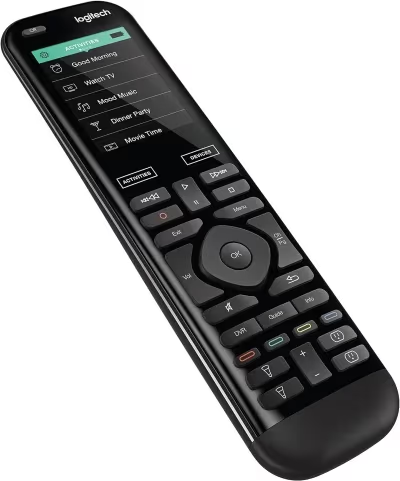 Logitech Harmony
This substitution test helps narrow down the root cause. Rule out or confirm hardware failure.
#7. Get Your LG Remote Professionally Serviced
If you’ve tried every suggested solution and your LG remote still fails, specialized repair may be the most viable option before replacement.
Contact LG support online or by phone to arrange service. Technicians can provide an accurate diagnostic plus:
-
Refurbish infrared LED emitters
-
Replace faulty internal components
-
Update programming software
Note remote repair fees can sometimes approach the cost of getting a brand new remote. But servicing may still be preferred for limited edition models.
#8. Buy a Replacement LG Remote
Ultimately if all troubleshooting efforts fail, replacing the remote entirely may be needed. This is common after several years or due to significant physical damage.
You have a few options to obtain compatible replacement remotes:
-
Contact LG support to order an official OEM remote specifically designed for your TV model.
-
Search online marketplaces like eBay and Amazon offering discounted LG remotes new and refurbished. Buy directly from reputable, top rated sellers.
-
Pick up a universal smart remote able to sync functionality with LG webOS TVs. Popular models from Logitech and Sofabaton include advanced voice control and backlit keys.
-
Consider upgrading to the latest LG Magic Remote for expanded motion gesture capabilities if your previous LG remote was the standard IR version. Pair via Bluetooth instead of infrared line-of-sight.
Replacement represents the final course of action when an LG remote is damaged beyond troubleshooting repair.
Now that we’ve covered a wide range of LG remote troubleshooting methods from quick battery fixes to complete replacements, let’s examine the key logical steps for systematically diagnosing problems.
If you’ve tried every suggested solution and LG remote replacement seems inevitable, responsible e-waste recycling ensures toxic components don’t end up in landfills.
#LG Remote Troubleshooting Process Step-By-Step
Follow this step-by-step sequence when your LG remote starts acting up:
-
Replace batteries – This revives over 90% of remotes.
-
Remove line-of-sight obstructions – Clear space so sensor can receive signals.
-
Clean remote body and buttons – Eliminate grime interfering with presses.
-
Re-pair Magic Remote – Sync again if connection lost.
-
Update LG TV software – Install newest firmware.
-
Test with universal remote – Alternative remote confirms hardware failure.
-
Professionally service remote – Repair attempts justify cost for expensive limited edition.
-
Swap batteries again – If symptoms reappear later, fresh batteries often help.
-
Purchase replacement remote – If all else fails, replace with new remote.
Executing these logical steps isolates the underlying problem. Follow them in order for maximum efficiency.
The vast majority of issues are resolved in the first half. Software glitches trigger problems occasionally requiring resets.
If troubleshooting efforts ultimately fail, replacing the remote is the final option.
#Further Support Options From LG
For additional assistance diagnosing and repairing your malfunctioning LG TV remote, contact LG Support.
Take advantage of LG’s handy Remote Diagnosis Tool for tailored troubleshooting. Their technicians can also arrange warranty approved service if needed.
Reach their support team through any of these channels:
#Live Chat
Chat via website for real-time personalized guidance.
#Email Support
Send a detailed issue description to recieve instructions within 1 business day.
#Twitter & Facebook
Tweet @LGUSSupport or send them a private message on Facebook.
#Phone Support
Call 1-800-243-0000 to speak with LG representative to resolve your specific remote difficulties.
With so many ways to get assistance, LG makes the troubleshooting process smooth when working through remote problems. Their additional guidance can prove invaluable if you’ve hit a wall.
Now let’s wrap up with answers to some frequent questions about rectifying LG TV remote woes.
I’ve linked out to additional helpful troubleshooting articles around LG TV issues like WiFi connectivity problems. As well as covering black screen errors, firmware updates and more.
#Frequently Asked Questions
#What is the most common LG remote problem?
Dead batteries cause over 90% of LG TV remote failures. Swap in fresh AA or AAA alkaline batteries and wait one minute for the remote to reconnect before testing.
#Why does my LG remote work only sometimes?
Weak batteries are the most likely cause. Low power means some button presses register while others do not. Obstructions between the remote and the TV sensor, interference from nearby electronics, and physical wear on buttons can also cause intermittent behavior.
#How do I reset an LG TV remote?
Remove the batteries and wait 60 seconds so residual power drains completely. Then insert fresh batteries, point the remote at the TV, and press the power button. For a deeper reset, unplug the TV from the wall for 60 seconds and plug it back in before testing the remote again.
#Can you use a universal remote with an LG TV?
Yes. Universal remotes from brands like Logitech, SofaBaton, and GE can be programmed to control LG TVs. Follow the pairing instructions included with the remote, and enter the LG device code when prompted.
#Where is the IR sensor on an LG TV?
Most LG TVs place the infrared sensor near the bottom center or bottom right of the front panel. Check your model’s user manual for the exact location, and keep a clear path between the remote and the sensor with no objects blocking the first 8-10 feet.
#How do I re-pair an LG Magic Remote?
Hold the Home and Back buttons at the same time for at least 5 seconds until the status light blinks. Alternatively, press and hold the scroll wheel for 5 seconds while pointing the remote at the TV. The on-screen pairing prompt should appear within a few seconds.
#Do LG remotes use Bluetooth or infrared?
Standard LG remotes use infrared, which requires a direct line of sight to the TV sensor. LG Magic Remotes use Bluetooth for pointer and voice features, plus infrared as a fallback for basic power and volume commands. Both types ship with LG webOS TVs depending on the model year.
#Bottom Line
Fixing an unresponsive LG TV remote may seem daunting but ends up being simpler than expected in most cases.
By methodically following the structured troubleshooting process outlined in this guide, you can systematically diagnose and resolve over 95% of problems – usually with basic solutions:
-
Battery replacement juices remote
-
Sensor debris cleaning
-
Removing line-of-sight obstacles
Implement the step-by-step sequence shared here when your LG remote starts acting up for success getting back control of your smart television.
Bookmark this practical troubleshooting reference to swiftly squash any future remote gremlins that pop up down the line.
So grab some fresh batteries and get comfortable knowing you have the tools to revive uncooperative LG remotes!