Have you noticed your LG TV randomly turning off and restarting over and over? This frustrating glitch can be caused by a variety of issues, from software bugs to faulty hardware components. Below you will find 14 possible fixes to stop your LG TV from constantly rebooting itself, so you can get back to enjoying your favorite shows.
- Power cycling fixes most software-related restarts — unplug for 2 minutes and hold the power button for 60 seconds to drain residual charge
- HDMI-CEC (SimpLink) is a top culprit — connected devices can send unwanted power commands that trigger a reboot loop
- Firmware glitches cause repeated restarts after updates — a factory reset followed by a fresh firmware install resolves most cases
- Overheating triggers automatic shutdown protocols — dust buildup in vents and fan failures force the TV to restart as a safety measure
- Faulty capacitors on the power supply board — visually bulging or leaking capacitors are a common hardware cause in LG TVs older than 3 years
#What Causes an LG TV to Keep Restarting?
Before we jump into the step-by-step troubleshooting guide, let’s look at the most common culprits behind this reboot loop:
#1. Software Bugs
Glitches in the TV’s firmware can trigger random restarts. This is especially true after a faulty firmware update.
#2. Voltage/Power Issues
Insufficient, inconsistent power from the wall outlet or fluctuations on the TV’s power supply board can force a restart.
#3. Remote Control Problems
A stuck button on the remote accidentally sends the power toggle command. Low battery power can also cause signal issues.
#4. Settings Conflicts
Auto power-off timers, sleep settings, HDMI-CEC, or app caches being full can wreak havoc on an LG TV.
#5. Overheating
Dust buildup preventing ventilation, fan failures or intensive tasks overheating components can activate automatic restart protocols.
#6. Faulty Hardware
Defective capacitors, fuses, transistors and more on internal boards can trigger error codes and reboots.
Many of these issues can be fixed with straightforward troubleshooting steps or DIY repairs. Here are 14 solutions to stop your LG TV from repeatedly restarting itself.
#14 Fixes for an LG TV That Repeatedly Reboots
Follow these methods in order – later solutions build upon earlier ones:
#1. Power Cycle the LG TV
Start with the tried and true power cycle, which forces a hard reboot to clear any temporary software glitches:
-
Unplug TV from power source.
-
Press and hold power button on the TV for 60 seconds to drain residual electricity.
-
Leave unplugged for 2-3 minutes to allow components to fully reset.
-
Plug back in, power on, and test if fixed.
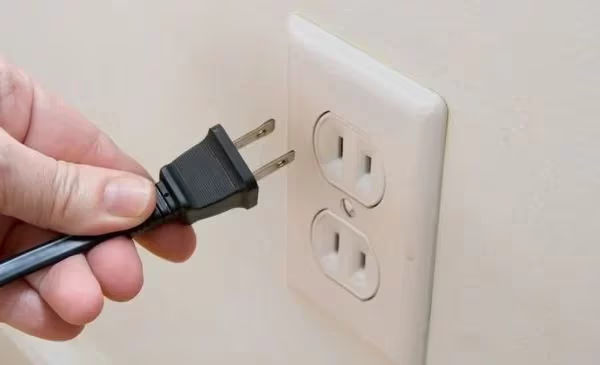
This soft reset solves many electronic issues, so it should be your first step.
#2. Inspect All Connections and Cables
Electrical issues in cables or loose connections can affect voltage delivery:
-
Check for damage, corrosion, breaks, kinks across all cables.
-
Remove and reseat all connections at wall outlet, power strip, TV ports.
-
Test different power outlets to rule out voltage deficiencies.
-
Try replacing suspect cables to improve power flow.
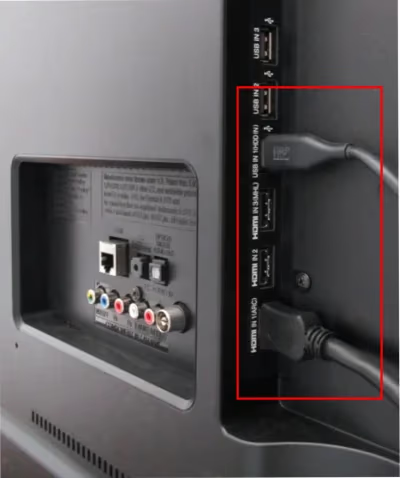
Take the time to methodically scrutinize every wire connection to catch elusive connectivity problems causing the constant restarts.
#3. Eliminate Source Device Conflicts
Interference from other devices can confuse the TV:
-
Unplug all devices (Blu-Ray, streaming stick, cable box) from TV inputs.
-
Disconnect Ethernet cables, streaming sticks, Bluetooth connections.
-
Power on TV and observe if issue persists when nothing is connected.
-
Slowly reconnect one device at a time, testing for problems after each.
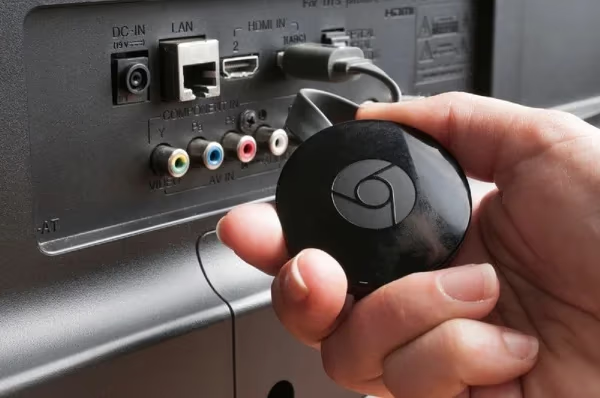
If the restarts stop once everything is unplugged, an incompatible or malfunctioning source device is likely at fault. Reintroduce them slowly to identify the problematic device.
#4. Disable Automatic Power Settings
Assessment hidden auto-off timers:
-
Using remote, check General → Timers menu for any enabled sleep timers or automatic power schedules.
-
Toggle all auto power settings to off temporarily for testing.
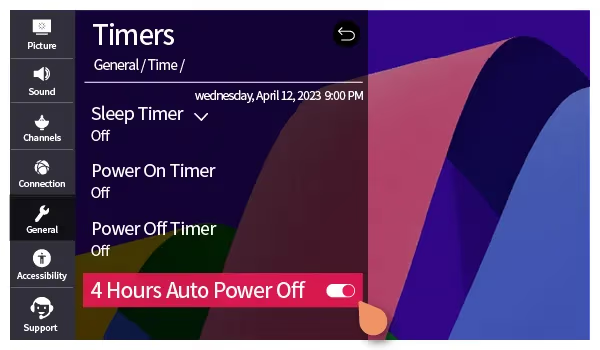
It’s easy to overlook automatic sleep/off functions as the cause. Flipping them off removes those instability variables during troubleshooting.
#5. Reset and Update LG TV Software
Glitch system software can wreak havoc:
- Attempt soft reset through Support → TV Software Update menu.
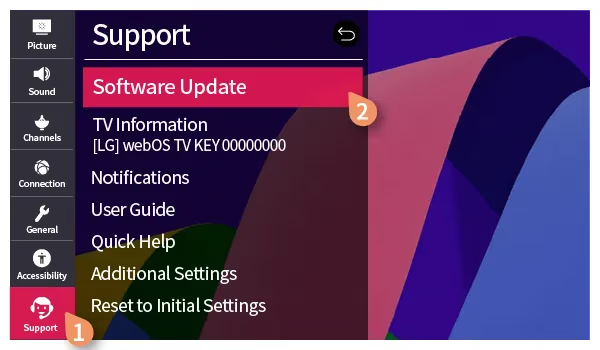
- If loop persists, perform factory reset through General → Reset to Initial Settings. This will delete all customizations and reinstall system software fresh.
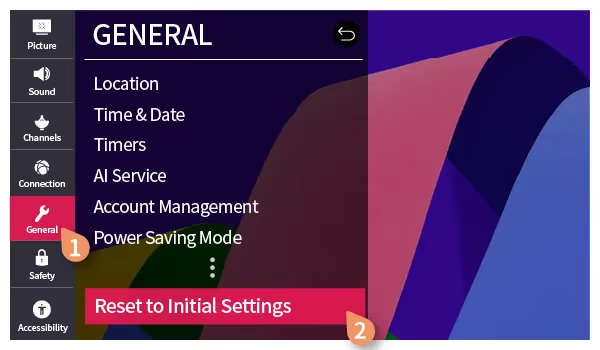
- After reset, retry updating software again.
Wiping the entire system and upgrading to the latest LG firmware often resolves software-based issues causing repeated crashing and reboot behavior.
#6. Remove Batteries from Remote
Rule out remote control problems:
-
Open battery compartment, remove all batteries from remote.
-
Press and hold power button on remote for 60 seconds to discharge completely.
-
With batteries still removed, press the power button on your TV set to turn on instead.
-
Observe if TV stays on for duration without the remote sending errant restart signals.
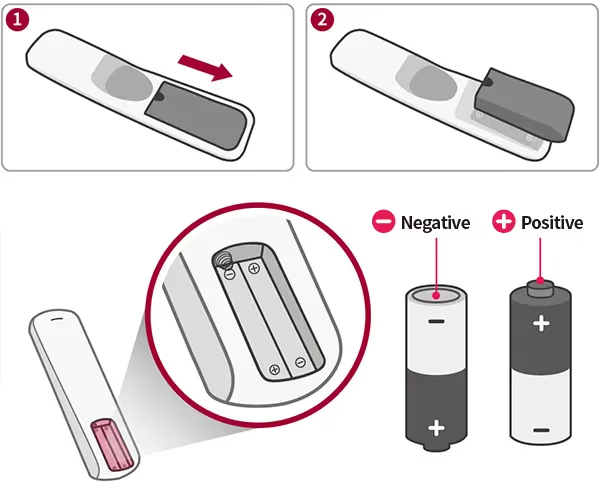
This determines if the remote is the culprit due to sticky buttons or low battery voltage interfering with normal TV functionality.
#7. Toggle Simplink (HDMI-CEC) Off
HDMI-CEC lets devices intercommunicate over an HDMI cable which can cause confusion:
-
Access General Menu → Simplink (HDMI-CEC)
-
Disable Simplink settings
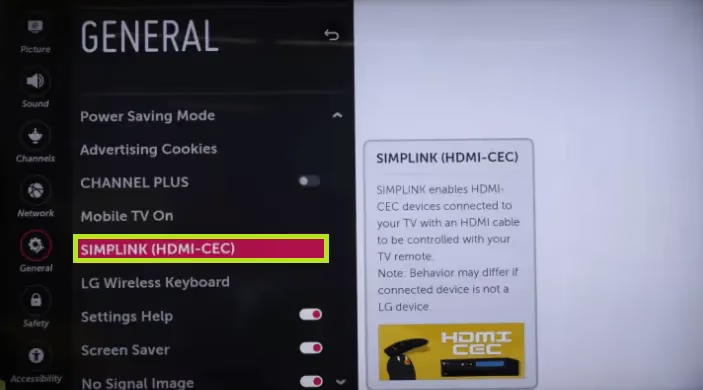
With this connectivity protocol disabled, connected devices can no longer directly influence TV power state changes, eliminating that possibility as the restart trigger source.
If you’re also having issues with LG TV sound not working or the optical audio output malfunctioning, it’s worth checking your HDMI connections as well.
#8. Eliminate Overheating Problems
Excess internal heat can trip automatic reset protocols:
-
Power off TV then carefully ventilate dust from any fans/vents along the back/bottom using compressed air.
-
Visually check fans are operational and internal components for signs of overheating damage.
-
After cleaning, check if reboot issue improves.
Preventing the system from getting so hot it has to reset itself solves some instances of LG TVs constantly restarting.
#9. Wipe System Cache Partition
Too much temporary cached data can sometimes destabilize systems:
-
Turn TV off then press and hold both volume down and menu button on TV set simultaneously for 10 seconds.
-
This boots into a special System Cache Partition menu.
-
Use volume and channel buttons to highlight ‘Wipe Cache Partition’ then press power button to select.
Erasing the cache forces the TV to recreate fresh temporary memory stores, fixing any corruption causing restarts.
#10. Test TV in Safe Mode
Isolating software factors from other variables:
-
Unplug all input cables from TV, including Ethernet, HDMI and the antenna/cable source.
-
Press power button on back/side panel to turn TV on.
-
Once booted up without inputs connected, observe if restart loop persists.
-
If problem disappears, plug in inputs one by one, testing stability each time to identify any particular trigger sources.
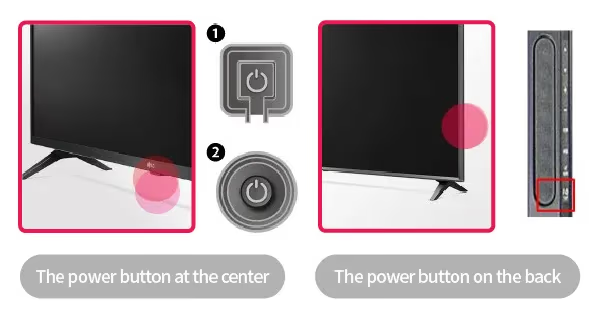
Safe mode prevents external devices or cables from influencing TV operations during testing. It can also be helpful when diagnosing LG TV lagging issues.
#11. Factory Reset without Internet
Further software troubleshooting:
-
If TV restarts in safe mode, perform factory reset like before.
-
Once completed this time however, do not reconnect wifi or internet.
-
Observe TV stability without any outside connectivity factors in the default factory state with apps uninstalled.
This determines if an internet-connected app or network issue may be causing crashing issues rather than base TV firmware.
#12. Replace Power Supply Board
Important hardware fix:
-
Only attempt if you have electronics repair experience.
-
Order replacement power supply board for exact LG TV model.
-
Carefully disassemble TV to safely access board.
-
Swap in replacement and reassemble TV.
-
Test for resolved reboot loop.
If you’ve made it this far without fixes, voltage irregularities on the power board could need rectifying with professional repair or replacement parts.
#13. Replace T-Con Board
Another advanced hardware fix:
-
The T-Con board controls critical LCD display driver functionality.
-
Faults on this board translate to flickering, distortion, color issues like yellow appearing green, and restarts.
-
Finding replacement T-Con boards also requires matching exact LG TV model numbers.
-
Carefully swap in new board, reassembling TV after.
Display failures on the T-Con board communicate over error pathways to trigger automated reboot protocols as protection.
#14. Call LG Support
After exhausting DIY fixes:
-
LG customer service can accurately diagnose remaining issues requiring repair.
-
Live agents troubleshoot over the phone and facilitate next steps.
-
Under active warranty, LG will dispatch specialized techs for free in-home service.
-
Out of scope of warranty, flat rate repair fees apply but less than buying a whole new TV!
Getting LG directly involved finally determines whether an affordable repair is possible or whether it might unfortunately be time for an upgraded television.
Their experts pinpoint quirky model-specific defects causing repeat restarts that we can’t always identify without internal service diagnostics.
#When Should I Call LG TV Support?
We recommend involving LG customer support if:
-
You’ve attempted all troubleshooting to no avail.
-
The issue started after a recent firmware update.
-
Local power outlets test normally but restarts persist.
-
The reboot loop continues in safe mode.
-
You lack electronics repair confidence for hardware fixes.
-
The LG TV is currently under 1 year factory warranty.
LG Techs have exclusive diagnostic tools to remotely access error logs and pinpoint failures. They best identify remaining software bugs versus hardware faults needing service.
Trained professionals quickly determine if replacement parts or technician repairs are the most cost-effective fix before your LG TV warranty expires.
#FAQs About LG TVs That Won’t Stop Restarting
#Why does my LG TV turn itself on and off randomly?
Frequent automatic power cycling usually points to conflicts between connected devices, loose cables, defective capacitors on internal boards, or firmware failures managing the power state. Disconnecting all HDMI devices and testing the TV on its own is the fastest way to narrow down the cause.
#Why does my LG TV keep showing the logo screen again and again?
The TV powers on but cannot finish booting past the splash screen, which indicates a serious failure triggering an automatic reboot. Software crashes and overheating components are the most common reasons. A factory reset through the service menu or a USB firmware reinstall typically resolves it.
#What should I do if factory resetting doesn’t fix my LG TV restarting?
If the problem persists after both a soft reset and a full factory reset, hardware faults on internal component boards are the likely cause. Focus on inspecting the power supply board for bulging capacitors. At that point, contacting LG support or a qualified repair technician is the best next step.
#Can bad capacitors cause my LG TV to turn off and on constantly?
Yes. Aged or failing capacitors on the power supply board can trigger protection protocols that force the TV to reboot. You can sometimes spot them visually because their tops bulge outward or leak electrolyte. Replacing the faulty capacitors or swapping the entire power supply board usually stops the loop.
#How long should I leave my LG TV unplugged to fix a reboot loop?
Two to three minutes is enough for most cases. Hold the physical power button on the TV for 60 seconds while it is unplugged to drain any residual charge from the capacitors. This full discharge forces the internal memory to clear, which resolves many firmware-related restart issues.
#Does a firmware update fix an LG TV that keeps restarting?
It can, especially if the restarts started after a previous update went wrong. Go to Support > TV Software Update and install the latest version. If the TV reboots too quickly to navigate menus, download the firmware to a USB drive from the LG support website and install it manually.
#Will disabling SimpLink stop my LG TV from restarting?
SimpLink (HDMI-CEC) allows connected devices to send power commands to your TV, and a misbehaving device can trigger repeated restarts. Turning SimpLink off in General > SimpLink (HDMI-CEC) removes that variable entirely. If the restarts stop, reconnect devices one at a time to find the culprit.
#Is it worth repairing an LG TV that keeps restarting or should I buy a new one?
That depends on the TV’s age and the cost of the repair. Replacing a power supply board typically runs $50 to $150 for parts and is a realistic DIY job if you have basic soldering skills. For TVs still under the one-year factory warranty, LG will dispatch a technician at no cost.
See Also:
TCL Roku TV Keep Restarting - How to Fix
Fire TV Stick Keeps Restarting - Troubleshooting Tips
#Bottom Line
Here is what to take away:
-
Common software and hardware causes of LG TVs constantly restarting
-
14 methodical troubleshooting fixes arranged by simplicity and effectiveness
-
At what point professional LG repair may be most practical
-
How to use LG customer service both in and out of warranty
Start with a power cycle and work through the list in order. Most reboot loops resolve within the first five fixes. If you reach the hardware steps and feel uncomfortable opening the TV, call LG support — they can run remote diagnostics and arrange a repair under warranty if your TV qualifies.