Has your LG TV screen gone black randomly? You can fix this problem yourself in most cases. In this article, we cover methods to fix the LG TV’s black screen of death problem, including quick steps for fixing the LG TV black screen with no sound problem.
Many smart TV users deal with black screen and no sound problems. Sometimes technical faults cause the issue, and sometimes hardware failures are to blame. LG TV owners often report this problem after several years of use.
If you are facing the same issue, you have arrived at the right place. We cover simple and useful methods to fix it below. But first, you should know the reasons that cause the black screen problem.
- Power cycling fixes most cases — unplug your LG TV for 10 to 15 minutes, then hold the power button for 15 seconds before plugging back in
- Loose HDMI cables rank among the top causes — disconnect and reconnect every cable, and test with a different HDMI port
- Outdated firmware triggers display failures — check Settings > General > Expert Firmware Update to install pending updates
- Energy Saving mode can blank the screen — disable it under Settings > Picture > Energy Saving
- Factory reset is the last software fix — it restores all settings to default, so back up your preferences first
#What Causes the LG TV Black Screen of Death?
Many reasons can trigger this problem. Here are the most common ones.
-
Temporary glitch: A temporary glitch in your TV is one of the most frequent reasons for a black screen of death on LG TVs.
-
Loose cables: Loosely connected cables can shut off your TV display. Make sure every cable and plug is seated firmly.
-
Outdated firmware: When the firmware on your LG TV falls behind, display problems can follow. Keeping your TV updated helps prevent this.
-
Hardware problem: A failing backlight or other hardware component causes a black screen. Hardware problems often stem from power supply issues.
-
Enabled power saver: This mode cuts power usage by reducing brightness and contrast, which can leave the screen completely dark.
-
Faulty components: Bad input connections, unsuitable outlets, and broken ports also cause black screen problems on LG TVs.
These are the main reasons behind LG TV black screens and no sound issues. Now that you know the causes, here are eight methods to fix the problem.
Try each method in the listed order to pinpoint the exact cause. If your LG smart TV goes black often, work through every solution and see which one resolves it.
#How Do You Fix LG TV Black Screen With No Sound?
#Method 1: Check Cable Connections
This is the simplest and quickest way to fix an LG TV black screen with no sound. Check for loose or improperly connected cables on your smart TV.
This problem does not only stem from loose TV cables. Damaged components and inactive power sources are also common culprits that cause a black screen.
First, confirm that all cables are plugged firmly into their ports. You can disconnect each cable and reconnect it. If you use an HDMI connection, make sure HDMI is enabled and, if possible, test the cable on another TV.
If you are dealing with similar display issues on other brands, check out our guide on Samsung TV green screen errors.
#Method 2: Firmware Update
Outdated firmware can also trigger a black screen and no sound on your LG smart TV. LG regularly releases new firmware versions that improve features and stability.
That is why you should update your TV periodically to stay current with technical improvements. For a detailed walkthrough, see our full guide on LG TV firmware update.
#Steps to Update Your Smart TV Firmware
-
Turn on your LG TV.
-
Go to the menu section.
-
Select the ‘General’ tab.
-
Navigate to ‘Expert Firmware Update’ and click on it.
-
Then, choose the ‘Update’ button.
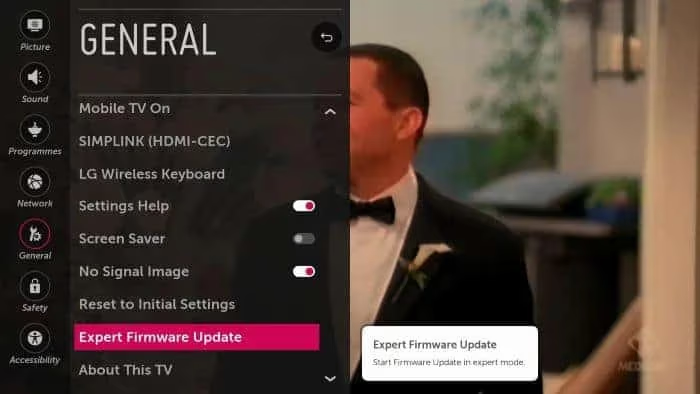
Wait a few minutes until the system completes all pending updates. If it asks you to download or install new firmware, do it right away. After the install finishes, check whether the problem persists.
Important Note: During the update, your TV will shut down and restart several times. Do not unplug the power cable while this is happening.
If your TV screen goes black but you can still hear audio, our guide on TV screen is black with sound covers that specific scenario.
#Method 3: Check TV Mode
Sometimes LG TV owners accidentally enable power saver mode, which results in a black screen.
To save energy, the system automatically shuts down the display if the TV sits idle for more than five minutes.
The best fix is to disable this mode entirely.
#Steps to Disable Power Saver Mode
-
Turn on your LG TV.
-
On your TV remote, press the ‘Home’ button.
-
Navigate to ‘Settings’ and select ‘Picture.’
-
In Picture, search for ‘Energy Saving’ and click on it.
-
If it is enabled, click the ‘ON’ button to turn it off.
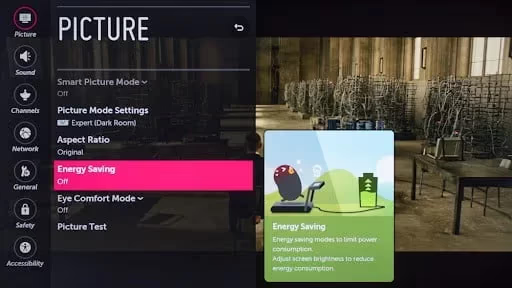
If the mode is already disabled, enable it and then disable it again. Check whether this resolves the problem.
#Method 4: Reset TV Input
Incorrect input settings also lead to LG TV black screen problems. An improper power supply to the source device affects the TV display and causes the issue.
To fix it, press the source button on your TV remote. All available inputs will appear, and you can verify the input settings.
Use the source menu to confirm that all features on your TV are configured correctly. Also check for input failures or malfunctions in the settings.
If you use the HDMI port of an external device, try switching to a different source device. Also make sure all firmware updates are installed.
If you still have the problem, test the external device on another TV to narrow down the cause. You might also want to read about LG TV keeps switching to HDMI if your TV changes inputs on its own.
#Method 5: Factory Reset LG TV
Keep in mind that a factory reset removes all your custom configurations. Once the reset completes, the TV returns to its original out-of-box settings.
Before starting, back up your configurations, data, and network settings so you can restore them later. For a step-by-step guide, see our article on how to factory reset LG TV.
-
Turn on your LG TV.
-
Navigate to TV ‘Settings.’
-
Click on ‘General Settings.’
-
Select ‘Reset to Initial Settings.’
-
Enter your password and press ‘Reset.’ Then click ‘Confirm’ to save the changes.
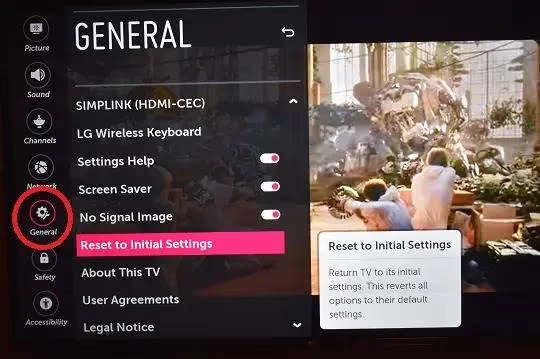
Wait until the process finishes. After the reset, go through the input settings and evaluate the TV’s performance.
#Method 6: Change Backlight Settings and Picture Mode
This is another way to fix the LG TV black screen problem. Bright backlights and certain display settings can overheat the TV, which blacks out the screen.
To prevent this, adjust the backlight settings and Picture mode on your LG TV.
-
Turn on your LG TV.
-
Navigate to ‘Settings’ and choose ‘All Settings.’
-
Choose the ‘Picture More’ option.
-
Change the Picture Mode to ‘Standard.’
-
Lower the backlight bar and set it between 10 and 30.
-
Set the brightness to 50.
That should keep your TV from overheating and maintain a stable temperature. The black screen problem should stop after these adjustments.
#Method 7: General Troubleshooting
If the solutions above have not worked, there might be a hardware or power supply problem. Try these troubleshooting steps to address wiring and hardware issues.
-
Use a standalone outlet: Plug your TV directly into a wall outlet rather than a power strip or divider.
-
Remove the remote batteries: Check whether the power button on your TV remote is sending signals unintentionally.
If your TV shows other symptoms like random restarts, our guide on LG TV keeps restarting can help.
#Method 8: Power Cycle Your LG TV
Power cycling is the most common and quickest fix for the LG TV black screen of death. It clears temporary glitches by fully draining residual power. Here are the steps.
-
Turn off your LG smart TV.
-
Unplug the power cable from the outlet.
-
Wait at least 10 to 15 minutes.
-
Plug the cable back in and turn on the TV.
-
Press and hold the power button for 10 to 15 seconds. The power button is usually on the back or bottom of the TV.
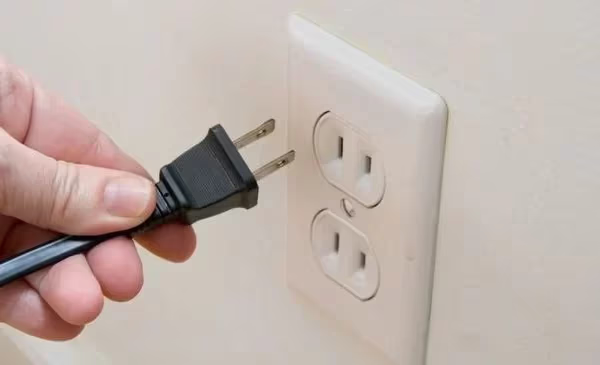
These steps should fix the LG TV black screen with no sound. An alternative approach: press the power key and volume down button at the same time, then unplug the power cable for a few minutes.
After waiting, plug the cable back in and turn on the TV to check if the problem is fixed.
If none of these methods work, contact the LG support team. For major hardware problems, take your TV to an authorized service center.
#When Should You Contact LG Support?
If you have tried every method above and the black screen persists, the issue likely requires professional repair. Signs that point to a hardware failure include a cracked or damaged panel, a buzzing sound from the back of the TV, or a faint image visible only under bright light (which indicates backlight failure). You can reach LG support through their official support page or call their customer service line.
#Bottom Line
We covered the reasons and solutions for fixing the LG TV black screen with no sound problem in detail.
Start with the simplest fix (power cycling) and work your way through cable checks, firmware updates, and settings adjustments. If software fixes do not resolve it, a factory reset or professional repair may be necessary.
#Frequently Asked Questions
#How do I know if my LG TV has a black screen of death?
The clearest sign is when your LG TV shows a completely black screen and produces no sound while the power indicator light remains on. You may also notice the remote still works because you can hear menu sounds, but nothing appears on screen.
#Can a faulty HDMI cable cause a black screen on an LG TV?
Yes. A loose or damaged HDMI cable blocks the video signal from reaching the display. Try unplugging the HDMI cable, inspecting it for visible damage, and plugging it into a different HDMI port on your TV.
#Does updating firmware fix the LG TV black screen problem?
Firmware updates patch software bugs that can cause display failures. Go to Settings > General > Expert Firmware Update to check for available updates. LG releases firmware fixes several times a year.
#Can I fix the LG TV black screen of death myself?
Most causes have a DIY fix. Cable checks, power cycling, firmware updates, and factory resets all take less than 30 minutes. Only backlight or panel failures require a technician.
#How long does a power cycle take to fix the black screen?
The entire process takes about 15 to 20 minutes. You need to unplug the TV for at least 10 minutes to fully drain residual power, then hold the power button for 15 seconds before plugging back in.
#What does it mean when my LG TV screen is black but sound works?
This usually points to a backlight failure or a loose ribbon cable inside the TV. Shine a flashlight at the screen. If you can see a faint image, the backlight has failed and needs replacement.
#Will a factory reset erase all my apps and settings?
Yes. A factory reset returns your LG TV to its original out-of-box state. All downloaded apps, saved Wi-Fi passwords, and custom picture settings will be removed. Write down your preferences before starting the reset.
#How often should I update my LG TV firmware?
Check for firmware updates at least once every three months. LG pushes updates that fix bugs, improve stability, and patch security vulnerabilities. Enabling automatic updates in Settings > General ensures you never miss one.