Jellyfin is an open-source, free media solution for cord-cutters. But is it right for you? This guide examines the pros and cons to help you decide.
- 100% free with no subscriptions — no monthly fees once your server hardware is running
- Open-source and private — zero data collection, self-hosted so media never leaves your network
- Setup is hands-on — expect to configure server software, tuners, guide data, and networking yourself
- Apps lag behind Plex and Emby — missing grid guides on Roku and Apple TV, inconsistent playback controls
- Best clients are Fire TV and Android TV — these platforms get the most polished Jellyfin experience
#What is Jellyfin & Who is it For?
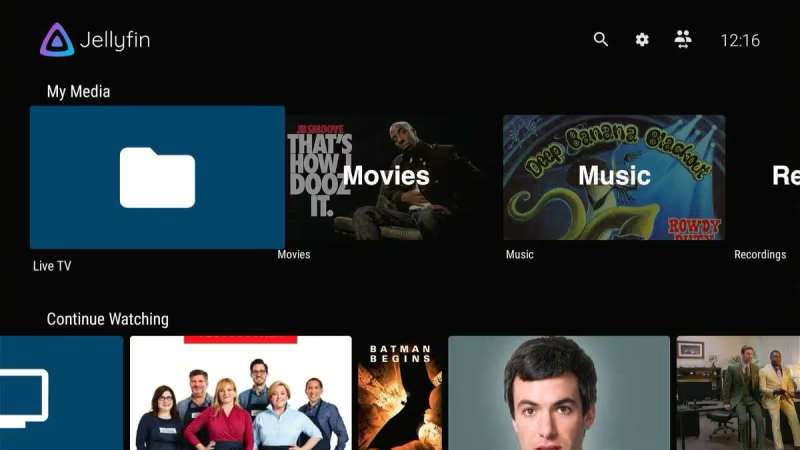
 Jellyfin is an open-source alternative to proprietary media center software like Plex and Emby. It lets you aggregate media files, live TV, streaming sources and recordings into a unified interface accessible from various devices.
As an over-the-air DVR and media solution, Jellyfin appeals most to a technically inclined subset of cord-cutters who value customization over polish and are willing to tinker. Those wanting an easy out-of-box experience would be better served by options like Plex, Emby or Tablo.
#Pros of Using Jellyfin
For the right type of user, Jellyfin does offer some distinct advantages:
#1. 100% Free and Open Source
Once you have Jellyfin up and running, there are no ongoing costs associated with using it. This freedom comes from Jellyfin’s open-source nature, meaning anyone can view, modify or distribute the code as they please.
You have full control to customize the software to your liking without worrying about artificial limitations. And you don’t have to worry about your data or privacy being exploited since Jellyfin has no commercial interests driving it.
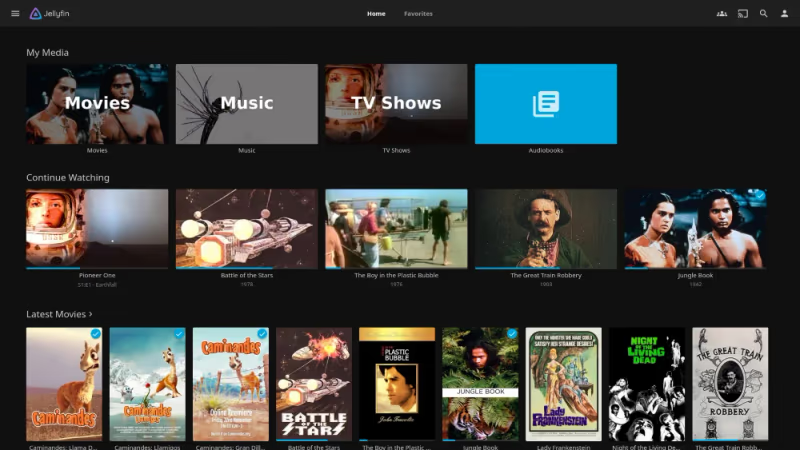
#2. Flexible Platform Support
Another benefit stemming from the open-source ecosystem is Jellyfin’s support for an array of platforms:
-
Chromecast
-
iOS
-
iPadOS
-
Android
-
Windows
-
MacOS
-
Linux
It also works with a wide variety of TV tuner hardware beyond SiliconDust’s HDHomeRun. The ability to run Jellyfin easily on low-powered devices like Raspberry Pi’s makes it accessible.
#3. Full-Featured DVR Functionality
At its core, Jellyfin works well as an over-the-air DVR solution for antenna broadcasts. But it can also pull in IPTV streaming sources thanks to built-in M3U playlist support.
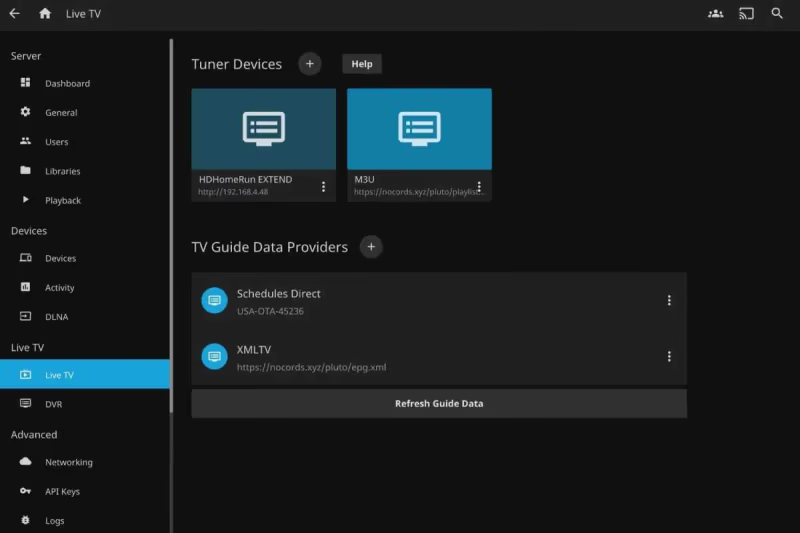
This means you can consolidate live TV, recordings and on-demand content into one interface. Jellyfin enables recording multiple shows at once, series recordings, start/stop buffers and per-channel quotas.
There’s no subscription or purchasing required to unlock DVR features as there is with Plex or Emby. Of course, time-shifting and transcoding large recordings demands ample storage and a powerful server.
#4. BYOD Ethos
Jellyfin embodies the BYOD or “Bring Your Own Device” ethos of cord cutting solutions. Since you supply your own compatible hardware, there’s greater flexibility and cost savings versus closed ecosystems.
You can repurpose old desktop computers or laptops to act as Jellyfin’s server instead of buying proprietary hardware like Tablo DVRs. Similarly you can employ a $30 Roku or Fire Stick instead of a $150 TiVo Stream 4K for clients.
#5. Offline Support
Jellyfin allows you to download media to mobile devices for offline playback later. This comes in handy in areas with poor connectivity. And it helps avoid impacting home bandwidth caps if you have tons of remote users streaming large files.
#Cons of Jellyfin
Despite some useful capabilities, Jellyfin does suffer from some substantial downsides:
#1. Complicated Initial Setup
Getting Jellyfin running requires the ability to:
-
Install server software
-
Configure libraries
-
Connect & tune TV tuners
-
Troubleshoot network issues
-
Find & format guide data
-
Optimize resource usage
-
Support remote streaming
These aren’t trivial tasks for novice users. Expect to invest a fair amount of time upfront tinkering and tweaking.
Ideally you’ll also need:
-
Always-on desktop PC
-
At least 500GB storage
-
Wired tuner (HDHomeRun)
-
Static IP & port forwarding
As you can see, the setup demands technical skills and networking know how.
#2. Subpar Interface & Apps
Once functional, Jellyfin’s interface and apps don’t stack up well to polished DVR solutions from SiliconDust, Plex or TiVo.
The layouts feel antiquated and offer inconsistent feature support across platforms:
-
No grid guide on Apple TV or Roku
-
Playback controls missing on Apple TV & Roku
-
Fire TV guide lacks usability
Core capabilities like series recordings and timer buffers also vary wildly or get excluded from apps altogether.
This speaks to Jellyfin’s community development approach lacking UX oversight and quality assurance. Too many things feel half-baked rather than consumer grade.
#3. Reliability Issues
With developers and hobbyists building Jellyfin, reliability suffers as a result. Bugs, crashes, playback failures and erroneous behaviors occur way too often.
Errors you’re likely to encounter include:
-
Recording failures
-
Tuner conflicts
-
Library scanning problems
-
Crashing clients
-
Playback failures
-
Inaccessible web interface
-
Remote access problems
-
Hardware encoding problems
Plan to spend time troubleshooting, restarting and resyncing things. For mission critical TV viewing, this could prove quite frustrating.
#4. Lacks Creature Comforts
Unlike Plex which innovates constantly, Jellyfin trails behind in certain areas like:
-
Polished mobile apps
-
Grid guide customization
-
Account & user management
-
Streaming device support
-
Metadata fetching
-
Hardware accelerated streaming
Little creature comforts also go missing:
-
SkipMode ad-skipping
-
Resuming playback
-
Bandwidth monitoring
-
Audio boosting
-
Trakt and Alexa integration
-
IFTTT automation
This makes the overall experience less refined and polished.
#How Does Jellyfin Compare?
Let’s examine how some alternatives like Plex, Emby and Channels DVR compare:
| Jellyfin | Plex | Emby | Channels | |
|---|---|---|---|---|
| Price | Free | Monthy Fee | Monthly Fee | $8/month |
| Apps | Decent | Excellent | Great | Limited |
| Reliability | Fair | Excellent | Good | Great |
| Features | Average | Excellent | Great | Average |
| Setup | Hard | Easy | Moderate | Moderate |
| Guides | Limited | Full | Full | Full |
Jellyfin competes mostly on price while providing an average feature set backed by fair reliability. But competitors like Plex offer far more value given their polished apps, reliability and features despite monthly fees.
Open-source devotees partial towards tinkering may still favor Jellyfin though. And for large households, the free nature can add up to big savings.
#Getting Started with Jellyfin
If you understand the tradeoffs and still wish to use Jellyfin, here is an overview of recommendations when getting started:
#Choose Reliable Server Hardware
Don’t skimp on your server hardware if possible. Here are ideal specs:
-
Windows, Linux or MacOS
-
Intel Core i5 minimum
-
16GB RAM
-
500GB+ SSD storage
-
Wired ethernet
Prioritize plenty of CPU cores and RAM over sheer horsepower for smooth transcoding. For storage, start with at least 500GB and scale up as your library grows.
#Shop Carefully for Tuners
For over-the-air antenna integration, choose HDHomeRun tuners with ample tuners (4+) and ATSC 3.0 support when possible. Connect them via gigabit ethernet to your router for reliability.
If using IPTV sources, select tuners carefully to ensure compatibility with M3U sources and protocols. SiliconDust Prime 6 is a good bet.
Always favor wired connections rather than WiFi or Powerline which can degrade.
#Automate Guide Data
Don’t expect to compile guide data manually long term. Instead set up automatic XMLTV grabbing using online tools or Docker containers. Schedules Direct integration is another option for $25/year.
Accurate and update listings are crucial to properly scheduling recordings so this step is worth the effort.
#Standardize on Best Clients
The best Jellyfin client experience resides on Fire TV, Android TV and Apple TV. Roku, LG and lesser known platforms offer compromised interfaces.
So choose your streaming devices accordingly, and understand limitations upfront if repurposing old Roku or Chromecasts.
Also prioritize mobile apps on iOS or Android which are more refined than the TV front ends.
#Troubleshoot Ruthlessly
Brace yourself for at least some growing pains during setup. Networking problems can arise. Tuners may act flaky. Clients can crash frequently.
Always check Jellyfin’s logs after issues to pinpoint causes. Keep firmware and software updated. Reboot components regularly to minimize weird glitches from permeating the ecosystem.
Don’t hesitate to reset components to factory default and start fresh if problems cascade.
#FAQs About Jellyfin
#Does Jellyfin have DVR functionality?
Yes. Jellyfin has full DVR capabilities for live OTA antenna feeds from HDHomeRun tuners. It can record multiple shows at once, handle series recordings, and set start/stop buffers. You do not need a paid subscription to unlock any DVR features.
#Is Jellyfin actually 100% free?
The server software and all client apps carry no cost. However, you need to supply your own compatible hardware including a computer for the server, TV tuners, and storage drives. Guide data is another expense if you use a paid service like Schedules Direct at $25 per year.
#What are the best Jellyfin clients?
Fire TV, Android TV, and Apple TV clients offer the most polished experience with grid guides and proper playback controls. Roku and mobile apps work but feel more limited in features and interface quality. For the smoothest playback, NVIDIA Shield TV with its hardware transcoding is hard to beat.
#Can Jellyfin integrate local media files?
Yes. Jellyfin started as a local media server, so it handles personal video files, music, and photos under one interface quite well. It automatically fetches metadata and artwork for most common media types, making library browsing straightforward.
#Does Jellyfin work with NVIDIA Shield TV?
The Android TV app on Shield TV boxes runs Jellyfin nicely after recent improvements. Shield TV’s hardware transcoding helps process video efficiently, and the remote-friendly interface makes navigation comfortable from the couch. It is one of the best client devices for Jellyfin overall.
#How private and secure is Jellyfin?
Jellyfin gathers zero private user data and relies entirely on self-hosting, so your media never touches external servers. The open-source codebase means anyone can audit the code for security issues. For users who want full control over their viewing data, Jellyfin is the strongest option among media servers.
#Can Jellyfin handle IPTV sources?
Yes. Jellyfin supports M3U playlists and XMLTV guide data, so you can add IPTV channels alongside your OTA antenna feeds. This lets you consolidate live TV from multiple sources into one guide. Compatibility varies by provider, so test your specific M3U source before committing.
#How does Jellyfin compare to Plex for DVR use?
Plex offers a more polished interface, better mobile apps, and stronger reliability out of the box. Jellyfin wins on price since Plex requires a Plex Pass subscription for DVR features. If you value ease of setup and app quality, Plex is the better choice; if you prioritize zero cost and open-source principles, Jellyfin holds the edge.
#Bottom Line
Jellyfin brings together OTA DVR, media serving and streaming into a singular open-source platform. For a certain type of tinker-happy cord cutter, it can save money compared to paid alternatives like Plex.
But the setup complexity, reliability woes and jagged apps mar the experience. You end up sacrificing substantial refinement in exchange for the “free” nature and customization potential.
If you truly wish to explore Jellyfin regardless, choose reliable server hardware, wired tuners and automated guide data. Prioritize Fire TV or Shield TV for smooth playback, and troubleshoot issues relentlessly.
While the project remains rough around the edges, Jellyfin may suit the hardcore open-source enthusiast. Just temper expectations, prepare for frustrating growing pains and understand the alternatives may provide superior ease of use for many.