Hulu is one of the most popular streaming services available today. It ranks among the top 3 paid streaming services in the United States. However, there are times when users find themselves unable to access their accounts, even after entering their login credentials.
If this happens to you, don’t worry because we’ll help you fix this ‘Hulu, Your Login Has Been Blocked’ issue right away!
- Wrong credentials are the top cause - entering an incorrect username or password multiple times triggers Hulu’s security lockout
- Expired subscriptions block access - Hulu will prevent login if your payment method has failed or your plan has lapsed
- Browser settings can interfere - Firefox tracking protection and cached data often cause login blocks on desktop
- Server overloads happen during peak hours - Hulu’s servers can temporarily block logins when traffic spikes
- A simple app reinstall fixes most cases - uninstalling and reinstalling the Hulu app resolves persistent login errors on mobile and smart TV devices
#What Causes the ‘Hulu, Your Login Has Been Blocked’ Error?
If you are experiencing ‘Hulu, Your Login Has Been Blocked,’ it is most likely due to one of the following reasons:
#Reason 1. You Have Entered Invalid Login Credentials
First, please check if you have entered your username and password correctly. If they are correct, then the most likely cause of this error is that someone else has compromised or used the account without your knowledge. In such cases, it’s a good idea to reset your password and change it from time to time.
Besides, many streamers have complained about Hulu not working on Samsung Smart TV. Let’s figure out the reasons and the best seven solutions to fix it easily.
#Reason 2. The Issue with the Hulu Subscription
There are many reasons why ‘Hulu, Your Login Has Been Blocked.’ The most common cause is an expired subscription; you need to renew it.
If this is the case, contact Hulu support for help with updating your payment method or canceling your subscription.
Also, if you are facing Hulu connection issues, such as Hulu not working on mobile and Windows, here are the top solutions you should check out.
#Reason 3. Your Hulu Account is Not Activated

You may have forgotten to sign in to the correct Hulu account. Or you have signed in to an old account that has since been deactivated.
To ensure you are logged into a valid account, visit My Account on your computer. And make sure the name next to “Account Name” matches what is on screen.
If you’re still having trouble, resetting and reactivating your Hulu account can solve many issues at once.
#Reason 4. Server Issue
The server issue is the most common reason ‘Hulu, Your Login Has Been Blocked.’ And the typical reason why there is a server issue is that there is an overload of traffic. If many people try to access the same site at once, it can cause the server to crash.
This will result in the Hulu login page not loading correctly. And it will display the “Your login has been blocked” message when trying to watch something on Hulu. Another common cause of server errors is network failure or power failure.
#Reason 5. Glitch with the Hulu App

If there’s a problem with ‘Hulu, Your Login Has Been Blocked,’ you’ll likely see issues opening and using it on your device. This can be due to the glitch with the Hulu app.
Some users have reported that their Hulu app will not open. Others report that they cannot click on anything in the app because it won’t respond or freezes up entirely.
If this happens to you, try rebooting your device and then try again. If that doesn’t work, uninstall and reinstall the Hulu app. You may also run into Hulu not working on Firestick, which has its own set of fixes.
#Reason 6. You Have Violated Hulu’s Terms of Services

The following reason behind ‘Hulu, Your Login Has Been Blocked’ is that you may have violated the terms of service.
This can be done by not paying for your subscription or using someone else’s account. Or by using a VPN to watch content unavailable in your region.
#Reason 7. Connectivity Issue
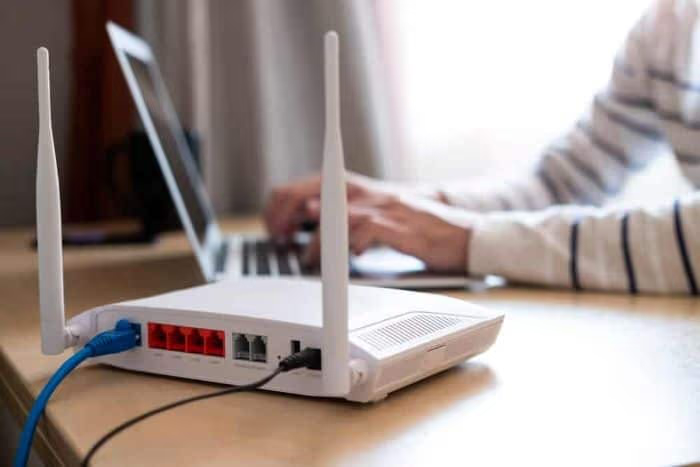
If you are experiencing ‘Hulu, Your Login Has Been Blocked,’ there can be a connectivity issue.
And if there is a connectivity issue, make sure that you are connected to the Internet and that your connection is secure. You may have a firewall running on your computer or router. If so, turn it off and try again.
#Reason 8. Tracking Protection is Turned ON on Firefox

If you’re using Firefox, and your login has been blocked, tracking protection may be turned ON. This can cause the error ‘Hulu, Your Login Has Been Blocked.’
Tracking protection is a privacy feature that blocks cookies and trackers. It’s turned on by default in Firefox but can be turned off in the settings menu.
If tracking protection is turned off, you may be able to log in again. Go to the settings menu and look for “Privacy & Security” or “Tracking Protection,” depending on your version of Firefox.
If you don’t see either of those options in your settings menu, tracking protection may have been disabled by an add-on or extension.
#Reason 9. Glitch with the Browser

The next reason ‘Hulu, Your Login Has Been Blocked’ is a glitch with the browser you are using. If you use a browser like Chrome or Firefox, try using a different one. You can also try using another device, like your phone or tablet, to access Hulu.
If none of these options work, then it’s time for you to switch your internet connection.
#Reason 10. Your Home Network is Not Set Up
If you think this is the issue, you will need to do a few things. First, ensure that your router is connected to a power source and that the connection status is good.
Make sure that the network setup is correct. And if so, try checking if you have any other devices connected to your network. This could be one of those solutions for the ‘Hulu, Your Login Has Been Blocked’ problem.
#How Do You Fix ‘Hulu, Your Login Has Been Blocked’?
There are several ways by which you can fix the issue of ‘Hulu, Your Login Has Been Blocked.’ Here are the most effective methods:
#Fix 1. Disconnect and Reconnect the Internet Source
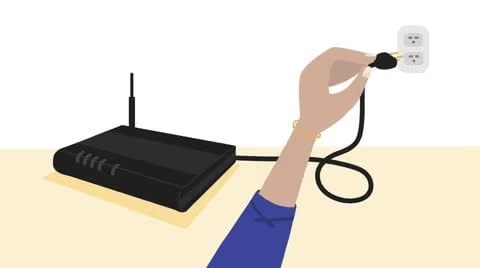
To start fixing ‘Hulu, Your Login Has Been Blocked,’ you’ll need to disconnect your internet source. This means unplugging it from the wall or turning off your WiFi router.
This depends on what type of device you’re using. After doing this, wait for two minutes before reconnecting and trying again.
#Fix 2. Update Your Credentials by Setting a New Password
If you have trouble logging in due to ‘Hulu, Your Login Has Been Blocked,’ the best thing to do is reset your password. To do this, head to the Hulu website and click “Sign In.”
In the Sign In box on the right side of your screen, enter your email address or username and click “Forgot?”
You’ll be taken to a page where you can choose whether you’ve forgotten something about your account. Select that option and then click “Send me a reset link.”
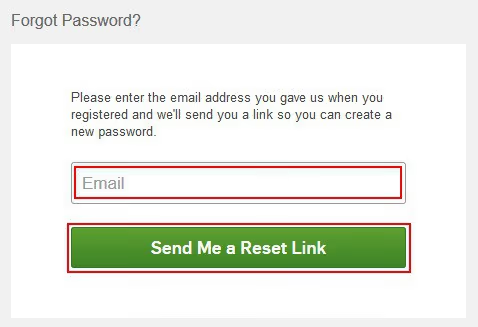
An email from Hulu with instructions for resetting your password will appear on a new page. Follow these steps carefully, so there’s no confusion when changing it back later!
#Fix 3. Sign Out of Your Account and Sign Back In
If you’ve been having issues with ‘Hulu, Your Login Has Been Blocked,’ there could be an issue with the login. In this case, signing out of your account may be best, and then signing back in.
To do so:
-
On the top-right corner of the screen, click on “Sign Out.”
-
Log out of your Hulu account by clicking on “Log out.” This will remove any saved credentials so that no one can access them.
-
Sign back into Hulu using a new username or password.
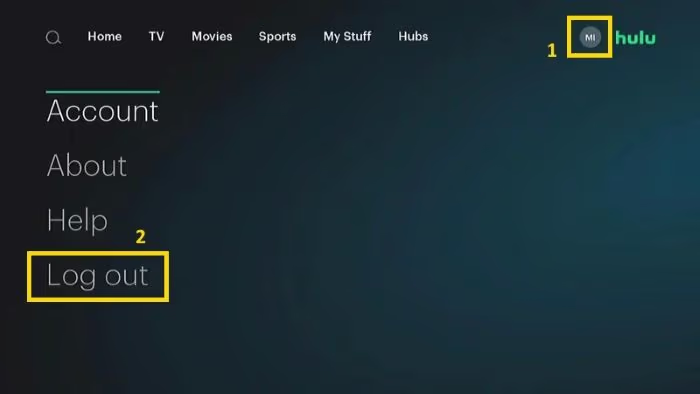
You may also want to check your browser settings and ensure they are not blocking cookies. If this is the case, you can go into your browser settings and unblock Hulu’s cookies.
#Fix 4. Restart the Hulu App
To fix ‘Hulu, Your Login Has Been Blocked,’ you might need to restart Hulu. You’ll need to close the app and open it again to restart Hulu.
You can do this by pressing and holding down on the Home button of your iPhone or iPad. You need to do this until you see a message that says, “Press Home to Close Apps.” Then, swipe up on Hulu to close it and reopen it.
When you restart Hulu, there are two main reasons why this works:
-
The app still runs in the background even after you’ve closed it. Sometimes this happens when you’re multitasking with other apps. So just closing out those other apps will help clear up some memory space for Hulu.
-
Sometimes an update gets stuck downloading in the background. Restarting allows these updates to download correctly, so they don’t interrupt your experience!
#Fix 5. Uninstall and Reinstall the Hulu App
Next up, you should uninstall and reinstall the Hulu app to fix ‘Hulu, Your Login Has Been Blocked.’
Go to Settings > Apps or Applications manager. Then select Hulu from your device’s list of installed apps. Once you’ve found it, tap on Uninstall and confirm that you want to uninstall it.
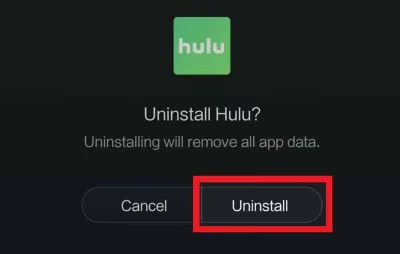
Once you uninstall the app, go back to your home screen and search for Hulu in the Play Store. Then install it again.
Tap log in with your registered email address when prompted to log in with an account or create a new one if necessary! If Hulu is not working on Roku, a fresh install on that device can also help.
#Fix 6. Check if Your Subscription is Up-to-date
If you keep getting the ‘Hulu, Your Login Has Been Blocked’ screen, your subscription may have expired. To renew your subscription, go to the Hulu.com/subscribe page and sign in with your email address or Facebook account.
If you’d rather pay for Hulu with a credit card instead of PayPal or Apple Pay, click at the top right of the “Pay as You Go” section and choose “Other Payment Method.”
#Fix 7. Activate Your Hulu Subscription if It Has Expired
While the Hulu website will let you sign in, certain conditions must be met before accessing your account.
If you have been a subscriber for a long time but can now not log in, this may be due to an expired subscription. If this is the case, you have to renew your subscription from within the app or by contacting Hulu’s customer care services.
#Fix 8. Update the Hulu App
The Hulu app on your device is out of date. It may be missing features, bugs, or security fixes that make it less secure.
To update the Hulu app and fix ‘Hulu, Your Login Has Been Blocked,’ do this:
-
On an iPhone or iPad, tap ‘App Store’ and then tap Update at the top right corner of the screen.
-
On a Mac or PC, open iTunes > select Account > Sign in with your Apple ID > Account Info. Then click the Check for Updates button next to the Hulu downloads and updates section. Check if the app is pending an update.
#Fix 9. Clear Cache
Clearing the cache and cookies on your computer can also help you fix ‘Hulu, Your Login Has Been Blocked’ and get around a Hulu login error.
If you’re using a laptop or desktop, follow these steps:
-
Open the Firefox menu by clicking on its icon in the top right corner of your screen.
-
Click ‘Options’ at the bottom of this menu, then select ‘Preferences’ from that list.
-
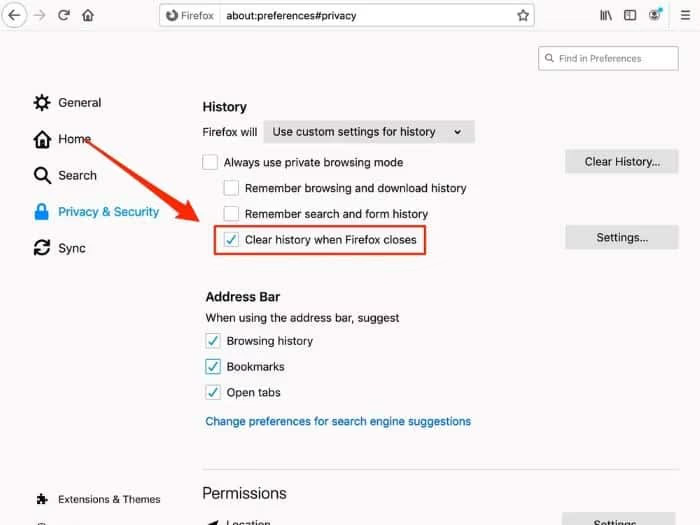
In Preferences, click Privacy & Security. Find “Clear history when Firefox closes” under History. Make sure it’s checked so you don’t have to worry about clearing your browser settings every time you use it. Click OK once more to save everything into place!
#Fix 10. Contact Hulu’s Customer Care Support
Hulu is a top-rated streaming service. This means there’s a high chance that you’ll face some technical issues while using it.
There are many troubleshooting steps you can take to fix the errors of ‘Hulu, Your Login Has Been Blocked’ on your own, as already mentioned.
But if these fail to work out for you, we recommend contacting Hulu’s customer care support, as they will solve your issue within minutes. You can also check Hulu error code P-TS207 if you’re seeing a different error message.
#Bottom Line
So, there you have it! We hope this article about ‘Hulu, Your Login Has Been Blocked’ (reasons and fixes) was helpful.
If you’re having trouble with Hulu, try the steps in this article and see if any of them help. Combining these steps will likely solve any issues you are experiencing with Hulu login problems.
#FAQ
#How long does a Hulu account stay blocked?
The duration of a blocked Hulu account varies depending on the circumstances. Temporary blocks from too many failed login attempts usually lift within 30 minutes to a few hours. For account-level suspensions tied to payment or terms violations, the block stays until you resolve the underlying issue with Hulu support.
#Can I unblock my Hulu account on my own?
Yes, in most cases you can unblock your Hulu account by resetting your password, clearing your browser cache, or reinstalling the app. If the block is due to a subscription lapse, renewing your plan will restore access. However, if the issue persists after trying these steps, you should contact Hulu support directly.
#What should I do if I forgot my Hulu password?
You can reset your Hulu password by clicking the “Forgot Password” link on the Hulu login page. Hulu will send a reset link to the email address tied to your account. Follow the instructions in that email to create a new password and regain access.
#Will clearing my browser cache delete my Hulu account data?
No, clearing your browser cache only removes temporary files stored on your device. Your Hulu account data, watchlist, and preferences are all saved on Hulu’s servers. You will need to log in again after clearing the cache, but nothing on your account will be lost.
#Does a VPN cause the Hulu login blocked error?
Yes, using a VPN is one of the most common triggers for Hulu blocking your login. Hulu restricts access to users within the United States, and VPN connections often get flagged and blocked. Turning off your VPN and connecting through your regular internet provider usually fixes this problem.
#How do I check if Hulu servers are down?
You can visit Hulu’s official social media accounts or check third-party status sites like Downdetector to see if other users are reporting outages. If the servers are down, there’s nothing you can do except wait for Hulu to restore service. Server outages typically get resolved within a few hours.
#Can I use the same Hulu account on multiple devices?
Yes, Hulu allows you to stream on multiple devices with one account, though the number of simultaneous streams depends on your plan. The basic plan allows one stream at a time, while Hulu + Live TV allows two. Logging in from too many different locations in a short period can sometimes trigger a security block.
#What happens if someone else is using my Hulu account?
If someone else has access to your Hulu credentials, they could trigger a login block by entering the wrong password or streaming from an unusual location. You should change your password immediately and check your account’s viewing history for any activity you don’t recognize. You can review your Hulu watch history to spot unauthorized usage.