Are you an anime fan trying to figure out how to watch Crunchyroll on your Samsung smart TV? While there’s no native Crunchyroll app available, we’ve got you covered with this ultimate guide on alternative methods to stream your favorite shows on the big screen. Follow these steps for the best Crunchyroll viewing experience on Samsung TVs.
- No native Crunchyroll app exists for Samsung TVs — Samsung’s Tizen OS is not among the supported smart TV platforms
- Chromecast is the most affordable option — cast from your phone or laptop starting at around $30 for the device
- Amazon Fire TV Stick offers a dedicated Crunchyroll app — browse and watch directly with Alexa voice search support
- HDMI from a laptop requires zero extra purchases — connect your computer and stream through Crunchyroll’s website at full 1080p
- Crunchyroll Premium starts at $7.99/month — unlocks ad-free HD streaming and simulcast episodes within 1 hour of Japan airing
#What is Crunchyroll?
 Crunchyroll is the leading streaming service for anime lovers, offering a vast library of popular series and films, as well as simulcasts straight from Japan. Key features include:
-
1000s of anime titles across every genre
-
Simulcast episodes within an hour of Japan release
-
Ad-free HD viewing with a premium plan
-
Available on multiple devices like phones, consoles, and smart TVs
#Does Samsung TV Have a Crunchyroll App?
Unfortunately, there is currently no dedicated Crunchyroll app that you can download directly onto Samsung smart TVs. The Crunchyroll TV app is only available on select platforms like Roku and Android TV at this time.
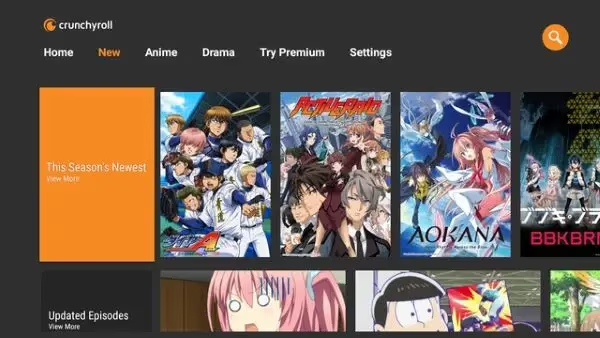
However, that doesn’t mean you can’t enjoy Crunchyroll’s anime catalog on your Samsung TV! Below we outline the best alternative methods to get Crunchyroll on your screen. And if you’re having other issues with your Samsung TV, check out our guides on how to find your Samsung TV power button and troubleshooting Samsung TV WiFi connection problems.
#How to Get Crunchyroll on Samsung TV
#Method 1: Chromecast
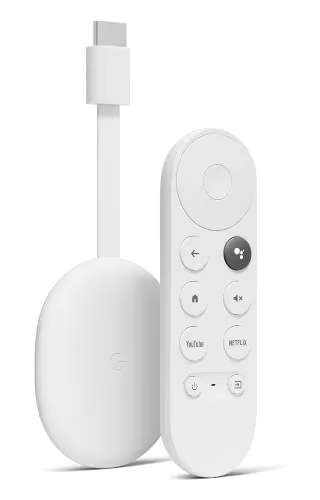
The simplest way to cast Crunchyroll to a Samsung TV is using a Google Chromecast device. Here’s how:
-
Connect Chromecast to your TV’s HDMI port and set up
-
Download Crunchyroll app on your phone or computer
-
Log in and start playing the anime you want to watch
-
Tap the Cast icon and select your Chromecast device
-
The video will appear on your TV – enjoy!
Pros:
-
Easy to set up and use
-
Affordable option
-
Can cast from various devices
Cons:
-
Requires separate purchase of Chromecast
-
May have connectivity issues
#Method 2: Amazon Fire TV Stick
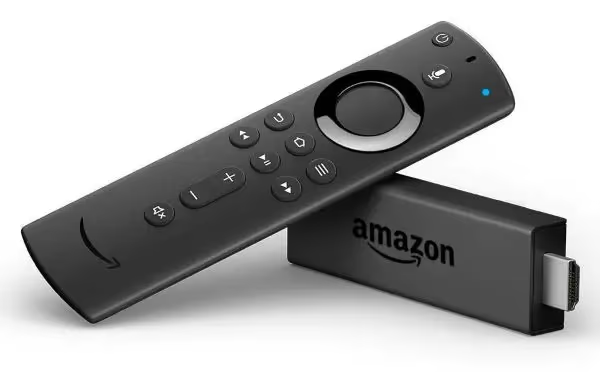
Another popular streaming stick that supports Crunchyroll is the Amazon Fire TV Stick. To use it:
-
Plug Fire Stick into your Samsung TV’s HDMI port
-
Download Crunchyroll from the Amazon Appstore
-
Launch the app and sign in
-
Browse and watch anime right on your TV
Pros:
-
User-friendly interface
-
Supports many streaming apps
-
Voice control with Alexa
Cons:
-
Pricier than Chromecast
-
Limited storage space
#Method 3: HDMI Connection
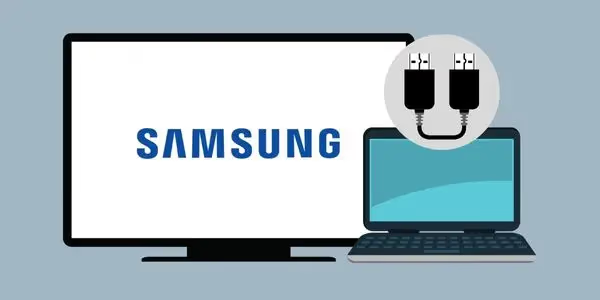
For a direct connection, you can hook up a laptop or computer to your Samsung TV with an HDMI cable. Then:
-
Connect devices with HDMI cable
-
Switch TV source to the HDMI input
-
Open a web browser on your computer
-
Go to Crunchyroll’s website and log in
-
Click on a video to play on your TV screen
Pros:
-
Uses equipment you likely already have
-
Straightforward setup
-
Mirrors your computer screen
Cons:
-
Requires long HDMI cable
-
have to control playback from your computer
#Method 4: Plex Media Server
Plex is a media server app you can install on Samsung smart TVs to stream content from various sources, including Crunchyroll. To use it:
-
Add the Plex app on your Samsung TV
-
Download Plex on your computer and sign up
-
Install the Crunchyroll plugin on your Plex server
-
Link accounts and sync your anime watchlist
-
Open Plex on your TV to stream synced content
Pros:
-
Manages content in a central media library
-
Supports many file types and sources
-
Customizable interface
Cons:
-
Setup can be technical for beginners
-
No Crunchyroll integration on some devices
#FAQ
#Can I watch Crunchyroll for free on Samsung TV?
Crunchyroll offers an ad-supported free tier with a limited content library. You can access this free tier through any of the methods listed above, including Chromecast or Fire TV Stick. For the full anime catalog, simulcast episodes, and ad-free HD streaming, you will need a Premium membership starting at $7.99/month.
#Is there a native Crunchyroll app for Samsung smart TVs?
No. Samsung smart TVs run on the Tizen operating system, and Crunchyroll has not developed an app for that platform. The workaround is to use an external streaming device like a Roku, Fire TV Stick, or Chromecast plugged into your TV’s HDMI port.
#Why is Crunchyroll not available on Samsung TV?
Crunchyroll prioritizes platforms with larger anime-watching audiences first. Samsung’s Tizen OS has a smaller developer ecosystem compared to Android TV, Roku, and Fire TV, so Crunchyroll has not built a native app for it. There is no official timeline for when this might change.
#Can I download Crunchyroll episodes for offline viewing on my TV?
No. Crunchyroll only supports offline downloads on iOS and Android mobile devices with a Premium subscription. You cannot download episodes for offline playback on any TV platform, including Samsung.
#What streaming devices work best for Crunchyroll on a Samsung TV?
The Amazon Fire TV Stick and Google Chromecast with Google TV are the two best options. Both have dedicated Crunchyroll apps, support HD and 4K streaming, and cost between $30 and $50. Fire TV Stick is better if you want a standalone remote and Alexa voice search, while Chromecast is ideal if you prefer casting from your phone.
#Does Crunchyroll support 4K streaming on external devices?
Crunchyroll does not currently offer 4K content. Most anime streams at 1080p Full HD. Any external device that supports 1080p output will give you the best available quality.
#What other devices support the Crunchyroll app?
Crunchyroll is available on iOS and Android phones, Xbox and PlayStation consoles, Apple TV, Android TV, Roku, Chromecast, and Amazon Fire TV. Check Crunchyroll’s official website for the full list of supported devices.
#Bottom Line
While it’s unfortunate that Samsung smart TVs don’t have a native Crunchyroll app, anime fans still have plenty of options to watch their favorite shows on the big screen. Whether you use a streaming stick, Plex server, or direct HDMI connection, you can easily enjoy Crunchyroll’s expansive library from the comfort of your living room.
Just remember to maintain a strong internet connection for an uninterrupted viewing experience, and consider upgrading to Crunchyroll Premium for the best video quality and full access to the latest simulcast shows.
For troubleshooting other common Samsung TV streaming issues, check out our guides on fixing YouTube TV not working on Samsung TV, HBO Max not working on Samsung TV, Disney Plus not working on Samsung TV, and Peacock not working on Samsung TV.
Hopefully this guide has helped you find the best method to get Crunchyroll on your Samsung TV. Happy streaming!