Hulu is a very popular video streaming website that brings entertainment to people through the internet. This online streaming service is a great choice among people from the United States and Japan. Hulu started by streaming the most liked TV series and original shows and included movies and documentaries in the content list.
Let’s see how to skip Hulu ads easily.
The sad part is that sometimes an ad disrupts the show you enjoy, and such incidents are annoying. You must then be thinking if there is any way to skip Hulu ads and enjoy uninterrupted shows.
There are many ways of doing so, and in this article, we will discuss some of the best methods.
- Ad-blocker extensions — uBlock and AdBlock Plus are free browser plugins that block or mute most Hulu ads on desktop
- Hulu ad-free plan — upgrading to the $11.99/month tier removes all ads from on-demand content
- Web filtering — blocking the domain ads-e-darwin.Hulustream.com at the router level stops ads network-wide
- Mobile solutions — Blokada for Android and the Brave browser block ads on smartphones without rooting
- Page refresh trick — reloading the browser tab during an ad break replaces longer commercials with shorter 30-second spots
#What Does Hulu Offer With Its Subscription Plans?
Hulu gives its customers an edge over the subscribers of other platforms like Netflix and Amazon prime by allowing them to watch their favorite content very early.
The maximum waiting time is a week, and mostly it is on the same day that you get to watch the TV shows when they are aired. You can also follow the TV shows that you like and the movies regularly with much ease.
Many famous movies are exclusively available on the Hulu platform. And Hulu has two subscription packages that include ads:
-
Hulu On-Demand, including ads for $5.99
-
Hulu Live TV and O-Demand, including ads for $44.99
People mostly prefer these two basic packages with advertisements as they are budget-friendly too.
Most of the ads occur on these basic subscription plans only. People have only opted to skip or block these ads as they are unaware of the other cool tricks to do the job.
We will provide you with the best tricks to skip Hulu ads and enjoy the smooth streaming of movies and shows. Just pick any of the methods, and there you go.
#What Are the Best Methods to Skip Hulu Ads?
Before starting, it is important to remember that using these methods wouldn’t remove the ads forever. They generate revenue for the website, so they will keep coming as Hulu won’t let you use the services free of cost. These methods will help you to remove the ads for the period and enjoy smooth streaming.
#1. How to Block Ads on Hulu by Ad blockers

One of the most effective ways to block ads on Hulu and Amazon Prime, YouTube, etc., is by using an ad blocker app. You can find many such ad-blocking plugins just by searching them on the Google Chrome browser. Most of them are free and powerful extensions.
One such extension is uBlock Plus, which works efficiently if you want to see how to block ads on Hulu. It might not work for some users due to its unavailability in their local region. In that case, you have another plugin called AdBlock Plus.
It doesn’t remove the ad but only puts up a blank screen in its place. It might just lessen the annoyance caused by the ads. You may disable this extension temporarily if it fails to work with any particular movie or show.
Besides, let’s learn more about how to fix the Hulu not working on Samsung Smart TV error and Hulu connection issues.
#2. How to Block Ads on Hulu by Refreshing the Hulu page
When you start watching any video on Hulu, they will first show you the short-duration ads and then keep increasing the length, and sometimes you can’t even skip them. Too annoying? There is another method to deal with this problem if you find the first trick very hefty.
All you need to do is just refresh the current program tab by clicking on the reload button on the upper side of the page. This method doesn’t remove the ad totally but only decreases its length.
Once the page is reloaded, you will only have to deal with two shorter ads. After the ads are over, you can resume from the same point where you started the reloading. The longer ads are also replaced with shorter commercials of nearly 30 seconds.
#3. How to Block Ads on Hulu by running the show on two tabs
This particular method might look a little lengthy and tricky, but it remains very performative to skip Hulu ads. You start by opening the same program on Hulu on two tabs. Mute the video on the second tab and click on the marker of the first commercial to fast-forward the video to that point.
Now play and watch the video on the first tab until the first ad begins. Go back to the second tab and start from the same point where you left off in the first tab.
The ad is stepped over, as you already forwarded the video. Follow the same method every time you watch any video or in case any ad occurs. This method is a hit and hasn’t failed yet.
In addition, are you experiencing the issue with ‘Hulu, Your Login Has Been Blocked’? If so, here are several reasons and the best ten fixes.
#4. Fast-forwarding ads with Enounce MySpeed
This method is similar to the previous one if you wonder how to block ads on Hulu. This software works to speed up the ad; this means that the ad is not completely blocked away or removed. It just fast-forwards the ad. This software can be used to run the ads faster on other video streaming websites as well.
The thing to note is that the software isn’t free and offers a free trial for seven days before you decide to become a paid member if you like the performance. It will charge you $29.99 for the impressive and versatile features. The interruptions in the show will decrease with the help of this software.
#5. How to Block Ads on Hulu via the Blokada app

This third-party application will be your best option if watching videos on your smartphone is your favorite source of entertainment. If you are looking for options that give you better choices in blocking ads, then Blokada is the app for you.
Once you are finished downloading and then installing the app, just open it and tap on the Blacklist option. Click on “Goodbye ads.”
This will block the ads that occur while watching videos on Hulu. The only restrictive thing about this app is that it doesn’t work for some ads.
#6. How to Block Ads on Hulu via Upgrade your Hulu Subscription

One of the simplest ways to skip Hulu ads. Let’s go without saying. Pay and get what you need.
If you find every other method much consuming, then you may just consider upgrading your Hulu subscription to premium. Along with ad-free streaming, you will also be able to enjoy many other services.
The Hulu premium packages are as follows:
-
Hulu on-demand ad-free for $11.99
-
Hulu live TV and on-demand ad-free for $50.99
You get a free trial for one month before buying the plan. The investment will prove to be worthy since all the longer ads are blocked.
By the way, here are the top solutions for Hulu error 94.
#7. Try Web filtering
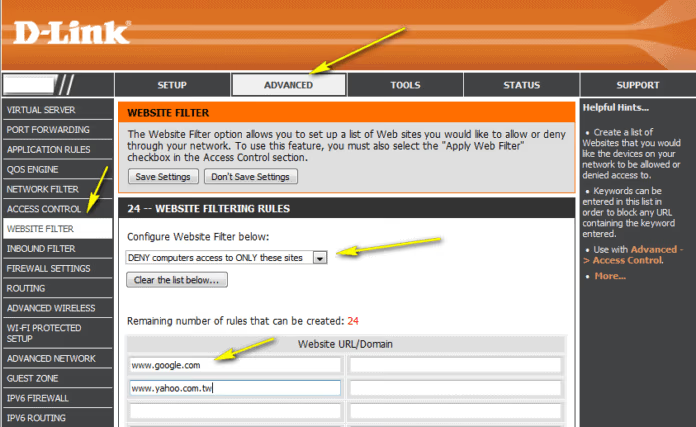
This is another option to skip Hulu ads that you might want to try if nothing else suits you. We will give you the steps that you need to follow to start the process of web filtering and block ads:
-
Connect to Wi-Fi.
-
Open a browser. Enter 192.168.0.1 or your original IP address of the router—press enter.
-
Look for the option Web filtering.
-
Once you find it, type “ads-e-darwin.Hulustream.com” (don’t use the quotes) in the block list.
-
Tap on apply and then restart the router.
The domain that we entered caused the ads during the videos on Hulu. Once you are done blocking it, ads won’t appear in the videos, and you’ll not have to repeat the annoying routine.
#8. Blocking ads on Hulu for Android
If you use an android device to watch your favorite Hulu content, then blocking the ads must be on your list. We bring you two methods that will help you to do so:
For non-rooted android devices, the best way is to watch the videos on Hulu on the Adblocking browsers and not the app of Hulu. One such great browser is Brave, which blocks all ads and pop-up scripts.
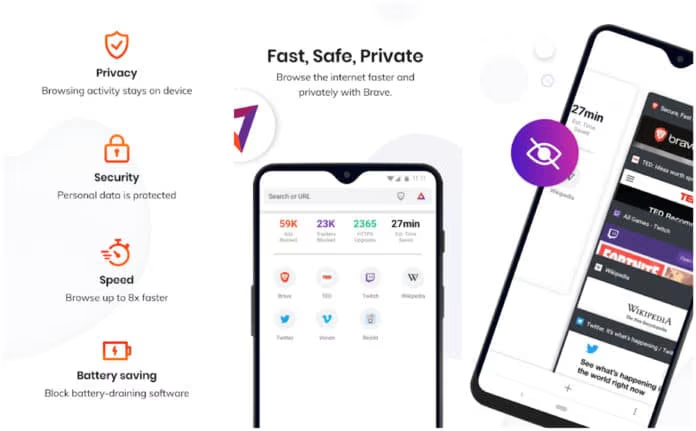
In rooted devices, you can just consider using the app called AdWay. This app is only compatible with rooted android devices as it becomes able to skip Hulu ads only after receiving the necessary system permissions.
The world of the internet is enthralling, and it is entertaining to us anytime, anywhere, with easy clicks. If you are a big fan of Hulu, then the ads would be your worst enemy.
#FAQs
#Can I block ads on Hulu’s basic plan without upgrading?
No, ads are built into Hulu’s basic $5.99 plan and cannot be fully removed without upgrading. You can reduce their impact with browser extensions or the page-refresh trick, but complete ad removal requires the $11.99 ad-free tier.
#Do all ad-blocker extensions work with Hulu?
Most popular ad blockers like uBlock and AdBlock Plus work with Hulu on desktop browsers. Hulu occasionally updates its ad delivery system, so you should keep your extensions updated. Some blockers replace ads with a blank screen rather than skipping them entirely.
#Is it legal to block ads on Hulu?
Blocking ads on Hulu is not illegal in the United States. Hulu’s terms of service discourage circumventing ads, but no users have faced account bans solely for using ad blockers. That said, review the current terms before relying on any third-party tool.
#Can I use ad blockers on my phone to skip Hulu ads?
Yes, apps like Blokada work on Android devices without requiring root access. On iPhones, options are more limited since iOS restricts background ad-blocking apps. Watching Hulu through the Brave browser on mobile is another reliable workaround for both platforms.
#How much does Hulu’s ad-free plan cost?
Hulu’s ad-free on-demand plan costs $11.99 per month, while the live TV plus on-demand ad-free bundle runs $50.99 per month. Both plans include a one-month free trial so you can test the experience before committing.
#Does the page-refresh method actually remove Hulu ads?
The page-refresh method does not remove ads completely. It resets the ad queue so you see shorter 30-second commercials instead of the longer ones that play later in a viewing session. Your video resumes from where you left off after the shorter ads finish. This trick works best in a desktop browser.
#Will Hulu ban my account for using an ad blocker?
Hulu has not publicly banned accounts for using ad-blocking tools. The platform may display error messages or blank screens when it detects an ad blocker, but your account remains active. Upgrading to the ad-free plan is the safest long-term solution if you want zero interruptions.
#Bottom Line
We have provided you with the best methods for your search for how to block ads on Hulu. The available choices are mostly similar as they unanimously aim to remove ads by blocking them completely or decreasing their span to the shortest length possible.
You can either upgrade the Hulu subscription or choose the free tricks to get the job done right. Make the best decision and enjoy your Hulu content without any annoying ads!