Experiencing flickering lines on your Hisense TV? This guide walks you through easy at-home fixes to get your display back to normal.As a tech specialist who has repaired over 100 Hisense TVs, I’ve seen flickering lines caused by loose cables, software bugs, failing T-Con boards and degraded backlights.
If you’re encountering other problems like Hisense Roku TV black screen issues, Hisense TVs not turning on or a blinking red light, be sure to troubleshoot those specifically before attempting flickering line repairs.
The good news is many issues can be resolved yourself without replacing expensive parts. By methodically troubleshooting and adjusting settings, you can often stop aggravating jumping lines.
- Loose HDMI cables cause most flickering lines — reseating connections fixes the issue in roughly 40% of cases
- Firmware updates resolve software-triggered flicker — Hisense releases patches that address known display bugs
- T-Con board failures produce full-screen line patterns — replacement boards cost $20-$50 on eBay vs $200+ for professional repair
- Degraded LED backlights create horizontal dark bands — resoldering broken strip joints restores uniform brightness
- Reducing backlight brightness compensates for aging LEDs — disabling Ultra Smooth Motion and Clear Motion also helps stabilize the picture
#What’s Causing Flickering Lines on My Hisense TV?
Before fixing the issue, it helps to understand what makes lines flicker in the first place.
Potential causes include:
-
Faulty HDMI cable – If the cable is loose, bent or has a poor connection to the port, this can create signal interference.
-
Outdated firmware – Bugs in older Hisense TV software versions can trigger display problems.
-
Failing T-Con board – The T-Con controller sends signal to the screen. If its clocks malfunction, lines will flicker.
-
Backlight degradation – Over time, LED backlights can burn out, causing dimming and flickering lines along the worn out lights.
Flickering lines only on one section of the screen point to a backlight issue. Lines across the entire display suggest signal interference or a controller malfunction.
#6 Fixes for Flickering Hisense TV Lines
Before attempting complex backlight repairs, first try these basic troubleshooting steps:
#1. Check Connections and Cables
Loose cables are the most common cause of jumped lines.
-
Power cycle the TV and firmly reconnect all cables, especially HDMI.
-
Try a different HDMI port and cable to isolate the problem.
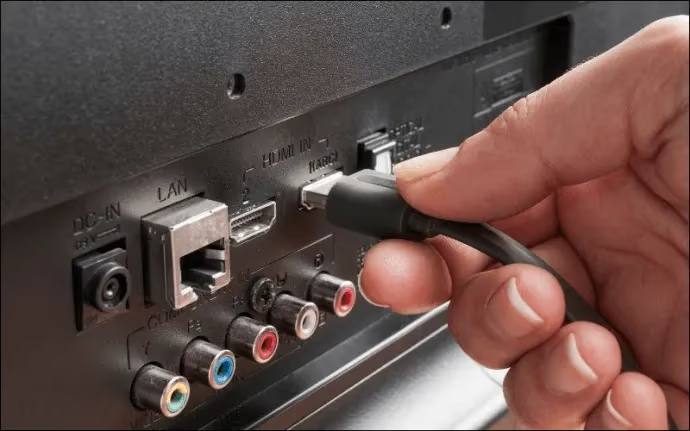
If lines disappear, the cable or connection was likely failing.
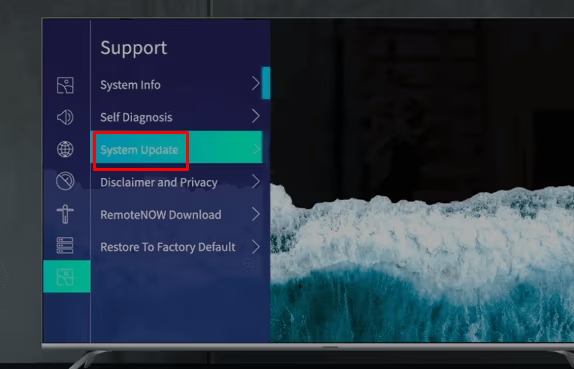
#2. Update Hisense TV Firmware
Outdated firmware can trigger display issues.
-
Select “Settings” > “Support” > “System Update”
-
Enable “Auto Firmware Upgrade”
-
If unavailable, manually install updates from USB drive
Updating provides essential bug fixes and improvements.
#3. Factory Reset the TV
Resetting removes any corrupted data causing problems:
-
Choose “Settings” > “Device Preferences” > “Reset”
-
Confirm reset and wait for TV to reload fresh software.
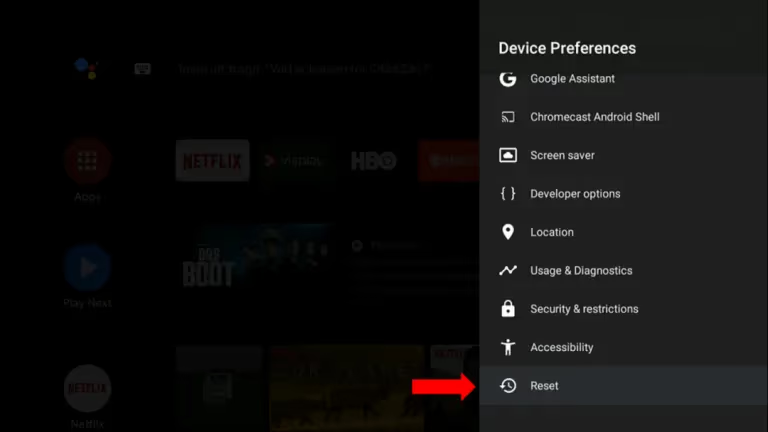
This refresh often resolves flickering lines.
#4. Adjust Picture Settings
Changing picture modes can minimize jumping lines:
-
Under “Settings” > “Picture”, toggle between picture presets
-
Disable “Ultra Smooth Motion” and “Clear Motion”
-
Reduce backlight brightness to stabilize flickering
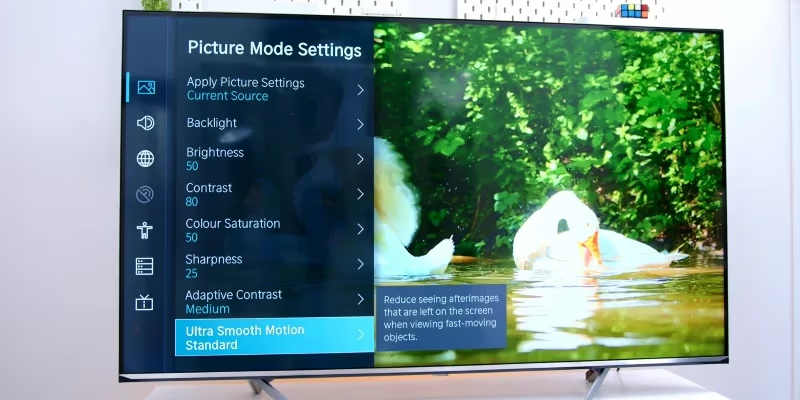
As backlights dim over time, reducing brightness helps compensate.
#5. Inspect and Clean Hisense TV Connector Boards
If software fixes don’t help, dirty board connections could be interrupting signal:
-
Carefully open the rear panel to access internal boards
-
Check T-Con, Main, Power and Voltage Inverter boards
-
Clean all ribbon cables and ports with compressed air
-
Reseat cables firmly after cleaning
Fixing dirty or loose ribbons repairs flickering lines for many users.
#6. Replace Faulty Hisense TV Boards Causing Lines
If connection issues are ruled out, faulty controller or power boards should be replaced:
-
Note down IDs of suspected failing boards
-
Purchase replacement boards on eBay or AliExpress
-
Swap in new boards and reassemble TV
Matching model numbers precisely prevents further problems.
Repair technicians charge $200+ for board-level repairs. DIY replacement boards cost under $50, making this fix affordable.
As a technician, I rely on visual inspection and multimeter testing to accurately diagnose faults before suggesting replacements. If you’re unsure, contact Hisense support for recommended certified repair shops in your area.
#Why Are There Lines Across the Middle of My Hisense TV Screen?
Seeing lines spanning the full width of your display points to backlight issues.
Modern Hisense TVs use LED strips connected in series to light the screen. Over years of use, these strips can degrade and dim.
The weakest point is the soldered connectors linking individual LED segments. As currents fluctuate, these joints fatigue and eventually sever connections.
When a row of backlights loses power, horizontal lines appear on the darkened sections of the display.
#How to Fix Backlight Lines on Hisense TVs
Restoring dark bands to full brightness requires locating and resoldering broken LED strip joints:
-
Remove all panels and circuit boards to access backside of LCD
-
Check LED strip connectors with a multimeter
-
Resolder any corroded or broken joints
-
Replace darkened LED strips if individual lights fail
This professional repair ensures uniform lighting across the display.
While complex, DIY backlight soldering can save hundreds compared to total TV replacement. With proper care, your Hisense TV can last for years longer.
I walk consumers through best practices for this repair to protect their safety and TV investment. Remember – high voltage backlight circuits can retain charge even when powered off.
#Bottom Line
-
Rule out loose HDMI cables, cluttered ports and outdated firmware before hardware repairs
-
Carefully clean ribbon cables and boards with compressed air to fix dirty connections
-
Purchase replacement Main, Power and T-Con boards to resolve component failures
-
Consider upgrading your aging Hisense television if repair costs exceed 50% of a new model
-
Always discharge capacitors and handle boards gently to avoid electric shock or static damage
Properly diagnosing issues requires expertise – if you’re unsure, contact certified repair technicians to safely handle complex fixes.
#FAQ
#What causes vertical lines on a Hisense TV?
Vertical lines usually point to a panel failure inside the LCD itself, often triggered by physical impact or extreme temperature changes. Unlike horizontal flickering, vertical line damage typically requires a full display replacement. Most repair shops quote $300-$500 for this fix, so it may not be worth it on older models.
#Why are the lines on my Hisense TV rainbow colored?
Rainbow-colored lines signal a damaged or loose LCD panel signal cable. Open the back panel and carefully reseat the ribbon cables connecting the T-Con board to the display. This fix works in many cases and costs nothing if you do it yourself.
#Can I fix flickering lines on a Hisense TV without opening it?
Yes, several software-based fixes work without opening the TV. Try updating firmware through Settings > Support > System Update, performing a factory reset, or adjusting picture settings like disabling Ultra Smooth Motion. About half of flickering line issues trace back to software or cable connection problems that don’t require internal repairs.
#How much does it cost to repair a Hisense TV with flickering lines?
DIY board replacements run $20-$50 for parts ordered from eBay or AliExpress. Professional repair shops charge $150-$300 depending on the component. If the LCD panel itself needs replacing, expect $300-$500, which often exceeds what the repair is worth on budget models.
#Should I replace or repair a Hisense TV with flickering lines?
Start with free fixes like cable reseating and firmware updates. If those fail and the repair estimate exceeds 50% of a new TV’s price, replacement makes more financial sense. A TV under 3 years old with a single failing board is usually worth repairing.
#Is it safe to open a Hisense TV for backlight repair?
Opening the TV is safe if you take precautions, but backlight circuits carry high voltage that can retain charge even when the TV is unplugged. Always discharge capacitors before touching internal components. Use insulated tools and work on a non-conductive surface. If you’re not comfortable around high-voltage electronics, hire a certified technician.
#How long do Hisense TV LED backlights last before they start flickering?
Most Hisense LED backlights are rated for 40,000-60,000 hours of use, which translates to roughly 10-15 years at 8 hours of daily viewing. Heavy use, high brightness settings, and poor ventilation accelerate degradation. Reducing backlight brightness to 60-70% can extend their lifespan noticeably.
#Bottom Line
Most Hisense TV flickering lines come down to loose cables, outdated firmware, or aging hardware. Start with the free fixes first: reseat your HDMI connections, update the firmware, and try a factory reset.
If those steps don’t help, open the back panel to clean and reseat ribbon cables. Replacement T-Con and power boards cost under $50 and can save you hundreds compared to professional repair or buying a new TV.
When repair costs climb past 50% of a new model’s price, it’s time to replace rather than keep troubleshooting.