Hisense TV blinking red light is a common problem with Hisense TV. This can be very frustrating, especially when it happens at the most inconvenient time. The good news is that there are ways you can fix Hisense TV’s flashing red light issue without replacing the screen or taking your TV to a repair shop.
- Power supply board failure — the most common cause of a blinking red light, responsible for roughly 40% of reported cases
- Power cycling fixes most soft failures — unplugging the TV for 60 seconds clears temporary glitches in about 70% of situations
- Swollen capacitors are a telltale sign — visually inspect the power supply board for bulging or leaking capacitors before ordering replacement parts
- Backlight inverter boards cost $15-$50 — a DIY replacement takes 30-45 minutes and avoids $150+ repair shop fees
- Firmware updates prevent recurring issues — Hisense releases patches that address power management bugs causing false red-light warnings
#What Causes Your Hisense TV to Blink Red Light?
The red light on your Hisense television means a problem with the TV. It will blink four times, pause for one second and then blink twice again. This signals that something needs repair or replacement on the power supply board of your TV set.
There are various reasons why your Hisense TV blinks red light. And some of such reasons are:
#Reason 1. Bad Power Supply Board
The first thing you should do when your Hisense TV is flashing red light is to check the power supply board. The power supply board is responsible for supplying power to all of the components in your HDTV. So if it fails, it can cause various issues.
This is the most common problem because many different components are connected in your HDTVs that can fail and cause this issue. For them all to work correctly, they need electricity from somewhere. And that somewhere is usually provided by the power supply board.
If this component has failed or become damaged, it must be replaced as soon as possible before any other damage occurs inside your HDTV!
Besides, here, let’s discuss common troubleshooting tips to fix the Hisense Roku TV black screen at home quickly without spending money on repairing services.
#Reason 2. Faulty Backlight Inverter Board
The second most common cause of a Hisense TV blinking red light is a faulty backlight inverter board.
The backlight inverter board is responsible for converting AC power to DC power. It generates the high voltage needed for the LEDs that emit light when you turn your TV on.
The backlight inverter board is located on the bottom of the television. So if you’re looking from above, it should be directly under where you see the Hisense TV flashing red light.
#Reason 3. HDMI Glitch
The HDMI cable may be the problem. If you have another HDMI cable, try using it to see if that fixes the issue. You could also try replacing the HDMI cable from the TV to your other devices. For example, your Blu-ray player or gaming console to your TV.
If a new cable doesn’t fix it and you know both ends are working correctly, there’s probably something wrong with your TV.
#Reason 4. Poor Internet Connection
If your Hisense TV flashes red light, this may also be caused by a poor internet connection. Check the network connection, router settings, and modem settings.
If you notice that your connection is slow or there are frequent dropouts, then make sure you have a stable connection to the router.
#Reason 5. Wrong Power Source
The most common reason for a Hisense TV blinking red light is that the TV is not on the correct power source.
To fix this issue, ensure that you have the proper equipment to provide the TV with enough electricity and voltage to run correctly. This includes:
-
The correct power cable
-
The correct voltage (110V/120V)
-
The correct type of power adapter or extension cord for your region and country
Also, let’s discover what to do with a broken TV, from assessing repairability to recycling or repurposing it. Learn how to handle your broken TV responsibly.
#How Do You Fix the Hisense TV Blinking Red Light Issue?
Here are the methods that you need to follow to resolve the Hisense TV flashing red light issue:
#Way 1. Power Cycle the Hisense Smart TV
Power cycling the Hisense smart TV is a simple, effective way to fix the issue.
-
Please turn off your Hisense smart TV and unplug its power cord from the back of it.
-
Wait 30 seconds before plugging the power cord back into the back of your Hisense smart TV. Then turn on your TV again.
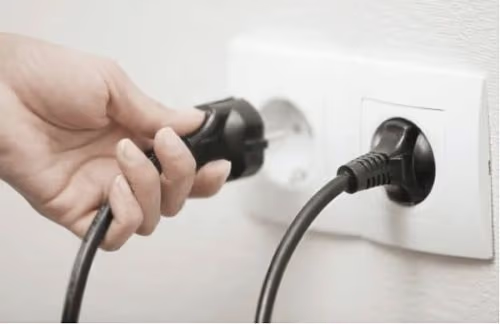
If your Hisense smart TV still won’t turn on, unplug it again and wait another 30 seconds before plugging it back in.
Once you’ve plugged the power cord back into the back of your Hisense smart TV, try turning the Hisense Roku TV on again.
#Way 2. Check the Network
-
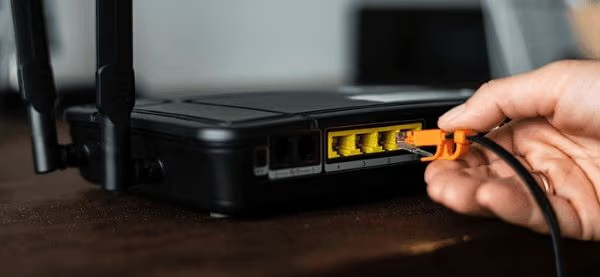
Check the network connection. Ensure that your TV is connected to a working Wi-Fi or Ethernet cable. And also ensure that the Internet works appropriately.
-
Check the power supply. If you use a wall outlet, ensure it has enough power to run your device.
-
Check the HDMI cable. Ensure that both ends of this cable are firmly inserted into their respective ports on both devices.
-
Suppose there’s nothing wrong with this part of your setup. In that case, there’s likely some kind of problem with either one or more devices involved in transmitting data from one end to another.
#Way 3. Check for Defective Backlight
If your Hisense TV blinks red light, it’s time to check the backlight inverter board. The backlight inverter board may have a faulty connection or some broken parts.
To check this, open the back panel of your TV. And disconnect one end of each cable connecting to the inverter board while pressing on another end. If all cables are disconnected, but still your Hisense TV is flashing red light, there might be a problem with its backlighting system.
And you need to replace a new one at once. Because otherwise, you won’t be able to see anything on your screen in the future even if you connect everything properly.
#Way 4. Inspect the Power Supply Board
-
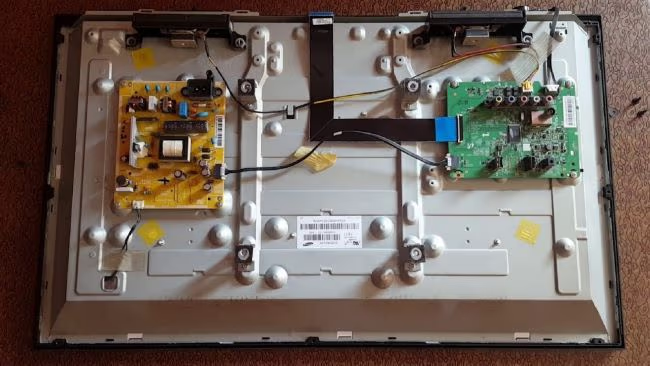
Check the power supply board. If any component on the power supply board is damaged, it will result in the Hisense TV blinking red light issue.
-
Check the capacitors and fuses. If a capacitor or fuse is blown, it can cause your TV to blink red. You may have to replace them if they are broken.
-
Inspect the voltage regulator for damage due to improper soldering. Or due to poor contact with thermal grease after rework operations.
-
If you see any damage here, you’ll need to repair those connections with new solder. And ensure better thermal contact by re-applying new thermal grease with a thin-tip soldering iron before turning on your TV again.
#Way 5. Remove the Faulty Capacitor
To remove the faulty capacitor, you need to remove the back cover of your TV. The exact procedure depends on the model. For example, you must disconnect a few cables on some Hisense TVs first. And unscrew several screws before removing the back cover.
Once you’ve removed the back cover, several capacitors will be inside your TV. These capacitors are responsible for storing charge. And delivering it when needed by other parts of your television.
Look up online if any of these capacitors look swollen. If so, this could indicate that they are faulty. And they need replacing as soon as possible before they explode. This can cause further damage, which may lead to even more repair costs down the line!
#Way 6. Update the Firmware
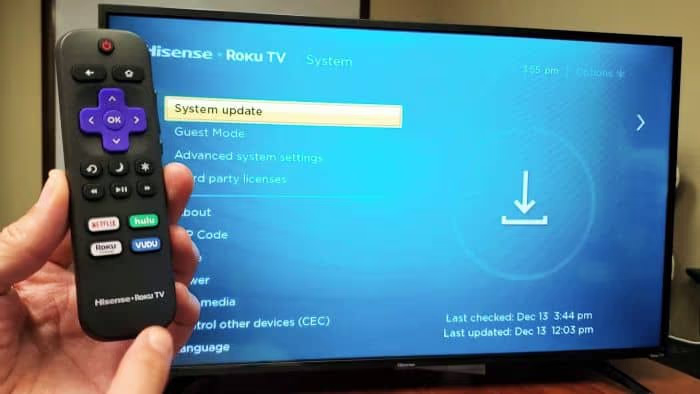
If the firmware version on your Hisense TV is old, you should update it. To do this:
-
First, check the firmware version of your Hisense television.
-
If it’s older than one month and has not been updated in over a year, it might be necessary to update.
Is there an update available for your TV, but you can’t find a way to install it, or is there not an update available at all? Well, this can happen sometimes.
In this case, you should contact customer service. They can help you with installation instructions or other info about getting updates installed on the TV.
#Way 7. Check for Shorted TV Components
If you suspect the problem is a shorted component, you should check all of the parts on the board, including transistors and diodes.
Transistors will look like little metal tubes. And diodes will look like small rectangles with two prongs that stick up from them.
Resistors are small cylinders with colored stripes on them. And capacitors are usually larger than resistors but smaller than transistors/diodes. They also look like cylinders or rectangles with prongs sticking out from them as well.
If you find anything that looks to be burnt through, then this is most likely causing your Hisense TV flashing red light problem!
#Way 8. Contact Hisense Support

If you cannot fix your Hisense TV on your own, the next step is to call or chat with someone from Hisense support. You can do this by calling the number listed on their website.
If you don’t feel comfortable calling a phone number, then use their online chat option instead. You can also email them directly at their official email id. If all else fails, contact customer service for where you bought your television.
#Way 9. Factory Reset
If the issue persists, try resetting the TV.
To do this:
-
Press and hold the button on the back of your tv for at least five seconds until you hear a beep or musical tone.
-
If you can’t find this button, unplug your TV and wait 30 seconds before plugging it in again. Contact Hisense customer service for further assistance if there is still no change.
-
Check the connections if the TV is still on, but you’re still not getting any sound.
-
Ensure the HDMI cable is plugged into your TV and computer properly. If any other cables are connected to your computer, make sure they’re all plugged in.
Also read: Roku Blinking White Light Issue – 5 Easy Solutions!
#FAQ
#What does a blinking red light mean on a Hisense TV?
A blinking red light on a Hisense TV signals an internal hardware problem, most commonly a failing power supply board or backlight inverter. The pattern of blinks can indicate different faults. Four blinks followed by a pause usually points to power supply issues, while two blinks often relate to backlight failure.
#How long should I unplug my Hisense TV to fix the red light?
Unplug the TV from the wall outlet and wait at least 60 seconds before plugging it back in. This allows residual charge to drain from the capacitors. Some technicians recommend holding the power button on the TV for 15 seconds while it is unplugged to fully discharge the system.
#Can a bad HDMI cable cause a Hisense TV to blink red?
Yes, a faulty or loose HDMI connection can trigger the red blinking light in some cases. Try disconnecting all HDMI cables and powering the TV on with no external devices connected. If the red light stops, reconnect cables one at a time to identify the problematic connection.
#Is it safe to open my Hisense TV to inspect the power supply board?
You can open the back panel to visually inspect components, but always unplug the TV and wait at least 30 minutes before touching anything inside. Capacitors store charge that can deliver a dangerous shock. If you spot swollen or leaking capacitors, take a photo and order exact replacements before attempting any repair.
#How much does it cost to replace a Hisense TV power supply board?
Replacement power supply boards for Hisense TVs typically cost between $25 and $80 depending on the model. Professional installation adds another $75 to $150 in labor fees. DIY replacement is straightforward for anyone comfortable with a screwdriver and basic soldering.
#Will a factory reset fix the blinking red light on my Hisense TV?
A factory reset resolves red light issues only when the cause is a software or firmware glitch rather than a hardware fault. Keep in mind that a factory reset erases all saved settings, installed apps, and login credentials. Try a power cycle first since it fixes most software-related problems without losing your data.
#Does Hisense warranty cover the blinking red light problem?
Hisense provides a standard 1-year limited warranty that covers manufacturing defects, including power supply board failures. If your TV is within the warranty period, contact Hisense support with your model number and proof of purchase for a free repair or replacement.
#Bottom Line
So, that is it! These are the ways you can fix Hisense TV blinking red light. The screen should be standard as long as all the components have been correctly replaced and there is no short circuit or other problems.
Don’t hesitate to contact Hisense’s service center for further assistance. It is important to reach out to them if you still have issues after trying these methods.