fuboTV runs on every Apple TV from the 4th generation onward, and Apple TV is the only device that unlocks fuboTV’s Multiview feature. If you are looking at live sports streaming through fuboTV, pairing it with Apple TV gives you capabilities no other streaming device can match. This guide walks through setup, the exclusive features you get, and how to fix common issues along the way.
- Apple TV exclusivity — fuboTV’s Multiview feature only works on Apple TV, letting you watch four live channels simultaneously
- Device requirement — You need an Apple TV 4th generation (2015) or newer to run the fuboTV app
- Channel count — fuboTV’s Pro plan includes 190+ channels with a heavy focus on live sports networks
- FanView integration — Apple TV users can add live scoreboards and stats widgets directly inside Multiview
- Internet speed — fuboTV recommends at least 25 Mbps for reliable 4K HDR sports streaming on Apple TV
#How Do You Set Up fuboTV on Apple TV?
Getting fuboTV running on your Apple TV takes about five minutes. Here is the process.
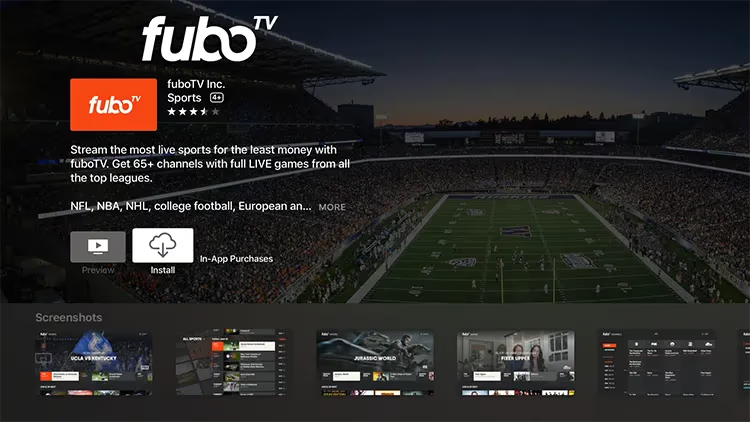
- Open the App Store on your Apple TV
- Search for “fuboTV” using the Siri Remote or the keyboard
- Select the fuboTV app and click Get to download it
- Open the app and sign in with your fuboTV account (or create one directly on the device)
- Start browsing channels and live events
If you do not have a fuboTV subscription yet, you can sign up through the app. Apple TV also supports signing in via a web activation code at fubo.tv/connect, which is faster than typing your email and password with the Siri Remote.
#Minimum Requirements
Your Apple TV needs tvOS 16 or later for the best experience. Older tvOS versions may run the app but miss newer features like FanView widgets. Check your tvOS version in Settings > General > About, and update if needed.
For streaming quality, fuboTV recommends 25 Mbps for 4K content. A wired Ethernet connection to your Apple TV gives the most stable performance during live games when buffering matters most. If you are stuck on Wi-Fi, keep the Apple TV within clear line of sight to your router.
#What Makes Multiview Worth Using?
Multiview is the single biggest reason to run fuboTV on Apple TV instead of any other device. No Roku, no Fire TV Stick, no smart TV app offers this feature.

With Multiview, your screen splits into up to four live channels playing at the same time. You control which channel’s audio plays by highlighting that tile. Any tile can go fullscreen with a single click, and you can swap channels in and out without stopping the other streams.
Sports fans use this during packed schedules. Sunday NFL games, March Madness tournament rounds, or Champions League group stage days all benefit from watching multiple games without constantly switching channels. The experience is similar to what you would see at a sports bar, but on your own TV.
#How to Activate Multiview
While watching any live channel, swipe down on the Siri Remote to open the player menu. Select the Multiview option and choose which additional channels to add. You can start with two and expand to four as more games begin.
#How Does FanView Work on Apple TV?
FanView adds live scoreboards, play-by-play stats, and game trackers as overlay widgets on your screen. On Apple TV, FanView integrates directly into Multiview.
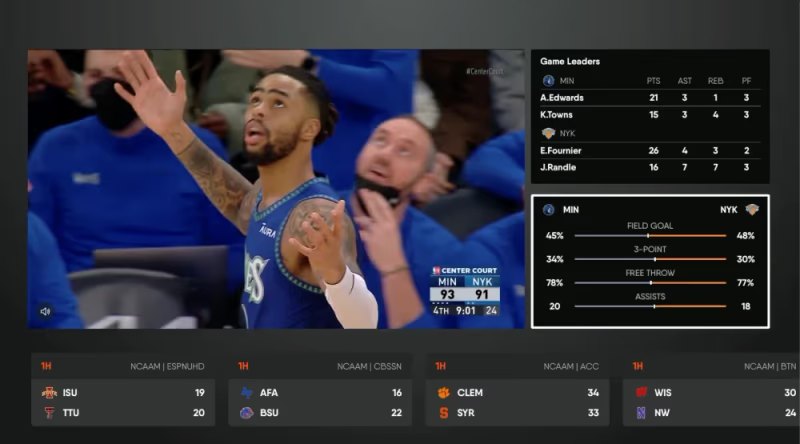
You can add up to two FanView widgets alongside your live channels. Each widget shows real-time scores for a specific game, and tapping a score switches the corresponding channel to that game’s broadcast. It is a fast way to jump between games without searching the channel guide.
FanView covers NFL, NBA, MLB, NHL, MLS, and major college sports. Not every game has FanView data, but national broadcasts and primetime matchups almost always do.
#fuboTV Channel Lineup and Plans
fuboTV’s Pro plan starts at $79.99 per month and includes 190+ channels. The sports coverage is the main draw.
#Sports Networks Included
The base plan covers ESPN, ESPN2, FS1, FS2, CBS Sports Network, NFL Network, NBA TV, MLB Network, NHL Network, Big Ten Network, SEC Network, and beIN SPORTS. Regional sports networks (RSNs) vary by market. Check your zip code on fubo.tv to see which local RSNs are available in your area.
For additional sports, the Sports Plus add-on ($10.99/month) adds NFL RedZone, Stadium, and several international sports channels. This add-on is popular during football season.
#Beyond Sports
fuboTV is not only sports. The Pro plan includes news channels (CNN, MSNBC, Fox News, BBC World News), entertainment (USA, Bravo, FX, AMC, HGTV), and family content (Nickelodeon, Disney Channel). It competes directly with YouTube TV and Hulu + Live TV across all major channel categories.
#DVR Storage
Every fuboTV plan includes unlimited cloud DVR with recordings stored for up to nine months. On Apple TV, you access recordings through the Library tab. Recorded content supports fast-forward and rewind at up to 3x speed.
#Troubleshooting fuboTV on Apple TV
If fuboTV is not loading or streams keep buffering, try these steps before contacting support.
Force-quit and reopen the app. Double-press the TV button on your Siri Remote, swipe up on the fuboTV preview card, then relaunch. This clears temporary glitches.
Restart your Apple TV. Go to Settings > System > Restart. A restart refreshes the network connection and clears cached data that might cause playback problems.
Check for updates. Open the App Store, go to Purchased, and see if fuboTV has a pending update. Also check Settings > System > Software Updates for tvOS updates.
Test your internet speed. Use a speed test app on your Apple TV or check from another device on the same network. If you are below 25 Mbps, try switching to a 5 GHz Wi-Fi band or connecting via Ethernet.
For persistent issues, our fuboTV not working troubleshooting guide covers more detailed fixes including DNS changes and account-level problems.
#Other Devices That Run fuboTV
Apple TV is the best option for Multiview, but fuboTV works across many other platforms if you need flexibility.
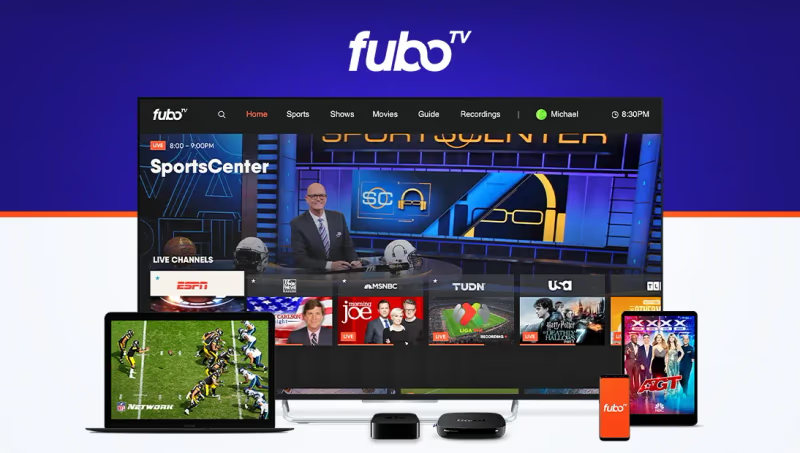
The app is available on iPhone, iPad, Android phones and tablets, Amazon Fire TV Stick, Roku, Chromecast with Google TV, Samsung Smart TVs, LG Smart TVs, and Vizio SmartCast TVs. You can also watch in a browser at fubo.tv.
fuboTV allows unlimited simultaneous streams on your home network and up to three streams outside the home. The Family Share add-on ($5.99/month) bumps the away-from-home limit to five, which is useful for households where people travel frequently.
#How Does fuboTV Compare to Other Live TV Services?
fuboTV competes with YouTube TV, Hulu + Live TV, Sling TV, and DIRECTV STREAM. Each has strengths in different areas.
fuboTV stands out for sports-specific features (Multiview, FanView, 4K sports broadcasts) and its international soccer coverage through beIN SPORTS. YouTube TV has a slight edge in local channel availability. Sling TV costs less but carries fewer channels. DIRECTV STREAM includes more RSNs in some markets but costs significantly more at higher tiers.
If live sports is your priority, fuboTV paired with Apple TV gives you the richest feature set. For general entertainment and local channels, YouTube TV may be a better fit. According to Apple’s official specs, the Apple TV 4K supports Dolby Vision, HDR10+, and Dolby Atmos, which makes it the best hardware match for fuboTV’s 4K HDR sports broadcasts.
#Bottom Line
fuboTV on Apple TV is the strongest combination for live sports streaming right now. The exclusive Multiview feature alone justifies choosing Apple TV as your streaming device if fuboTV is your primary service. Set up takes five minutes, the channel lineup covers all major sports networks, and the unlimited DVR means you never miss a game even when four are on at once.
If you already own an Apple TV, download fuboTV from the App Store and take advantage of features you cannot get anywhere else. If you are still choosing a streaming device, the Apple TV 4K is worth the investment specifically for the Multiview and FanView experience with fuboTV.
#FAQ
#Is Apple TV the best device for fuboTV?
Yes, and it is not close. Apple TV is the only device that supports fuboTV’s Multiview feature, which lets you watch four live channels simultaneously. Other devices like Roku and Fire TV Stick run the app well but lack this split-screen capability.
#How much does fuboTV cost per month?
The Pro plan starts at $79.99 per month with 190+ channels. Annual billing saves roughly 10%. Add-ons like Sports Plus ($10.99/month) and Family Share ($5.99/month) are optional extras that you can add or remove at any time.
#Can you watch fuboTV in 4K on Apple TV?
Select live events stream in 4K HDR on Apple TV, primarily major sports broadcasts. Your Apple TV needs to be a 4K model, and your internet connection should run at 25 Mbps or faster. Not all channels broadcast in 4K, so check the program guide for the 4K badge on supported events.
#Does fuboTV include local channels?
fuboTV carries ABC, CBS, NBC, and Fox in most U.S. markets. Coverage depends on your zip code. Enter your address during signup to see exactly which local channels are available before committing to a subscription.
#How many devices can stream fuboTV at once?
Unlimited devices can stream simultaneously on your home Wi-Fi network. Outside the home, the default limit is three concurrent streams. The Family Share add-on increases the away-from-home limit to five streams for $5.99 per month.
#What sports leagues does fuboTV cover?
fuboTV carries networks for NFL, NBA, MLB, NHL, MLS, college sports (Big Ten, SEC, ACC), and international soccer through beIN SPORTS. The Sports Plus add-on adds NFL RedZone and additional niche sports channels. It has broader sports coverage than most competitors except DIRECTV STREAM at its highest pricing tier.
#Can you record live games on fuboTV?
Every fuboTV plan includes unlimited cloud DVR storage. Recordings stay available for up to nine months. On Apple TV, recorded content appears in the Library tab, and you can fast-forward through commercials at up to 3x speed.
#Does fuboTV work on older Apple TV models?
The fuboTV app requires Apple TV 4th generation (2015) or newer. The original Apple TV and Apple TV 2nd/3rd generation do not support the App Store, so they cannot run fuboTV. For Multiview and 4K playback, you need the Apple TV 4K specifically.