The Amazon Fire TV Stick costs between $29.99 and $59.99 as a one-time purchase with zero monthly equipment fees. Every recurring charge comes from the streaming apps you choose to subscribe to, not from the device itself. This guide breaks down exactly what you will and won’t pay for after plugging in your Fire TV Stick.
- No monthly device fee — the Fire TV Stick is a one-time purchase ranging from $29.99 to $59.99 depending on model
- Streaming subscriptions are optional — paid apps like Netflix ($7.99/mo) and Amazon Prime Video ($14.99/mo) are separate from the hardware cost
- Free content is available — apps like Tubi, Pluto TV, and Freevee offer thousands of movies and shows at no cost
- Amazon Prime is not required — you can use a Fire TV Stick without a Prime membership by using free or third-party paid apps
- Subscription rotation saves money — subscribing to 1-2 services at a time instead of 5+ can cut your annual streaming bill by over 50%
#What Does the Fire TV Stick Actually Cost?
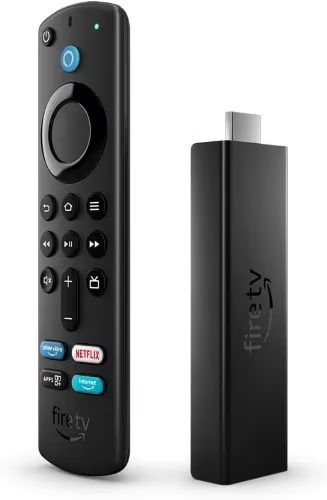
The Fire TV Stick is a small streaming device that plugs into your TV’s HDMI port. Amazon sells several models at different price points:
| Model | Price | Resolution | Key Feature |
|---|---|---|---|
| Fire TV Stick Lite | $29.99 | 1080p | Basic streaming |
| Fire TV Stick | $39.99 | 1080p | TV controls on remote |
| Fire TV Stick 4K | $49.99 | 4K UHD | Dolby Vision + Atmos |
| Fire TV Stick 4K Max | $59.99 | 4K UHD | Wi-Fi 6E, ambient display |
That price is the full hardware cost. Amazon does not charge any activation fees, equipment rental fees, or recurring device charges. Once you buy it, the Firestick is yours to use indefinitely.
If you’re deciding between a Firestick and a Roku player, check out our Fire TV Stick vs Roku comparison for a side-by-side breakdown.
#Do You Need a Subscription to Use Fire TV Stick?
No. A Fire TV Stick works without any paid subscriptions. You can set it up with just a free Amazon account (not Prime) and immediately access free apps like Tubi, Pluto TV, and YouTube.
That said, most people subscribe to at least one or two paid streaming services. Here is what the major apps cost per month:
#Amazon Prime Video
- $8.99/month (standalone) or $14.99/month as part of Amazon Prime
- Amazon Prime members get Prime Video included, plus free shipping and other perks
- Prime Video with ads launched in early 2024 as the default tier
#Netflix
- Standard with Ads: $7.99/month
- Standard: $17.99/month (2 screens, 1080p)
- Premium: $24.99/month (4 screens, 4K UHD)
Netflix removed its Basic plan in 2024. The ad-supported tier is now the entry point, which makes it one of the more affordable options for new subscribers.
#Disney+
- With Ads: $9.99/month
- No Ads: $16.99/month
- Bundle (Disney+, Hulu, ESPN+): starts at $16.99/month
#Max (Formerly HBO Max)
- With Ads: $9.99/month
- Ad-Free: $16.99/month
- Ultimate Ad-Free: $20.99/month (4K, Dolby Atmos)
#YouTube TV

- $72.99/month for 100+ live channels
- This is a live TV replacement, not a standard streaming app, so the price reflects cable-like channel packages
These prices change frequently. Check each service’s website for current rates. For official Amazon pricing, visit Amazon’s Fire TV support page.
#What Can You Watch for Free on Fire TV Stick?
You don’t have to pay for anything beyond the hardware. Several legitimate apps offer free movies, TV shows, live news, and sports without a subscription:
Ad-supported free apps:
- Tubi has a large library of movies and TV series, no account needed
- Pluto TV offers 250+ live channels covering news, sports, movies, and entertainment
- Amazon Freevee is Amazon’s own free tier with original content and licensed movies
- Plex provides free ad-supported movies and shows plus live TV channels
- YouTube is the largest free video platform, available on every Fire TV device
Library-based free apps:
- Kanopy is free with a library card, focused on documentaries and indie films
- Hoopla is another library card option with movies, audiobooks, and comics
For a full list of free options, see our guide to free channels on Fire TV Stick. If you’re into live sports specifically, we also cover free sports streaming apps that work on the Firestick.
#Is Amazon Prime Required for Fire TV Stick?
No. This is one of the most common misconceptions. You need a free Amazon account to set up the Fire TV Stick and download apps from the Amazon Appstore. You do not need Amazon Prime.
Without Prime, you can still:
- Download and use any free app (Tubi, YouTube, Pluto TV)
- Subscribe to paid services like Netflix, Hulu, or Disney+ independently
- Use the Alexa voice remote for searching and playback control
- Access the Fire TV interface and all device settings
Amazon Prime ($14.99/month or $139/year) is only necessary if you want Prime Video content and the other Prime benefits. Many Firestick owners skip Prime entirely and rely on other services.
#How Can You Reduce Streaming Costs?
Paying for five or six subscriptions at $10-20 each adds up fast. Here are three practical ways to keep costs down.
Rotate subscriptions. Pick one or two services per month. Watch everything you want on Netflix for two months, cancel, then switch to Max for a month. Most services let you cancel and re-subscribe with no penalty, and your watchlist carries over. A household spending $80/month on five services can cut that to $20-30 by rotating two at a time.
Use free tiers and ad-supported plans. Tubi and Pluto TV cost nothing. Netflix, Disney+, and Peacock all have lower-priced ad tiers that cut the monthly cost by 30-50%. If you don’t mind occasional ads, these plans deliver the same content libraries.
Share family plans. Netflix Standard allows 2 screens. YouTube TV lets up to 6 accounts share one subscription within a household. Splitting costs with family members in the same home is the most straightforward way to cut per-person costs.
#How Does Fire TV Stick Compare to Cable TV Costs?
A basic cable package costs $50-100/month plus equipment rental fees of $5-15/month per box. Over a year, that is $660-$1,380 minimum.
By comparison, a Fire TV Stick 4K ($49.99 one-time) plus two rotating streaming subscriptions ($20-30/month) puts your annual cost at roughly $290-$410. That is less than half of a typical cable bill, with the added flexibility to cancel anytime.
The Leichtman Research Group reported that over 25% of U.S. households have cut the cord completely as of 2024. The Fire TV Stick is one of the most popular devices making that switch possible.
If your Fire TV Stick starts running slowly after months of use, clearing the cache and unused apps usually fixes it. Our Fire TV Stick running slow guide walks through every fix.
#Bottom Line
The Fire TV Stick is a one-time purchase with no hidden monthly fees attached to the device. Every dollar you spend after the initial buy goes toward optional streaming subscriptions that you control. Start with the free apps already available, add one paid service at a time, and rotate as needed. That approach keeps your total monthly streaming cost well under what cable would charge for fewer channels and less flexibility.
#FAQ
#Does the Fire TV Stick charge a monthly fee after purchase?
No. The Fire TV Stick is a one-time hardware purchase. Amazon does not charge monthly equipment fees, activation fees, or recurring device costs. The only ongoing costs are streaming subscriptions you voluntarily sign up for through apps on the device.
#Can you use a Fire TV Stick without Wi-Fi?
The Fire TV Stick requires Wi-Fi for initial setup and streaming. Without an internet connection, you cannot download apps or watch online content. Some users load media onto USB storage via the Fire TV Stick 4K Max’s USB port, but this is not the intended use case and has limited format support.
#What happens if you cancel all streaming subscriptions?
Your Fire TV Stick still works. You can browse and use free apps like Tubi, Pluto TV, YouTube, and Amazon Freevee without any active paid subscriptions. The device itself remains fully functional regardless of how many services you subscribe to.
#Is Amazon Freevee really free?
Yes. Amazon Freevee (formerly IMDb TV) is completely free and ad-supported. It includes original series, licensed movies, and live TV channels. You access it through the Freevee app or directly from the Fire TV home screen. No Prime membership required.
#Do you need a smart TV to use a Fire TV Stick?
No. The Fire TV Stick plugs into any TV with an HDMI port, including older non-smart TVs and computer monitors with HDMI input. It turns any display into a smart TV with its own operating system and app store. For more details, see our guide on using a Fire TV Stick with a non-smart TV.
#Are there hidden fees with the Fire TV Stick?
There are no hidden fees from Amazon for the hardware itself. The purchase price covers the device and remote. Sales tax applies at checkout depending on your state. The only additional costs are voluntary streaming service subscriptions, in-app purchases, or Amazon channel add-ons you choose to buy.
#How much does it cost to stream in 4K on Fire TV Stick?
The Fire TV Stick 4K ($49.99) or 4K Max ($59.99) handles 4K content. On the app side, Netflix charges $24.99/month for its Premium plan with 4K, Disney+ includes 4K in its $16.99/month ad-free plan, and Amazon Prime Video streams 4K at no extra charge beyond the standard subscription. Not all content is available in 4K on every service.
#Can you return a Fire TV Stick if you don’t like it?
Amazon offers a 30-day return policy on Fire TV devices purchased directly from Amazon.com. Third-party retailers may have different return windows, so check the seller’s policy before buying.