ESPN on Pluto TV sits at channel 506 and gives sports fans free access to highlights, classic games, and analysis without a cable subscription. Pluto TV is fully ad-supported, so there are no fees, no sign-ups, and no credit card prompts. If you want ESPN content but don’t want to pay for cable or a live TV streaming service, channel 506 is your starting point.
- ESPN lives on channel 506 on Pluto TV and is free to watch with no account or subscription needed
- Content includes highlights, classic games, and talk shows but not live ESPN broadcasts like Monday Night Football
- Pluto TV works on Roku, Fire TV Stick, Apple TV, iOS, Android, and most smart TVs with no device restrictions
- A slight streaming delay of 15-60 seconds is normal compared to cable broadcasts, which is standard across all free streaming platforms
- ESPN+ is a separate paid service that costs $11.99/month and is not included with Pluto TV’s free ESPN channel
#What Sports Content Does ESPN on Pluto TV Include?
Channel 506 pulls from ESPN’s library, but it does not mirror the full ESPN cable channel. Here is what you actually get when you tune in.
Highlights and recap shows. SportsCenter clips, game breakdowns, and top plays across the NFL, NBA, MLB, and college sports cycle through regularly. The programming updates daily, so there is always fresh content in rotation.
Classic games from ESPN’s vault. This is one of the best parts of channel 506. Iconic matchups from decades past air throughout the day. Think legendary Super Bowls, NCAA tournament thrillers, and memorable NBA Finals games.
Analysis and talk shows. Segments from ESPN’s commentary lineup fill much of the schedule. You get opinions, debates, and expert breakdowns covering the biggest stories in sports.
What you will NOT get. Live ESPN broadcasts like Monday Night Football, NBA on ESPN, or College GameDay are not available on Pluto TV. Those require either a cable subscription, a live TV streaming service like Sling TV, or ESPN+ for certain exclusive events.
#How Does ESPN on Pluto TV Compare to ESPN+ and Cable?
Understanding the difference between these three options saves you from subscribing to something you do not need.
ESPN on Pluto TV (free) gives you highlights, classic games, and analysis. No live game broadcasts. No account required. Ad-supported with commercial breaks every 10-15 minutes.
ESPN+ ($11.99/month) is a paid streaming service with exclusive live events including UFC Fight Night, select MLB and NHL games, and some college sports. It does not include the main ESPN cable channel, which confuses a lot of people. ESPN+ is an add-on, not a replacement for cable ESPN. You can learn more on the official ESPN+ page.
ESPN via cable or live TV streaming is the only way to watch marquee events like Monday Night Football and the NBA on ESPN. Services like YouTube TV, fuboTV, and Sling TV carry the full ESPN channel. Sling TV’s Orange plan starts at $40/month and includes ESPN, ESPN2, and ESPN3. Check our breakdown of ESPN on Sling TV for more details.
For most casual fans who want background sports content and classic games, Pluto TV’s free channel 506 does the job. Dedicated fans who need live events will want ESPN+ or a live TV package.
#Which Devices Support ESPN Channel 506 on Pluto TV?
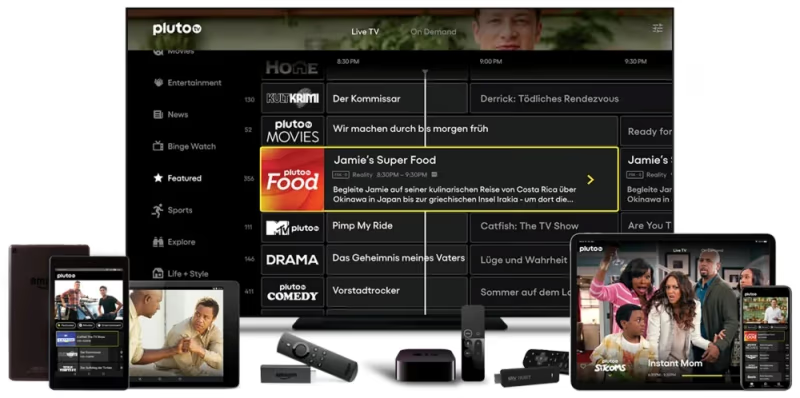
Pluto TV runs on almost every major streaming device and smart TV platform. No special hardware is required.
Streaming devices: Roku (Express, Streaming Stick, Ultra), Amazon Fire TV Stick, Fire TV Stick 4K, Apple TV, Apple TV 4K, and Chromecast with Google TV all support the Pluto TV app. If you use a Fire TV Stick, our guide on Pluto TV on Firestick walks through installation.
Smart TVs: Samsung Smart TV, LG Smart TV, Sony Bravia, Vizio SmartCast, and Hisense Smart TV all have the Pluto TV app in their respective app stores. On most models, the app comes pre-installed.
Mobile and web: The Pluto TV app is available on iOS and Android. You can also watch directly at pluto.tv in any desktop browser without downloading anything.
One limitation to know: Pluto TV (and ESPN channel 506) is only available in the United States. Regional broadcasting rights restrict access outside the US, so international viewers cannot tune in without a VPN.
#How to Find ESPN Channel 506 on Pluto TV
Finding channel 506 takes about 10 seconds once you have the app open. There are two ways.
Method 1: Direct channel entry. Open Pluto TV, press the up arrow on your remote to open the channel guide, and scroll to channel 506. On Roku and Fire TV Stick, you can also type “506” using the on-screen number pad if your guide supports it.
Method 2: Use the search function. Pluto TV has a built-in search tool. Type “ESPN” and channel 506 will appear in the results. If you have not used Pluto TV’s search before, our guide on how to search on Pluto TV covers the steps for every device.
Once you land on channel 506, the stream starts immediately. There is no buffering screen or login prompt. The channel runs 24/7 with a linear programming schedule, similar to traditional cable.
#Is Pluto TV the Best Free Option for Sports?
Pluto TV is not the only free ad-supported streaming service with sports content. Here is how it compares to the main competitors.
Tubi carries some sports content but focuses heavily on movies and TV shows. Its sports library is thinner than Pluto TV’s ESPN channel, though Tubi occasionally streams live events from smaller leagues.
Xumo offers sports channels including some ESPN-adjacent content. The channel lineup varies by device, and Xumo’s interface is not as polished as Pluto TV’s on most smart TVs.
Freevee (now folded into Amazon Prime Video) was primarily an on-demand movie service and did not offer live or linear sports content. See how Pluto TV and Freevee compared before the merger.
For free ESPN content specifically, Pluto TV channel 506 remains the strongest option. If you want to explore beyond Pluto TV entirely, our Pluto TV alternatives guide covers other services worth considering.
The Tom’s Guide free streaming roundup also ranks the top options if you want an independent comparison.
#Bottom Line
ESPN on Pluto TV channel 506 is a solid free option for sports fans who want highlights, classic games, and analysis without paying for cable. It will not replace a full ESPN subscription for live events, but it fills the gap for casual viewing and background sports content. Download Pluto TV on your preferred device, navigate to channel 506, and start watching. No account, no fees, no commitment.
#FAQ
#Is ESPN on Pluto TV completely free?
Yes, 100% free. Pluto TV is ad-supported, so you watch commercials during breaks, but there is no subscription fee, no account registration, and no credit card needed. The ESPN channel 506 has the same access as every other channel on the platform.
#Can I watch live ESPN games on Pluto TV?
No. Channel 506 airs highlights, classic games, and analysis shows, but live broadcasts like Monday Night Football or NBA on ESPN require cable or a paid live TV streaming service. ESPN+ also carries some exclusive live events for $11.99/month.
#What channel number is ESPN on Pluto TV?
Channel 506. You can scroll to it in the channel guide or use Pluto TV’s search function to find it directly.
#Does Pluto TV have ESPN2 or ESPNU?
Pluto TV only carries one ESPN-branded channel at 506. ESPN2, ESPNU, ESPNews, and SEC Network are not available on the platform. Those channels require a cable package or live TV streaming service.
#Why is the ESPN stream delayed compared to cable?
All internet-based streaming services have a delay of roughly 15 to 60 seconds compared to traditional cable or satellite broadcasts. This happens because the video signal must be encoded, sent to servers, and then decoded on your device. The delay is standard across every streaming platform, not just Pluto TV.
#Can I watch ESPN on Pluto TV outside the United States?
No. Pluto TV and its ESPN channel are restricted to the US due to broadcasting rights agreements. International viewers will see an access error. Some users work around this with a VPN, but ESPN content availability through VPNs is not guaranteed and may violate terms of service.
#Does Pluto TV’s ESPN channel show college sports?
Yes, classic college games appear regularly in the channel 506 rotation. You will find archived college football bowl games and March Madness matchups from past years. Current-season live college games are not available.
#How do I get Pluto TV on my smart TV?
Open your TV’s app store (Samsung App Store, LG Content Store, Google Play on Sony and TCL), search for “Pluto TV,” and install. On many 2020 and newer smart TVs, the app comes pre-installed. After opening the app, scroll to channel 506 for ESPN content.