ESPN+ is not available as a native app on Vizio Smart TVs. That catches a lot of sports fans off guard, especially since Vizio SmartCast supports many other streaming services out of the box. The good news: you have several reliable workarounds that take just a few minutes to set up, and every one of them gives you full access to ESPN+ live sports, UFC events, and original content on your Vizio screen.
- No native ESPN+ app on Vizio — Vizio SmartCast does not include ESPN+ in its app store as of March 2026
- AirPlay casting works on 2016+ models — iPhone and iPad users can cast ESPN+ directly to any AirPlay 2-compatible Vizio TV
- Chromecast is built into most Vizio TVs — Android users can cast from the ESPN app without buying extra hardware
- Streaming devices add full app access — Roku, Fire TV Stick, and Apple TV all have dedicated ESPN apps with ESPN+ built in
- ESPN+ costs $11.99/month — the subscription is required regardless of which method you use to watch on your Vizio TV
#Why Doesn’t Vizio Have an ESPN+ App?
Vizio SmartCast runs its own operating system, which limits the number of apps available compared to platforms like Roku OS or Google TV. ESPN has not developed a native SmartCast app, and Vizio has not announced plans to add one. This is a platform decision, not a hardware limitation.
Your Vizio TV is still fully capable of displaying ESPN+ content. It just needs a source device to send that content to the screen. Think of your Vizio as the display and your phone or streaming stick as the brain.
This is actually common across Vizio’s lineup. Many popular apps that run natively on Samsung or LG TVs require casting or an external device on Vizio. If you already own a Roku or Fire TV Stick, you may already have everything you need.
#How Do You Cast ESPN+ to a Vizio TV?
Casting is the fastest way to get ESPN+ on your Vizio screen without buying anything extra. Both AirPlay (for Apple devices) and Chromecast (for Android) are built into most Vizio SmartCast TVs manufactured after 2016.
#From iPhone or iPad
- Open the ESPN app and sign in with your ESPN+ account
- Make sure your iPhone/iPad and Vizio TV are on the same Wi-Fi network
- Start playing the ESPN+ content you want to watch
- Tap the AirPlay icon (the rectangle with a triangle) in the video player
- Select your Vizio TV from the list of available devices
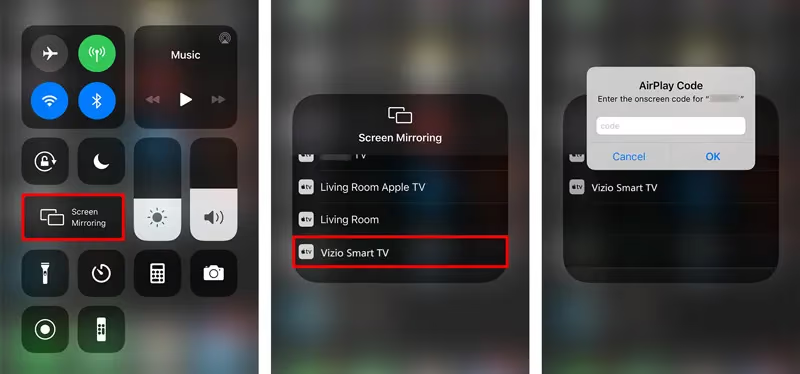
Your phone acts as the remote while the video plays on the TV. You can lock your phone screen and the stream will continue. For a deeper look at AirPlay setup and troubleshooting on Vizio, check out our AirPlay on Vizio TV guide.
#From Android Phone or Tablet
- Open the ESPN app and sign in to your ESPN+ account
- Connect both your Android device and Vizio TV to the same Wi-Fi network
- Play any ESPN+ video
- Tap the Cast icon (the rectangle with Wi-Fi waves) in the top-right corner
- Choose your Vizio TV from the device list
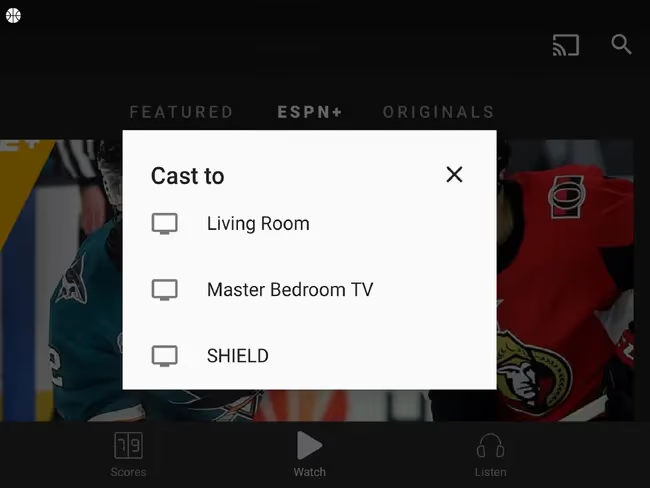
Chromecast built-in handles the stream directly on the TV after you start it, so your phone battery drain is minimal. You can also cast from the Chrome browser on a laptop by clicking the three-dot menu and selecting “Cast.” For more on Chromecast with ESPN, see our ESPN on Chromecast walkthrough.
#From a Laptop or Desktop
- Open plus.espn.com in Google Chrome
- Sign in with your ESPN+ credentials
- Start playing a video
- Click the three-dot menu in Chrome and select “Cast”
- Choose your Vizio TV from the available devices
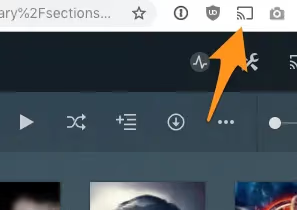
This method works well for watching on a big screen while your phone stays free. Video quality depends on your Wi-Fi speed, so a 5GHz connection is recommended for 1080p or 4K streams.
#What Streaming Devices Work With ESPN+ on Vizio?
If casting feels unreliable or you want a dedicated ESPN app experience with a remote control, plugging a streaming device into your Vizio TV’s HDMI port is the best long-term solution.
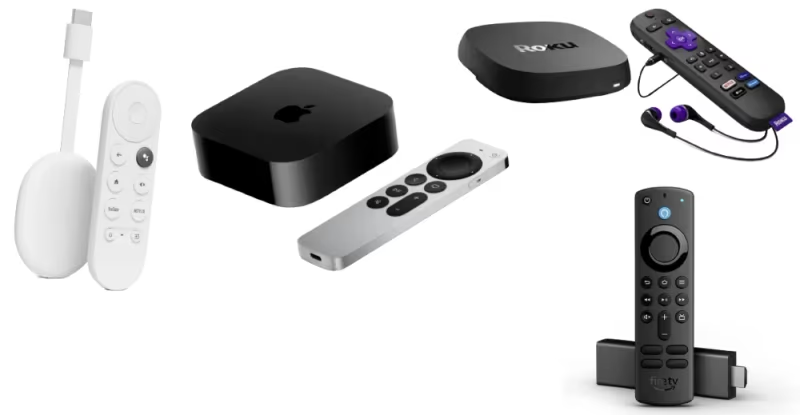
Every major streaming platform has a dedicated ESPN app with full ESPN+ integration. Here is how each option stacks up:
#Roku
Roku devices have a free ESPN app in the Roku Channel Store. Download it, sign in with your ESPN+ account, and you are ready to go. Roku Express starts at around $30 and plugs directly into any HDMI port on your Vizio TV. For a full walkthrough, read our guide on watching ESPN on Roku.
#Amazon Fire TV Stick
The Fire TV Stick runs the ESPN app natively. The Fire TV Stick 4K gives you access to ESPN+ in up to 4K resolution when available. Setup takes about five minutes from unboxing to streaming. It is one of the most popular choices for adding apps to TVs with limited app stores.
#Apple TV
Apple TV 4K runs the ESPN app and supports features like picture-in-picture for watching multiple games at once. It is the priciest option (starting around $129) but pairs well with Vizio TVs that already support AirPlay, giving you both casting and native app access.
#Chromecast with Google TV
Chromecast with Google TV runs a full Android TV interface with the ESPN app available on the Google Play Store. It costs around $30 and includes a remote control, unlike the older Chromecast models that required a phone to operate.
#Setting Up ESPN+ for the Best Picture Quality
Once you have ESPN+ streaming on your Vizio TV, a few settings adjustments will give you the best viewing experience for sports.
Switch your Vizio picture mode to “Sports” or “Game” in the picture settings menu. This mode reduces motion blur during fast-action scenes like football plays or hockey games. On Vizio M-Series and P-Series models, you can also enable “Game Low Latency” mode for minimal input lag.
Make sure your ESPN app streaming quality is set to “Best Available” in the app’s settings. ESPN+ streams up to 1080p at 60fps for most live events, with select content available in 4K. Your internet connection should be at least 25 Mbps for reliable HD streaming, according to ESPN’s support page.
If you are using a streaming device connected via HDMI, check that the HDMI port supports HDMI 2.0 or higher for 4K content. Vizio TVs label their HDMI ports on the back panel, and the one marked “HDMI 1” is typically the best option.
#Troubleshooting ESPN+ Casting Problems on Vizio
Casting issues are common but usually easy to fix. Here are the most frequent problems and their solutions.
Both devices must be on the same Wi-Fi network. This is the number-one reason casting fails. Check your Vizio TV’s network settings (Menu > Network > Network Information) and compare it to your phone’s Wi-Fi network name. They need to match exactly.
Restart your Vizio TV properly. Unplug the TV from the wall outlet for 60 seconds, then plug it back in. This clears the TV’s cache and resolves most connectivity glitches. A standard remote power-off does not fully restart the system.
Update your Vizio TV firmware. Go to Menu > System > Check for Updates. Outdated firmware can cause AirPlay and Chromecast to stop working. Vizio releases firmware updates several times per year, and these updates often fix casting compatibility issues.
Check the ESPN app version. An outdated ESPN app on your phone can cause casting to fail silently. Update the app through the App Store or Google Play Store before trying again. If problems persist, our ESPN+ not working troubleshooting guide covers additional fixes.
#Bottom Line
You have two paths to ESPN+ on your Vizio TV: casting from a phone or laptop (free if you already own the devices), or plugging in a streaming stick ($30 and up) for a dedicated app experience. Casting works well for occasional viewing. A streaming device is better if you watch sports daily and want a remote-controlled interface.
Start with casting today since it requires zero extra hardware. If you run into buffering or connection drops, pick up a Vizio-compatible streaming device for under $40. Either way, you will have full access to ESPN+ live sports, UFC pay-per-view events, and original programming on your Vizio screen within minutes.
#Frequently Asked Questions
#Does Vizio have a native ESPN+ app?
No. Vizio SmartCast does not include ESPN+ or the ESPN app in its app store. This has been the case since the SmartCast platform launched. You need to cast from a mobile device or use a plug-in streaming player to watch ESPN+ content on a Vizio TV.
#Is ESPN+ free with a Vizio TV purchase?
ESPN+ requires a separate paid subscription at $11.99 per month or $119.99 per year. Vizio does not bundle ESPN+ with any TV purchase. Disney also offers a bundle that includes ESPN+, Disney+, and Hulu starting at $16.99 per month, which can save you money if you use all three services.
#Can I use screen mirroring instead of casting for ESPN+?
Screen mirroring works but is not ideal for sports. It mirrors your entire phone screen, which drains battery faster and shows notifications during the game. Casting through AirPlay or Chromecast sends only the video feed to your TV while your phone stays free for other tasks. The picture quality is also better with casting since the TV pulls the stream directly.
#Which Vizio TV models support AirPlay?
Vizio added AirPlay 2 support to SmartCast TVs starting with 2016 models and newer. This includes the D-Series, V-Series, M-Series, P-Series, and OLED models from 2016 onward. You can verify your specific model’s compatibility by checking the AirPlay settings under Menu > Extras > Apple AirPlay on your TV.
#What internet speed do I need for ESPN+ on Vizio?
ESPN recommends at least 5 Mbps for standard definition and 25 Mbps for HD streaming. For 4K content (available on select events), you need 50 Mbps or more. Use a 5GHz Wi-Fi band instead of 2.4GHz to reduce interference, especially if multiple devices share your network.
#Can I watch ESPN+ on multiple Vizio TVs at the same time?
ESPN+ allows up to three simultaneous streams per account. You can cast to one Vizio TV while streaming on a phone and a tablet at the same time. Each Vizio TV needs its own casting source device or streaming player, and all devices must be signed into the same ESPN+ account.
#Do I lose any ESPN+ features when casting to Vizio?
You keep access to all ESPN+ content including live sports, replays, and original shows. The main feature you lose is multi-view (watching multiple games in split-screen), which only works within the native ESPN app on supported streaming devices like Apple TV 4K and Fire TV Stick 4K Max. Standard single-game viewing works identically through casting.
#Will Vizio ever add a native ESPN+ app?
Neither Vizio nor ESPN has confirmed plans for a native SmartCast ESPN+ app. Vizio’s app ecosystem has expanded slowly compared to competitors, and the company appears focused on its casting-first approach. If a native app does launch, it will likely appear as a firmware update that you can install from the SmartCast app store.