Your Element TV screen went black. This is one of the most common problems with Element televisions, and the fix is usually straightforward. Below are 11 solutions ranked from quickest to most involved, so you can work through them and get your picture back.
- Loose HDMI cables are the number one cause of black screens on Element TVs
- Power cycling for 60 seconds fixes most temporary software glitches causing a black display
- Wrong input source selected on the remote is an overlooked cause that takes seconds to check
- Audio still playing with a black screen points to a failed LED backlight strip, which costs under $30 to replace
- Factory reset using PIN 0000 clears software errors but erases all custom settings
#What Causes a Black Screen on Element TVs?
Before jumping into the fixes, it helps to understand what may be causing the black screen in the first place. Here are some of the most common culprits:
-
Loose or faulty HDMI cable connection like those covered for LG TVs and Vizio TVs.
-
Incorrect input source selected
-
External device like a Roku or cable box not working properly
-
Power saver/sleep setting enabled
-
Outdated TV firmware
-
Voltage fluctuations
-
Failure of internal component like the backlight or power supply
Pay attention to any other symptoms beyond just the black screen. If you still hear audio, that tells you the TV is on but the backlight or video output has failed.
#1. Check External Device Connections
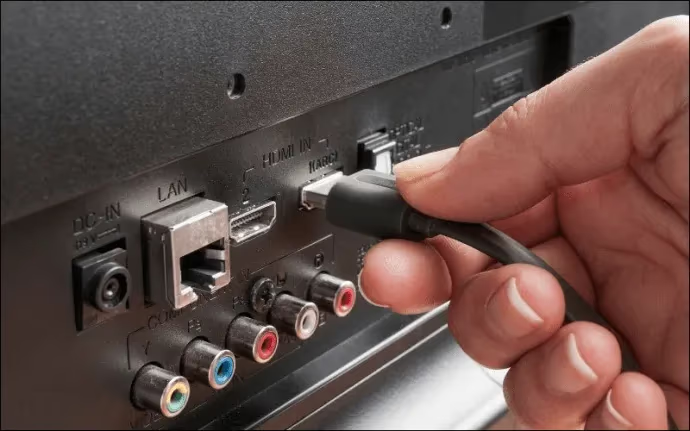
If you connect a device like a Roku, gaming console, or cable box to your Element TV, first make sure that external device is powered on and functioning properly. Then check that all the cables connecting the devices are securely attached and not loose or damaged. Try connecting the external device to another TV input or use alternate cables if available.
#2. How Do You Confirm the Correct Input Source?
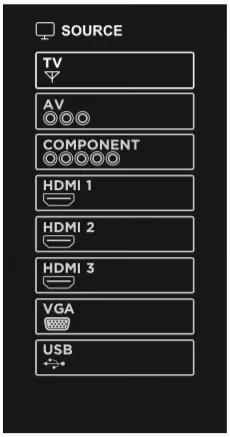
Press the Input or Source button on your Element TV remote and cycle through the options like HDMI 1, HDMI 2, AV, etc. Stop when you see video output on one of the input sources. If only one works, it likely points to an issue with the specific port the others are connected to.
#3. Reset Cables, TV Box and Remote
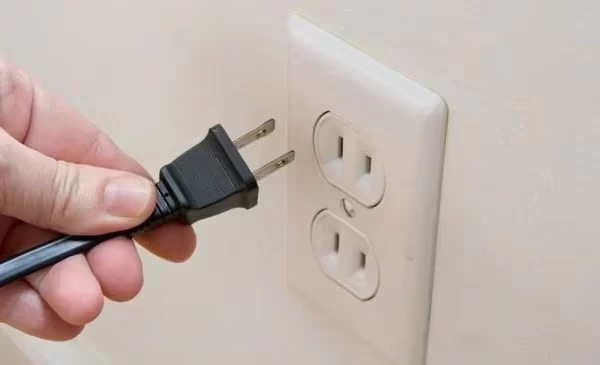
Unplug cables from both the Element TV and your external devices, then plug them firmly back in. Unplug and reconnect the TV’s power cord directly from the wall and turn it back on. Finally, remove batteries from the Element remote for 30 seconds and reinsert them. This often resolves any temporary glitches.
#4. How Do You Factory Reset an Element TV?
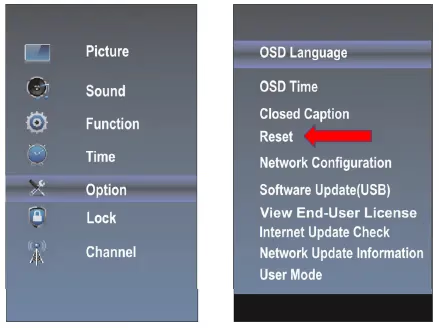
A factory reset clears software errors by restoring default settings. On your remote press Home -> Settings -> Option-> Reset. Enter 0000 as the PIN to reset. You will lose any custom settings so you may need to recalibrate the display afterward.
#5. Update Firmware
Outdated firmware can sometimes cause problems like black screens which have also impacted TCL, Sharp Roku, and Hisense Roku models. Find your current firmware under Home -> Settings -> Support -> Software Update. Select Update Now if a newer version is available and let the TV reboot.
#6. Disable Power Saving Features
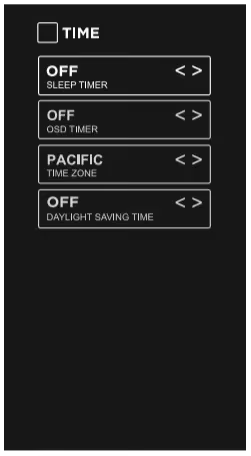
Energy saver modes can sometimes interfere with video output. Under Home -> TV Settings -> Time, turn off features like Sleep Timer, No Signal Power Off and Eco Solutions. See if disabling those allows the picture to show up.
#7. Inspect Back Panel Connections
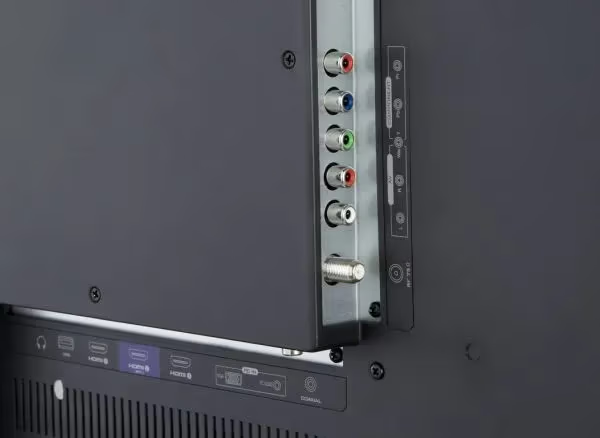
Examine all input ports, cables, and connectors at the back of your Element TV for any damage, wear or loose connections. Tighten any loose cables and swap out damaged cables if possible. Also dust off the inputs and outputs.
#8. Test with a Second TV
To confirm whether the issue stems from the Element TV or connected devices, disconnect your external device like a Roku box and connect it to another working TV if available. If the device works fine on the second TV, your Element likely needs servicing.
#9. Replace Backlight LED Strips
When images can’t be seen but audio plays, it often means the LED backlight strips have stopped working properly like those covered for Philips TVs. Element TVs use LED strips to provide the backlighting that makes the screen visible. These can burn out over time but are inexpensive to replace as a possible fix.
#10. Replace Power Supply Board
No power at all is a sign that the internal power supply board has failed. This board delivers power across the TV even when the screen is dark. You can find a replacement board online for under $100 for most Element TVs and install it yourself by opening up the chassis.
#11. Call for Professional TV Repair
If you have tried all other troubleshooting steps without success, it may be time to seek professional TV repair or Element TV remote assistance. A technician can identify and swap faulty internal components causing the Element black screen failure. Element’s customer support can direct you to authorized repair services.
#Bottom Line
Work through these 11 fixes in order, starting from the quickest checks like cables and input sources. Most Element TV black screen problems come down to a loose connection or a software glitch that a power cycle can clear. If the screen stays dark but you hear sound, a backlight replacement is likely the answer. For anything beyond that, a professional repair tech can diagnose the board-level issue.
#FAQ
#Why does my Element TV screen go black but still have sound?
Sound with no picture almost always means the LED backlight strips have failed. The TV’s main board and speakers still work, but the screen can’t illuminate. Replacement backlight strips for Element TVs cost around $15-$30 and can be installed at home with basic tools.
#Can a power surge cause a black screen on an Element TV?
Yes. A power surge can damage the power supply board or the T-con board inside the TV. If your Element TV went black right after a storm or power flicker, try unplugging it for 5 minutes before turning it back on. Using a surge protector going forward will help prevent this from happening again.
#How long should I unplug my Element TV to reset it?
Unplug it for at least 60 seconds. While unplugged, hold the power button on the TV itself for 15 seconds to drain any residual charge. This full power cycle clears temporary memory errors that a regular restart won’t fix.
#Does a factory reset fix the black screen on Element TVs?
It can, but only if the black screen is caused by a software or settings conflict. A factory reset won’t fix hardware failures like a dead backlight or blown power supply board. Use PIN 0000 to perform the reset through the on-screen menu, and keep in mind that all saved preferences and app logins will be erased.
#What input should my Element TV be set to?
Set the input to match the port your device is plugged into. If your Roku or cable box uses HDMI 1, press the Source button on your remote and select HDMI 1. Many black screen complaints turn out to be nothing more than the TV sitting on the wrong input.
#How much does it cost to repair an Element TV black screen?
That depends on the root cause. A new HDMI cable costs under $10, backlight strips run $15-$30, and a replacement power supply board is typically $40-$80. Professional repair labor adds $50-$150 on top of parts. If the total repair cost exceeds half the price of a new TV, replacement usually makes more sense.
#Is it worth repairing an old Element TV with a black screen?
For newer models still under warranty, absolutely contact Element support first. For older sets, compare the repair cost to what a new TV costs today. Element TVs in the 32-inch to 50-inch range sell for $100-$250 new, so spending $200 on a board repair for a 5-year-old set is hard to justify.
#Can a bad HDMI cable cause a black screen on Element TV?
A damaged or loose HDMI cable is one of the most frequent causes. Try a different HDMI cable and a different HDMI port on the TV. If the picture returns, the original cable was the problem. HDMI cables degrade over time, especially at the connector ends where repeated plugging and unplugging bends the pins.