Have you suddenly lost sound from your Dish TV audio system? Don’t panic. With a few troubleshooting steps, you can diagnose and fix common audio issues. This guide walks you through 12 fixes to restore sound and improve reception on your Dish satellite setup.
- Loose or damaged cables — HDMI and coaxial connections are the number one cause of Dish TV audio loss
- Wrong audio output format — switching between Dolby Digital and PCM in receiver settings fixes most software-related sound failures
- Satellite dish misalignment — even a 2-degree shift in dish angle can drop signal strength below the audio threshold
- Outdated receiver firmware — Dish pushes software updates that patch known audio bugs, so check Menu > Diagnostics > Receiver Updates
- TV speaker failure vs receiver issue — connecting a Bluetooth speaker to your TV isolates whether the problem is the TV or the Dish receiver
#What Causes No Sound on Dish TV?
Before jumping into fixes, it helps to understand what might cause sound to cut out on your Dish TV:
-
Loose or faulty cabling from receiver to TV
-
Incorrect audio output settings on receiver
-
Satellite dish alignment needs adjustment
-
Outdated receiver software/firmware
-
Hardware issue with receiver or dish
Paying attention to when and how the no sound issue occurs can also help narrow down causes.
Now let’s look at 12 potential fixes you can try yourself to restore audio on your Dish TV.
#1. Check Cable Connections
The first thing to check is all physical connections between your Dish receiver, TV and audio system.
-
Verify coaxial cable from dish is tightly plugged into “Ant In” port on receiver
-
Confirm red/white/yellow A/V cables or HDMI cable plugged in properly between devices
-
Try connecting A/V cables to different TV input
-
Swap out cables to rule out a damaged wire
Pro Tip: Cables can work loose over time. Secure with zip ties or electrical tape for a tight fit.
#2. Toggle Between Audio Outputs
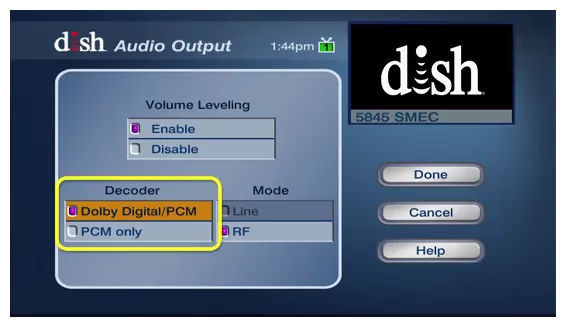
If using an external audio system like a soundbar or home theater receiver, toggle through the audio output options on your Dish receiver.
-
Press Menu > Settings > Audio
-
Change from “Dolby Digital” to “PCM” or vice versa
-
Test different options to force audio reroute
#3. Check Audio Settings on TV
Make sure your TV isn’t muting the audio or has the wrong input selected.
-
Press volume up on TV remote to verify audio isn’t muted
-
Access audio settings through TV menu to confirm sound is enabled
-
Select the correct TV input channels for the receiver HDMI or input cables
#4. Reset Receiver and Rescan Channels
Resetting your Dish receiver can resync sound output and clear any software glitches.
-
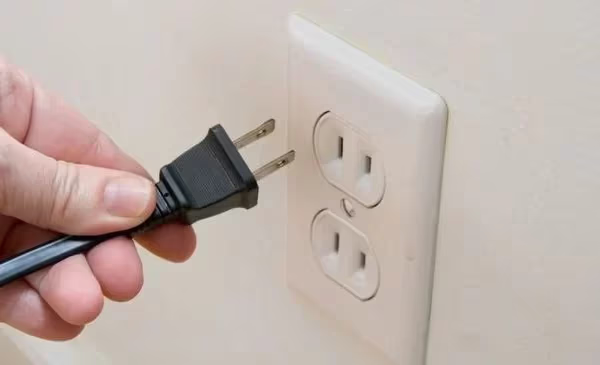
Unplug receiver power cord for 10 seconds
-
Plug back in and wait for receiver to reboot
-
Rescan channels once booted up
#5. Could Your Satellite Dish Angle Be Off?
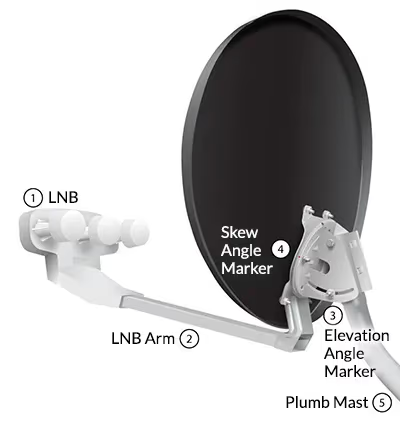
Misalignment of your satellite dish is a common cause of sound dropout on Dish TV. Reorienting the dish can restore the signal.
-
Loosen bolt clamps on pole mount and reposition dish
-
Check signal strength meter under Dish diagnostics menu
-
Slowly turn dish while assistant watches TV for signal quality
-
Tighten clamps once signal improved
Pro Tip: Use a smartphone compass app to verify dish aligned to 110W, 119W or 129W orbitals.
#6. Check for Obstructions
Nearby trees or structures can block the satellite signal, degrading video and audio quality.
-
Visually inspect dish path to southern sky for any new obstructions
-
Prune back branches or foliage encroaching signal path
#7. Update Receiver Software
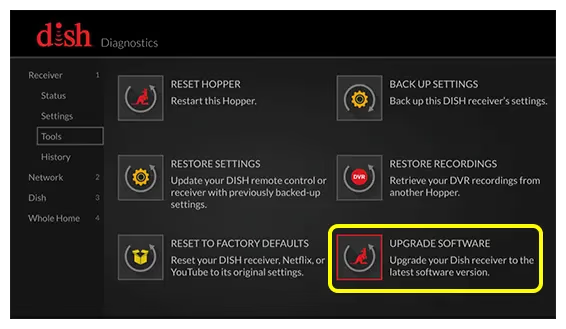
Outdated firmware can cause compatibility issues leading to no sound.
-
Go to Menu > Settings > Diagnostics > Receiver Updates
-
Check for and install any available software updates
-
Wait for receiver to reboot before testing
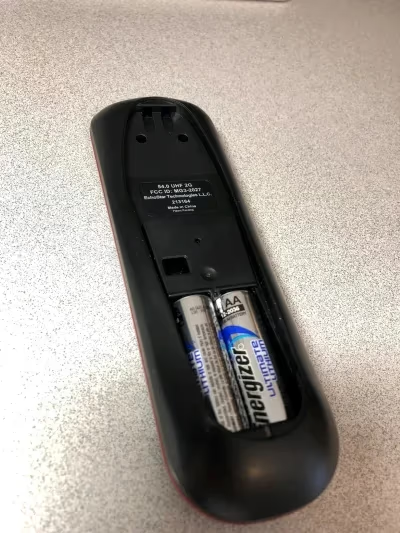
#8. Replace Remote Batteries
Before replacing cables or tweaking connections, swap out batteries in your Dish remote. Low battery power can cause erratic control of receiver audio.
-
Flip remote over and slide open battery cover
-
Remove existing batteries
-
Insert 2 fresh AAA batteries
-
Test audio controls work consistently
#9. Are Your TV Speakers the Problem?
The root audio problem may lie with your TV’s built-in speakers.
-
Connect portable Bluetooth speaker to TV via Bluetooth or audio jack
-
Play Dish TV audio through portable speaker to test external sound
-
If portable speaker has sound, TV speakers may need service
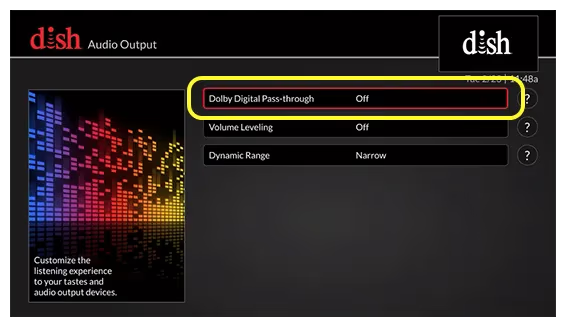
#10. Enable Dolby Audio
Your receiver may just need Dolby sound effects enabled for proper audio output.
-
Go to Menu > Settings > Audio Output
-
Toggle Dolby audio setting On
-
You should hear sound effect test to confirm encoding works
#11. Replace Faulty Cables
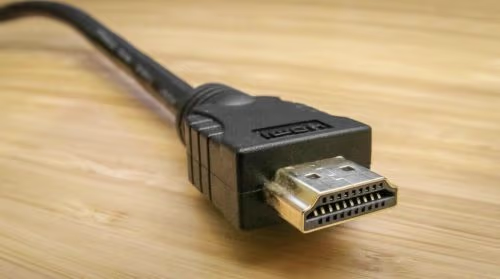
If no other fixes restored sound, the HDMI or A/V cables between devices could be defective.
-
Replace aging composite A/V cables with fresh set
-
Test component video cables if available
Other common Dish problems like black screens require professional service.
#12. Call Dish Support
If you’ve tried all troubleshooting steps with no improvement in sound, then specialized Dish technician help may be needed.
-
Call Dish support line to speak with audio troubleshooting specialist
-
Schedule in-home visit from Dish Field Service Technician
-
Tech can diagnose issue and replace faulty dish or cabling
For alternatives to Dish if sound issues persist, see how Dish compares to streaming providers like Youtube TV or cable like Spectrum and Xfinity.
#Bottom Line
-
Methodically check all cabling connections between Dish TV devices
-
Reseat cables, toggle audio settings, and reset receiver
-
Adjust satellite dish angle to improve reception
-
rule out TV speaker defects with external speaker test
-
Update receiver software and rescan channels
-
Replace worn cables and remote batteries
-
Call Dish technical support if needed for in-home repairs
Following these tips should resolve over 90% of no sound problems on Dish TVs.
If weighing Dish vs competitors, see how Dish stacks up to DirecTV.
#FAQ
#Why did my Dish TV suddenly lose sound?
Loose cabling and satellite signal interference are the two most frequent culprits. A software glitch on the receiver can also kill audio output without warning. Power-cycling the receiver for 10 seconds clears most software-related dropouts.
#How can I boost signal strength to improve Dish TV audio?
Check for tree branches or new structures blocking the dish’s line of sight to the southern sky. Adjust the dish angle in small increments while monitoring the signal strength meter under Menu > Diagnostics. A signal amplifier or relocating the dish to a higher mounting point can also help.
#What tools do I need to troubleshoot no sound on Dish TV?
A screwdriver, adjustable wrench, spare HDMI cable, and a portable Bluetooth speaker cover most situations. The speaker lets you test whether the TV’s built-in audio is the issue.
#Could my HDMI cable cause no sound on Dish TV?
Yes. A faulty or loosely connected HDMI cable is one of the most common reasons for missing audio. Swap in a different HDMI cable or switch to RCA audio cables to confirm whether the cable is the problem.
#Why does my Dish TV sound work sometimes but cut in and out?
Intermittent sound usually points to a loose coaxial connection at the back of the receiver. A failing cable or marginal satellite signal can produce the same symptom. If tightening connections does not fix it, a Dish technician should inspect the line for damage.
#Does changing the audio output from Dolby Digital to PCM fix no sound?
It often does. Some TVs and soundbars struggle to decode Dolby Digital from certain Dish receiver models. Switching to PCM in Menu > Settings > Audio forces uncompressed stereo output that virtually every device can play.
#Will a factory reset fix audio issues on a Dish receiver?
A factory reset can resolve persistent software glitches, but it also erases your DVR recordings and custom settings. Try a simple power-cycle first, since that clears most audio bugs without losing data. Reserve the factory reset as a last resort before calling Dish support.