Starz costs $8.99 per month, and if you’re not watching enough to justify that price, canceling takes just a few minutes. The exact steps depend on where you originally signed up.
- Cancel through the platform you subscribed on. Starz.com, Amazon, Apple, and Roku each have different cancellation paths
- Access continues until your billing period ends. You won’t lose content immediately after canceling
- No refunds are available. Starz does not issue partial refunds for the current billing cycle
- Resubscribing restores your profile. Your watchlist and preferences come back when you sign up again
- Third-party providers require separate steps. Sling TV, Hulu, and fuboTV each handle Starz cancellations through their own account settings
#What Is Starz and What Does It Include?
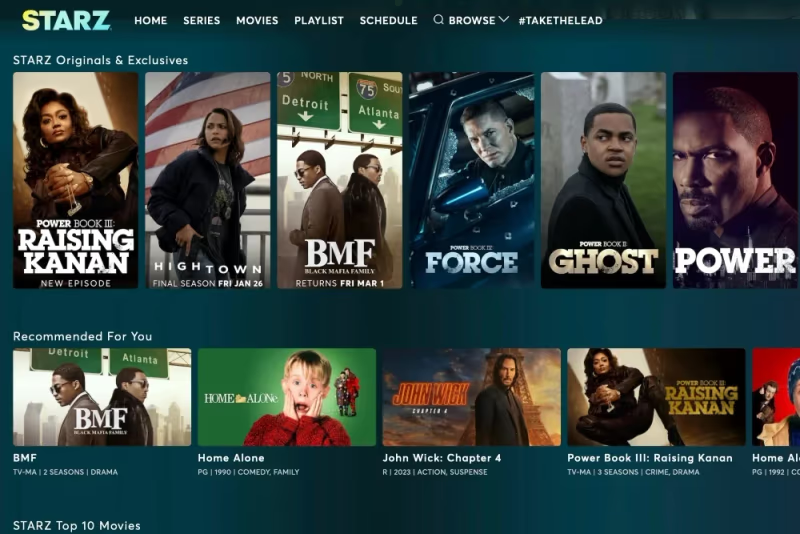 Starz is a premium cable network with hit movies, popular TV shows, and critically acclaimed Starz Originals like Outlander, Power, and American Gods. Though smaller than Netflix and Hulu, Starz fills an important niche.
Key Features:
-
Thousands of hit movies and TV shows
-
Starz Originals you can’t watch anywhere else
-
On-demand access with no regular TV required
-
Watch on a variety of devices
-
High video quality in HD or 4K
Even with these perks, you may not use Starz enough to keep paying. Here’s how to cancel regardless of where you signed up.
#Why Do People Cancel Their Starz Subscription?
Here are the main reasons people decide to cancel their Starz subscription:
-
The cost. At $8.99 per month, Starz sits at the higher end for streaming add-ons. The cost may not seem worth it if you don’t watch it enough. Consider Starz vs. Showtime or Starz vs. Cinemax for price comparisons.
-
Limited content. Compared to larger services, Starz has a smaller content library. You may feel you’ve watched most of what interests you.
-
You don’t use it. If you haven’t opened the Starz app in weeks, it’s probably time to cancel.
Subscription fatigue is real with so many streaming options today. Cutting services you barely use frees up budget for ones you actually enjoy.
#How to Cancel Starz if You Subscribed Directly
If you subscribed to Starz directly on Starz.com, canceling is quick:
-
On a computer, visit Starz.com and log into your account
-
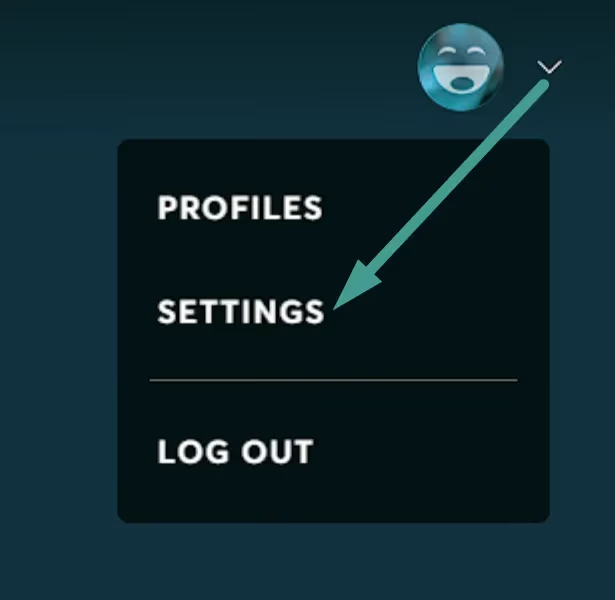
Click your profile icon and select “Settings”
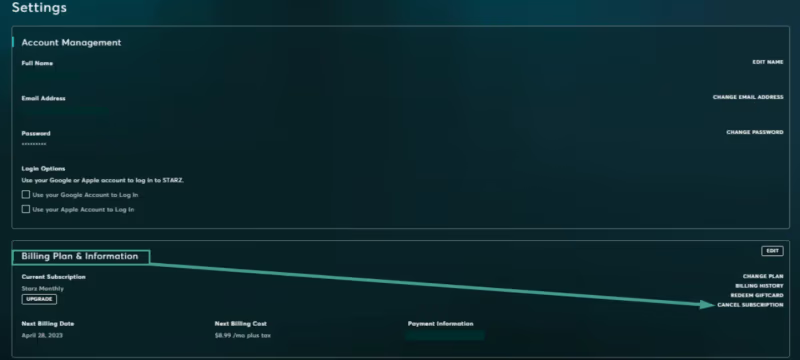
- Under “Billing Plan & Information”, click “Cancel Subscription”
- Select a reason for cancellation and confirm
Once you hit confirm, your subscription will be canceled at the end of your current billing period. You’ll continue to have access until then.
#How to Cancel Starz through Amazon Prime Video
Many people access Starz through Amazon Prime Video Channels. Here are the steps to cancel if that’s how you subscribed:
-
Visit Amazon.com and log into your Prime account
-
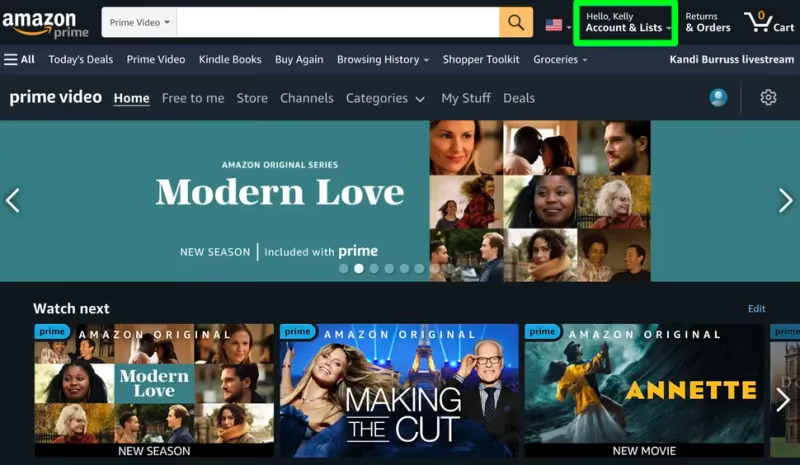
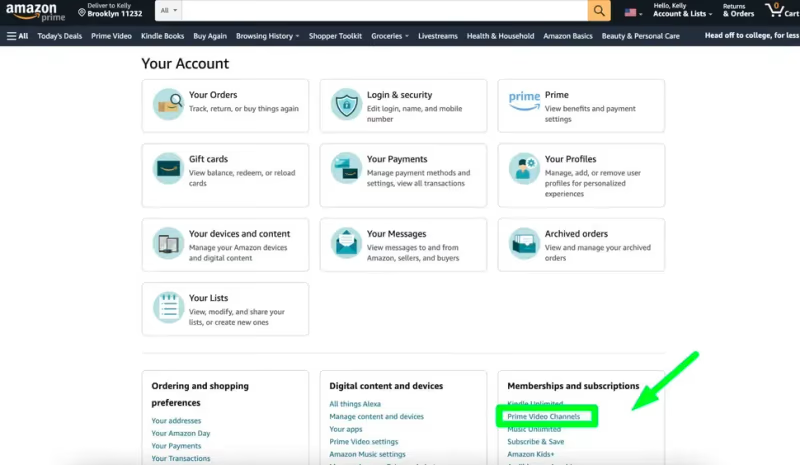
Hover over “Accounts & Lists” and click on “Memberships & Subscriptions”
- Under “Prime Video Channels”, click “Starz”
- Click “Cancel Channel” and confirm
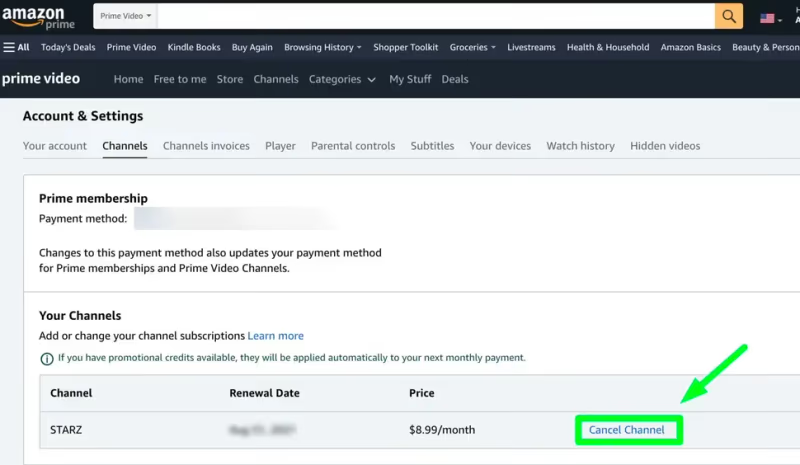
You’ll have access until the subscription lapses at the end of the current billing cycle.
Pro Tip: You can also cancel any Amazon Prime Video add-on channels under “Prime Video Channels” in your account.
#How to Cancel Starz through Apple iOS Subscriptions
If you subscribed to Starz through your Apple account and iPhone, here’s how to cancel:
-
On your iOS device, open the App Store app
-
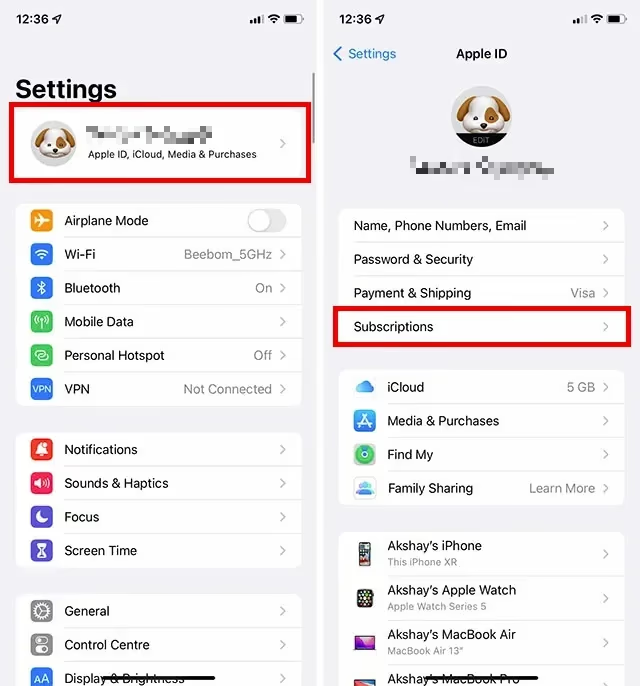
Tap your profile icon in the top right
-
Scroll down and tap “Subscriptions”
-
Under “Active”, tap on “Starz”
-
Tap “Cancel Subscription” and confirm
Your Starz subscription through Apple will be canceled at the next billing date. If you run into issues, refer to our guide on troubleshooting Starz not working on Apple TV.
#How to Cancel Starz through Roku
Roku makes it easy to cancel premium channel subscriptions directly on your device. Here are the steps:
-
From the Home screen, go to “Settings”
-
Navigate to “Account” > “Subscription”
-
Select your Starz subscription
-
Choose “Cancel Subscription”
After confirming cancellation, your Starz access will end at the close of the current billing period.
#How to Cancel Starz through Other Providers
If you subscribed to Starz through a cable TV, streaming, or mobile provider not listed above, log into your account with that specific provider to cancel.
For example:
-
Sling TV: Cancel premium add-ons under “My Account”. See the detailed guide on how to add or cancel Starz on Sling TV.
-
Hulu: Manage subscriptions under Account > Billing Details
-
fuboTV: Cancel Premium Add-ons under “My Profile”
-
DISH: Manage subscriptions directly through DISH TV.
-
DIRECTV: Follow instructions to cancel Starz on DIRECTV.
Most providers make it easy to find subscription details and make changes. When in doubt, contact their customer support for help canceling Starz.
#What Happens When You Cancel Starz?
When you cancel Starz through any provider, a few important things happen:
-
Your subscription remains active until the end of the current billing period
-
You keep full access to Starz until then
-
At the next billing date, your subscription will expire and not renew
-
You will no longer be charged any monthly fees
-
After access expires, Starz will no longer appear in your streaming apps
Enjoy your last days of access and binge your favorite shows before your cancellation takes effect.
#Alternative Streaming Services to Starz
If you’re canceling Starz because the content selection wasn’t meeting your needs, consider some alternatives:
-
HBO Max: Top quality shows and movies, plus new Warner Bros. films streaming the same day as theaters
-
Showtime: Entertainment-focused programming like Billions, The Chi, and Desus and Mero. Compare Starz and Showtime here.
-
AMC+: A strong choice for AMC network fans who want to watch new episodes early
-
Paramount+: Premium shows and movies from CBS, Comedy Central, MTV, and the full Star Trek universe
Check out the differences between Starz and Starz Encore when weighing your options. Each service has hit original series you can only stream there, so compare offerings to find the best fit for your viewing preferences.
#Bottom Line
Canceling Starz takes just a few minutes once you know where to go. The key is canceling through the same platform where you subscribed, whether that’s Starz.com, Amazon, Apple, Roku, or another provider.
Make the most of your remaining access. Download favorite episodes in the Starz app to watch offline before your subscription ends.
#FAQ
#Can I get a refund when I cancel Starz?
Starz does not issue refunds for the current billing period. You will still have full access to all content until your paid time runs out. If you were charged after already canceling, contact Starz support directly to dispute the charge.
#What happens to my downloaded content after canceling?
Any episodes or movies you downloaded through the Starz app will become unavailable once your subscription expires. The downloads are tied to your active subscription, so plan to watch them before your access ends.
#Does canceling Starz also cancel my Amazon Prime membership?
No. Starz through Amazon Prime Video is a separate add-on channel. Canceling Starz only removes that specific channel from your Prime Video account. Your Amazon Prime membership and all other benefits remain active.
#How do I know which platform I subscribed through?
Check your email for the original Starz signup confirmation. If you can’t find it, look at your bank or credit card statement to see which company charged you. The billing company name tells you where to go to cancel.
#Can I resubscribe to Starz after canceling?
Yes. You can resubscribe at any time through any supported platform. Your profile and viewing preferences are usually restored when you sign back in, so you won’t lose your watch history permanently.
#Will I be charged if I forget to cancel before the billing date?
Yes, Starz auto-renews at the start of each billing cycle. If you miss the cancellation window, you’ll be charged for another month. Set a calendar reminder a few days before your billing date to avoid an unwanted charge.
#Is there a way to pause Starz instead of canceling?
Starz does not offer a pause option on its own platform. Some providers like Amazon or Apple may let you pause certain subscriptions, but availability varies. If pausing isn’t available, your only option is to cancel and resubscribe later when you’re ready.