Playing retro video games on modern TVs can feel underwhelming. The games often look stretched out or blurry. For the best retro gaming experience, many enthusiasts turn to CRT (cathode ray tube) TVs. But with so many models out there, how do you pick the right one?
I’ve spent over 10 years collecting and restoring vintage consoles, and I’ve tested dozens of CRT TV setups along the way. This guide covers everything you need to find the right CRT TV for your setup.
- Sony KV-20FV300 Trinitron is the top overall pick for retro gaming, with component inputs and a 20-inch screen
- Component video inputs deliver the best balance of image quality and affordability on consumer CRTs
- Screen size matters by era with 13-20 inches for NES/SNES and 20-27 inches for PS1/N64
- Consumer Trinitrons cost $50-300 while professional monitors (PVMs) run $500-2,000+
- Always test a used CRT in person before buying, checking degauss, geometry, and color convergence
#What Should You Look for in a CRT TV for Retro Gaming?
When selecting a CRT TV for gaming, three key factors matter most:
#1. Supported Video Inputs
Ideally, your CRT should have component video inputs. This will give you higher quality visuals than composite video cables on consoles that support it like PlayStation 2 and Xbox.
RGB inputs are even better and provide the clearest CRT image possible for retro gaming. Few consumer TVs offer RGB, though. It’s mostly seen in high-end pro monitors.
At minimum, the TV should have composite video (the yellow, red, and white inputs) to connect older consoles like NES and SNES. S-Video also improves visuals over composite.
#2. Screen Size
The era-appropriate screen size for pixel-perfect gaming depends on your consoles:
-
NES/SNES-era: 13-20 inches
-
PlayStation 1/N64-era: 20-27 inches
-
Later consoles can use even bigger screens
Bigger CRT TVs tend to cost more and require more space. I recommend a 20-inch screen as the best size for most retro gamers.
#3. Price and Availability
CRT TV prices range widely, from free consumer sets to $1,000+ pro monitors. In general, aim for the best inputs and screen size you can afford and reasonably locate.
Consumer Trinitrons with component inputs strike an excellent balance for most retro gamers.
#How Do Consumer CRTs Compare to Professional Monitors?
There are two main classes of CRT TVs:
Consumer CRT TVs like those made by Sony, Toshiba and JVC were mass produced from the 1960s through the early 2000s for home entertainment. You’ll commonly find them at thrift stores, Craigslist, eBay, and similar marketplaces. They’re affordable but offer varying video quality. Models with component inputs work very well.
Professional video monitors (PVMs) were commercial units made by Sony, Panasonic, Ikegami and others for broadcast, medical, and creative pro uses. They provide reference-level image quality thanks to higher TV lines of resolution, deeper blacks and thick scanlines. They are costly and hard to find, though.
In short:
-
Consumer CRT TVs - Affordable, commonly available. Good enough for most retro gaming.
-
Pro PVMs - Superior image quality but expensive and rare. Mostly for serious enthusiasts.
For their balance of price and performance, I generally recommend late-model Sony Trinitrons in good condition for most retro gamers. If you already own a modern smart TV and want to add a CRT for retro gaming, a Trinitron is the way to go.
#The Best CRT TV Models for Retro Gaming
Based on years of gaming on CRTs and testing models with collectors worldwide, here are my top recommended CRT picks across classes and sizes:
#Best 20″ Consumer CRT TV
Sony KV-20FV300
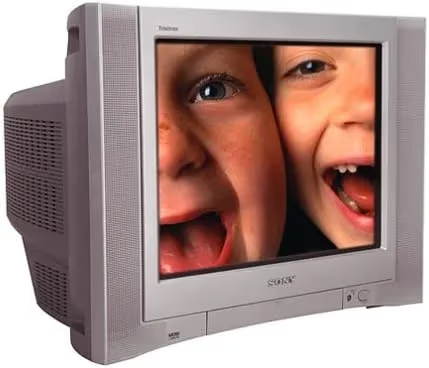
With component inputs, HDTV compatibility and a 20-inch screen, this late-model Trinitron excels at anything from Atari 2600 up to PS2/Xbox. It’s my #1 overall pick for most retro gamers.
#Best Bang-for-Buck 27″ CRT
Sony KV-27FS13
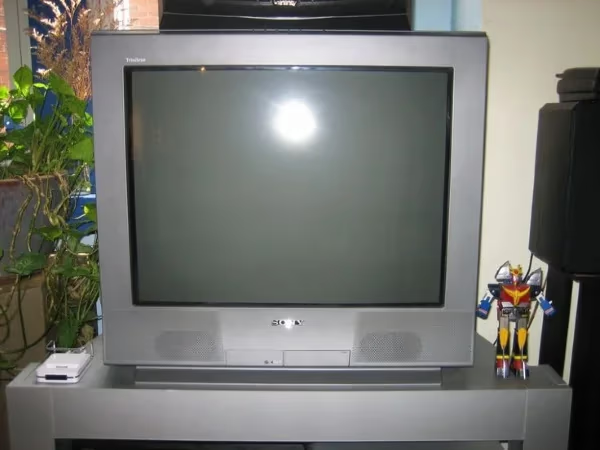
For N64/PS1 action, the FS13 line’s large 27-inch screen and component inputs provide stellar results without breaking your budget.
#Best High-End Consumer CRT
Sony KV-36XBR800
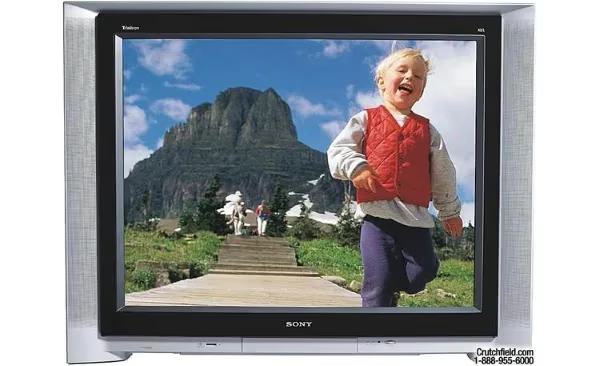
The ultimate big-screen retro gaming TV, this $1,000+ unit has a huge 36-inch display, component and S-Video inputs across multiple formats, and advanced processing for top-tier results.
#Best Entry-Level PVM
Sony PVM-1351Q
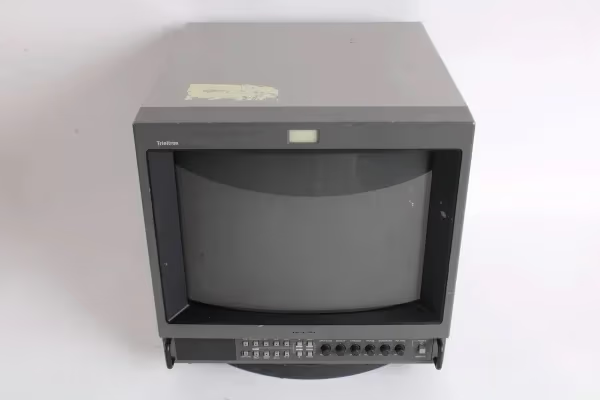
Under $200, this little RGB monitor provides authentic arcade visuals. Its small 13-inch screen suits old school consoles.
#Best High-End Pro Monitor
Sony BVM-D20F1U
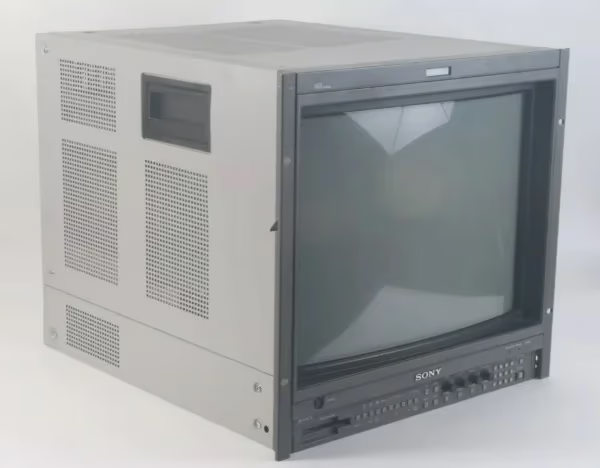
The Holy Grail of CRT gaming. With over 1000 lines of resolution, SDI inputs and the deepest blacks, this $2,000+ reference monitor displays retro games at their absolute best.
There are too many good CRT models to list fully, but this sampling covers recommended options across prices and use cases.
When evaluating a used CRT, test it thoroughly yourself rather than trusting the seller's claims about condition. Run a degauss cycle and check geometry, convergence, and color accuracy.
#Where Can You Buy a CRT TV for Retro Gaming?
Finding CRT TVs these days requires patience and persistence across multiple sources:
#Local Classifieds Sites
Scan Craigslist, OfferUp, Facebook Marketplace routinely for postings, but expect competition. Act fast!
#Thrift Stores
Visit multiple Goodwills, Salvation Army stores. Call ahead to ask if they have CRT TV stock. Prepare to thoroughly test before buying.
#eBay and Online Forums
eBay sellers offer CRT pickups or nationwide shipping. Enthusiasts often sell on gaming forums too.
#Recyclers and Resellers
Some companies specialize in used electronics like CRTs, but their testing practices and pricing vary. I particularly recommend Retro Tech and Tech Finds, both of which refurbish CRTs with guaranteed performance.
Wherever you source the CRT, budget extra for proper cables, converters or mods to optimize connections. If you have old VHS tapes lying around, a CRT also gives you the most authentic way to watch those.
#Connecting Retro Consoles to CRT TVs
To unlock a CRT’s full potential for retro gaming visuals, your console connections matter a lot:
-
RF/Coaxial - Worst quality. Avoid if possible.
-
Composite - Most common cables. Decent results.
-
S-Video - Sharper graphics than composite. Great for 16-bit era consoles.
-
Component - Significant video boost over composite and S-Video. Use this for DVD-era systems if available.
-
RGB SCART - Highest quality analog signal, like having an arcade cabinet at home. Requires a SCART input on the CRT.
-
HDMI - Doesn’t apply for pure retro gaming. Could enable modern remasters or emulators. Ensure your CRT accepts HDMI input if desired.
Based on your consoles’ output capabilities and the CRT TV inputs, connect using the best video signal available to get the sharpest picture.
#How Should You Calibrate a CRT TV?
Once you get your retro console hooked up properly, dialing in the right settings takes your CRT TV to the next level:
-
Degauss - Eliminates color contamination from nearby magnetic sources like speakers.
-
Geometry - Adjust linearity, rotation and edges for a square, centered picture.
-
Convergence - Line up color elements so pixels appear sharp instead of separated RGB strands. Reduces “color fringing.”
-
Brightness/Contrast - Set brightness as high as possible without crushing blacks. Adjust contrast depending on room lighting.
-
Sharpness - Best left all the way down for no artificial edge enhancement.
-
Color Temperature - Experiment between warm/neutral/cool presets. Avoid oversaturated colors.
-
Scanlines - Enable light scanlines to blend rows together for an authentic retro gaming look.
If your TV has a game mode or similar low-latency preset, try it out. Some late-model CRTs included this feature.
#Frequently Asked Questions
#Is a PVM worth the price over consumer CRTs?
For most retro gamers, consumer Sony Trinitrons offer excellent balance of price, performance and availability. PVMs provide unrivaled image quality, but you’ll need a budget of at least $500. Unless you’re chasing reference-grade visuals, a good Trinitron will satisfy most players.
#What is the best screen size for retro gaming?
Aim for era-appropriate sizes. For NES/SNES, 13-20 inches looks fantastic. PS1/N64 shine around 20-27 inches. After that, go as big as your space allows.
#Do all retro consoles work on CRT TVs?
All older cartridge-based systems connect fine. Disc-based consoles may have regional TV format conflicts that require modifications. Handheld console ports need upscalers. Overall, CRTs work with roughly 98% of retro hardware without issues.
#Can I connect retro consoles via HDMI?
You would need an upscaler like the RetroTINK, which converts analog signals to HDMI for modern displays and CRTs with HDMI ports. Results vary across upscalers, and direct analog connections are best for authenticity.
#How much should I pay for a CRT TV?
Expect to pay $50-300 based on model, age, condition and included accessories. Test any used CRT purchase regardless of price. Check that degauss, geometry, and colors all display properly without visible flaws.
#Are CRT TVs safe to move and store?
CRTs are heavy and contain high-voltage components. Always carry them with two people, keep them upright during transport, and let them discharge for 24 hours before opening the case. Store them in a dry, temperature-stable area to prevent screen damage.
#What happens if my CRT TV breaks down?
CRT repair specialists still exist, though they’re increasingly rare. Common fixes include replacing capacitors or adjusting the flyback transformer. Check local electronics repair shops or online forums for referrals. If repair isn’t an option, learn about responsible TV disposal.
#Should I mod my CRT for RGB input?
RGB modding a consumer CRT gives you arcade-quality visuals at a fraction of the PVM price. Popular mod targets include the Sony KV-27FV310 and Toshiba AF series. The process requires soldering skills and specific components, so research your exact model before attempting it.
#Bottom Line
The key points to remember are:
-
Seek models with component inputs for the best balance of price and performance
-
Sony Trinitron consumer CRTs provide outstanding value for most retro gamers
-
Screen size should fit your console era
-
Connect consoles using the highest quality cables possible
-
Calibrate CRT settings properly for best graphics
-
Inspect thoroughly and test CRTs before purchase to confirm condition
Follow this CRT buying guide and you’ll end up with the right display to enjoy your favorite retro games as authentically as possible.