AirPlay lets you stream videos, photos, music and more from Apple devices to compatible smart TVs. Adding an AirPlay receiver adapter allows older TVs to access these streaming capabilities. As a tech writer focused on smart home devices, I evaluated the top AirPlay adapters to help you find the right one. After hands-on testing and research, these are the best AirPlay TV adapters based on streaming performance, setup process and overall value.
- Apple TV 4K leads the pack — native AirPlay with A15 Bionic chip, 4K HDR, and Dolby Vision at a premium price
- Budget option works well — the Kanex ATV Pro handles 1080p AirPlay streaming and screen mirroring for under $100
- Audio-first adapters exist — the Belkin Soundform Connect doubles as a Hi-Res AirPlay speaker with 24-bit/48 kHz decoding
- All adapters need Wi-Fi — AirPlay requires both your Apple device and adapter on the same wireless network
- Prices range from $50 to $200+ — 1080p adapters suit most users, while 4K models add future-proofing
#What Exactly Is AirPlay and How Do AirPlay Adapters Work?
AirPlay is an Apple proprietary protocol that wirelessly streams media from Apple devices to compatible smart TVs, streaming boxes and audio receivers.
AirPlay adapter receivers connect via HDMI to non-smart TVs. They communicate with your iPhone, iPad or Mac to “catch” the AirPlay stream and display it directly on your TV screen.
#What Are the Key Benefits of Adding AirPlay to Your TV?
-
Stream videos, photos, music and screens right from your Apple device
-
Screen mirror to present slides, documents and more
-
Play Apple Fitness+ workouts on the big screen
-
Experience immersive spatial audio through home theater
-
Stream 4K HDR video for higher quality
-
Share content from friends and family’s devices instantly
#Top 6 AirPlay Adapter Receivers for Every Budget
Analyzing setup, streaming, range and cost, these options provide the best AirPlay experience.
#1. AirTame 2.0 Wireless HDMI Device
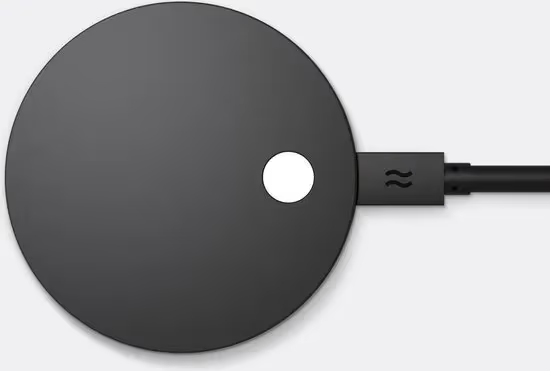
The AirTame 2.0 hits the sweet spot between price and performance with strong AirPlay support.
Key Features:
-
Streams 1080p 60fps video
-
Low latency screen mirroring
-
Dual-band WiFi keeps connections smooth
-
Secured enterprise-grade encryption
-
Affordable price point
This wired gadget is simple to set up and has better range than many costlier competitors. While 4K streaming would be nice, its reliable wireless streaming makes it a great choice.
#2. Apple TV 4K (3rd Generation)
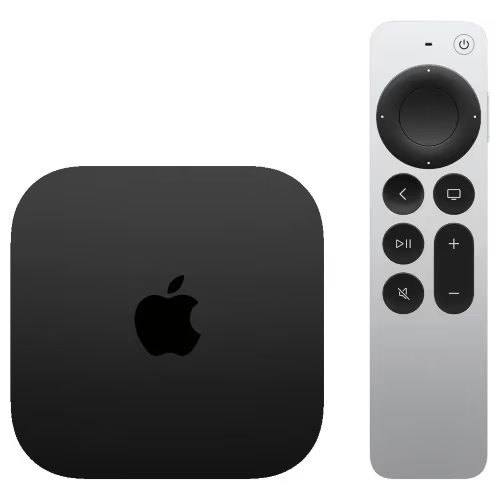
The newest Apple TV box is the best option for connecting media across Apple devices with additional smart features.
Key Benefits:
-
Native Apple ecosystem integration
-
Lightning-fast A15 Bionic chip performance
-
4K HDR and Dolby Vision support
-
Advanced HDMI 2.1 with high frame rates
-
Siri voice assistant built-in
-
Hundreds of apps and games
As expected, Apple’s own streaming box offers the fastest AirPlay connectivity and highest quality. The Apple TV 4K does come at a premium price, but provides extra capabilities beyond wireless streaming.
#3. Nvidia Shield TV Pro
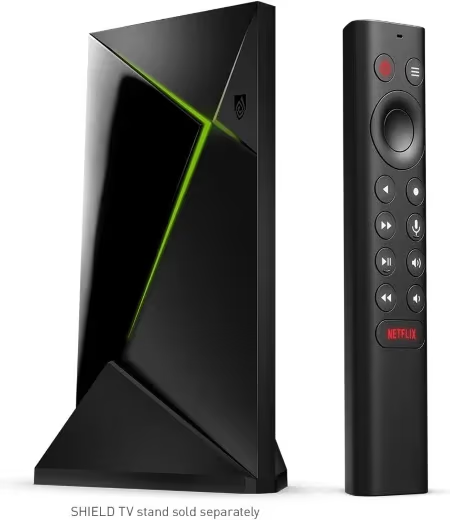
Serious streamers need to consider the Nvidia Shield TV Pro for its AI upscaling and top-tier streaming prowess.
Top Features
-
AI 4K upscaling for HD content
-
Dolby Vision and Atmos support
-
Built-in Chromecast, Alexa & Google Assistant
-
GeForce Now cloud gaming access
-
Plex media server and client
-
Most powerful streaming hardware available
While more costly upfront, the Nvidia Shield TV Pro goes far beyond AirPlay with exceptional wired and wireless performance. Media enthusiasts will find a lot to love with its smart features and customization.
#4. Kanex ATV Pro
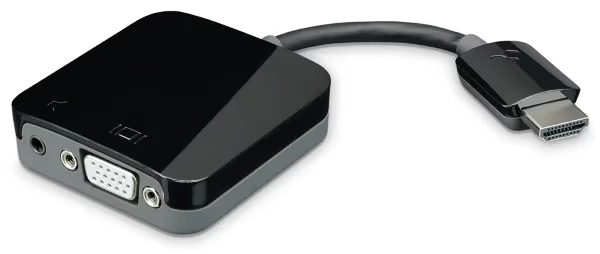
The Kanex ATV Pro provides solid AirPlay capabilities at a very affordable price point.
Principal Attributes:
-
Budget-friendly cost
-
Smooth 1080p streaming
-
Low latency screen mirroring
-
3.5mm audio port included
-
HDMI passthrough convenience
-
Compact, portable adapter size
This compact adapter makes it easy and inexpensive to equip an extra television with AirPlay. It reliably handles all core streaming and screen mirroring features.
#5. Belkin Soundform Connect
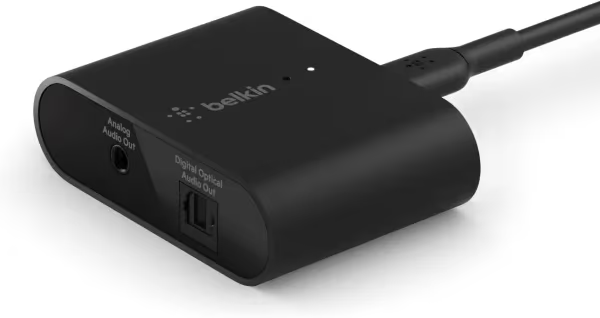
Optimized for audio, the Belkin Soundform Connect AirPlay adapter also works well for video streaming.
Leading Qualities:
-
Smooth AirPlay audio integration
-
Multilink lets you connect multiple adapters
-
Apple HomeKit support
-
24 bit/ 48 kHz Hi-Res audio decoding
-
Dolby Digital decoding via HDMI ARC
-
Doubles as an AirPlay speaker
Beyond TV connectivity, the portable Belkin device provides high fidelity music playback making it quite versatile. It’s a great option for both better audio and AirPlay video streaming.
#6. Silicondust HDHomeRun CONNECT 4K
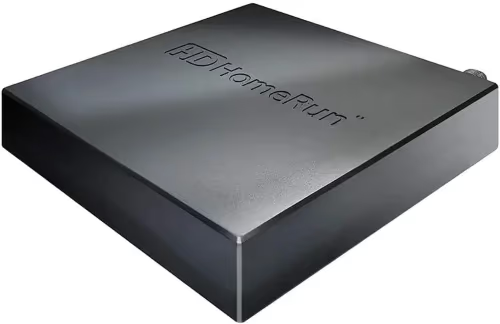
Cutting the cord? The HDHomeRun CONNECT 4K works with Plex DVR servers for antenna over-the-air recording.
Premier Features:
-
Built-in tuner records broadcast TV
-
Streams live and recorded TV
-
Works with Plex Media Server
-
AES-128 encryption support
-
MPEG-2 and H.264 HD video standards
For cord cutters with home antennas, this clever tuner box lets you set up a whole-home DVR while still enjoying AirPlay’s wireless streaming perks.
#How Do You Pick the Right AirPlay TV Adapter?
-
Streaming Performance – Ensure adapters match your wifi performance and handle your desired resolution whether 1080p or 4K. Look for low latency and wifi extending designs that maintain smooth video.
-
Sound Quality – Adapters handling audio may have better connectivity or decoding for home theater sound bars and receivers. HDMI-ARC ports can access Dolby audio too. If you encounter issues with no sound output via AirPlay, check audio settings on both devices.
-
Smart Features – Some adapters focus purely on AirPlay while others include voice assistants, Chromecast or smart home functions. Evaluate additional capabilities based on your needs.
-
Setup and Use – Well-designed adapters will be simple to get connected and working out of the box. Compact receiver sticks that plug directly into HDMI inputs provide easy permanent access. If AirPlay isn’t showing up after setup, double check network connections and compatibility.
-
Security – Enterprise-grade wifi encryption like WPA2 or AES-128 will secure streaming from iOS and Mac devices to adapted TVs without compromising privacy.
-
Price – AirPlay adapters range from $50 to $200+ depending on performance and extra capabilities. Cheaper 1080p options work well for most, while premium 4K models provide future-proofing.
#Frequently Asked Questions
#What is an AirPlay adapter?
An AirPlay adapter is a small receiver device that connects to a non-smart TV’s HDMI port. It picks up wireless AirPlay signals from your iPhone, iPad or Mac and displays the content on your TV screen.
#Do I need Wi-Fi to use an AirPlay adapter?
Yes, AirPlay requires both your Apple device and the adapter to be on the same wireless network. A stable, high-speed Wi-Fi connection prevents buffering and dropped streams. If AirPlay keeps disconnecting from your TV, try moving your router closer or switching to a 5 GHz band.
#Can I stream iTunes movies through an AirPlay adapter?
You can stream any media from your Apple device, including iTunes movies, Apple TV+ shows, photos and music. The adapter mirrors or casts whatever your device plays, so purchased iTunes content works just like any other video source.
#Do AirPlay adapters work with all TV models?
AirPlay adapters work with virtually any TV that has an HDMI input, regardless of brand or age. Older TVs limited to 480i or 480p resolution will display content at lower quality, but the adapter itself still functions.
Certain smart TV brands have run into AirPlay compatibility issues, so be sure to check troubleshooting guides for:
Alternatives to adapters include using AirPlay on Vizio TVs, Roku TVs or Amazon’s Fire TV Stick if you own those streaming devices already.
#Can multiple devices stream to one adapter at the same time?
Only one Apple device can actively stream to an AirPlay adapter at a time in most cases. The Kanex ATV Pro is an exception, allowing two devices to connect simultaneously with audio output toggling between them.
#What resolution do AirPlay adapters support?
Most budget AirPlay adapters max out at 1080p 60fps, which is plenty for casual streaming and screen mirroring. Premium options like the Apple TV 4K and Nvidia Shield TV Pro support full 4K HDR with Dolby Vision for sharper, more vivid picture quality.
#How do I set up an AirPlay adapter?
Plug the adapter into your TV’s HDMI port and connect it to your Wi-Fi network through the adapter’s setup app. Once both your Apple device and the adapter are on the same network, AirPlay will appear as an option in your device’s control center or share menu.
#Is there input lag when using AirPlay adapters for screen mirroring?
Some latency is normal with wireless screen mirroring, typically 50-150 milliseconds depending on your adapter and network quality. This delay is fine for presentations, web browsing and video playback, but may be noticeable during fast-paced gaming.
#Bottom Line
Whether you want easy big screen mirroring or media playback direct from Apple devices, these AirPlay TV adapters unlock wireless streaming for older televisions at a range of price points.
Match the performance, price and feature set to your needs. With the right adapter plugged into your existing setup, you can experience AirPlay’s wireless freedom on every TV in your home.